
1. Product Overview
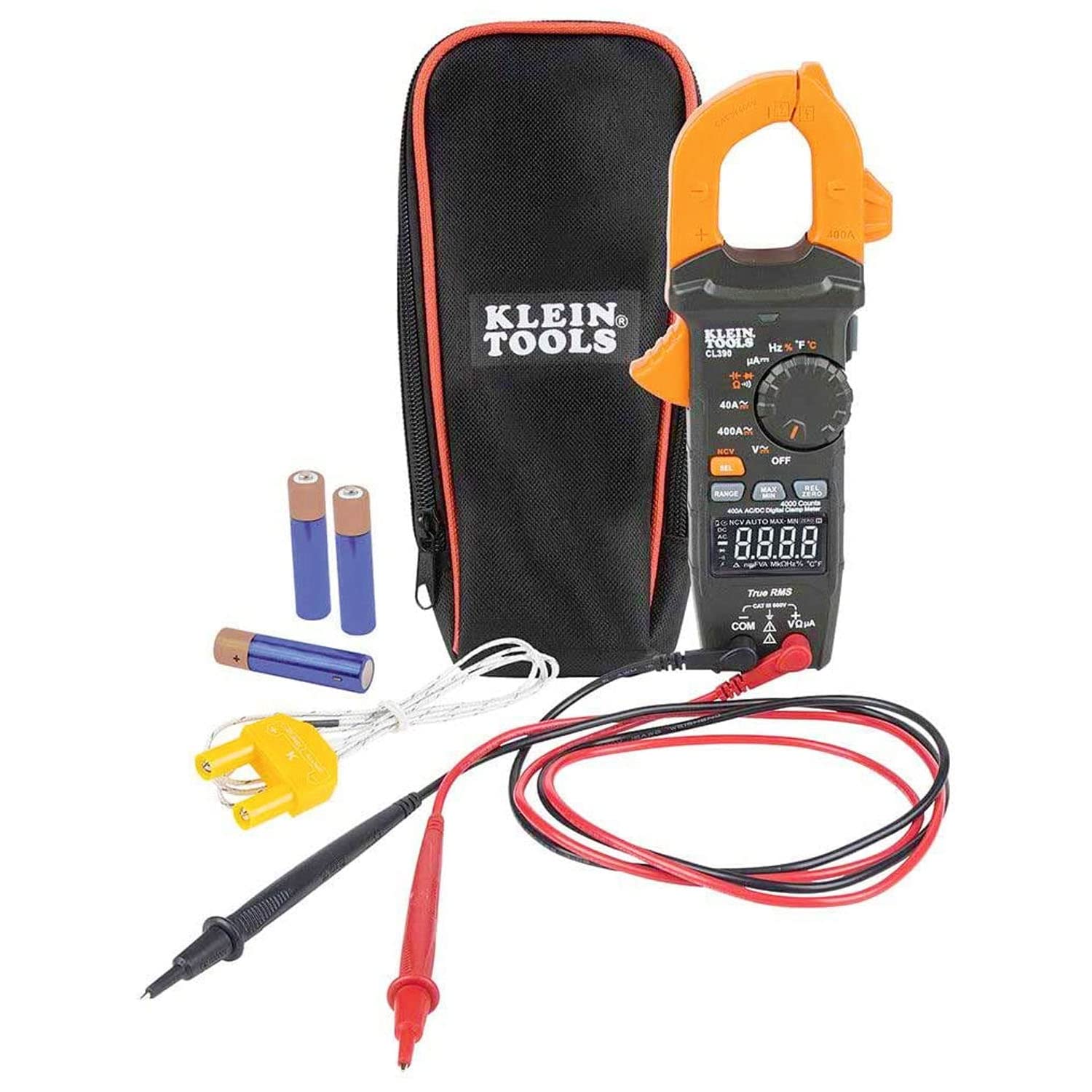
The Klein Tools CL390 is an advanced auto-ranging True Root Mean Squared (TRMS) digital clamp meter designed for precise electrical measurements. It is capable of measuring AC/DC current via the clamp, AC/DC voltage, DC microamps, resistance, continuity, frequency, capacitance, and diodes using the included test leads. Additionally, it measures temperature with a K-Type thermocouple probe. Its high-visibility, reverse contrast LCD display ensures optimal readability in various lighting conditions. The meter is built to withstand a 6.6-foot (2 m) drop and carries a CAT III 600V, Class 2, Double insulation safety rating.
The Klein Tools 69417 Rare-Earth Magnetic Hanger is a durable accessory designed to provide hands-free operation for compatible Klein Tools meters, including the CL390. Constructed with powerful rare-earth magnets and a robust nylon weave, it securely attaches to metal surfaces, enhancing convenience and safety during electrical work.

2. Setup
2.1 Battery Installation
The CL390 requires 3 x AAA batteries for operation. To install or replace batteries, locate the easily accessible battery compartment on the rear of the meter. Open the compartment, insert the batteries according to the polarity indicators, and securely close the cover.
2.2 Connecting Test Leads
The CL390 comes with test leads equipped with CAT III/CAT IV safety caps. Insert the black test lead into the 'COM' (common) input jack and the red test lead into the 'VΩµA' input jack for most measurements (voltage, resistance, microamps, capacitance, diode). Ensure connections are firm before use.
2.3 Attaching the Magnetic Hanger (69417)
The 69417 Rare-Earth Magnetic Hanger is designed for hands-free operation. It features a durable nylon weave strap with powerful rare-earth magnets. To attach, simply clip the hanger securely into the back of the meter's rubber boot. This allows the meter to be conveniently mounted on metal surfaces, freeing your hands for other tasks.

3. Operating the CL390 Digital Clamp Meter
The CL390 offers a variety of measurement functions. Always ensure the meter is set to the correct function and range before taking any measurements. The auto-ranging feature simplifies operation by automatically selecting the appropriate range for most measurements.
3.1 Voltage Measurement (AC/DC)
To measure AC or DC voltage, turn the rotary dial to the 'V~' (AC Voltage) or 'V-' (DC Voltage) setting. Insert the test leads into the appropriate input jacks (black into COM, red into VΩµA). Touch the test probes to the circuit points you wish to measure. The True RMS technology ensures accurate readings even with non-sinusoidal waveforms.

3.2 Current Measurement (AC/DC)
For AC or DC current measurement, turn the rotary dial to the '40A~' (AC Current) or '400A~' (AC Current) setting, or the corresponding DC current settings. Open the clamp jaw and encircle a single conductor. The meter will display the current flowing through the conductor. The CL390 can measure up to 400A AC/DC.
3.3 Resistance and Continuity
Select the resistance (Ω) or continuity (audible symbol) setting on the rotary dial. Connect the test leads to the component or circuit you wish to test. For continuity, the meter will emit an audible tone if a continuous path is detected, indicating low resistance.
3.4 Frequency and Capacitance
The CL390 can measure frequency (Hz) and capacitance (F). These functions are particularly useful for diagnosing issues in electronic circuits and HVAC systems, such as testing motor start/run capacitors.
3.5 Diode Test
The diode test function allows you to check the functionality of diodes by measuring the voltage drop across them.
3.6 Temperature Measurement
To measure temperature, connect the included K-Type thermocouple probe to the meter's input jacks, ensuring correct polarity. Turn the rotary dial to the temperature setting (°F or °C). This feature is valuable for HVAC diagnostics, allowing you to measure air temperatures in vents or other components.
3.7 Non-Contact Voltage Testing (NCVT)
The CL390 features an integrated non-contact voltage tester within its clamp jaw. To use, select the NCVT setting. Hold the clamp jaw near a conductor, and the meter will indicate the presence of AC voltage without direct contact, enhancing safety.
4. Maintenance
- Auto-Power Off: The meter is designed to automatically power off after 10 minutes of inactivity to conserve battery life.
- Low Battery Indicator: A low battery indicator will appear on the display when batteries need replacement.
- Battery Replacement: Access the battery compartment as described in Section 2.1 for easy battery replacement.
- Cleaning: Clean the meter with a dry, lint-free cloth. Do not use abrasive cleaners or solvents.
- Storage: Store the meter in its carrying case in a cool, dry place when not in use.
5. Troubleshooting
- No Display/Power: Check battery installation and ensure batteries are not depleted. Replace if necessary.
- Incorrect Readings: Verify the rotary dial is set to the correct function and range for the measurement being taken. Ensure test leads are securely connected and probes are making good contact.
- Continuity Test Issues: If the continuity alarm does not sound when expected, check the test leads for damage or breaks. Ensure the component being tested is not open-circuited.
- Temperature Readings: Ensure the thermocouple is correctly plugged in and making proper contact with the surface or air being measured.
- Clamp Meter Readings: Ensure only a single conductor is within the clamp jaw for accurate current measurements.
6. Specifications
| Specification | Value |
|---|---|
| Item Model Number | CL390 |
| Brand | KLEIN TOOLS |
| Power Source | Battery Powered (3 x AAA) |
| Style | Clamp + Hanger, with Strap |
| Color | Black, Orange |
| Safety Rating | CAT III 600V, Class 2, Double Insulation |
| Drop Protection | 6.6-Foot (2 m) |
| Display | High-visibility, Reverse Contrast LCD |
| Current Measurement | 400A AC/DC |
| Voltage Measurement | AC/DC Voltage |
| Other Measurements | DC Microamps, Resistance, Continuity, Frequency, Capacitance, Diodes, Temperature |
| Technology | True RMS, Auto-Ranging |
7. Warranty and Support
Klein Tools has a long-standing reputation for manufacturing premium-quality, professional-grade hand tools since 1857. While specific warranty details are not provided in this document, Klein Tools is known for its commitment to durability and performance. For detailed warranty information or technical support, please refer to the official Klein Tools website or contact their customer service directly.


