
1. Introduction
This manual provides detailed instructions for the installation, operation, and maintenance of your Dayton Audio KAB-250v4 2 x 50W Class D Audio Amplifier Board with Bluetooth 5.0. Please read this manual thoroughly before using the product to ensure proper functionality and to prevent damage.
2. Safety Information
Observe the following safety precautions to prevent electric shock, fire, or damage to the unit:
- Do not expose the amplifier board to moisture or extreme temperatures.
- Ensure proper ventilation to prevent overheating.
- Use only the specified power supply voltage (5-24V DC).
- Disconnect power before making any connections or disconnections.
- Avoid touching the circuit board components while the unit is powered on.
- Keep out of reach of children.
3. Features
The Dayton Audio KAB-250v4 amplifier board offers the following key features:
- Efficient 2 x 50 watts of power output, driven by the TPA3116 amplifier chip.
- Integrated Bluetooth 5.0 with aptX HD for high-quality wireless audio streaming.
- Simplified installation with included wire harnesses, eliminating the need for soldering for basic connections.
- Flexible power options, supporting both battery and direct DC input via separate ports.
- Expandable functionality through optional accessories.
4. Package Contents
Verify that all items are present in your package:
- Dayton Audio KAB-250v4 Amplifier Board
- Power Wire Harness
- Speaker Wire Harnesses (2 sets)
- Auxiliary Wire Harnesses (for optional controls/inputs)

Image: Included wire harnesses for power, speakers, and auxiliary connections.
5. Setup
Follow these steps to set up your KAB-250v4 amplifier board.
5.1 Board Overview

Image: Top view of the KAB-250v4 amplifier board, showing the heat sink and various connectors.
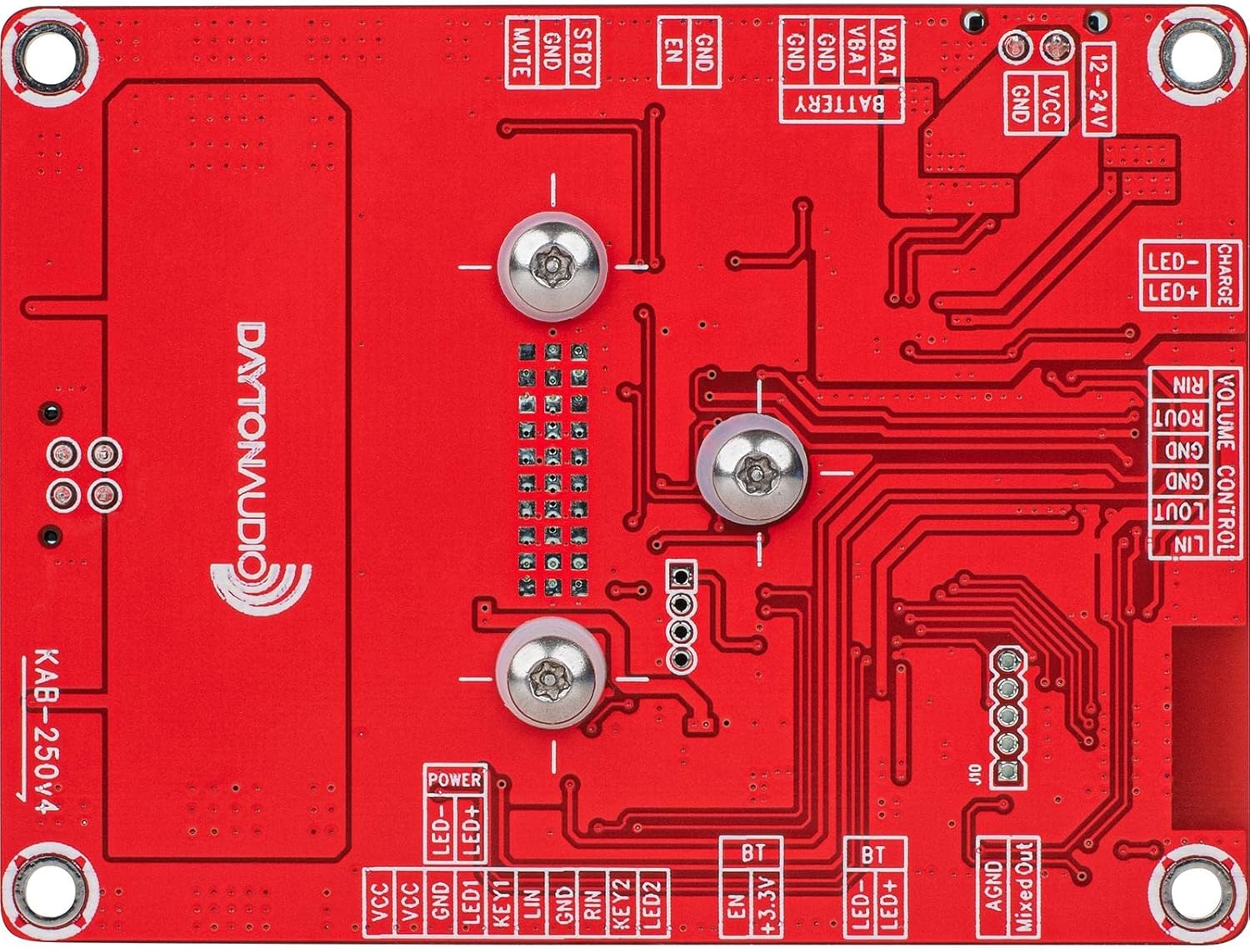
Image: Bottom view of the KAB-250v4 amplifier board, illustrating the labeled connection points for power, speakers, and controls.
5.2 Power Connection
The KAB-250v4 supports both DC adapter input and battery power. Ensure the power source is within the 5V to 24V DC range.
- Identify the power input connector on the board (labeled "12-24V" or "BATTERY" on the bottom view).
- Connect the provided power wire harness to the appropriate power input.
- Connect the other end of the power harness to your DC power adapter or battery pack. Do not apply power yet.
5.3 Speaker Connection
The board provides two channels for speaker output.
- Locate the speaker output connectors (labeled "L OUT+"/"L OUT-" and "R OUT+"/"R OUT-").
- Connect your speakers using the provided speaker wire harnesses. Ensure correct polarity (+ to + and - to -) for each speaker.
- Connect the left speaker to the "L OUT" terminals and the right speaker to the "R OUT" terminals.
5.4 Optional Connections
The board features various auxiliary ports for expanded functionality, such as external volume control, LED indicators, and additional inputs. Refer to the bottom view image for connector labels like "VOLUME CONTROL", "LED", "KEY", and "BT".

Image: A close-up view of one of the many connectors on the amplifier board, designed for wire harness integration.
6. Operating Instructions
6.1 Powering On/Off
Once all connections are secure, apply power to the board. An LED indicator (if connected) will illuminate, indicating the board is active.
To power off, disconnect the power source.
6.2 Bluetooth Pairing
The KAB-250v4 features integrated Bluetooth 5.0 with aptX HD for high-fidelity wireless audio.
- Ensure the amplifier board is powered on.
- On your Bluetooth-enabled device (e.g., smartphone, tablet), navigate to the Bluetooth settings.
- Search for available devices. The amplifier board will typically appear as "Dayton Audio KAB-250v4" or a similar identifier.
- Select the amplifier board to pair. A confirmation tone or LED indication may occur upon successful pairing.
- Once paired, your device's audio will be routed through the amplifier.

Image: Close-up of the integrated Bluetooth module on the KAB-250v4 amplifier board, enabling wireless audio connectivity.
6.3 Audio Playback
After successful Bluetooth pairing, begin playing audio from your source device. Adjust the volume using your source device's controls or any connected external volume control module.
7. Maintenance
To ensure the longevity and optimal performance of your Dayton Audio KAB-250v4 amplifier board:
- Keep the board clean and free from dust. Use a soft, dry cloth for cleaning.
- Avoid exposing the board to liquids or excessive humidity.
- Ensure adequate airflow around the board to prevent overheating, especially during extended operation.
- Regularly check all connections for security.
8. Troubleshooting
If you encounter issues with your KAB-250v4 amplifier board, refer to the following common problems and solutions:
| Problem | Possible Cause | Solution |
|---|---|---|
| No power/LED not lighting up | Incorrect power connection; insufficient voltage; faulty power supply. | Verify power connections and polarity. Ensure power supply is within 5-24V DC. Test with a different power supply if possible. |
| No audio output | Incorrect speaker connection; un-paired Bluetooth device; low volume on source device; faulty speakers. | Check speaker wiring and polarity. Confirm Bluetooth is paired and connected. Increase volume on both source device and amplifier (if external volume control is used). Test speakers with another audio source. |
| Bluetooth pairing issues | Device too far; interference; amplifier not in pairing mode. | Ensure your device is close to the amplifier. Turn off other Bluetooth devices. Restart the amplifier and your source device, then attempt pairing again. |
| Distorted or intermittent audio | Overdriving the amplifier; poor power supply; loose connections; speaker impedance mismatch. | Reduce volume. Ensure power supply is stable and sufficient. Check all wire connections. Verify speaker impedance is compatible with the amplifier. |
9. Specifications
Detailed technical specifications for the Dayton Audio KAB-250v4:
| Specification | Value |
|---|---|
| Output Power | 2 x 50 Watts |
| Amplifier Chip | TPA3116 |
| Bluetooth Version | 5.0 with aptX HD |
| Input Voltage | 5 - 24 Volts DC |
| Number of Channels | 2 |
| Dimensions (L x W x H) | 5 x 3.5 x 1.5 inches (12.7 x 8.9 x 3.8 cm) |
| Item Weight | 5 ounces (141.7 grams) |
| Material | Fiberglass or Epoxy |
| Supported Codecs | Bluetooth 5.0, Aptx, Aptx Hd, Aptx Ll, Sbc, Aac |

Image: Close-up view of the TPA3116 amplifier chip, a core component of the KAB-250v4 board.
10. Warranty and Support
For warranty information and technical support, please contact Dayton Audio directly or refer to their official website. While optional protection plans may be available from third-party providers, direct product support is handled by the manufacturer.
You can visit the Dayton Audio Store on Amazon for more information and contact details.