
ADESSO QA-04
Contents
ADESSO QA-04 Digital Alarm Clock User Manual
Model: QA-04
Introduction
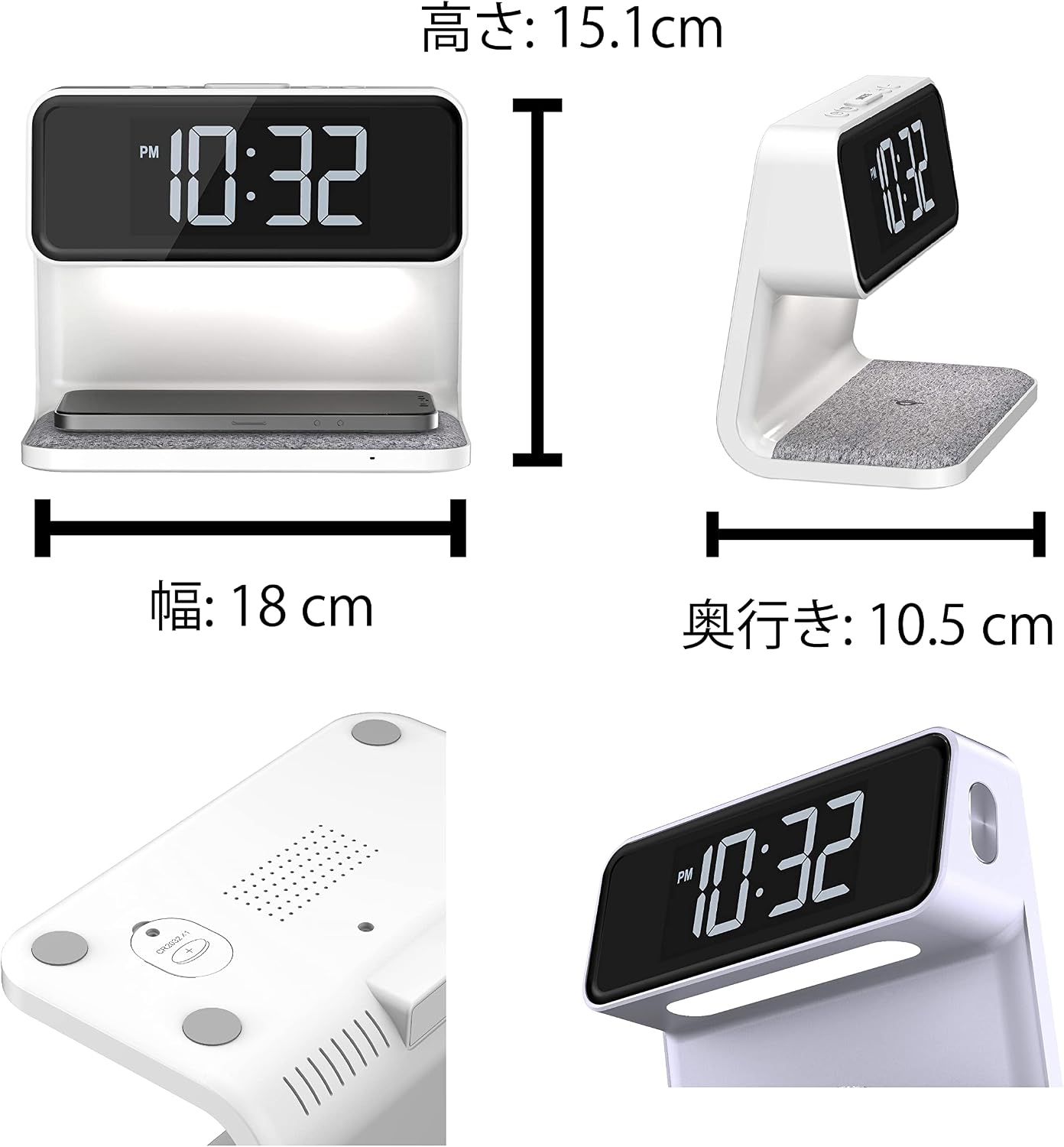
Thank you for purchasing the ADESSO QA-04 Digital Alarm Clock. This innovative device combines an alarm clock, a gentle bed light, and a Qi-compatible wireless charger into one compact unit, helping to keep your bedside tidy and functional. With its large, easy-to-read white LED display and multiple features, the QA-04 is designed to enhance your daily routine.

Safety Information
- Read all instructions carefully before use.
- Keep the device away from water and high humidity.
- Do not expose to direct sunlight or extreme temperatures.
- Use only the provided AC adapter.
- Do not attempt to disassemble or repair the device yourself.
Package Contents
Please check that all items are present in the package:
- ADESSO QA-04 Digital Alarm Clock
- AC Adapter
- CR2032 Coin Battery (built-in for backup)
- Instruction Manual (this document)
Product Overview
The ADESSO QA-04 integrates several essential bedside functions:

Wireless Charging: Simply place your smartphone on the pad to charge.
Alarm Clock: Features dual alarms and a snooze function.
Night Light: Gentle indirect lighting with adjustable brightness.

Setup
1. Power Connection
Connect the provided AC adapter to the DC input port on the back of the clock and plug it into a standard wall outlet. The clock will power on and the display will light up.
2. Backup Battery
The clock comes with a built-in CR2032 coin-type lithium battery for backup. This battery retains time settings during a power outage but does not power the clock for normal operation. The clock cannot be used with the battery only.
Operating Instructions
1. Setting Time
Refer to the detailed instructions in the included paper manual for specific button functions to set the time. The clock supports both 12-hour and 24-hour display formats.
2. Setting Alarm
The QA-04 features a dual alarm function. Consult the paper manual for step-by-step instructions on setting Alarm 1 and Alarm 2. The snooze function can be activated by pressing the SNOOZE button when the alarm sounds.
3. Display Brightness Adjustment
The LCD display brightness can be adjusted to 4 levels: Strong, Medium, Weak, and Off. This allows you to customize the display visibility for day or night, ensuring it doesn't disturb your sleep.

4. Bed Light Operation
The integrated bed light provides gentle, indirect illumination. Its brightness can also be adjusted in 4 levels: Strong, Medium, Weak, and Off. This feature is perfect for providing subtle lighting around your bed at night.
5. Wireless Charging
The QA-04 is equipped with a Qi-compatible wireless charging pad (5W). To charge your smartphone or other compatible mobile device, simply place it on the charging pad. An indicator light will confirm charging status.

Important Notes for Wireless Charging:
- Ensure your device is Qi-compatible.
- Charging may not be possible if your smartphone case is thicker than 3mm or made of certain materials.
- While this product complies with the Qi standard, compatibility with all Qi-standard devices is not guaranteed.
- For optimal charging, ensure your device is centered on the charging pad.
Maintenance
To ensure the longevity of your ADESSO QA-04 clock:
- Clean the device with a soft, dry cloth. Do not use abrasive cleaners or solvents.
- Keep the charging pad free of dust and debris.
- Avoid dropping the device or subjecting it to strong impacts.
Troubleshooting
| Problem | Possible Cause | Solution |
|---|---|---|
| Device not powering on. | AC adapter not properly connected or power outlet issue. | Ensure AC adapter is securely plugged into the clock and a working power outlet. |
| Wireless charging not working. | Phone not centered, case too thick, or device not Qi-compatible. | Reposition phone on the charging pad. Remove phone case. Verify phone is Qi-compatible. |
| Alarm sound is too low. | Alarm volume setting is low or user is wearing earplugs. | Adjust alarm volume (refer to manual). Consider alternative alarm methods if wearing earplugs. |
| Time/settings reset after power outage. | Backup battery depleted or not functioning. | The internal CR2032 battery is for backup only. If it's depleted, settings may reset. Replace if necessary (refer to manual for battery replacement). |
Specifications
| Feature | Detail |
|---|---|
| Model | QA-04 |
| Color | White |
| Display Type | Digital LED |
| Material | Resin |
| Product Dimensions (W x D x H) | 18 x 3.81 x 10.5 cm |
| Product Weight | 452 grams |
| Power Source | Corded Electric (AC Adapter) |
| Backup Battery | CR2032 Coin Battery (included) |
| Wireless Charging Output | 5W (Qi Standard) |
| Bed Light Luminous Flux | 180 LM |
| Bed Light Power | 0.66W |
| Display Brightness Levels | 4 (Strong, Medium, Weak, Off) |
| Bed Light Brightness Levels | 4 (Strong, Medium, Weak, Off) |
| Time Format | 12/24 Hour Display |
Warranty and Support
Information regarding specific warranty terms and customer support contact details is typically provided with the product packaging or on the manufacturer's official website. Please refer to the warranty card included with your purchase or visit the ADESSO website for further assistance.
Ask a question about this manual
Ask about setup, troubleshooting, compatibility, parts, safety, or missing instructions. Manuals+ will review the question and use this page’s manual context to help answer it.