
ASHATA ASHATAgnmtay56ki552-12
ASHATA Foldable Bluetooth 5.0 Rabbit Ear Headphones
Model: ASHATAgnmtay56ki552-12
Introduction
Thank you for purchasing the ASHATA Foldable Bluetooth 5.0 Rabbit Ear Headphones. This manual provides detailed instructions for the proper setup, operation, and maintenance of your new headphones. Please read this manual thoroughly before use to ensure optimal performance and longevity of the product.
Package Contents
Verify that all items are present in your package:
- 1 x Rabbit Ear Headphone
- 1 x Removable Microphone
- 1 x 3.5mm Audio Cable
- 1 x USB Charging Cable
Product Overview
The ASHATA Rabbit Ear Headphones feature a foldable design for portability and include a built-in microphone for communication. The headphones are equipped with LED lights on the rabbit ears and earcups, which can be turned on or off.

Figure 1: Front view of the ASHATA Rabbit Ear Headphones, showing the blue and white design with rabbit ears.
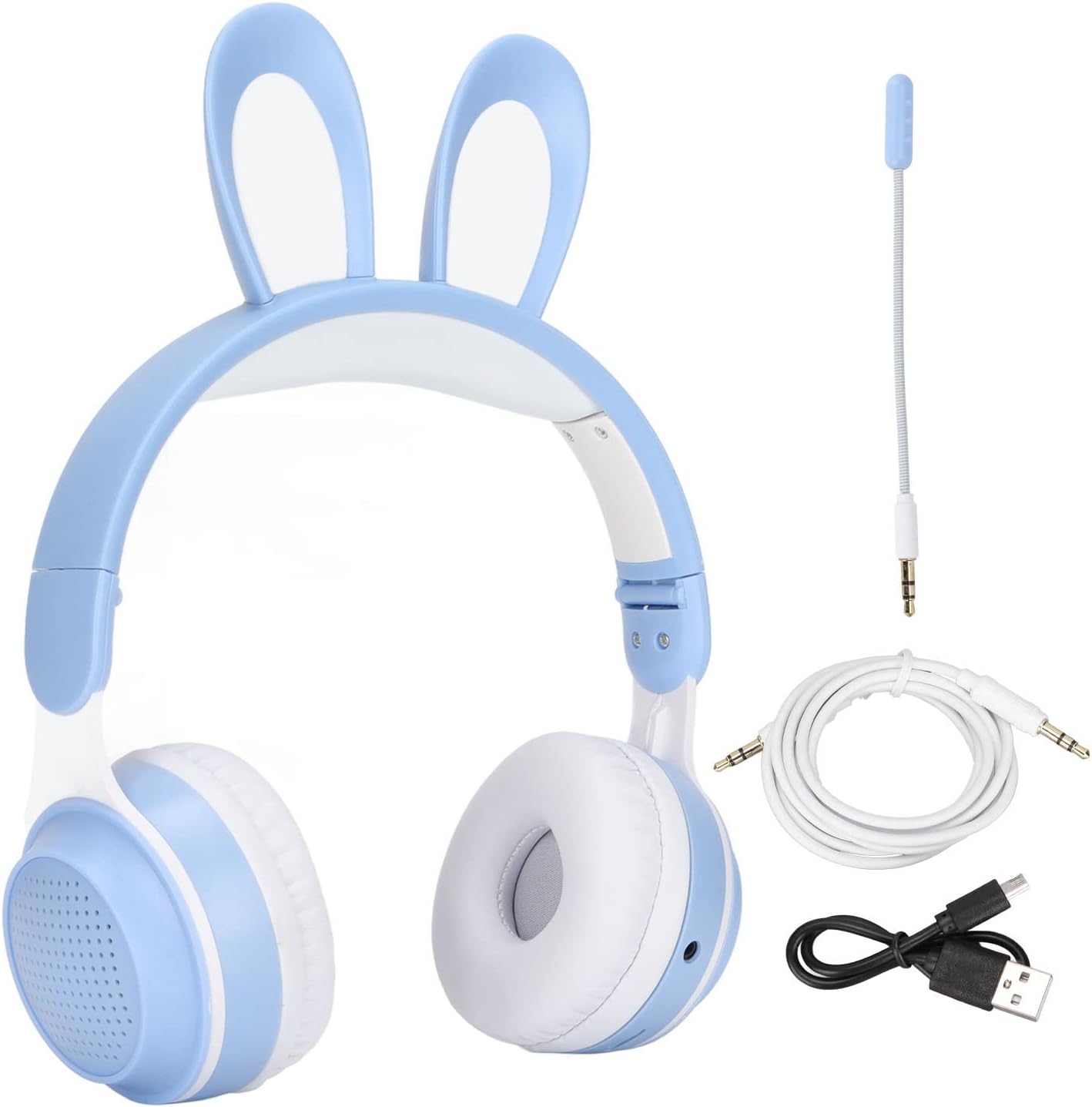
Figure 2: The headphones displayed with the removable microphone, 3.5mm audio cable, and USB charging cable.
Key Features
- Bluetooth 5.0 Connectivity: Ensures stable and efficient wireless connection.
- Dual Mode Operation: Supports both wireless (Bluetooth) and wired (3.5mm audio cable) listening.
- Built-in & Removable Microphone: For clear communication during calls or online learning.
- LED Lighting: Integrated 7-color LED lights on rabbit ears and earcups, with on/off control.
- Sound Isolation: Designed to reduce external noise for an immersive audio experience.
- Foldable Design: For easy storage and portability.
- Long Battery Life: Up to 12 hours of listening time (LEDs off) or 7 hours (LEDs on).
Video: An overview of the ASHATA Rabbit Ear Bluetooth Headphones, highlighting key features and design.
Setup
Initial Charging
- Connect the provided USB charging cable to the charging port on the headphones.
- Plug the other end of the USB cable into a 5V USB power adapter (not included) or a computer's USB port.
- The LED indicator on the headphones will illuminate during charging.
- A full charge takes approximately 2.5 hours. The LED indicator will change or turn off once charging is complete.
Operating Instructions
Power On/Off
- To power on, press and hold the Power button until the LED indicator lights up.
- To power off, press and hold the Power button until the LED indicator turns off.
Bluetooth Pairing
- Ensure the headphones are powered off.
- Press and hold the Power button for approximately 5-7 seconds until the LED indicator flashes blue and red alternately, indicating pairing mode.
- On your device (smartphone, tablet, computer), enable Bluetooth and search for available devices.
- Select "ASHATA Headphones" (or similar name) from the list of devices.
- Once paired, the LED indicator on the headphones will flash blue slowly.
- The headphones have a wireless range of up to 15 meters (49.2 feet).
Using the Wired Connection
If the battery is depleted or for devices without Bluetooth, you can use the 3.5mm audio cable:
- Plug one end of the 3.5mm audio cable into the AUX port on the headphones.
- Plug the other end into the 3.5mm audio jack of your device.
- The headphones will automatically switch to wired mode.
LED Light Control
The headphones feature built-in LED lights that can be controlled:

Figure 3: Headphones with red LED lights illuminated.

Figure 4: Headphones with blue LED lights illuminated.

Figure 5: Headphones with pink LED lights illuminated.

Figure 6: Headphones with green LED lights illuminated.
- To turn the LED lights on or off, locate the dedicated LED control button (refer to product diagram if available).
- Press the button to cycle through different light modes or to turn the lights off.
Using the Microphone
- The headphones include a built-in microphone for basic communication.
- For enhanced voice clarity, attach the removable microphone to the designated port on the headphones.
- Ensure the microphone is securely connected for optimal performance.
Volume Control
- Adjust the volume using the volume control buttons located on the headphone earcup (refer to product diagram if available).
- You can also control the volume directly from your connected device.
Maintenance
- Clean the headphones with a soft, dry cloth. Do not use abrasive cleaners or solvents.
- Avoid exposing the headphones to extreme temperatures, humidity, or direct sunlight.
- Store the headphones in a cool, dry place when not in use. The foldable design helps protect them during storage.
- Do not attempt to disassemble or repair the headphones yourself, as this will void the warranty.
Troubleshooting
No Power
- Ensure the headphones are fully charged.
- Check the charging cable and power source for proper connection.
Cannot Pair via Bluetooth
- Make sure the headphones are in pairing mode (LED flashing blue and red).
- Ensure Bluetooth is enabled on your device and it is within 15 meters of the headphones.
- Try restarting both the headphones and your device.
- Clear previous Bluetooth connections on your device and try pairing again.
No Sound
- Check the volume levels on both the headphones and your connected device.
- If using Bluetooth, ensure the headphones are successfully paired.
- If using the wired connection, ensure the 3.5mm audio cable is fully inserted into both the headphones and your device.
Microphone Not Working
- Ensure the removable microphone is securely attached.
- Check microphone settings on your connected device.
Specifications
| Feature | Specification |
|---|---|
| Model Name | ASHATAgnmtay56ki552 |
| Bluetooth Version | 5.0 |
| Wireless Range | 15 meters (49.2 feet) |
| Battery Capacity | 400mAh Lithium Battery |
| Charging Time | 2.5 Hours |
| Playback Time (LED off) | Up to 12 Hours |
| Playback Time (LED on) | Up to 7 Hours |
| Frequency Response | 20-20000 Hz |
| Headphone Sensitivity | 105 ± 3dB |
| Microphone Sensitivity | 42 ± 3dB |
| Impedance | 32 Ohms |
| Headphones Jack | 3.5 mm Jack |
| Material | Plastic (ABS) |
| Item Weight | 13.2 ounces |
| Package Dimensions | 8.5 x 8.15 x 3.62 inches |
Warranty and Support
For warranty information or technical support, please refer to the documentation provided with your purchase or contact ASHATA customer service. Keep your proof of purchase for warranty claims.
Ask a question about this manual
Ask about setup, troubleshooting, compatibility, parts, safety, or missing instructions. Manuals+ will review the question and use this page’s manual context to help answer it.