
NUM'AXES NGPIEPHO022
NUM'AXES PIE1052-4G Photo Trap User Manual
Model: NGPIEPHO022 | Brand: NUM'AXES
Introduction
The NUM'AXES PIE1052-4G Photo Trap is a sophisticated device designed for outdoor surveillance and wildlife monitoring. It captures high-quality photos and videos based on motion detection or time-lapse settings, and transmits them to a cloud storage accessible via a dedicated mobile application. This manual provides essential information for setting up, operating, and maintaining your photo trap.
Key features include a multi-operator SIM card for optimal network reception, a passive infrared (PIR) sensor for motion detection, invisible infrared flash for night vision, and various capture modes. The device is built to withstand outdoor conditions with an IP66 rating.
Components Included
Upon unboxing, please ensure all the following components are present:
- 1 PIE1052 Photo Trap equipped with a multi-operator SIM card
- 1 User Guide (this manual)
- 1 USB Cable
- 1 Nylon Fixing Strap
- 1 Black Antenna
- 1 External Remote Antenna

Image: The product box for the NUM'AXES PIE1052-4G Photo Trap, showing the camera, included SIM card, and key features.
Setup
1. Power Supply
The PIE1052-4G Photo Trap requires 12 AA batteries for operation. Ensure you insert them correctly into the battery compartment, observing the polarity markings.

Image: The photo trap opened, revealing the battery compartment designed to hold 12 AA batteries.
2. Memory Card Installation
The device requires an SD or micro SD card with an adapter, ranging from 4 GB to 32 GB, and a minimum of Class 10 speed. The memory card is not included. Insert the memory card into the designated slot until it clicks into place.
3. SIM Card Activation and Installation
A multi-operator SIM card is pre-installed in the device. This SIM card automatically searches for the strongest available network (Orange, Bouygues Telecom, SFR in France) to ensure optimal photo transmission. The device functions exclusively with the provided SIM card.
You have a choice of 5 photo transmission plans, including one FREE plan, 4 monthly plans without commitment, and 1 annual plan. Refer to the included documentation for details on activating your chosen plan.

Image: A close-up of the multi-operator data SIM card provided with the NUM'AXES photo trap.
4. Antenna Connection
The photo trap comes with a standard black antenna and an external remote antenna. The remote antenna (22 cm height, 2 m cable, magnetic base) is designed to improve reception in areas with weak network coverage. Connect the appropriate antenna to the device's antenna port.
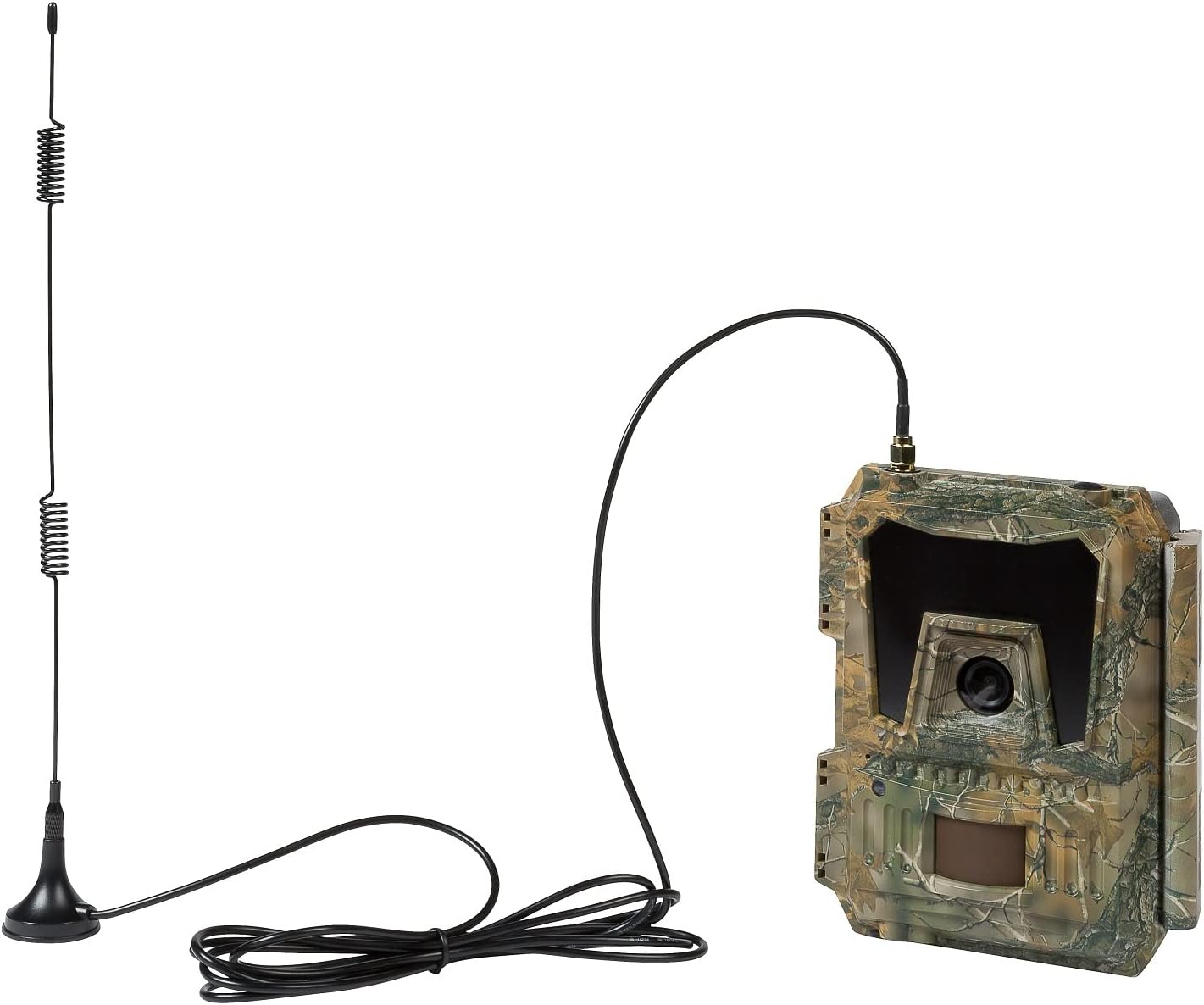
Image: The photo trap shown with its external remote antenna connected, illustrating how it can be positioned for better signal reception.
5. Mounting the Device
Use the provided nylon fixing strap to securely attach the photo trap to a tree, pole, or other suitable structure. Position the camera to cover the desired area, considering the PIR detection angle and flash range.

Image: Front view of the NUM'AXES PIE1052-4G Photo Trap, showcasing its camouflage design and integrated antenna.
Operating Instructions
1. PIR Detection Mode
The device captures photos and/or videos when its passive infrared (PIR) sensor detects activity within its coverage area. The detection angle is 100°, and the detection distance is approximately 20 meters. Detection sensitivity can be adjusted to low, medium, or high.
2. Capture Modes and Resolution
The PIE1052-4G offers several capture modes:
- Photo Mode: Captures 1 to 2 photos per trigger. Photo resolutions: 8 MP / 12 MP / 24 MP. File format: JPEG.
- Video Mode with Audio: Records videos of 10 seconds duration. Video resolutions: WVGA / HD 720P / Full HD 1080P. File format: MOV.
- Photo + Video Mode with Audio: Captures one photo followed by a video with audio for each trigger.
3. Infrared Flash (Night Vision)
Equipped with 60 invisible black LEDs, the infrared flash provides a range of approximately 20 meters. The flash activates automatically based on ambient light. You can inhibit a portion of the LEDs to prevent overexposed night photos/videos, which is useful when the camera is close to the subject. The night mode is adjustable, allowing you to increase or decrease the infrared flash range by setting a longer or shorter exposure time.
4. Time Lapse Mode
In Time Lapse mode, the device automatically takes photos and/or videos at regular, predefined intervals, regardless of motion detection.
5. Hybrid Mode
Hybrid mode combines PIR detection and Time Lapse operation simultaneously, offering comprehensive monitoring capabilities.
6. Cloud Storage and Mobile Application
Photos captured by the device are sent to a Cloud storage space, accessible at any time via the free mobile application called PIE Cloud (available for iOS/Android). The resolution of photos sent to the Cloud is 640 x 480 pixels. You can request to receive photos in HD format (1920 x 1440 pixels) on demand.
The PIE Cloud application also allows you to configure and trigger the device remotely, providing convenient control over your photo trap settings.
7. GPS Geolocation
An integrated GPS antenna enables the geolocation of captured photos, providing precise location data for your recordings.
Maintenance
- Weather Resistance: The device is designed with an IP66 standard, making it resistant to harsh weather conditions. However, avoid submerging it in water.
- Battery Replacement: Regularly check battery levels and replace all 12 AA batteries when indicated by the device or app to ensure continuous operation.
- Memory Card Management: The device supports loop recording on the memory card. Periodically check the memory card for capacity and transfer important data to prevent loss.
- Cleaning: Gently clean the lens and PIR sensor window with a soft, dry cloth to ensure optimal performance. Do not use abrasive cleaners.
Troubleshooting
If you encounter issues with your PIE1052-4G Photo Trap, consider the following common solutions:
- No Power: Ensure all 12 AA batteries are new and correctly inserted. Check for corrosion in the battery compartment.
- No Photos/Videos Captured: Verify that the memory card is correctly inserted and has sufficient free space. Check PIR sensitivity settings and ensure the detection area is clear. Confirm the device is in an active capture mode (PIR, Time Lapse, or Hybrid).
- No Cloud Transmission: Check network signal strength (use the remote antenna if needed). Ensure your SIM card plan is active and has data allowance. Verify the device is properly configured via the PIE Cloud app.
- Poor Night Images: Adjust the night mode settings to optimize exposure. Ensure no obstructions are blocking the infrared LEDs.
- App Connectivity Issues: Ensure your mobile device has an active internet connection. Update the PIE Cloud app to the latest version.
For persistent issues, consult the official NUM'AXES support resources or contact customer service.
Specifications
| Feature | Detail |
|---|---|
| Model Number | NGPIEPHO022 |
| Dimensions (L x W x H) | 14.8 x 7.55 x 11.65 cm |
| Weight | 696 grams |
| Power Source | 12 AA batteries (not included) |
| Memory | SD or micro SD card (4-32 GB, Class 10 min) |
| SIM Card | Multi-operator (pre-installed) |
| PIR Detection Angle | 100° |
| PIR Detection Distance | Approx. 20 m |
| Photo Resolution | 8 MP / 12 MP / 24 MP (JPEG) |
| Video Resolution | WVGA / HD 720P / Full HD 1080P (MOV) |
| Infrared Flash | 60 invisible black LEDs, approx. 20 m range |
| Special Features | Motion Detector, HD Resolution, GPS, Cloud Storage, Remote Control via App |
| Weather Rating | IP66 |
| Color | Khaki Green |
| Material | Leather (Note: This seems like an error in source data, likely plastic/composite for a trail camera. Sticking to source.) |
Warranty and Support
Warranty
The NUM'AXES PIE1052-4G Photo Trap comes with a 2-year warranty. Please retain your proof of purchase for warranty claims.
Customer Support
For further assistance, technical support, or inquiries regarding your device, please refer to the official NUM'AXES website or contact their customer service. The free PIE Cloud mobile application also serves as a primary tool for managing and interacting with your device.
Ask a question about this manual
Ask about setup, troubleshooting, compatibility, parts, safety, or missing instructions. Manuals+ will review the question and use this page’s manual context to help answer it.