1. Introduction
This manual provides comprehensive instructions for the proper use and maintenance of your Profey Max F6 Golf Rangefinder. Please read this manual carefully before using the device to ensure optimal performance and longevity. The Profey Max F6 is designed to provide accurate distance measurements for golf, featuring slope compensation, flag lock with vibration, and continuous scan modes.
2. Product Overview

Image: Front-side view of the Profey Max F6 Golf Rangefinder, showcasing its compact design and optical lenses.
Key Features:
- Precision Measurement: Offers accurate distance readings from 5 to 850 yards with ±1 yard accuracy.
- Flag Lock with Vibration: Confirms target acquisition with a vibrating burst, effective up to 250 yards.
- 6X Magnification: Provides clear and bright views with fully multi-coated lenses.
- Slope On/Off Function: Calculates slope-adjusted distances for uphill/downhill shots. Features a visual blue backlight to indicate when slope mode is off, making it tournament legal.
- Continuous Scan Mode: Allows for quick and accurate measurements of multiple targets.
- USB Rechargeable: Convenient power source for extended use.
- Ergonomic Design: Textured rubber exterior for a comfortable and secure grip.
- Built-in Magnet: For easy attachment to golf carts or metal surfaces.
Package Contents:
- Profey Max F6 Golf Rangefinder
- Carrying Case
- Cleaning Cloth
- Lanyard
- User Manual

Image: An infographic highlighting the main features of the Profey Max F6 Rangefinder, including slope compensation, vibration, flag lock, continuous scan, multi-coated lens, and 6x magnification.
3. Setup
3.1 Charging the Device
The Profey Max F6 Rangefinder is equipped with a rechargeable battery. Before first use, ensure the device is fully charged.
- Locate the USB charging port on the side of the rangefinder.
- Connect the provided USB cable to the rangefinder and a compatible USB power source (e.g., computer, wall adapter).
- The charging indicator will illuminate during charging and change color or turn off when fully charged.

Image: A detailed view of the rangefinder's USB charging port, indicating its rechargeable nature.
3.2 Adjusting the Eyepiece
To achieve a clear view through the eyepiece, rotate the diopter adjustment ring until the display and target appear sharp and in focus. This is especially useful for users with glasses.
4. Operating Instructions
4.1 Power On/Off
- To power on, press the Power/Measurement button once. The display will activate.
- The device will automatically power off after a period of inactivity to conserve battery.
4.2 Measuring Distance
- Look through the eyepiece and aim the crosshairs at your desired target.
- Press the Power/Measurement button once. The distance will be displayed instantly.
4.3 Continuous Scan Mode
For measuring multiple targets or moving objects, use the continuous scan mode:
- Press and hold the Power/Measurement button.
- Pan the rangefinder across the desired area. The distance readings will update continuously.
- Release the button to stop scanning.
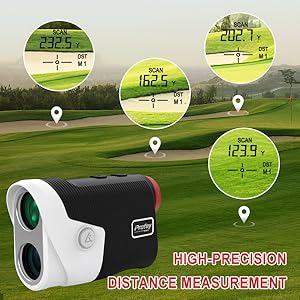
Image: An illustration of the rangefinder's display showing high-precision distance measurements to different targets on a golf course.
4.4 Switching Measurement Units (Yards/Meters)
To switch between yards and meters, press and hold the Mode button (usually labeled 'M' or similar) for a few seconds until the unit changes on the display.
5. Modes of Operation
5.1 General Mode
This is the standard mode for measuring direct line-of-sight distances. It does not account for elevation changes.
5.2 Golf Mode (Slope On/Off)
The Golf Mode provides slope-adjusted distances, which can be crucial for accurate club selection on varied terrain. The device can also be set to be tournament legal.
- Activating/Deactivating Slope: Press the dedicated Slope On/Off button (often indicated by a blue backlight when off) to toggle the slope compensation feature.
- When the blue backlight is visible, the slope function is off, and the device is tournament legal.

Image: A user's finger pressing the Slope On/Off button, illustrating how the display changes to show slope-adjusted distances or direct distances for tournament play.
5.3 Flag Lock with Vibration
This feature helps to lock onto the flagstick, ignoring background objects, and confirms the lock with a vibration.
- In Golf Mode, aim the crosshairs at the flagstick.
- Press and hold the Power/Measurement button. The device will scan and identify the closest object (the flag).
- Once locked, the device will vibrate, and the distance to the flag will be displayed.

Image: The rangefinder's view through the eyepiece, demonstrating the flag lock feature with the flagstick clearly targeted and the measured distance shown.
Video: Demonstration of the Profey Golf Rangefinder's features, including flag lock, slope compensation, and general use on a golf course. This video showcases the device's capabilities in various golfing scenarios.
6. Maintenance
- Cleaning Lenses: Use the provided cleaning cloth to gently wipe the lenses. Avoid using abrasive materials or harsh chemicals.
- Cleaning Body: Wipe the body of the rangefinder with a soft, damp cloth.
- Storage: Store the device in its carrying case in a cool, dry place when not in use. Avoid extreme temperatures.
- Battery Care: Recharge the battery regularly, even if not frequently used, to maintain battery health.
7. Troubleshooting
| Problem | Possible Cause | Solution |
|---|---|---|
| Device does not power on. | Low battery. | Charge the device using the provided USB cable. |
| Inaccurate distance readings. | Lens is dirty; target is too small or reflective; environmental factors (fog, heavy rain). | Clean the lenses. Ensure proper targeting. Note that extreme weather can affect accuracy. |
| Cannot lock onto flag. | Flag is too far; strong background interference. | Ensure flag is within 250 yards. Use continuous scan mode to help identify the flag. |
| Display is blurry. | Eyepiece not adjusted. | Rotate the diopter adjustment ring until the display is clear. |
8. Specifications
- Measuring Range: 5 to 850 yards
- Accuracy: ±1 yard
- Magnification: 6X
- Laser Type: Class 1, 905nm
- Water Resistance: Waterproof (IP54 rating)
- Power Source: Rechargeable Lithium Battery
- Item Weight: 340 g
- Dimensions: 15.1 x 10.9 x 6.7 cm
- Material: Rubber
- Color: Blue (Note: Product image shows black/white/red, but specifications list blue.)
Video: A product video showcasing a Profey golf rangefinder (model MAX-F1, similar to Max F6) in action, highlighting its accuracy, continuous scan, and slope technology. This video demonstrates the practical application of the device on a golf course.
9. Warranty and Support
The Profey Max F6 Golf Rangefinder comes with a 1-year warranty from the date of purchase. This warranty covers manufacturing defects and ensures replacement or a full refund for eligible issues.
For technical support, warranty claims, or any inquiries, please refer to the contact information provided on the product packaging or the official Profey website.