
Introduction
This manual provides instructions for the RemotesReplaced compatible remote control, designed for use with SANYO CE21AT2-2 televisions. This remote is an electronic replacement, offering all the functionalities of the original remote without requiring complex setup codes. Please read this manual thoroughly before use.
Product Overview
The RemotesReplaced remote control is designed to replicate the functionality of your original SANYO CE21AT2-2 remote. It features a standard layout for easy navigation and control of your television.
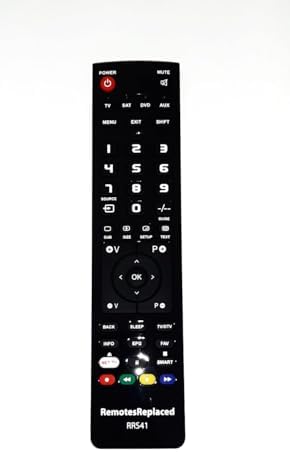
Figure 1: Front View of the Remote Control. This image displays the front of the remote control, showing the power button, number pad, navigation buttons, and various function keys for TV, SAT, DVD, and AUX inputs, along with menu and exit controls.

Figure 2: Back View of the Remote Control. This image shows the rear of the remote control, highlighting the battery compartment cover at the bottom and regulatory markings near the top.

Figure 3: Top View of the Remote Control. This image illustrates the top edge of the remote control, where the infrared (IR) emitter is located, responsible for sending signals to the television.
Setup and Installation
This remote control requires no programming or setup codes. Simply insert the batteries, and it is ready for use.
Battery Installation
- Locate the battery compartment on the back of the remote control.
- Slide the battery compartment cover downwards or in the direction indicated by an arrow to open it.
- Insert two (2) AAA batteries, ensuring the positive (+) and negative (-) terminals align correctly with the markings inside the compartment.
- Replace the battery compartment cover by sliding it back into position until it clicks securely.
Note: Always use new batteries and replace both batteries at the same time. Do not mix old and new batteries or different types of batteries.

Figure 4: Bottom View with Battery Compartment. This image shows the bottom edge of the remote control, where the battery compartment is typically located for easy access.
Basic Operation
The remote control provides direct access to all standard functions of your SANYO CE21AT2-2 television.
- Power (POWER): Press to turn the television on or off.
- Mute (MUTE): Press to temporarily silence the television audio. Press again to restore sound.
- Volume Up/Down (VOL +/-): Press to increase or decrease the volume level.
- Channel Up/Down (CH +/-): Press to change the television channel sequentially.
- Number Pad (0-9): Use these buttons to directly enter channel numbers.
- Input/Source (SOURCE): Press to cycle through available input sources (e.g., TV, HDMI, AV).
- Navigation Buttons (Up/Down/Left/Right Arrows, OK): Use these to navigate menus and confirm selections.
Advanced Functions
This remote also supports advanced features of your SANYO CE21AT2-2 television.
- Menu (MENU): Access the television's main menu for settings adjustments.
- Exit (EXIT): Close the current menu or on-screen display.
- Guide (GUIDE): Display the electronic program guide (if supported by your TV and broadcast).
- Info (INFO): Display information about the current program or input.
- Sleep (SLEEP): Set a timer for the television to automatically turn off.
- Smart/NET TV: Access smart TV features or streaming applications (if your SANYO CE21AT2-2 model supports these functions).
- Color Buttons (Red, Green, Yellow, Blue): These buttons typically correspond to specific functions within menus or interactive services, as indicated on your TV screen.
Maintenance
- Cleaning: Use a soft, dry cloth to clean the remote control. Do not use liquid cleaners or abrasive materials.
- Battery Replacement: Replace batteries when the remote's response becomes sluggish or stops working. Remove batteries if the remote will not be used for an extended period to prevent leakage.
- Storage: Store the remote control in a cool, dry place away from direct sunlight and extreme temperatures.
Troubleshooting
| Problem | Solution |
|---|---|
| Remote control is not working. |
|
| Some buttons are not responding. |
|
Specifications
- Brand: RemotesReplaced
- Model: CE21AT2-2 (Compatible Replacement)
- Power Source: 2 x AAA Batteries (not included)
- Compatibility: Designed for SANYO CE21AT2-2 televisions
- Weight: Approximately 120 Grams (without batteries)
Warranty and Support
This RemotesReplaced compatible remote control comes with a 1-year warranty from the date of purchase, covering manufacturing defects. For warranty claims or technical support, please contact your retailer or the RemotesReplaced customer service.
Please retain your proof of purchase for warranty purposes.