
Introduction
This manual provides instructions for the installation, operation, and maintenance of your MASO Digital Car Thermometer. This device features a large 4.6-inch LCD with a blue backlight, displaying indoor and outdoor temperatures, a digital compass, time, and date. Please read this manual thoroughly before use to ensure proper functionality and longevity of the product.
Package Contents
Verify that all items listed below are present in your package:
- 1 x Digital Car Thermometer unit
- 1 x Car charger
- 1 x Fixing bracket
- 1 x English instruction manual
- Note: A CR2030 coin cell battery is required for operation and is not included in the package.
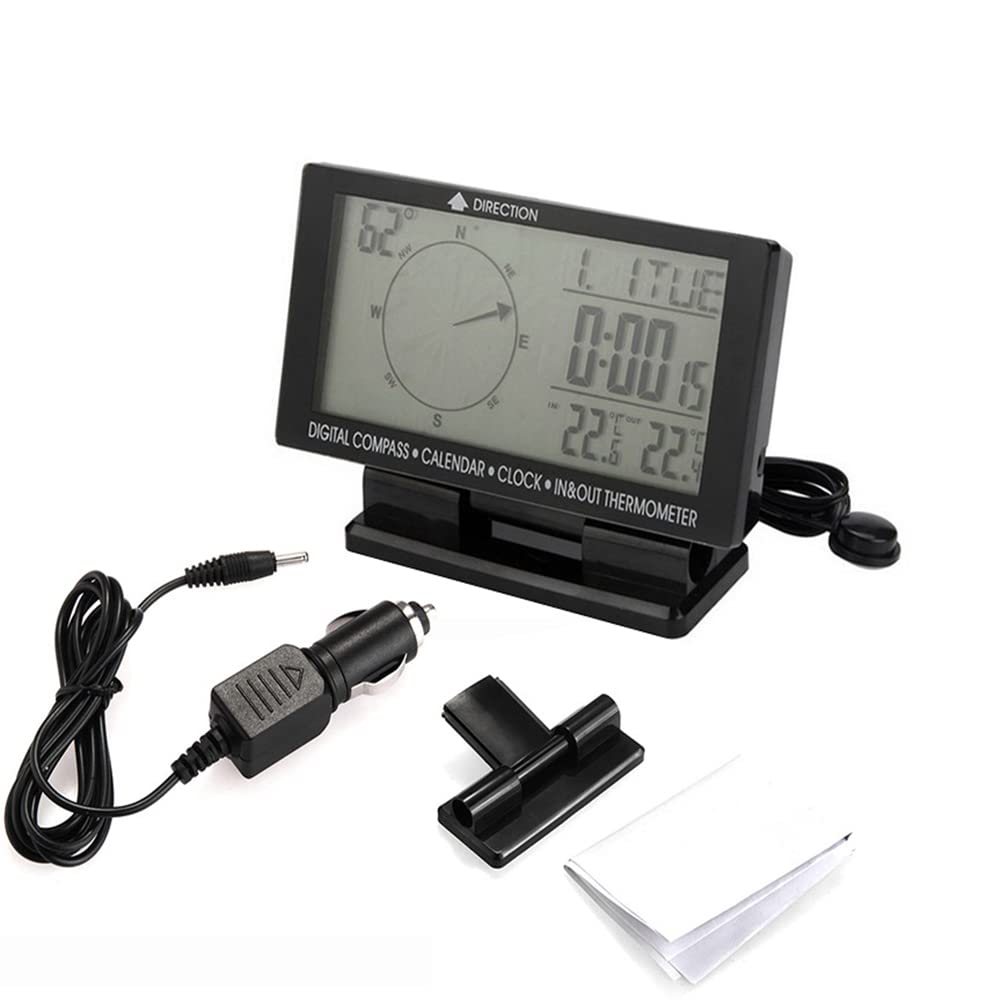
Image: All components included in the package: the main thermometer unit, car charger, fixing bracket, and a small instruction manual.
Setup
- Battery Installation: Locate the battery compartment on the back of the unit. Insert one CR2030 coin cell battery, ensuring correct polarity.
- Mounting the Device: Attach the fixing bracket to a suitable, stable surface in your vehicle. Secure the Digital Car Thermometer unit onto the bracket. Ensure the unit is positioned for clear visibility and minimal obstruction.
- Connecting Power: Plug the car charger into your vehicle's 12V power outlet. Connect the other end of the charger cable to the power input port on the back of the thermometer unit.
- Outdoor Sensor Placement: The unit includes an external temperature sensor. Route this sensor to an appropriate outdoor location, such as outside the vehicle cabin, ensuring it is not exposed to direct sunlight or engine heat for accurate outdoor temperature readings.

Image: Rear view of the thermometer unit, showing the power input port, external sensor cable, and control buttons.
Operating Instructions
The MASO Digital Car Thermometer features several functions accessible via the control buttons located on the back of the unit.

Image: Close-up of the "UP", "SET", "DOWN", and "COMPASS" buttons on the back of the device.
- Power On/Off: The device powers on automatically when connected to the car charger and the vehicle's ignition is on. Disconnect the charger to power off.
- Time and Date Setting:
- Press the SET button to enter time/date setting mode.
- Use the UP and DOWN buttons to adjust values (hours, minutes, year, month, day).
- Press SET again to confirm each setting and move to the next.
- To switch between 12-hour and 24-hour modes, press the MODE button (if available, otherwise it might be part of the SET sequence).
- Temperature Unit Selection: Press the UP button (or a dedicated °C/°F button if present) to toggle between Celsius (°C) and Fahrenheit (°F) temperature display.
- Compass Function: The digital compass displays direction from 0-360 degrees with an accuracy of ±8 degrees. Ensure the device is level for optimal accuracy. Some models may require initial calibration; refer to the included manual for specific steps if compass readings appear inaccurate.
- Backlight Activation: The blue backlight activates when the device is powered on, enhancing visibility in low-light conditions.
- Indoor and Outdoor Temperature Display: The device simultaneously displays both indoor and outdoor temperatures. The indoor temperature is measured by a sensor within the main unit, while the outdoor temperature is measured by the external sensor.

Image: The main display showing the digital compass, current time, date, and both indoor and outdoor temperature readings.

Image: The thermometer unit displaying both indoor and outdoor temperatures, with a visual representation of two thermometers indicating different readings.
Specifications
| Material | Plastic |
| Color | Black |
| Display Type | Digital LCD |
| Display Size | 4.6 inches (11.68 cm) |
| Overall Dimensions (L*W*H) | 126 x 66 x 20 mm (4.96 x 2.60 x 0.79 inches) |
| Power Type | CR2030 Coin Cell Battery (not included) |
| Indoor Temperature Range | -10°C to +60°C (14°F to 140°F) |
| Outdoor Temperature Range | -50°C to +70°C (-58°F to 158°F) |
| Temperature Display Unit | °C / °F (selectable) |
| Compass Angle Range | 0-360 degrees |
| Compass Accuracy | ±8 degrees |
| Backlight Color | Blue |
| Time Display Type | 12-hour / 24-hour mode (selectable) |
| Item Weight | 9.5 ounces |
Maintenance
- Cleaning: To clean the device, gently wipe the surface with a soft, dry cloth. Avoid using abrasive cleaners or solvents, which may damage the display or casing.
- Battery Replacement: When the display becomes dim or functions irregularly, replace the CR2030 coin cell battery. Ensure the device is powered off before replacing the battery.
- Storage: If storing the device for an extended period, remove the battery to prevent leakage. Store the unit in a dry place within the recommended storage temperature range of -10°C to +60°C.
- Sensor Care: Ensure the external temperature sensor cable is not pinched or damaged. Keep the sensor clean and free from debris for accurate readings.
Troubleshooting
If you encounter issues with your Digital Car Thermometer, refer to the following common problems and solutions:
- No Display or Dim Display:
- Check if the car charger is securely connected to both the device and the vehicle's power outlet.
- Ensure the vehicle's ignition is on if the power outlet is ignition-controlled.
- Replace the CR2030 coin cell battery if it is depleted.
- Inaccurate Temperature Readings:
- For outdoor temperature, verify that the external sensor is properly positioned and not exposed to direct sunlight, engine heat, or other heat sources.
- For indoor temperature, ensure the main unit is not placed near air vents or direct sunlight.
- Allow a few minutes for the temperature readings to stabilize after initial setup or significant environmental changes.
- Inaccurate Compass Readings:
- Ensure the device is placed on a level surface.
- Avoid placing the device near strong magnetic fields or large metal objects, which can interfere with compass accuracy.
- If the compass consistently shows incorrect directions, refer to the detailed English manual included in the package for specific calibration procedures, if applicable to your model.
- Buttons Not Responding:
- Ensure the device has sufficient power.
- Gently press the buttons to ensure proper contact.
For further assistance, please consult the comprehensive English manual provided with your product.
Warranty and Support
Specific warranty terms and conditions for the MASO Digital Car Thermometer are typically provided by the retailer at the time of purchase or detailed in the included product documentation. Please retain your proof of purchase for any warranty claims.
For technical support or inquiries not covered in this manual, please contact the retailer or manufacturer directly using the contact information provided with your purchase or on the product packaging.