Pulsar Talion XQ38 Thermal Riflescope User Manual
Model: PL76561 | Brand: Pulsar
Introduction
Welcome to the user manual for your Pulsar Talion XQ38 Thermal Riflescope. This document provides essential information for the safe and effective operation, setup, and maintenance of your device. The Talion XQ38 is designed for detecting heat signatures in various conditions, offering advanced thermal imaging capabilities for hunting and observation.
Important Safety Information
Read all instructions carefully before using the device. Failure to follow safety guidelines may result in injury or damage to the device.
- Do not look directly at intense light sources through the device.
- Keep the device away from extreme temperatures and direct sunlight.
- Ensure proper mounting on a firearm to prevent recoil-related injuries.
- This product is controlled for export and in-country transfer under the International Traffic in Arms Regulations (ITAR). Diversion contrary to U.S. law is prohibited.
Package Contents
Verify that all items are present in the package:
- Thermal Imaging Riflescope
- Rechargeable APS5 Battery Pack
- APS battery charger
- USB cable
- Carrying case
- Lens-cleaning cloth
- Quick User Manual (this document)
- Warranty card
Product Overview
The Pulsar Talion XQ38 is a compact thermal riflescope featuring a 384x288 microbolometer sensor and a variable magnification of 2.5-10x. It is housed in a durable magnesium alloy body, designed for robust performance in the field.


Setup
1. Battery Installation
The Talion XQ38 uses a rechargeable APS5 Battery Pack for power.

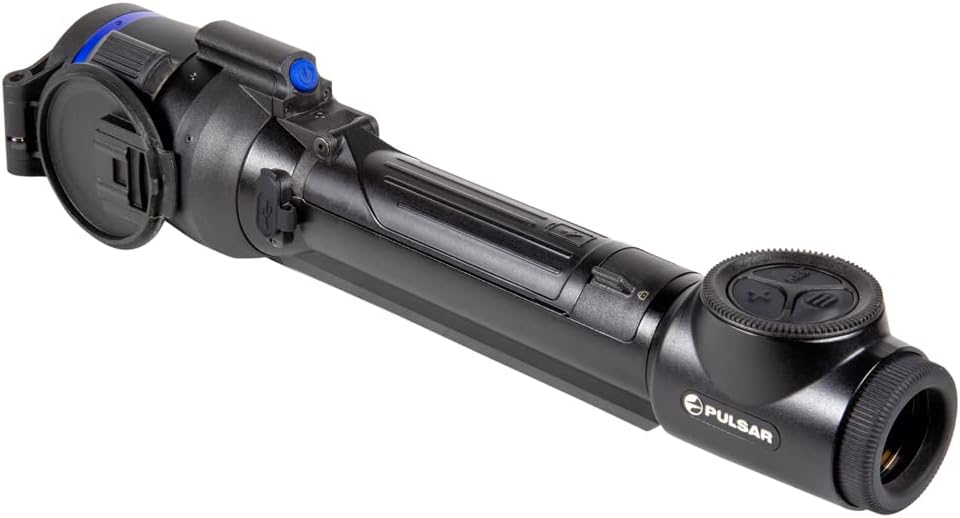
- Locate the battery compartment on the device.
- Open the battery compartment cover.
- Insert the APS5 battery pack, ensuring correct polarity.
- Close the battery compartment cover securely.
- Charge the battery using the provided APS battery charger and USB cable before first use.
2. Mounting the Riflescope
The Talion features a multi-point prism mount for precise positioning on your firearm.
- Attach the riflescope to your firearm's Picatinny mount using appropriate mounting hardware (not included).
- Ensure the riflescope is securely fastened and aligned for optimal viewing.
- Refer to your firearm's manual for specific mounting instructions.
Operating the Device
1. Power On/Off
To power on the device, press and hold the power button.

To power off, press and hold the power button again until the device shuts down.
2. Basic Controls
The device features intuitive controls for navigation and settings adjustment.

Key controls include:
- REC Button: For recording videos and taking photos.
- X Button: Typically used for zoom or navigation within menus.
- Menu Button: Accesses the main menu for settings adjustments.
3. Magnification Adjustment
The Talion XQ38 offers a variable magnification of 2.5-10x. Adjust magnification using the designated control (often the 'X' button or a rotary encoder, depending on the specific model's interface).
4. Reticle Selection and Zeroing
The device provides a selection of ten reticle shapes in nine color modes. Precision aiming is enhanced with Picture-in-Picture mode.
- Access the reticle settings through the main menu.
- Select your desired reticle shape and color.
- Utilize the 5 shooting profiles and 50 zeroing distances for accurate calibration. Refer to the on-screen interface for detailed zeroing procedures.
5. Wi-Fi Integration and Stream Vision 2 App
The Talion XQ38 supports Wi-Fi integration with iOS and Android devices via the Stream Vision 2 application.

- Download the Stream Vision 2 app from your device's app store.
- Enable Wi-Fi on your Talion XQ38 through the device menu.
- Connect your smartphone or tablet to the riflescope's Wi-Fi network.
- Use the app for remote control, live streaming, and managing recorded media.
6. Photo and Video Recording
The device has built-in photo and video recording capabilities.
- Press the REC button to start/stop video recording.
- A short press of the REC button typically captures a still image.
- Recorded media can be accessed via the device's internal memory or through the Stream Vision 2 app.
7. Color Palettes and Sensitivity
The Talion XQ38 offers a large selection of different color palettes and three sensitivity amplification levels to optimize thermal imaging for various environments.
- Navigate to the display settings in the menu to select your preferred color palette.
- Adjust the sensitivity amplification level to enhance detection based on ambient conditions.
Maintenance
1. Cleaning
Use the provided lens-cleaning cloth to gently wipe the optical surfaces. Avoid abrasive materials.
For the device body, use a soft, damp cloth. Do not use harsh chemicals or solvents.
2. Storage
Store the riflescope in its carrying case in a cool, dry place when not in use.
Remove the battery pack if storing for extended periods.
Troubleshooting
This section addresses common issues you might encounter with your Talion XQ38.
| Problem | Possible Cause | Solution |
|---|---|---|
| Device does not power on | Battery discharged or incorrectly installed | Charge battery, ensure correct installation |
| Poor image quality | Lens dirty, incorrect focus, environmental factors | Clean lens, adjust focus, change color palette/sensitivity |
| Wi-Fi connection issues | Wi-Fi disabled, app not connected | Enable Wi-Fi on device, ensure app is running and connected |
Specifications
Detailed technical specifications for the Pulsar Talion XQ38 Thermal Riflescope.
| Feature | Value |
|---|---|
| Brand | Pulsar |
| Color | XQ38 |
| Sport | Airsoft, Hunting |
| Item Weight | 1.5 Pounds |
| Material | Magnesium Alloy |
| Objective Lens Diameter | 38 Millimeters |
| Magnification Minimum | 2.5 x |
| Compatible Devices | Handgun |
| Mounting Type | Picatinny Mount |
| Night vision | No |
| Field Of View | 68.3 Feet |
| Model Name | Talion |
| Manufacturer | Sellmark Corporation |
| UPC | 812495029639 |
| Item Package Dimensions L x W x H | 18 x 6.25 x 4 inches |
| Package Weight | 4 Pounds |
| Item Dimensions LxWxH | 13 x 2.24 x 2.65 inches |
| Suggested Users | mens |
| Number of Items | 1 |
| Part Number | PL76561 |
| Date First Available | February 18, 2022 |
Warranty and Support
Warranty Information
The Pulsar Talion XQ38 Thermal Riflescope comes with a 3 Year Limited Warranty. Please refer to the included Warranty card for full terms and conditions regarding coverage and claims.
Customer Support
For technical assistance, service, or warranty claims, please contact Pulsar customer support. Visit the official Pulsar website or the Pulsar Store on Amazon for contact details and additional resources: Pulsar Store.


