
RecPro RP-2166
RecPro RV Refrigerator User Manual
Model: RP-2166
1. Introduction
Thank you for choosing the RecPro RV Refrigerator. This manual provides essential information for the safe and efficient operation of your 6.3 Cubic Feet Gas and Electric RV Refrigerator. Please read this manual thoroughly before installation and use, and keep it for future reference.

Figure 1: RecPro RV Refrigerator (Black Finish)
This image shows the RecPro RV Refrigerator in a sleek black finish, viewed from the front. It highlights the dual-door design for the freezer and refrigerator compartments.
2. Safety Information
Always adhere to the following safety precautions to prevent injury or damage to the appliance.
- Electrical Safety: Ensure the refrigerator is connected to a properly grounded power source (110V or 12V) as specified. Do not use extension cords.
- Gas Safety: When operating on propane gas, ensure proper ventilation. Check for gas leaks regularly using a soapy water solution. Never use an open flame to check for leaks.
- Ventilation: Adequate ventilation is crucial for proper operation and safety, especially when using propane. Ensure the refrigerator's ventilation openings are not obstructed.
- Installation: Installation should be performed by a qualified technician in accordance with all local codes and regulations.
- Children: Keep children away from the refrigerator, especially when the door is open.
- Flammable Materials: Do not store explosive substances or flammable materials inside or near the refrigerator.

Figure 2: Rear Components and Safety Labels
This image displays the rear of the refrigerator, showing the cooling unit, wiring, and various warning labels. It emphasizes the importance of proper installation and adherence to safety guidelines.
3. Setup & Installation
3.1 Unpacking
Carefully remove the refrigerator from its packaging. Inspect for any shipping damage. Report any damage to your dealer immediately.
3.2 Placement
Position the refrigerator on a level, stable surface. Ensure adequate clearance around the unit for proper ventilation. Refer to the dimensions for precise fitting.
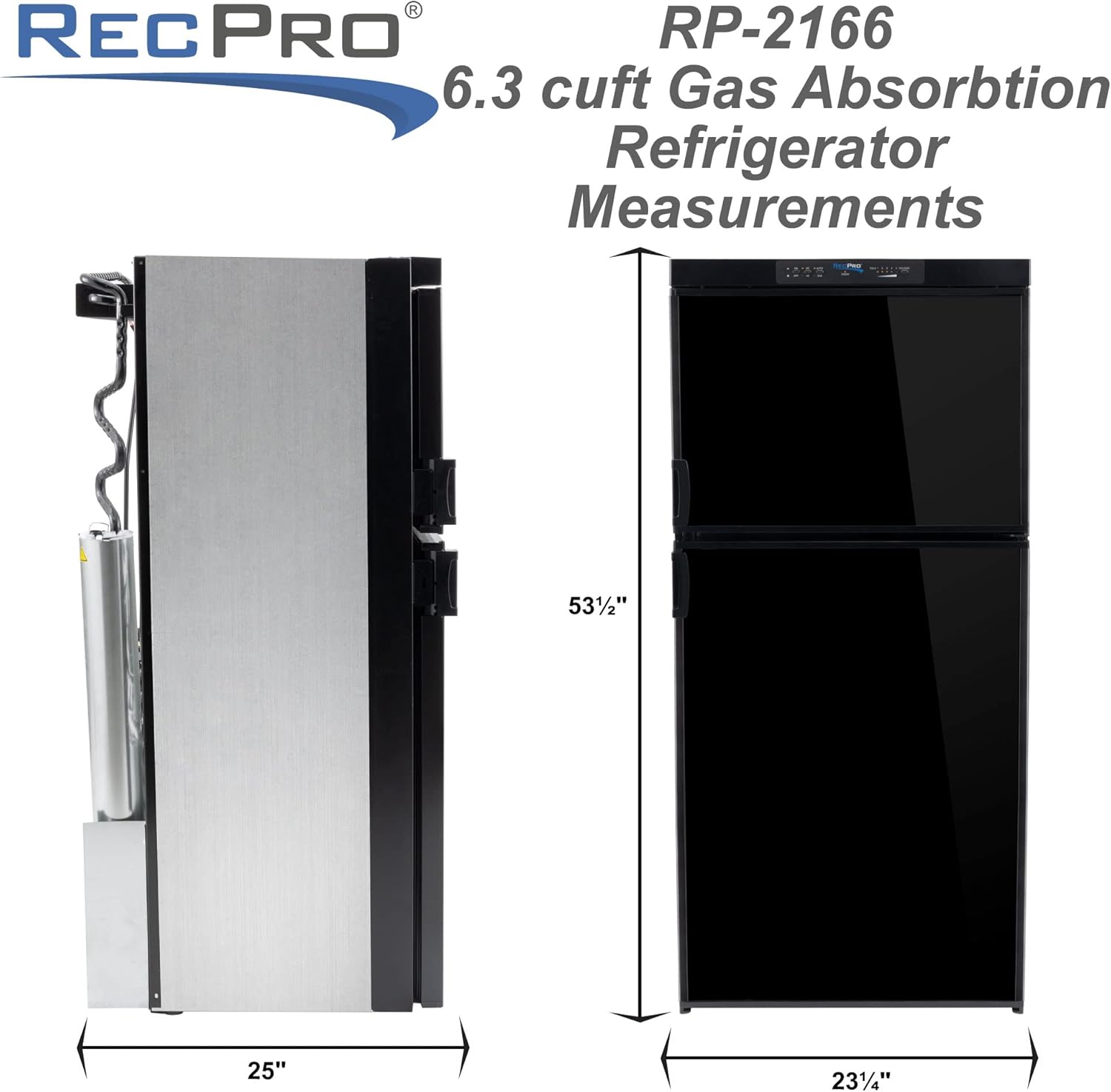
Figure 3: Refrigerator Dimensions
This diagram illustrates the key dimensions of the RecPro RV Refrigerator, including its height, width, and depth, crucial for proper installation planning.
3.3 Power Connections
This refrigerator supports 110V-120V AC, 12V DC, and Propane Gas operation. Connect the appropriate power source based on your RV's setup. Ensure all electrical connections are secure and conform to local electrical codes.
- 110V/120V AC: Plug into a grounded outlet.
- 12V DC: Connect to the RV's 12V system, ensuring correct polarity.
- Propane Gas: Connect to the RV's propane supply. A qualified technician should perform gas connections and leak checks.

Figure 4: Propane Gas Connection Point
A detailed view of the brass fitting used for connecting the propane gas line to the refrigerator, highlighting the precision of the component.
4. Operation
4.1 Control Panel
The control panel is located at the top of the refrigerator. It allows you to select the power source (Auto/Gas) and monitor the cooling status.

Figure 5: Control Panel Detail
This close-up shows the control panel of the RecPro RV Refrigerator, featuring buttons for 'AUTO' and 'GAS' modes, along with indicator lights, including a 'CHECK' light for system status.
4.2 Initial Cooling
For optimal cooling efficiency, turn the refrigerator on and allow it to chill for 12 hours prior to placing food inside. This allows the absorption system to stabilize and reach optimal temperatures.
4.3 Power Source Selection
- AUTO Mode: The refrigerator will automatically select the best available power source (AC, then DC, then Gas).
- GAS Mode: Forces the refrigerator to operate on propane gas. Ensure gas supply is open and pilot light (if applicable) is lit.

Figure 6: Refrigerator Interior
This image provides a clear view of the refrigerator's interior, showcasing its spacious design, adjustable shelves, and door storage, filled with various food items to demonstrate capacity.
5. Maintenance
5.1 Cleaning
Clean the interior and exterior of the refrigerator regularly with a mild detergent and warm water. Avoid abrasive cleaners or solvents. Ensure the drain tube is clear to prevent water buildup.
5.2 Ventilation Grilles
Keep the exterior ventilation grilles clean and free of obstructions (dust, leaves, insects) to ensure proper airflow for the cooling unit.
5.3 Reversible Doors
The refrigerator features reversible doors, allowing you to change the door swing direction to suit your RV layout. A hardware kit for reversible doors is available from RecPro. Consult the kit's instructions for the reversal process.

Figure 7: Key Features Overview
This graphic highlights three key features of the RecPro RV Refrigerator: latching handles for secure travel, reversible doors for flexible installation, and its versatile 3-way power capability (Propane, 12V, and 110V).
6. Troubleshooting
This section provides solutions to common issues you might encounter. For problems not listed here, contact RecPro customer support.
| Problem | Possible Cause | Solution |
|---|---|---|
| Refrigerator not cooling |
|
|
| "CHECK" light illuminated |
|
|
| Excessive frost in freezer |
|
|
7. Specifications
Detailed technical specifications for the RecPro RV Refrigerator Model RP-2166.
| Feature | Detail |
|---|---|
| Brand | RecPro |
| Model Info | RP-2166 |
| Part Number | RP-21656 |
| Capacity | 6.3 Cubic Feet |
| Product Dimensions (D x W x H) | 25" x 23.25" x 53.5" |
| Installation Type | Freestanding |
| Power Options | 110V-120V AC, 12V DC, Propane Gas |
| Defrost System | Hot gas defrost |
| Door Hinges | Reversible |
| Number of Doors | 3 |
| Color | Black Finish (also available in Stainless Steel) |
| Material | Stainless Steel (Door Material Type) |
| Shelf Type | Wire |
| Number of Shelves | 3 |
| Certification | Compliant with RV refrigerator standards and specifications |
8. Warranty & Support
8.1 Warranty Information
RecPro products are designed for durability and performance. For specific warranty details, please refer to the warranty card included with your purchase or visit the official RecPro website. Keep your proof of purchase for warranty claims.
8.2 Customer Support
If you have any questions, require technical assistance, or need to order replacement parts, please contact RecPro customer support. You can find contact information on the RecPro website or through your original retailer.
RecPro Website: Visit the RecPro Store on Amazon
Related documentsRP-2166


Ask a question about this manual
Ask about setup, troubleshooting, compatibility, parts, safety, or missing instructions. Manuals+ will review the question and use this page’s manual context to help answer it.