
TZT NanoVNA-F V3.1
NanoVNA-F V3.1 Vector Network Analyzer User Manual
Model: NanoVNA-F V3.1 | Brand: TZT
1. Introduction
The TZT NanoVNA-F V3.1 is a compact and versatile Vector Network Analyzer (VNA) designed for measuring RF circuits and antenna performance. It operates within a wide frequency range of 10KHz to 1.5GHz, making it suitable for various applications including amateur radio, antenna tuning, and general RF circuit analysis. This manual provides essential information for the proper setup, operation, and maintenance of your NanoVNA-F V3.1.

Figure 1: The NanoVNA-F V3.1 Vector Network Analyzer with its 4.3-inch IPS display showing S-parameter measurements.
2. Key Features
- Wide Measurement Range: Covers 10KHz to 1.5GHz, with excellent dynamic range: >70dB for 10K-300MHz, >60dB for 300M-900MHz, and >40dB for 900M-1.5GHz.
- High Capacity Battery: Equipped with a 5000mAh battery for extended operation. Can also function as a mobile power source via its extended USB interface.
- Clear Display: Features a 4.3-inch IPS TFT LCD with a resistive touch screen for clear data and curve visualization.
- Powerful Functions: Capable of measuring S-parameters, Voltage Standing Wave Ratio (SWR), phase map, group delay, Smith chart, DELAY, POLAR, and LINEAR. Supports firmware upgrades via virtual U disk.
- PC and Android Phone Connectivity: Compatible with PC software (e.g., NanoVNA Saver) for data display and Touchstone (.snp) file export. Supports Android mobile phones for control.
3. Package Contents
Upon opening the package, please verify that all the following items are included:
- NanoVNA-F V3.1 Vector Network Analyzer Unit
- USB Type-C Cable
- 2 x SMA Male to Male RG316 RF Cables
- Calibration Kit (OPEN, SHORT, LOAD)
- SMA Male to Female Adapters (various types)
- Stylus Pen
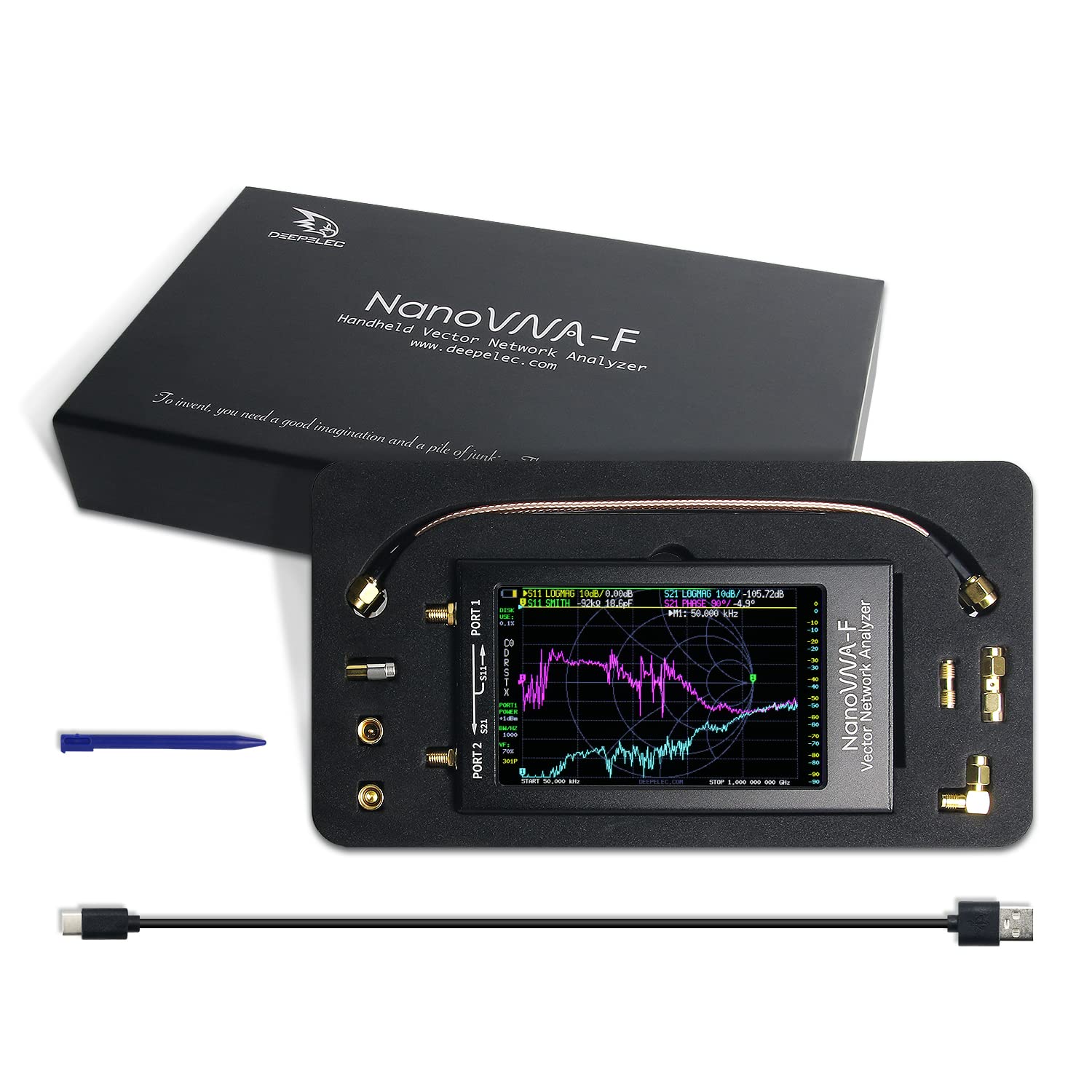
Figure 2: All components included in the NanoVNA-F V3.1 package.
4. Setup Guide
4.1 Initial Charging
Before first use, fully charge the NanoVNA-F V3.1. Connect the provided USB Type-C cable to the device's USB-C port and the other end to a standard USB power adapter (5V, 1A recommended) or a computer's USB port. The charging indicator will show the charging status.
4.2 Powering On/Off
Locate the power switch on the side of the device. Slide the switch to the "ON" position to power on the unit. To power off, slide the switch to the "OFF" position.
4.3 Connecting to a Device Under Test (DUT)
The NanoVNA-F V3.1 has two SMA ports: PORT 1 (S11) and PORT 2 (S21). Use the provided SMA cables and adapters to connect your DUT. For reflection measurements (S11), connect the DUT to PORT 1. For transmission measurements (S21), connect the input of the DUT to PORT 1 and the output to PORT 2.

Figure 3: Schematic representation of S-parameter measurement connections on the NanoVNA-F V3.1.
5. Operation
5.1 User Interface Navigation
The NanoVNA-F V3.1 features a resistive touch screen and a wheel button for navigation. Use the stylus or your finger to interact with the touch screen menus. The wheel button can be used for fine adjustments or menu selection in some modes.
5.2 Calibration
Calibration is crucial for accurate measurements. Perform a full two-port calibration (OPEN, SHORT, LOAD, THRU) for the desired frequency range before taking measurements. Access the calibration menu from the main screen.
- Connect the OPEN standard to PORT 1 and perform the OPEN calibration.
- Connect the SHORT standard to PORT 1 and perform the SHORT calibration.
- Connect the LOAD standard to PORT 1 and perform the LOAD calibration.
- Connect PORT 1 and PORT 2 directly using a THRU cable and perform the THRU calibration.
- Save the calibration data.
5.3 Measurement Modes
The device supports various measurement modes, including:
- S11 (Reflection Coefficient): Measures the reflection characteristics of a device connected to PORT 1. Useful for SWR, Return Loss, and Smith Chart analysis.
- S21 (Transmission Coefficient): Measures the transmission characteristics between PORT 1 and PORT 2. Useful for gain/loss and phase measurements of filters, amplifiers, etc.
- SWR (Standing Wave Ratio): Indicates the impedance match of an antenna or transmission line.
- Smith Chart: Graphical representation of complex impedance.
- Phase: Displays the phase response of the DUT.
- Group Delay: Measures the time delay of signals through the DUT.
5.4 PC Software Connectivity
For advanced analysis and data logging, connect the NanoVNA-F V3.1 to a PC using the USB Type-C cable. Download and install compatible software like NanoVNA Saver. This software allows for larger display, detailed analysis, and export of Touchstone (.snp) files for use in other RF simulation tools.
6. Maintenance
6.1 Cleaning
Use a soft, dry cloth to clean the device. For stubborn dirt, a slightly damp cloth can be used. Avoid using harsh chemicals or abrasive materials, as they may damage the screen or casing.
6.2 Storage
When not in use, store the NanoVNA-F V3.1 in a cool, dry place, away from direct sunlight and extreme temperatures. Keep it in its original packaging or a protective case to prevent physical damage.
6.3 Battery Care
To prolong battery life, avoid fully discharging the battery frequently. If storing for an extended period, charge the battery to approximately 50% and recharge every few months.
7. Troubleshooting
| Problem | Possible Cause | Solution |
|---|---|---|
| Device does not power on. | Low battery or power switch in OFF position. | Charge the device. Ensure the power switch is in the ON position. |
| Inaccurate measurements. | Improper calibration or faulty cables/adapters. | Perform a full calibration for the current frequency range. Check cables and connectors for damage. |
| Screen unresponsive. | Software glitch or physical damage. | Restart the device. If issue persists, contact support. |
| Cannot connect to PC. | Incorrect USB cable, driver issues, or software settings. | Ensure you are using the correct USB Type-C cable. Install necessary drivers. Check PC software settings. |
8. Specifications
| Feature | Detail |
|---|---|
| Frequency Range | 10KHz - 1.5GHz |
| Display | 4.3-inch IPS TFT LCD, Resistive Touch Screen |
| Dynamic Range | >70dB (10K-300MHz), >60dB (300M-900MHz), >40dB (900M-1.5GHz) |
| Battery Capacity | 5000mAh |
| Ports | 2 x SMA (PORT 1, PORT 2), 1 x USB Type-C |
| Dimensions | Approximately 127mm x 74mm x 21mm (5in x 2.9in x 0.8in) |
| Weight | Approximately 1 Pound |
| Manufacturer | TZT |
| Country of Origin | China |

Figure 4: Physical dimensions of the NanoVNA-F V3.1.
9. Warranty and Support
For warranty information and technical support, please refer to the documentation provided with your purchase or contact the manufacturer directly. Keep your proof of purchase for warranty claims.
No official product videos from the seller were found for this model.
Ask a question about this manual
Ask about setup, troubleshooting, compatibility, parts, safety, or missing instructions. Manuals+ will review the question and use this page’s manual context to help answer it.