
1. Introduction
Thank you for choosing the Braun Series 7 electric shaver. This manual provides essential information for the safe and effective use of your new shaver. Please read these instructions carefully before use and keep them for future reference.
The Braun Series 7 electric shaver, model 71-N1500s, is equipped with advanced AI technology and a 360-degree adaptation system. This design allows the shaver head to move in all directions, ensuring a close shave even in hard-to-reach areas like under the chin. The AI technology intelligently reads your beard density and automatically adjusts power 13 times per second for consistent performance. Its 100% waterproof design enables both dry and wet shaving, including use in the shower. A beard trimmer attachment is included for versatile styling. The DeepCatch blade, with its 900 mesh patterns, is designed to cut hairs growing in various directions from the root. The shaver is rechargeable, with a full charge achieved in approximately 1 hour, providing about 50 minutes of operating time.
2. Safety Information
To reduce the risk of electric shock, injury, or fire, please observe the following safety precautions:
- This appliance is suitable for cleaning under running water. Unplug the shaver from the power supply before cleaning with water.
- Do not use this appliance with a damaged foil or cord.
- Keep the appliance dry. Do not immerse it in water or other liquids.
- This appliance is not intended for use by persons (including children) with reduced physical, sensory or mental capabilities, or lack of experience and knowledge, unless they have been given supervision or instruction concerning use of the appliance by a person responsible for their safety.
- Children should be supervised to ensure that they do not play with the appliance.
- Only use the power supply provided with the appliance.
- Do not open the appliance. The built-in rechargeable battery is not replaceable.
3. Product Overview
The Braun Series 7 shaver is designed for a precise and comfortable shave. Key features include:
- 360° Adaptation System: The flexible head adapts to your facial contours for maximum skin contact.
- AI Technology: Automatically senses and adapts to your beard density, delivering optimal power.
- DeepCatch Blade: Features 900 unique patterns to capture and cut hairs growing in different directions.
- 100% Waterproof: Suitable for dry shaving, wet shaving with foam/gel, and use in the shower.
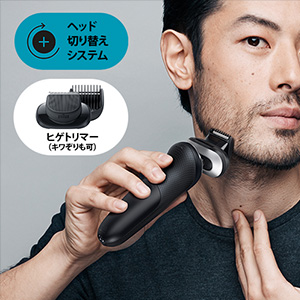
- Head Replacement System: Allows for easy attachment of grooming accessories like the beard trimmer.



4. Setup
4.1 Charging the Shaver
Before first use, or when the battery is low, charge your shaver. The shaver is equipped with a powerful Lithium-ion battery.
- Ensure the shaver is switched off.
- Connect the shaver to the power cord and plug it into an electrical outlet.
- The LED display will indicate the charging status. A full charge takes approximately 1 hour.
- Once fully charged, the shaver provides approximately 50 minutes of cordless shaving time.

5. Operating Instructions
5.1 Shaving
The Braun Series 7 can be used for both dry and wet shaving.
- Dry Shaving: For a quick and convenient shave, use the shaver on dry skin.
- Wet Shaving: For a refreshing shave, use with water, shaving foam, or gel. The shaver is also suitable for use in the shower.
To shave, press the power button to turn on the shaver. Move the shaver in straight, overlapping strokes against the direction of hair growth. The 360° flexible head will adapt to your facial contours, ensuring optimal skin contact.
5.2 Using the Beard Trimmer Attachment
To attach the beard trimmer:
- Ensure the shaver is switched off.
- Remove the standard shaver head by pressing the release buttons on the sides.
- Attach the beard trimmer head until it clicks into place.
- Use the trimmer to style your beard or trim longer hairs before shaving.
This video demonstrates the key features of the Braun Series 7 shaver, including its 360-degree flexible head, 3-blade system for ultimate closeness, AI technology for power adjustment, and its suitability for both dry and wet shaving. It also shows the versatility of the head replacement system with various attachments.
6. Maintenance and Cleaning
Regular cleaning ensures optimal performance and hygiene for your shaver.
6.1 Cleaning under Running Water
The Braun Series 7 is 100% waterproof and can be easily cleaned under running water.
- Ensure the shaver is unplugged from the power supply.
- Turn on the shaver.
- Rinse the shaver head under hot running water until all residue is removed.
- For a more thorough cleaning, you can use a small amount of liquid soap.
- After cleaning, switch off the shaver and remove the shaver head to allow it to air dry completely.
6.2 Replacing Shaver Parts
To maintain 100% shaving performance, replace the shaver head (foil and cutter block) every 18 months or when worn. Replacement parts are available from Braun retailers or service centers.
7. Troubleshooting
If you encounter any issues with your Braun Series 7 shaver, refer to the following common problems and solutions:
| Problem | Possible Cause | Solution |
|---|---|---|
| Shaver does not turn on. | Battery is empty or shaver is locked. | Charge the shaver. Press and hold the power button for 3 seconds to unlock. |
| Poor shaving performance. | Shaver head is worn or dirty. | Clean the shaver head thoroughly. Replace the shaver head if it is older than 18 months or visibly worn. |
| Shaver stops during use. | Battery is low. | Recharge the shaver. |
| Skin irritation after shaving. | Incorrect shaving technique or sensitive skin. | Ensure you are shaving against the direction of hair growth with light pressure. Consider using shaving foam/gel or shaving in the shower. Allow skin to adapt to the new shaver. |
8. Specifications
| Feature | Detail |
|---|---|
| Model Name | 71-N1500s |
| Power Source | Rechargeable (Power Cord Type) |
| Charging Time | Approx. 1 hour |
| Operating Time | Approx. 50 minutes |
| Battery Type | Lithium-ion |
| Blade Material | Metal |
| Head Type | Foil (Reciprocating) |
| Number of Blades | 1 (Foil system with multiple cutting elements) |
| Special Features | Waterproof, AI Technology, 360° Flex Head |
| Color | Black |
| Package Dimensions | 25.3 x 13.8 x 6.7 cm |
| Package Weight | 0.44 kg |
9. Warranty and Support
Your Braun Series 7 shaver comes with a manufacturer's warranty. Please refer to the warranty card included in your product packaging for specific terms and conditions. For further assistance, product registration, or to find authorized service centers, please visit the official Braun website or contact their customer support.
Official Braun Website: www.braun.com


