
Introduction
This manual provides detailed instructions for the installation, operation, and maintenance of the HYPERLITE Microwave Motion Sensor, specifically designed for use with HYPERLITE Radar Series LED High Bay Lights. This sensor enhances energy efficiency by automatically controlling lighting based on detected motion.
Safety Information
- Read all instructions carefully before installation and use.
- Ensure power is disconnected before any installation or maintenance.
- This device is designed for indoor use with compatible HYPERLITE Radar Series LED High Bay Lights only.
- Do not attempt to modify or repair the sensor. Contact qualified personnel for assistance.
- Keep out of reach of children.
Product Overview
The HYPERLITE Microwave Motion Sensor (Model HU-XI-201) is a compact, detachable unit that integrates seamlessly with HYPERLITE Radar Series LED High Bay Lights. It utilizes microwave technology to detect motion, providing automatic light control.
Components
- Microwave Motion Sensor Unit
- Remote Control (included)
Features
- Compatibility: Exclusively for HYPERLITE Radar Series LED High Bay Lights.
- Automatic On/Off: Lights turn on when motion is detected and off after 30 seconds of no movement (factory setting).
- Easy Installation: Detachable design for quick and convenient setup.
- Wide Operating Temperature: -40°C to +70°C.
- Operating Voltage: 10.5-15V DC.
- Max. Mounting Height: 15m (ceiling mounted).
Setup and Installation
The motion sensor is designed for quick and easy installation. Follow these steps to attach it to your HYPERLITE Radar Series LED High Bay Light.
Installation Steps
- Prepare the Light Fixture: Ensure the HYPERLITE Radar Series LED High Bay Light is powered off and safely positioned for installation.
- Unscrew the Base Cover: Locate the central cover on the base of the high bay light. Unscrew this cover to reveal the sensor port.

Figure 1: Unscrewing the cover from the base of the high bay light.
- Insert the Motion Sensor: Carefully align the HYPERLITE Microwave Motion Sensor with the exposed port.

Figure 2: The HYPERLITE Microwave Motion Sensor unit.
- Screw on the Motion Sensor: Gently screw the motion sensor into the port until it is securely fastened.
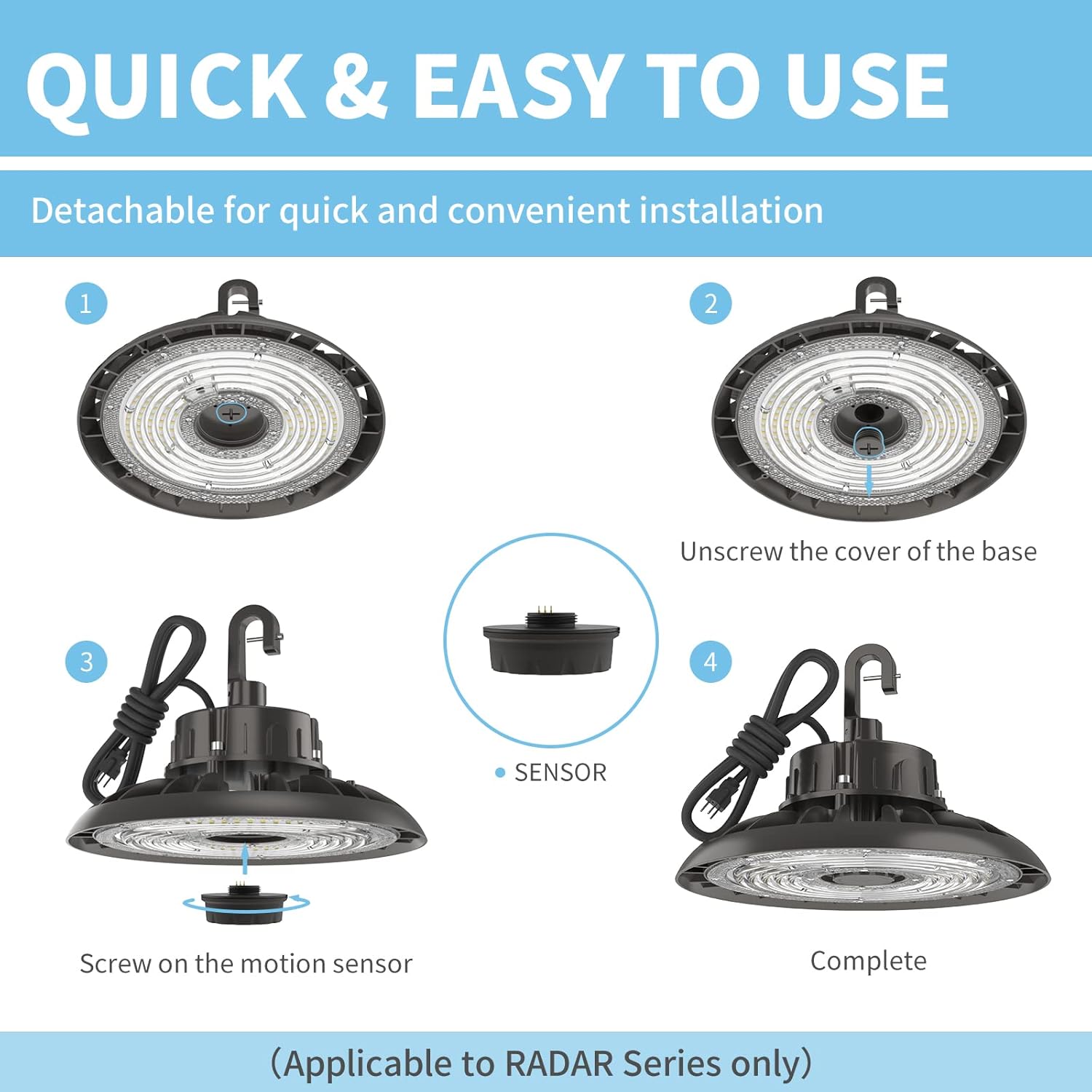
Figure 3: Screwing the motion sensor onto the high bay light.
- Verify Compatibility: Ensure your light is a Radar Series model. The sensor is not compatible with other series.
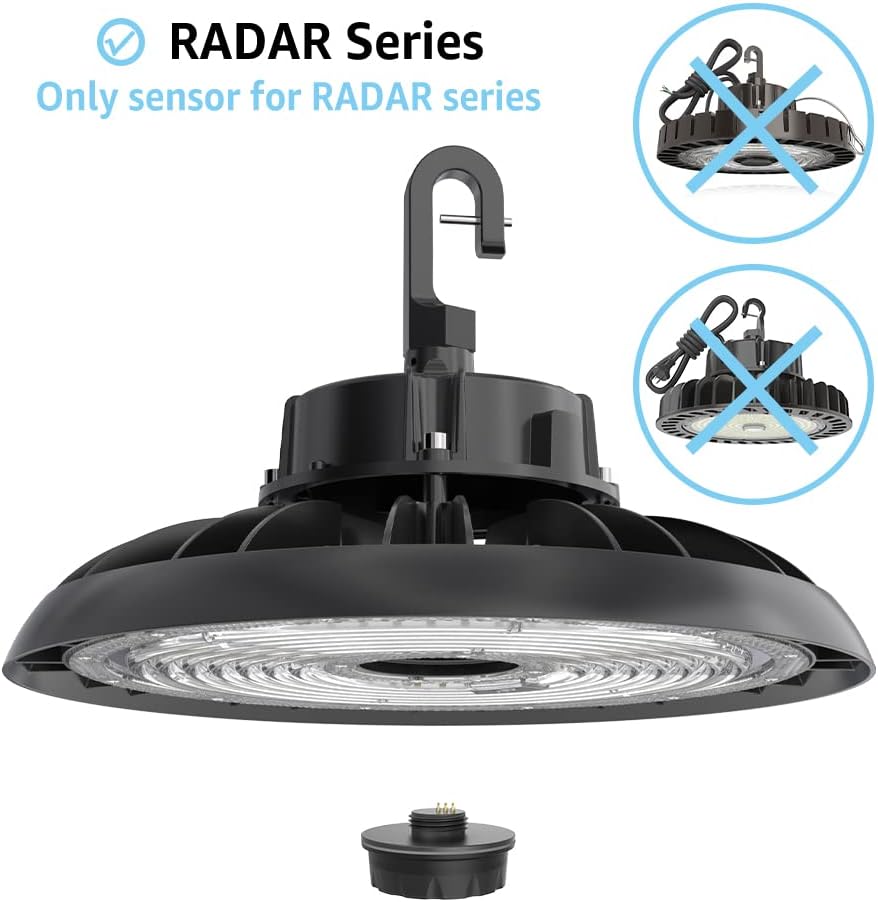
Figure 4: Compatibility check for Radar Series lights.
Video Guide
For a visual guide on installing the motion sensor, please watch the video below:
Video: Demonstrates the simple installation process of the HYPERLITE motion sensor onto a high bay light. It shows unscrewing the base cover, inserting the sensor, and screwing it in place.
Operating Instructions
Once installed, the HYPERLITE Microwave Motion Sensor operates automatically.
Motion Detection
- The sensor detects movement of people, cars, or other objects within its detection range.
- Upon detection, the connected HYPERLITE Radar Series LED High Bay Light will automatically turn on.
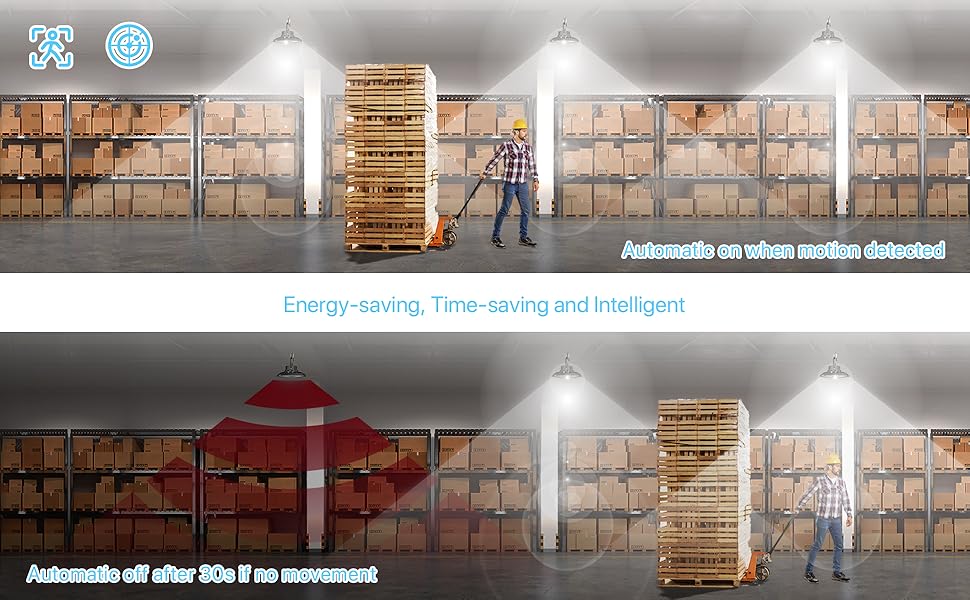
Figure 5: Automatic light activation upon motion detection.
Automatic Shut-off
- If no movement is detected for a period of approximately 30 seconds (factory default setting), the light will automatically turn off. This feature helps conserve energy.
Figure 6: Automatic light deactivation after a period of no motion.
Detection Range and Mounting Height
The sensor can be mounted up to a maximum height of 15 meters (ceiling mounted). The detection range is influenced by mounting height and surrounding environment.
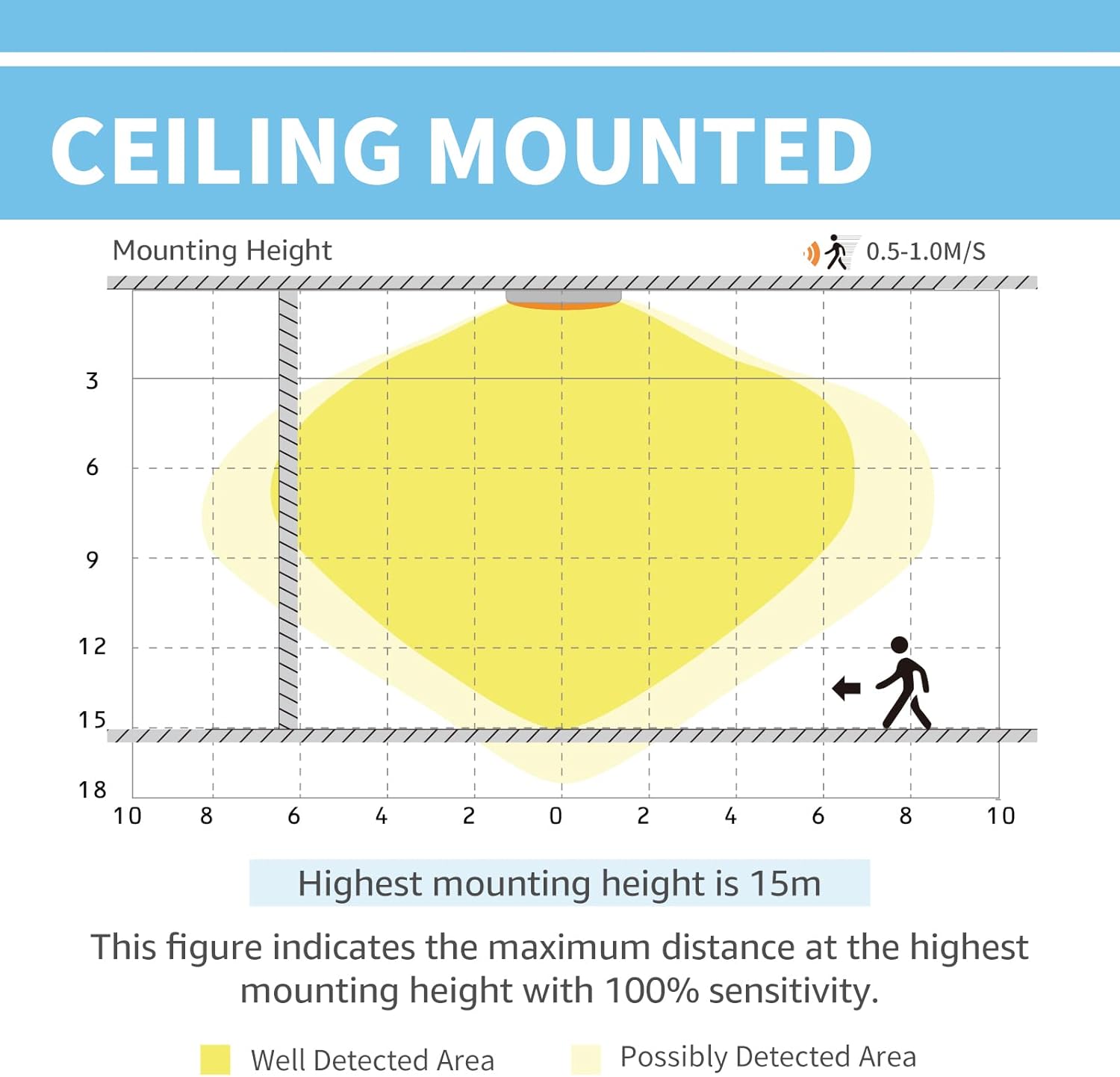
Figure 7: Sensor detection area based on mounting height.
Note: The motion sensing function can be affected by the surrounding environment. It is not recommended for outdoor use as a street light.
Maintenance
The HYPERLITE Microwave Motion Sensor requires minimal maintenance.
- Cleaning: Periodically wipe the sensor's surface with a soft, dry cloth to remove dust or debris. Do not use abrasive cleaners or solvents.
- Inspection: Regularly check for any visible damage to the sensor or its connection to the light fixture.
- Environmental Considerations: Ensure the sensor is not obstructed by objects that could block its detection field.
Troubleshooting
| Problem | Possible Cause | Solution |
|---|---|---|
| Light does not turn on with motion. |
|
|
| Light stays on constantly. |
|
|
| Light turns off too quickly/slowly. |
|
|
Specifications
| Attribute | Detail |
|---|---|
| Brand | HYPERLITE |
| Model Number | HU-XI-201 |
| Color | Black |
| Material | Plastic |
| Style | Modern |
| Light fixture form | Ceiling |
| Room Type | Garage |
| Specific Uses For Product | Garage |
| Indoor/Outdoor Usage | Indoor |
| Power Source | Corded Electric |
| Installation Type | Ceiling Mount |
| Special Feature | Motion Sensor |
| Control Method | Remote |
| Light Source Type | LED |
| Number of Light Sources | 1 |
| Voltage | 110 Volts |
| Included Components | Remote Control |
| Warranty Type | Limited |
| Lighting Method | LED |
| Wattage (for compatible light) | 110 watts |
| Bulb Base (for compatible light) | GX53 |
| Controller Type | Remote Control |
| Switch Type | Motion Sensor |
| Unit Count | 1.0 Count |
| Efficiency | Energy Efficient |
| Mounting Type | Ceiling Mount |
| Fixture Type | Non Removable |
| Assembly Required | No |
| Item Weight | 1.13 ounces |
| Package Dimensions | 2.28 x 2.28 x 1.85 inches |
| Operating Temperature | -40°C to +70°C |
| Operating Voltage | 10.5-15V DC |
| Max. Mounting Height | 15m (ceiling mounted) |
| Factory Setting Timing | 30 seconds |
Warranty and Support
The HYPERLITE Microwave Motion Sensor comes with a Limited Warranty. For detailed warranty information, technical support, or any inquiries, please visit the official HYPERLITE website or contact their customer service.
Visit the HYPERLITE Store on Amazon
Manufacturer: HYPERLITE
Model: HU-XI-201
Date First Available: February 14, 2022

