
BAOFENG UV-5R
Baofeng UV-5R Dual Band Two Way Radio User Manual
Model: UV-5R
1. Introduction
The Baofeng UV-5R is a compact, handheld dual-band two-way radio designed for reliable communication across various environments. It supports both VHF and UHF frequency bands, offering up to 128 memory channels. This manual provides essential information for setting up, operating, and maintaining your UV-5R radio to ensure optimal performance and longevity.

Image: Baofeng UV-5R Dual Band Two Way Radio in a desert setting, highlighting its outdoor use.
2. What's in the Box
Upon unboxing your Baofeng UV-5R radio set, please verify that all the following components are included:
- 6 x BAOFENG UV-5R radio with antenna
- 6 x 1800mAh Li-Ion battery
- 6 x Headset
- 6 x Charger
- 6 x Belt clip
- 6 x Hand strap
- 1 x English manual
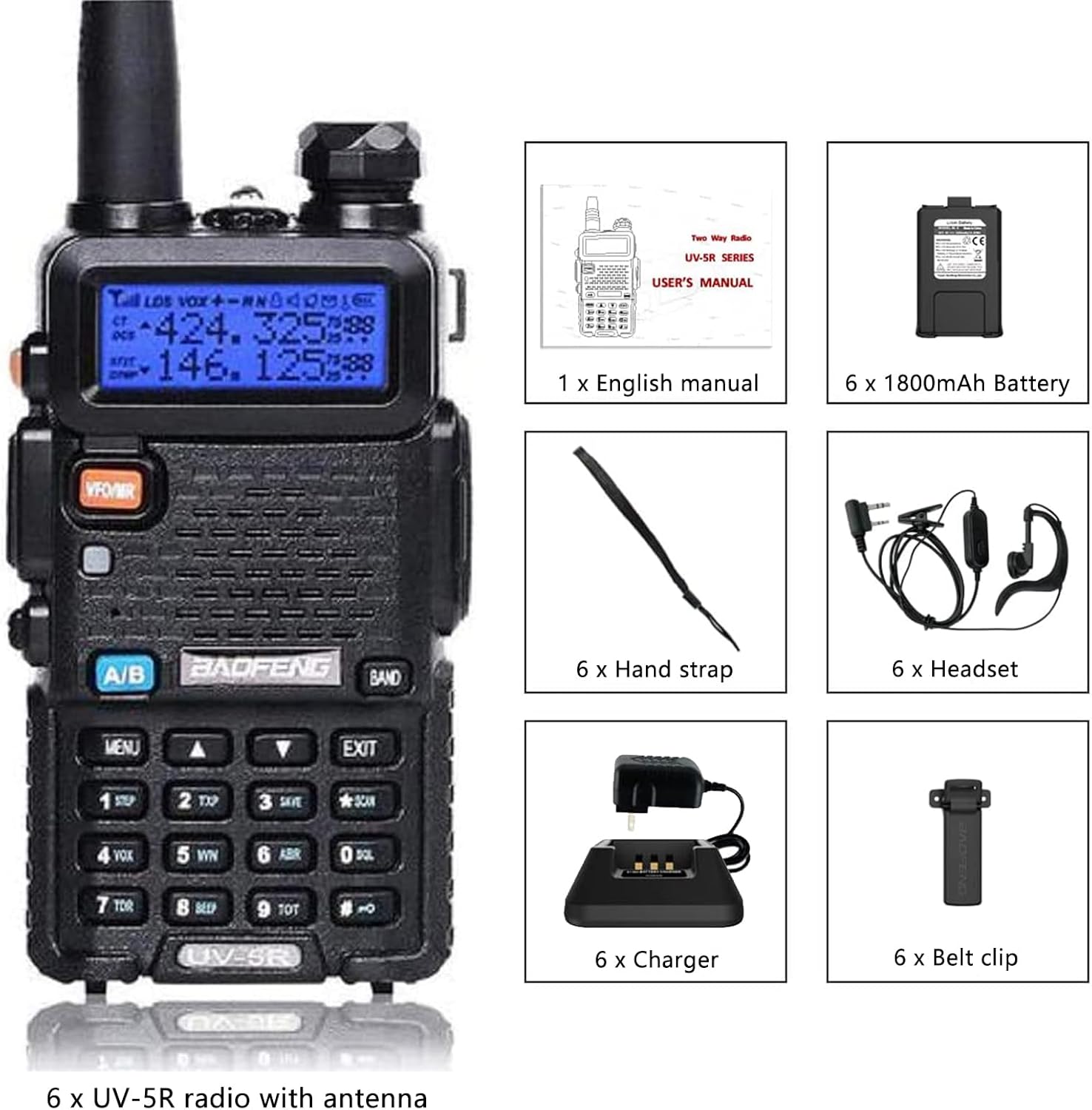
Image: A visual representation of all items included in the Baofeng UV-5R package, including the radio, battery, headset, charger, belt clip, hand strap, and user manual.
3. Product Features
The Baofeng UV-5R radio is equipped with a range of features designed for versatile and effective communication:
- Dual Band Operation: Supports VHF/UHF frequency bands.
- Channel Management: Up to 128 memory channels with display of bands and channel names.
- Squelch Control: Adjustable squelch in 9 levels for clear audio.
- Privacy Codes: Features 50 CTCSS tones and 210 DCS codes for private communication.
- Emergency Functions: Includes SOS Emergency function and Alarm function.
- Display: LCD display with backlight adjustable in 3 colors.
- Voice Activated Transmission (VOX): Allows hands-free operation.
- Scanning: VOX, Scan, and Dual Watch functions for monitoring multiple channels.
- Repeater Support: Repeater shift functionality.
- Voice Prompts: Vocal indication of selected functions.
- Power Saving: Power Save mode to extend battery life.
- Time-Out Timer (TOT): Prevents accidental continuous transmission.
- Busy Channel Lockout (BCL): Prevents transmission on an occupied channel.
- DTMF Function: For advanced signaling.
- Reverse Function: Swaps transmit and receive frequencies.
- CHIRP Programming: Advanced programming capabilities for custom settings and compliance with local regulations.
Clear and Loud Sound

The radio is engineered to deliver crystal-clear and powerful sound, ensuring that every conversation is heard with exceptional clarity and volume, regardless of the surrounding noise level, thus providing an unparalleled communication experience.
CHIRP Programming

Baofeng UV-5R radio is equipped with advanced CHIRP programming capabilities, allowing users to effortlessly configure and customize their radio settings, including frequency and other parameters, for optimal performance and compliance with local regulations, thereby enhancing operational efficiency and flexibility.
4. Components and Controls
Familiarize yourself with the various parts and controls of your Baofeng UV-5R radio:

Image: A detailed diagram of the Baofeng UV-5R radio with key components labeled, including the antenna, flashlight, knob (On/Off/Volume), LCD display, frequency mode/channel mode button, LED indicator, SP.& MIC, frequency display switches, and keyboard.
- Antenna: For transmitting and receiving signals.
- Flashlight: Integrated LED light for illumination.
- Knob (On/Off/Volume): Rotates to power the radio on/off and adjust volume.
- LCD Display: Shows frequency, channel, battery status, and other indicators.
- VFO/MR Button: Switches between Frequency Mode (VFO) and Channel Mode (MR).
- LED Indicator: Illuminates to indicate transmission (red) or reception (green).
- SP. & MIC: Speaker and Microphone ports.
- A/B Button: Switches between the upper and lower frequency displays.
- BAND Button: Switches between VHF and UHF bands.
- Keyboard: Numeric keypad for frequency input, channel selection, and function access.
- MENU Button: Enters the menu system.
- EXIT Button: Exits menu or cancels current operation.
5. Setup
Follow these steps to prepare your Baofeng UV-5R radio for first use:
- Install the Battery: Align the 1800mAh Li-Ion battery with the battery compartment on the back of the radio. Slide it into place until it clicks securely.
- Attach the Antenna: Screw the antenna clockwise onto the connector at the top of the radio until it is finger-tight. Do not overtighten.
- Charge the Battery: Place the radio (with battery installed) into the charging cradle. Connect the charger's power adapter to a wall outlet. The LED indicator on the charger will typically show red during charging and green when fully charged. Allow approximately 4-5 hours for a full charge.

Image: A Baofeng UV-5R radio placed in its charging cradle, illustrating the charging process.
- Attach Belt Clip and Hand Strap (Optional): Secure the belt clip to the back of the radio using the provided screws. Attach the hand strap to the designated loop for added security.
6. Operating Instructions
6.1 Power On/Off and Volume
To power on the radio, rotate the top knob clockwise. Continue rotating to increase the volume. Rotate counter-clockwise to decrease volume and power off the radio.
6.2 Mode Selection (VFO/MR)
Press the VFO/MR button to switch between Frequency Mode (VFO) and Channel Mode (MR).
- Frequency Mode (VFO): Allows direct frequency input and scanning.
- Channel Mode (MR): Allows selection of pre-programmed channels.
6.3 Channel/Frequency Selection
- In Channel Mode: Use the UP/DOWN arrow keys on the keypad to scroll through channels.
- In Frequency Mode: Directly input the desired frequency using the numeric keypad.
6.4 Transmitting and Receiving
To transmit, press and hold the Push-To-Talk (PTT) button on the side of the radio. Speak clearly into the microphone. Release the PTT button to receive.
6.5 Key Functions
- Squelch: Adjust squelch level via the menu to filter out weak signals and background noise.
- VOX (Voice Operated Transmit): Enable VOX in the menu to transmit automatically when you speak, without pressing PTT. Adjust VOX sensitivity as needed.
- Scan: Press the SCAN button (usually the '*' key) to initiate channel or frequency scanning.
- Dual Watch: Allows monitoring two different frequencies/channels simultaneously.
- SOS Emergency: Activates an alarm signal. Refer to the full manual for specific activation steps.
- DTMF: Used for sending tones for various applications, such as repeater access or remote control.
- TOT (Time-Out Timer): Prevents excessively long transmissions by automatically stopping transmission after a set time.
- BCL (Busy Channel Lockout): Prevents accidental transmission on an already occupied channel.
7. Maintenance
Proper maintenance ensures the longevity and optimal performance of your radio:
- Cleaning: Use a soft, damp cloth to clean the radio's exterior. Do not use harsh chemicals or abrasive cleaners.
- Battery Care: Avoid fully discharging the Li-Ion battery frequently. Charge it regularly, even if not in use, to maintain battery health. Store batteries in a cool, dry place.
- Storage: When not in use for extended periods, remove the battery and store the radio in a dry, dust-free environment.
- Antenna: Handle the antenna carefully. Bending or stressing it can damage the radio's internal components.
8. Troubleshooting
If you encounter issues with your radio, try these basic troubleshooting steps:
| Problem | Possible Cause | Solution |
|---|---|---|
| Radio does not power on. | Battery is dead or not properly installed. | Charge the battery fully. Ensure battery is securely clicked into place. |
| Cannot transmit or receive. | Incorrect frequency/channel, antenna not connected, or low battery. | Verify frequency/channel settings. Ensure antenna is securely attached. Charge battery. |
| Poor audio quality or static. | Squelch level too low/high, interference, or out of range. | Adjust squelch level. Move to an area with less interference. Ensure you are within communication range. |
| Keypad unresponsive. | Keypad lock is enabled. | Press and hold the '#' key to toggle keypad lock. |
If the problem persists after attempting these solutions, please refer to the warranty and support section for further assistance.
9. Specifications
| Feature | Detail |
|---|---|
| Brand | BAOFENG |
| Model Number | BAOFENG UV-5R Ham Radio Walkie Talkies |
| Item Weight | 6.23 pounds (for 6-pack) |
| Product Dimensions | 2.1 x 1.2 x 10.2 inches |
| Batteries | 6 Lithium Ion batteries required (included) |
| Voltage | 7.4 Volts |
| Color | Black |
| Number of Channels | 128 |
| Frequency Range | VHF/UHF |
| Talking Range Maximum | 5 Kilometer |
| Special Features | Battery Saver Mode, Call Alert, Integrated Flashlight, Long Range, Rechargeable |
| Water Resistance Level | Not Water Resistant |
10. Warranty and Support
If you have any questions or require assistance with your Baofeng UV-5R radio, please feel free to contact us via Amazon. We provide a 30-day return and exchange policy, along with a 12-month warranty from the date of purchase.
For additional information and support, you may visit the official BAOFENG Store on Amazon.
Related Documents - UV-5R
 |
Manual de Instrucciones Baofeng UV-5R Comprehensive instruction manual for the Baofeng UV-5R portable dual-band transceiver, covering features, installation of accessories and battery, charging, basic and advanced operations, menu settings, and detailed technical specifications. Optimize your radio's performance with this guide. |
 |
Baofeng UV-5R 사용자 설명서: 종합 안내 및 작동 지침 Baofeng UV-5R 무전기 사용 설명서는 배터리 관리, 기기 작동, 주요 기능, 메뉴 설정, 문제 해결 및 기술 사양에 대한 자세한 정보를 제공합니다. |
 |
BaoFeng BF-UV5R Programming Guide A comprehensive guide to programming the BaoFeng BF-UV5R dual-band amateur radio using both the manufacturer's software and CHIRP. Covers system requirements, cable setup, software installation, and detailed parameter explanations for radio customization. |
 |
BAOFENG UV-5R FM Dual-Band Transceiver User's Manual Comprehensive user manual for the BAOFENG UV-5R FM Dual-Band Transceiver, covering installation, operation, safety guidelines, advanced features, troubleshooting, and technical specifications for this portable two-way radio. |
 |
BaoFeng UV-5R Series FAQs: Your Comprehensive Guide Frequently asked questions (FAQs) for the BaoFeng UV-5R, UV-5RA, UV-5RE, and UV-5R+ series radios. Covers firmware, FCC certification, transmitter/receiver, programming, scanning, tone access, accessories, software, audio, antennas, display, and general troubleshooting. |
 |
Baofeng UV-5R User Manual Comprehensive user manual for the Baofeng UV-5R dual-band two-way radio, covering safety guidelines, product features, setup instructions, battery charging procedures, detailed control descriptions, and advanced menu functions for optimal operation. |