
1. Introduction
The TOPDON ArtiDiag600S is an advanced OBD2 diagnostic tool designed for comprehensive vehicle system analysis and maintenance. This device provides professional-grade diagnostics for four key systems: Engine, Anti-lock Braking System (ABS), Airbag (SRS), and Transmission. Additionally, it offers nine essential reset functions to help restore vehicle performance and clear common fault indicators. With its user-friendly interface, automatic VIN recognition, and lifetime free software updates, the ArtiDiag600S is an indispensable tool for both professional mechanics and DIY enthusiasts.

Image 1.1: The TOPDON ArtiDiag600S diagnostic device with its packaging, highlighting key features like lifetime free updates, 4 system diagnostics, 9 maintenance services, CAN-FD protocol, and FCA support.
2. Setup and Initial Use
2.1 Unboxing and Components
Upon opening the package, ensure all components are present. The standard package includes:
- ArtiDiag600S Unit
- OBD2 Diagnostic Cable
- USB Cable
- User Manual
- Storage Bag
- Packaging Box

Image 2.1: Visual representation of the items included in the ArtiDiag600S package, showing the main unit, cables, manual, and storage case.
2.2 Charging the Device
Before first use, fully charge the ArtiDiag600S using the provided USB cable and a compatible power adapter. The device features a 3350mAh battery for extended operation.
2.3 Connecting to Wi-Fi
For optimal performance and software updates, connect the device to a stable Wi-Fi network. Navigate to the device settings and select your Wi-Fi network to establish a connection.
2.4 Software Updates
The ArtiDiag600S offers lifetime free software updates. It is highly recommended to update the software regularly to ensure compatibility with the latest vehicle models and access to new features. Updates can be performed with a single click via Wi-Fi.

Image 2.2: The device screen showing the update interface, indicating the availability of lifetime free software updates for various vehicle brands.
3. Operating Instructions
3.1 Basic Navigation
The ArtiDiag600S features a 5-inch touchscreen display with 1280x800 resolution for clear readability. Navigation can be done via touch or using the physical buttons on the side of the device.
3.2 Connecting to a Vehicle
Locate the OBD2 port in your vehicle (usually under the dashboard). Connect the provided OBD2 diagnostic cable from the ArtiDiag600S to the vehicle's OBD2 port. Ensure the vehicle's ignition is on.
3.3 Auto VIN Recognition
The device supports Auto VIN technology, which automatically identifies the vehicle's make, model, and year information upon connection. This streamlines the diagnostic process by eliminating manual input.

Image 3.1: The Auto VIN screen on the ArtiDiag600S, demonstrating its ability to automatically identify vehicle information for quick and accurate diagnostics.
3.4 4 System Diagnostics
The ArtiDiag600S provides in-depth diagnostics for the following four core vehicle systems:
- Engine System: Reads and clears engine fault codes, displays live data, and turns off the Malfunction Indicator Light (MIL).
- Anti-lock Braking System (ABS): Diagnoses ABS issues, reads and clears ABS fault codes, and performs ABS bleeding.
- Airbag System (SRS): Detects and clears airbag system fault codes, helping to ensure proper airbag functionality.
- Transmission System: Monitors transmission health, reads and clears transmission-related fault codes.
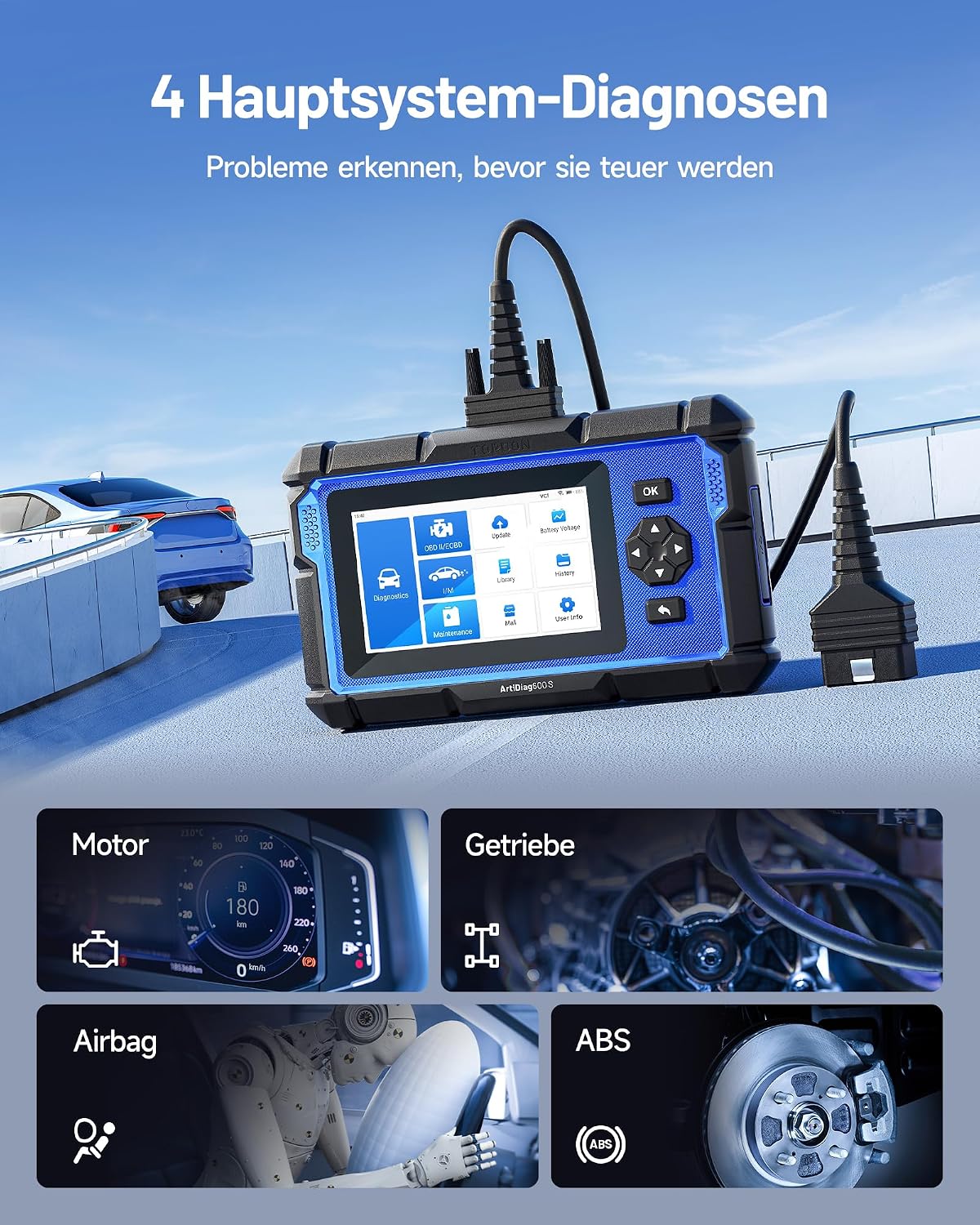
Image 3.2: An illustration showing the four main systems (Engine, Transmission, Airbag, ABS) that the ArtiDiag600S can diagnose, emphasizing its capability to detect problems early.
3.5 9 Reset Functions
The device includes nine commonly used reset functions to assist with vehicle maintenance:
- Oil Reset: Resets the oil life system after an oil change.
- Brake Reset: Resets the electronic parking brake (EPB) system after brake pad replacement.
- SAS Reset (Steering Angle Sensor): Calibrates the steering angle sensor after replacement or repair.
- BMS Reset (Battery Management System): Registers the new battery after replacement.
- ABS Bleeding: Bleeds air from the brake system after component replacement.
- DPF Regeneration (Diesel Particulate Filter): Initiates the regeneration process for the DPF.
- TPMS Reset (Tire Pressure Monitoring System): Resets tire pressure sensors after tire rotation or replacement.
- Injector Coding: Codes new injector numbers to the ECU after replacement.
- Throttle Adaptation: Relearns the throttle body position after cleaning or replacement.

Image 3.3: A visual guide to the nine important maintenance functions available on the ArtiDiag600S, including Oil Reset, Brake Reset, SAS Reset, BMS Reset, ABS Bleeding, DPF Regeneration, TPMS Reset, Injector Coding, and Throttle Adaptation.
3.6 Full OBD2 Functions
The ArtiDiag600S supports all 10 modes of OBD2 testing, providing comprehensive emission-related diagnostics:
- Read Codes: Displays detailed descriptions of Diagnostic Trouble Codes (DTCs).
- Clear Codes: Turns off the Check Engine Light (MIL) and clears codes.
- O2 Sensor Test: Retrieves and views O2 sensor monitor test results for the most recently performed tests from the vehicle's on-board computer.
- I/M Readiness: Checks the readiness of the emission monitoring systems.
- Live Data Stream: Displays real-time data from the vehicle's sensors in text and graph formats.
- Freeze Frame Data: Displays the engine conditions at the time an emission-related fault occurred.
- On-Board Monitor Test: Retrieves and displays test results for emission-related powertrain components and systems.
- EVAP Test (Evaporative System Test): Initiates a leak test for the vehicle's EVAP system.
- Vehicle Information: Retrieves the Vehicle Identification Number (VIN), Calibration ID (CALID), and Calibration Verification Number (CVN).
- DTC Library: Provides a built-in library with detailed explanations of diagnostic trouble codes.

Image 3.4: An overview of the complete OBD2 functions offered by the ArtiDiag600S, including reading/clearing fault codes, O2 sensor test, I/M readiness, live data, and DTC library.
3.7 Live Data Streaming
The Live Data Streaming feature allows you to visualize vehicle performance in real-time. This helps in identifying intermittent problems or verifying repairs by monitoring various sensor readings simultaneously.

Image 3.5: Examples of live data graphs displayed on the ArtiDiag600S, showing parameters like engine speed, oil temperature, power supply, and turbine speed over time.
3.8 Diagnostic Reports and DTC Library
The ArtiFolder feature saves diagnostic reports and records for quick access and future reference. These reports can be shared and printed via email for further analysis. The integrated DTC Library provides extensive information on specific fault codes, aiding in accurate diagnosis.
4. Maintenance
4.1 Software Updates
Regular software updates are crucial for maintaining the device's functionality and compatibility. Connect the device to Wi-Fi and check for updates periodically through the 'Update' icon on the main menu. These updates are provided free for the lifetime of the product.
4.2 Cleaning and Storage
Keep the device clean by wiping it with a soft, dry cloth. Avoid using abrasive cleaners or solvents. Store the ArtiDiag600S in its provided storage bag in a cool, dry place away from direct sunlight and extreme temperatures when not in use.
5. Troubleshooting
If you encounter any issues with your ArtiDiag600S, consider the following general troubleshooting steps:
- Device not powering on: Ensure the battery is charged or connect the device to a power source.
- No communication with vehicle: Verify the OBD2 cable is securely connected to both the device and the vehicle's OBD2 port. Ensure the vehicle's ignition is on. Check the vehicle's battery voltage.
- Update issues: Ensure a stable Wi-Fi connection. Restart the device and try updating again.
For more complex issues or technical assistance, utilize the online feedback function on the device or contact the TOPDON post-sale support team.
6. Specifications
The following table outlines the key technical specifications of the TOPDON ArtiDiag600S:
| Feature | Specification |
|---|---|
| Operating System | Android 10.0 |
| Display | 5-inch Touchscreen |
| Display Resolution | 1280 x 800 pixels |
| Memory | 2GB RAM + 32GB Storage |
| Battery | 3350mAh Lithium-Polymer |
| Connectivity | Wi-Fi, Wired OBD2 |
| Vehicle Coverage | 70+ Brands, 10000+ Models (from 1996+) |
| Weight | 1.02 Kilograms |
| Dimensions (Packaging) | 29.5 x 22.8 x 8.8 cm |
| Power Source | Wired (via OBD2) |

Image 6.1: A visual summary of the ArtiDiag600S's technical specifications, including Android 11.0 (note: input says 10.0, image says 11.0, using 10.0 from structured data), 1280*800 resolution, 5-inch display, 2G+32G memory, removable cable, and 3350mAh battery.
7. Warranty and Support
TOPDON provides comprehensive support for the ArtiDiag600S. The device comes with lifetime free software updates, ensuring your tool remains current with the latest vehicle data and features. A dedicated 24/7 post-sale support team is available to provide technical guidance and assist with any inquiries. Users can also utilize the online feedback function within the device for direct problem resolution.
For further assistance, please refer to the official TOPDON website or contact their customer service directly.


