
1. Introduction
The Philips Hue Resonate Outdoor Smart Wall Light is designed to enhance your outdoor spaces with customizable, colorful light. This smart wall light directs light in triangular effects both upwards and downwards, providing elegant illumination for porches, patios, and other outdoor areas. It requires a Philips Hue Bridge (sold separately) for full smart functionality, including automations, remote control, and a stable connection.
This manual provides detailed instructions for the installation, operation, and maintenance of your Philips Hue Resonate Outdoor Smart Wall Light.
2. Product Features
- White and Color Ambiance: Offers 16 million colors and a range from warm to cool white light to create any desired ambiance.
- Weatherproof Design: Specifically designed for outdoor use and rigorously tested to withstand various weather conditions. Wet UL location rated.
- Requires Hue Bridge: Unlocks advanced features such as automations, control from anywhere, and Matter compatibility.
- Voice Control: Compatible with Amazon Alexa and Google Assistant for convenient hands-free control.
- Personalized Lighting: Adjustable color and brightness to suit any occasion, from security to holiday decoration.
- Triangular Light Effect: Unique up and down light projection for distinctive architectural illumination.

Image: Overview of Philips Hue Resonate features, including color options, smart control, and timers.

Image: Detail showing the weatherproof construction, suitable for outdoor use.
3. What's in the Box
The package for your Philips Hue Resonate Outdoor Smart Wall Light includes:
- 1x Philips Hue Resonate Color-Changing Outdoor Wall Light (Black)
Note: A Philips Hue Bridge is required for full smart functionality and is sold separately.
4. Setup and Installation
Follow these steps to install and set up your Philips Hue Resonate Outdoor Smart Wall Light:
- Step 1: Install Your Lighting
Mount the Resonate wall light securely to your desired outdoor wall location. Ensure all electrical connections are made safely and according to local electrical codes. If you are unsure, consult a qualified electrician. - Step 2: Connect the Philips Hue Bridge
If you do not already have one, install a Philips Hue Bridge. Plug the Hue Bridge into a power outlet and connect it to your Wi-Fi router using an Ethernet cable. The Bridge acts as the central hub for your smart lighting system, enabling secure and stable control. - Step 3: Download the Philips Hue App
Download the Philips Hue app from the App Store (iOS) or Google Play Store (Android). Open the app and follow the on-screen instructions to connect to your Hue Bridge and discover your new Resonate wall light.

Image: Visual guide for installing the wall light, including wiring and mounting.

Image: Infographic detailing the three steps for setting up your Philips Hue system, including Bridge connection.

Image: Explanation of why the Hue Bridge is essential for outdoor lighting functionality.
Video: An official Philips Hue video demonstrating the benefits and setup of Hue Outdoor Wall Lights, including the Resonate model.
5. Operating Instructions
Once installed and connected to your Hue Bridge, you can control your Resonate wall light using the Philips Hue app or voice commands.
5.1. Using the Philips Hue App
- On/Off Control: Tap the light icon in the app to turn the light on or off.
- Color and Brightness Adjustment: Select your Resonate light in the app to access color palettes and brightness sliders. Choose from 16 million colors or various shades of white light.
- Scenes: Apply pre-set or custom scenes to instantly change the ambiance of your outdoor space.
- Routines and Automations: Set schedules for your lights to turn on/off at specific times, or create automations based on location (e.g., turn on when you arrive home).

Image: The Resonate light projecting its distinctive triangular light pattern.
5.2. Voice Control
Integrate your Philips Hue system with Amazon Alexa or Google Assistant for voice-activated control:
- Link Accounts: In the Philips Hue app, navigate to the 'Explore' tab, then 'Voice assistants' to link your Amazon Alexa or Google Assistant account.
- Voice Commands: Use commands such as:
- "Alexa, turn on the patio light."
- "Hey Google, set the porch light to blue."
- "Alexa, dim the outdoor lights to 50%."

Image: Demonstrating voice control functionality for outdoor lighting.
Video: An official Philips Hue video highlighting the comprehensive smart lighting ecosystem and control options.
6. Maintenance
To ensure the longevity and optimal performance of your Philips Hue Resonate Outdoor Smart Wall Light, follow these maintenance guidelines:
- Cleaning: Periodically clean the exterior of the light fixture with a soft, damp cloth. Avoid using abrasive cleaners or solvents, as these can damage the finish.
- Inspection: Regularly inspect the fixture for any signs of damage, loose connections, or wear. Address any issues promptly to prevent further damage or safety hazards.
- Software Updates: Keep your Philips Hue app and Bridge firmware updated to ensure compatibility and access to the latest features and security enhancements.
- Environmental Considerations: While weatherproof, extreme weather conditions (e.g., severe storms, prolonged freezing temperatures) may require additional protective measures or temporary removal if possible.
7. Troubleshooting
If you encounter issues with your Philips Hue Resonate Outdoor Smart Wall Light, refer to the following common troubleshooting steps:
- Light Not Responding:
- Check if the light fixture is properly powered and the wall switch (if any) is in the ON position.
- Ensure your Philips Hue Bridge is powered on and connected to your router.
- Verify that the light is listed and reachable in the Philips Hue app. Try re-searching for lights in the app settings.
- Move the light closer to the Hue Bridge or another Hue light to improve Zigbee signal strength.
- Connectivity Issues:
- Restart your Wi-Fi router and the Philips Hue Bridge.
- Ensure your smartphone or tablet is connected to the same Wi-Fi network as the Hue Bridge.
- Check for any obstructions or interference between the light and the Bridge.
- Incorrect Color/Brightness:
- Calibrate the light within the Philips Hue app if color accuracy is consistently off.
- Ensure no conflicting scenes or automations are active.
- Voice Control Not Working:
- Confirm that your voice assistant (Alexa/Google Assistant) account is correctly linked to your Philips Hue account.
- Check your internet connection.
- Ensure the device you are speaking to (Echo, Google Home) is powered on and connected to the internet.
For more detailed troubleshooting or persistent issues, visit the official Philips Hue support website or contact their customer service.
8. Specifications
| Feature | Specification |
|---|---|
| Brand | Philips Hue |
| Model Number | 576082 |
| Style Name | Resonate |
| Color | Black |
| Material | Aluminum, Plastic |
| Light Fixture Form | Wall |
| Indoor/Outdoor Usage | Outdoor |
| Power Source | Electric |
| Light Source | LED |
| Number of Light Sources | 1 |
| Voltage | 120 volts |
| Light Color | White and Color Ambiance |
| Wattage | 20 watts |
| Light Output Maximum | 800 lumens |
| Control Method | App, Voice |
| Controller Type | Amazon Alexa, Apple HomeKit, Google Assistant |
| Water Resistance Level | Waterproof |
| Connectivity Protocol | Zigbee |
| Mounting Type | Wall Mount |
| Item Dimensions (L x W x H) | 6.1"L x 5.12"W x 8.66"H |
| Item Weight | 1.7 pounds |
| UPC | 046677576080 |
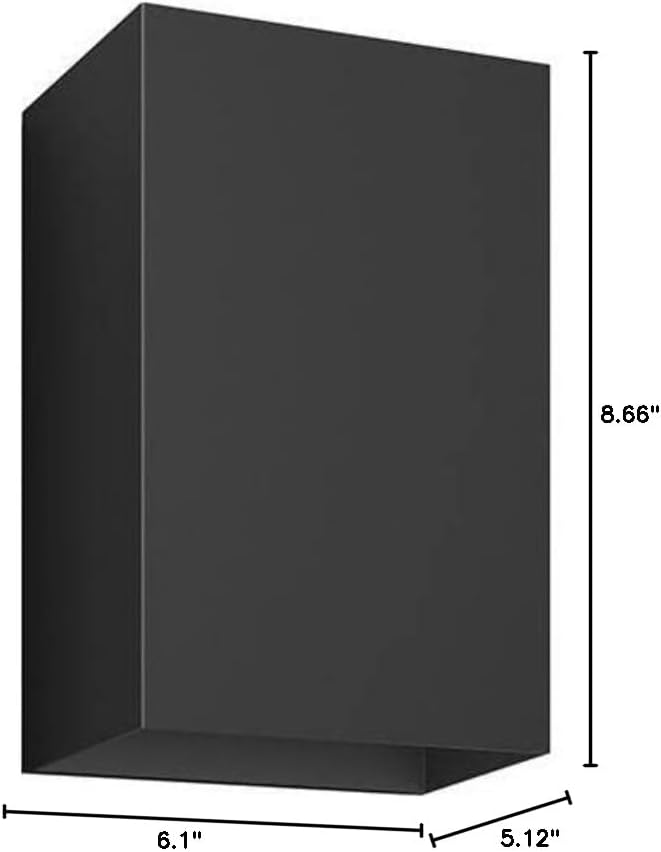
Image: Dimensional drawing of the Philips Hue Resonate wall light.
9. Warranty Information
The Philips Hue Resonate Outdoor Smart Wall Light comes with a 2-year manufacturer's warranty. This warranty covers defects in materials and workmanship under normal use. Please retain your proof of purchase for warranty claims.
For detailed terms and conditions, refer to the official Philips Hue warranty documentation or contact Philips Hue customer support.
10. Support
For further assistance, product registration, or to explore additional Philips Hue products and accessories, please visit the official Philips Hue website:
You can also find FAQs and contact customer support through their website.


