
Armitron 40/8485BKSV
Armitron Sport Retro Digital Chronograph Mesh Bracelet Watch
Model: 40/8485BKSV
Introduction
This manual provides detailed instructions for the operation, maintenance, and care of your Armitron Sport Retro Digital Chronograph Mesh Bracelet Watch. Please read this manual thoroughly to ensure proper use and to maximize the lifespan of your timepiece.
Product Overview
The Armitron Sport Retro Digital Chronograph Watch combines classic digital aesthetics with modern functionality. It features a clear LCD display and a durable silver-tone mesh bracelet.

Figure 1: Front view of the Armitron Sport Retro Digital Chronograph Mesh Bracelet Watch.
Key Features:
- LCD display showing time, seconds, day, and date.
- Multiple functions including chronograph, lap time, alarm with chime, dual time, and military time.
- Integrated backlight for low-light visibility.
- Silver-tone mesh bracelet with an adjustable sliding buckle for a comfortable fit.
- Water resistant to 165 feet (50 meters).
Setup
Setting Time and Date:
- Press the MODE button repeatedly until the time setting mode is displayed (usually indicated by flashing digits).
- Use the RESET button to select the digit or setting you wish to adjust (e.g., hours, minutes, year, month, day).
- Use the START-STOP button to increase the selected value.
- Once all settings are correct, press the MODE button to exit the setting mode.
Adjusting the Mesh Bracelet:
The mesh bracelet features an adjustable sliding buckle to ensure a secure and comfortable fit. To adjust:
- Locate the small clasp on the underside of the buckle.
- Using a small, flat tool (like a screwdriver or a paperclip), gently lift the clasp to unlock the buckle from the mesh band.
- Slide the buckle along the mesh band to your desired position.
- Press the clasp firmly back down to lock the buckle in place. Ensure it is securely fastened before wearing.
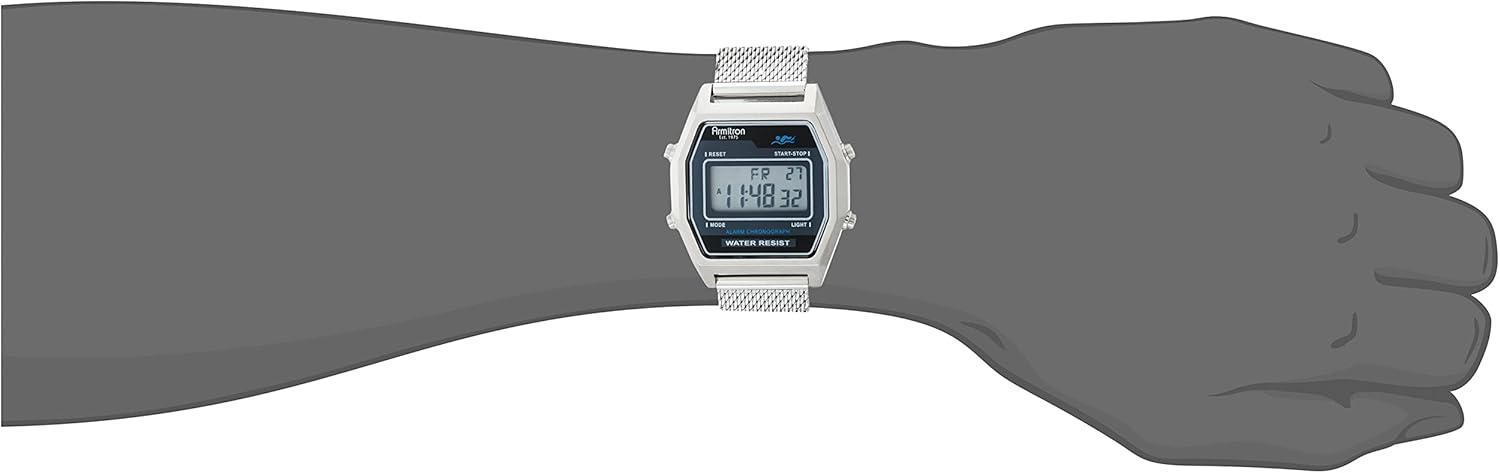
Figure 2: Adjustable sliding buckle on the mesh bracelet.
Operating Instructions
Mode Navigation:
Press the MODE button to cycle through the different functions: Time, Chronograph, Alarm, Dual Time.
Chronograph (Stopwatch):
- From Time mode, press MODE to enter Chronograph mode.
- Press START-STOP to begin timing.
- Press START-STOP again to pause timing.
- Press RESET to clear the chronograph to zero.
- To record lap times while the chronograph is running, press RESET. The lap time will display briefly, and the chronograph will continue running in the background. Press RESET again to return to the running chronograph display.
Alarm:
- From Time mode, press MODE twice to enter Alarm mode.
- Press RESET to select hours or minutes.
- Press START-STOP to adjust the alarm time.
- Press MODE to confirm and exit.
- To activate/deactivate the alarm, press START-STOP while in Alarm mode. An alarm icon will appear/disappear.
- The watch will chime at the set alarm time. Press any button to silence the alarm.
Dual Time:
- From Time mode, press MODE three times to enter Dual Time mode.
- Press RESET to select hours or minutes.
- Press START-STOP to adjust the dual time.
- Press MODE to confirm and exit.
Military Time (24-Hour Format):
- In Time mode, press and hold the RESET button to toggle between 12-hour and 24-hour (military) time formats.
Backlight:
- Press the LIGHT button to illuminate the display for a few seconds.
Water Resistance:
This watch is water resistant to 165 feet (50 meters). This rating means the watch is suitable for short periods of recreational swimming. It is not suitable for diving or snorkeling. Avoid pressing buttons while the watch is submerged.

Figure 3: Water Resistance Chart. This watch is rated for 50M (165FT), suitable for swimming.
Video 1: Official product video showcasing the Armitron Sport Retro Digital Chronograph Mesh Bracelet Watch, highlighting its design and features.
Maintenance
Cleaning:
To maintain the appearance of your watch, wipe it regularly with a soft, dry cloth. For the mesh bracelet, a soft brush can be used to gently remove dirt from the links. Avoid using harsh chemicals or abrasive materials.
Battery Replacement:
The watch is powered by 1 product-specific battery (included). When the display becomes dim or functions become erratic, it may be time to replace the battery. Battery replacement should ideally be performed by a qualified watch technician to ensure water resistance is maintained.
Troubleshooting
| Problem | Possible Cause | Solution |
|---|---|---|
| Display is blank or dim. | Low battery. | Replace the battery. |
| Buttons are unresponsive. | Watch may be in a locked mode or internal malfunction. | Try pressing all buttons to see if any respond. If not, a reset may be required (consult a technician) or battery replacement. |
| Water inside the watch. | Water resistance compromised (e.g., buttons pressed underwater, seal failure). | Immediately take the watch to a qualified technician for inspection and repair to prevent further damage. |
Specifications
- Model Number: 40/8485BKSV
- Brand: Armitron Sport
- Department: Mens
- Power Source: 1 Product Specific battery (included)
- Water Resistance: 165 feet (50 meters)
- Case Material: Stainless Steel
- Band Material: Mesh Bracelet
- Display Type: LCD Digital
- Functions: Time, Seconds, Day, Date, Chronograph, Lap Time, Alarm, Dual Time, Military Time, Backlight
- Country of Origin: China
- Date First Available: February 15, 2022
- Package Dimensions: 3.66 x 3.54 x 2.52 inches
- Item Weight: 5.93 ounces
Warranty and Support
Warranty Information:
Armitron watches typically come with a limited warranty covering manufacturing defects. For specific warranty terms and conditions, please refer to the warranty card included with your purchase or visit the official Armitron website.
Customer Support:
For further assistance, technical support, or service inquiries, please contact Armitron customer service. You can find contact information on the official Armitron website or through the retailer where you purchased the watch.
Visit the official Armitron Store on Amazon: Armitron Store
Ask a question about this manual
Ask about setup, troubleshooting, compatibility, parts, safety, or missing instructions. Manuals+ will review the question and use this page’s manual context to help answer it.