
RemotesReplaced DV139
Instruction Manual
RemotesReplaced Replacement Remote Control for LAUSON DV139
Product Overview
This RemotesReplaced remote control is designed as a direct replacement for the original LAUSON DV139 remote. It is electronically identical to the original and provides the same full functionality. This remote is not a universal remote but is specifically manufactured to operate with the LAUSON DV139 device.
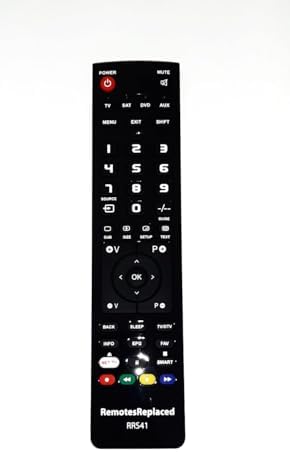
Figure 1: Front view of the RemotesReplaced replacement remote control, showing all buttons and the brand logo at the bottom.
Setup
No setup code is required for this remote control. Simply insert the batteries, and it is ready for use with your LAUSON DV139 device.
Battery Installation:
- Locate the battery compartment on the back of the remote control.
- Slide the battery compartment cover downwards or in the direction indicated by an arrow to open it.
- Insert two (2) AAA batteries, ensuring the positive (+) and negative (-) terminals align correctly with the markings inside the compartment.
- Close the battery compartment cover by sliding it back into place until it clicks securely.

Figure 2: Bottom view of the remote control, highlighting the battery compartment cover.
Note: Batteries are not included with the remote control and must be purchased separately.
Operating Instructions
This replacement remote control is designed to replicate all functions of your original LAUSON DV139 remote. Point the remote control directly at the LAUSON DV139 device you wish to control.
Key Functions:
- Power Button: Turns the device on or off.
- Mute Button: Mutes or unmutes the audio.
- TV/SAT/DVD/AUX Buttons: Selects the input source or device mode.
- Number Buttons (0-9): Direct input for channels or menu selections.
- Navigation Pad (Up, Down, Left, Right, OK): Used for menu navigation and selection.
- Volume Up/Down (V+/V-): Adjusts the audio volume.
- Channel Up/Down (P+/P-): Changes the channel.
- Playback Controls (Play, Pause, Stop, Fast Forward, Rewind): Controls media playback.
- Smart/NET TV Buttons: Accesses smart TV features or streaming applications (if supported by your device).
- Menu/Exit/Shift Buttons: Accesses device menus, exits current screens, or provides alternative button functions.

Figure 3: Detailed view of the remote control's button layout for operational reference.
Maintenance
Cleaning:
To clean the remote control, use a soft, dry cloth. For stubborn dirt, slightly dampen the cloth with water or a mild, non-abrasive cleaner. Avoid using harsh chemicals or abrasive materials, as these can damage the remote's surface or buttons.
Battery Replacement:
Replace batteries when the remote's performance degrades or if the device does not respond to commands. Always replace both batteries at the same time with new AAA batteries. Do not mix old and new batteries, or different types of batteries.
Storage:
Store the remote control in a cool, dry place away from direct sunlight and extreme temperatures. If the remote will not be used for an extended period, it is recommended to remove the batteries to prevent leakage.
Troubleshooting
- Remote not responding:
- Check if the batteries are inserted correctly with the correct polarity (+/-).
- Replace the batteries with new ones.
- Ensure there are no obstructions between the remote control and the LAUSON DV139 device's infrared receiver.
- Make sure you are within the effective operating range of the device.
- Certain buttons not working:
- Verify that the remote is pointed directly at the device.
- Ensure the device is powered on and in the correct mode (e.g., TV, DVD).
- Clean the remote control's surface and buttons to remove any dirt or residue that might be interfering with button presses.
Specifications
| Feature | Detail |
|---|---|
| Brand | RemotesReplaced |
| Model Number | DV139 |
| Compatible Device | LAUSON DV139 |
| Battery Type | 2 x AAA (not included) |
| Product Weight | 120 g |
| Manufacturer | Linkwebb |
Warranty and Support
Warranty Information:
This RemotesReplaced remote control comes with a 1-year warranty from the date of purchase. This warranty covers manufacturing defects and ensures the remote functions as intended under normal use. Please retain your proof of purchase for warranty claims.
Customer Support:
For any questions, troubleshooting assistance, or warranty claims, please contact your retailer or the RemotesReplaced customer support. Refer to the contact information provided with your purchase or visit the official RemotesReplaced website for further assistance.
Ask a question about this manual
Ask about setup, troubleshooting, compatibility, parts, safety, or missing instructions. Manuals+ will review the question and use this page’s manual context to help answer it.