
1. Product Overview
The uxcell Sapphire Crystal Watch Lens is designed as a high-quality replacement part for watches. It is crafted from sapphire crystal glass, known for its exceptional durability, scratch resistance, and high transparency. This single dome lens offers a clear and aesthetically pleasing alternative to standard flat glass, enhancing the watch's appearance and protecting its dial.
Its smooth, rounded edges ensure a comfortable feel and prevent scratches during handling. The unique optical properties of sapphire glass, including a white light transmitting layer, distinguish it from ordinary optical glass which typically has a green layer.

Figure 1.1: Front view of the uxcell Sapphire Crystal Watch Lens.

Figure 1.2: Illustration of the distinct white light transmitting layer in sapphire glass compared to the green layer in ordinary optical glass.
2. Preparation and Measurement (Setup)
Accurate measurement of your existing watch glass is critical before selecting a replacement. This ensures proper fit and function. The lens diameter tolerance is ±0.05mm, and a precise measurement is essential for successful installation.
2.1 Required Tools
- Vernier caliper (recommended for accurate measurement)
- Watch case opener (if needed to access the watch glass)
- Dust blower or lint-free cloth
2.2 Measuring Your Watch Glass
- Carefully remove the existing watch glass lens from your watch.
- Using a vernier caliper, accurately measure the diameter of the glass lens. Lay the glass lens flat to ensure a precise measurement.
- Measure the edge thickness of the glass lens using the caliper.
- Note down both the diameter and thickness. Ensure these measurements match the specifications of the replacement lens.
Important: Do not use low-precision tools such as soft rulers, standard rulers, or measuring software. Inaccurate measurements can lead to the replacement lens not fitting correctly. The marked size of the lens does not include the waterproof ring, which typically adds 0.5mm to the diameter.

Figure 2.1: Proper method for measuring watch glass diameter and edge thickness with a vernier caliper.
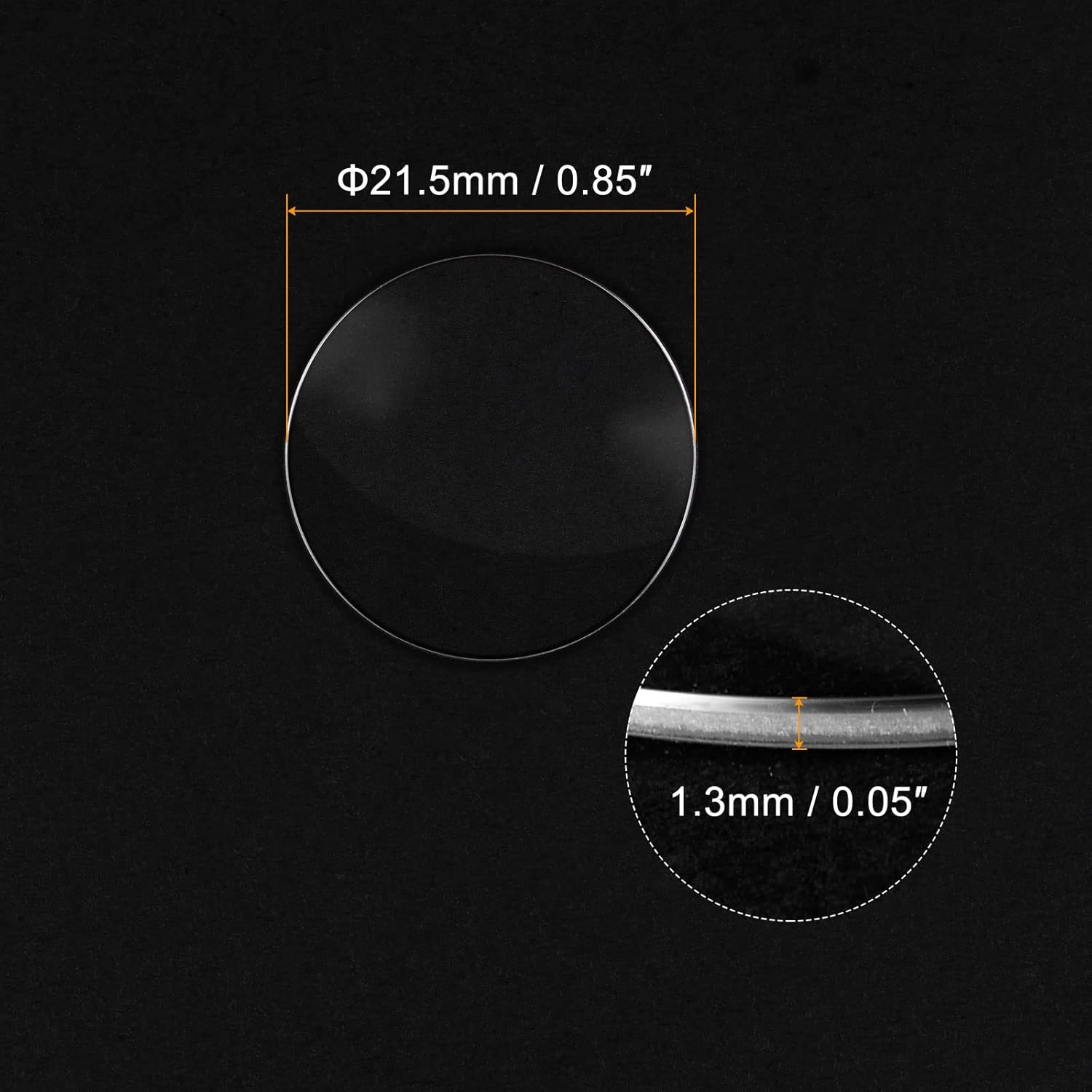
Figure 2.2: Visual representation of the lens dimensions: 21.5mm diameter and 1.3mm edge thickness.
3. Installation (Operating)
Once you have confirmed the correct size of your replacement sapphire crystal lens, you can proceed with the installation. This process typically involves carefully seating the new lens into the watch case.
3.1 Installation Steps
- Ensure the watch case and the new sapphire lens are clean and free of dust or debris. Use a dust blower if necessary.
- Carefully align the new single dome lens with the watch case opening.
- Gently press the lens into place. Depending on the watch case design, a watch press tool may be required to securely seat the lens. Apply even pressure to avoid damaging the lens or case.
- Verify that the lens is seated flush and securely within the watch case.
- Reassemble the watch, ensuring all components are correctly put back together.

Figure 3.1: Demonstrating the placement of the single dome lens onto a watch, which also provides a magnifying and focusing effect.
4. Maintenance
The sapphire crystal glass is highly durable and scratch-resistant, but proper care will maintain its clarity and appearance over time.
4.1 Cleaning Instructions
- To clean the sapphire crystal lens, simply wipe it with a soft, lint-free cloth.
- For stubborn smudges, a slightly damp cloth can be used, followed by a dry wipe.
- Avoid using abrasive materials such as paper towels or hard cloths, as these can potentially scratch the surface, despite its scratch-resistant properties.
- Do not use harsh chemicals or cleaning agents, as they may damage the watch case or seals.
5. Troubleshooting
If you encounter issues during installation or after replacing the watch glass, consider the following common problems and solutions.
5.1 Common Issues and Solutions
- Lens does not fit:
If the glass lens diameter error is 0.1mm or more, it cannot be installed correctly. This is almost always due to inaccurate measurement. Re-measure your watch's original glass or opening using a vernier caliper. Ensure the replacement lens's diameter and thickness precisely match your requirements. Remember that the listed diameter does not include the waterproof ring, which adds approximately 0.5mm to the overall diameter needed for the watch case opening.
- Scratches on the lens:
While sapphire crystal is highly scratch-resistant, it is not entirely scratch-proof. Avoid contact with extremely hard materials like diamonds or certain industrial abrasives. Ensure cleaning is done with a soft, lint-free cloth.
- Dust or debris under the lens:
This indicates that the watch case or lens was not thoroughly cleaned before installation. Carefully remove the lens, clean both the lens and the watch interior with a dust blower and lint-free cloth, and then re-install.
6. Specifications
| Attribute | Detail |
|---|---|
| Material | Sapphire Crystal Glass |
| Shape | Single Dome |
| Diameter | 21.5mm / 0.85-inch |
| Edge Thickness | 1.3mm / 0.05-inch |
| Package Content | 1 x Watch Lens Glass |
| Model Number | a21121100ux0268 |
| Package Dimensions | 5.47 x 3.94 x 0.55 inches |
| Item Weight | 0.63 ounces |

Figure 6.1: The compact size of the watch lens, as seen resting on a fingertip.
7. Warranty and Support
Information regarding product warranty and customer support is not available in the provided product data. For any inquiries or support, please refer to the seller's information on the purchase platform or contact uxcell directly if their contact details are available through your purchase documentation.