
JIGUUN 3000W 12V LED
JIGUUN 3000 Watt Pure Sine Wave Inverter User Manual
Model: 3000W 12V LED
1. Introduction
Thank you for choosing the JIGUUN 3000 Watt Pure Sine Wave Inverter. This device is designed to convert 12V DC power from your battery into stable 110V/120V AC power, suitable for a wide range of electronic devices and appliances. Its pure sine wave output ensures clean and reliable power, protecting sensitive equipment. This manual provides essential information for safe operation, installation, maintenance, and troubleshooting.
Safety Precautions
- Read all instructions before operating the inverter.
- Do not expose the inverter to rain, moisture, or extreme temperatures.
- Ensure proper ventilation around the inverter to prevent overheating.
- Connect the inverter to a 12V DC power source only. Incorrect voltage will damage the unit.
- Always connect the inverter to the battery with the correct polarity (red to positive, black to negative). Reverse polarity will cause damage.
- Do not exceed the inverter's rated continuous power (3000W) or peak power (6000W).
- Keep children away from the inverter during operation.
- Disconnect the inverter from the power source before performing any maintenance or cleaning.
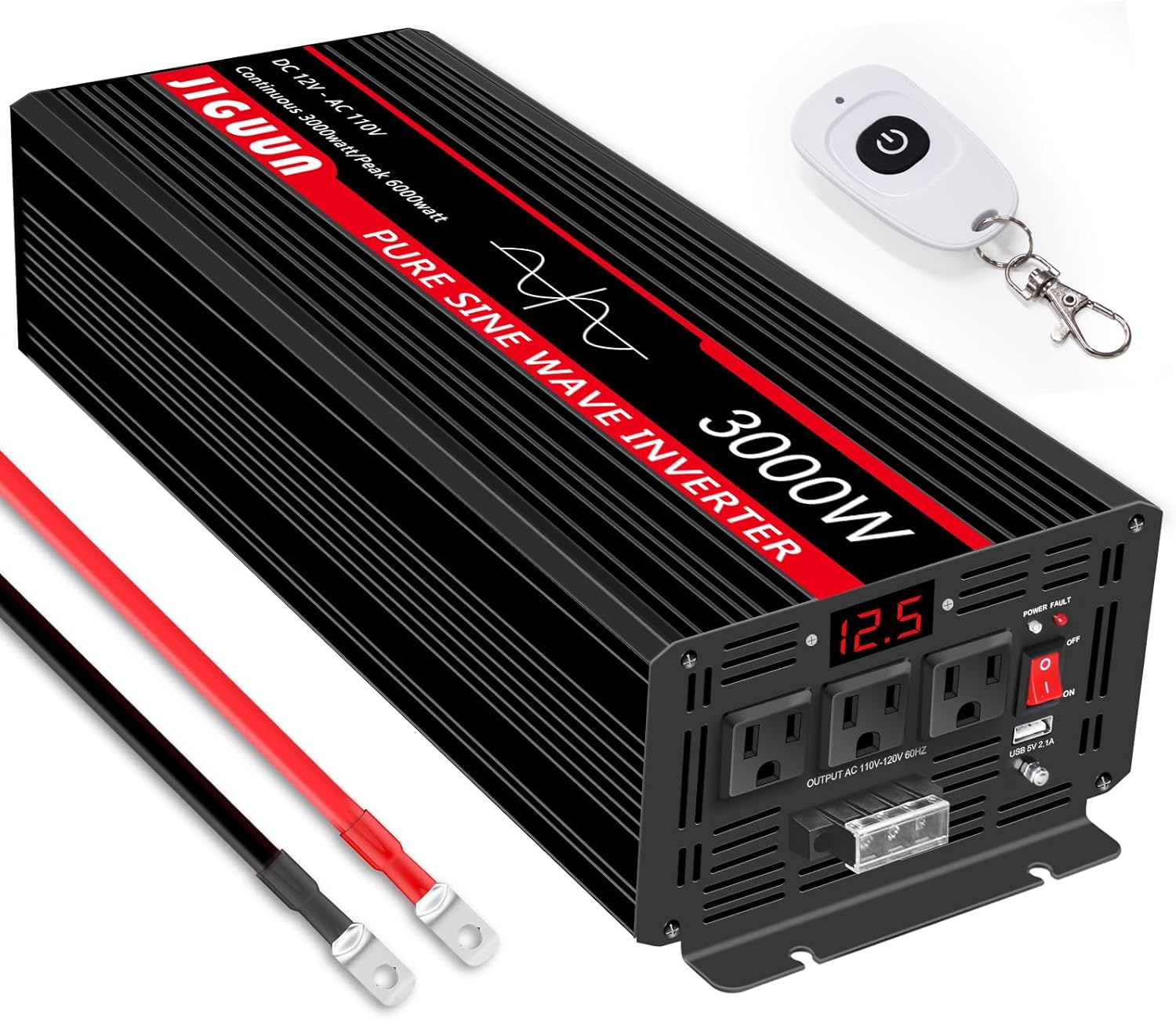
Image 1.1: The JIGUUN 3000 Watt Pure Sine Wave Inverter, showing its main unit, remote control, and included battery cables.
2. Package Contents
Please check the package contents to ensure all items are present and undamaged:
- 1x JIGUUN DC 12V to AC 110V 3000W Pure Sine Inverter
- 1x User Manual (this document)
- 2 Sets of Battery Cables (2x Red, 2x Black)
- 1x Remote Control
- 6x 20A Fuses (built-in, no need to install)
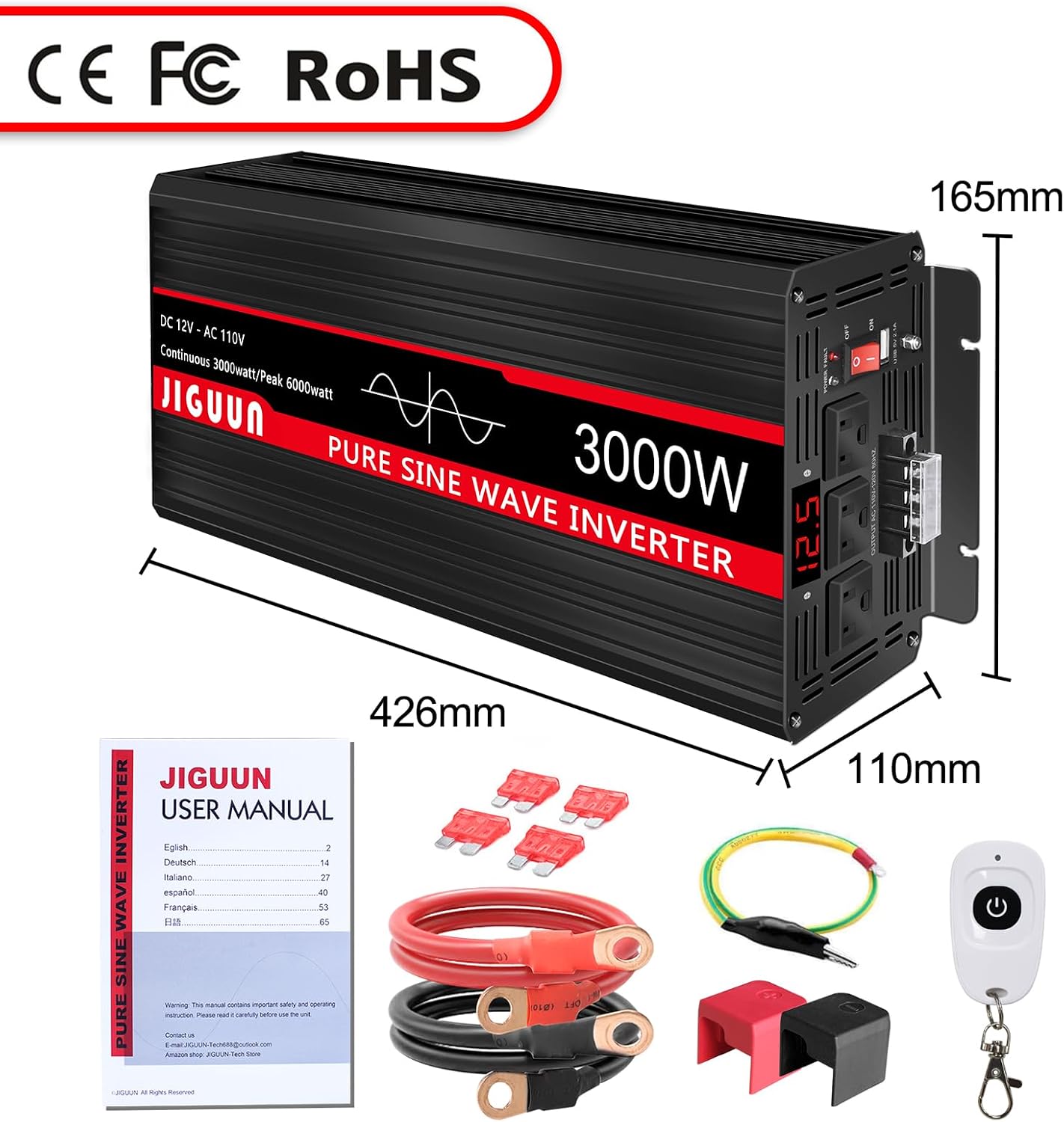
Image 2.1: Visual representation of all items included in the JIGUUN 3000W Pure Sine Wave Inverter package.
3. Product Features
The JIGUUN 3000 Watt Pure Sine Wave Inverter is equipped with advanced features for optimal performance and safety:
- Pure Sine Wave Output: Provides clean, stable, and reliable AC power, similar to household electricity, making it safe for sensitive electronics like laptops, TVs, and medical equipment. Conversion efficiency is greater than 90%.
- High Power Output: Delivers a continuous 3000W and a peak power of 6000W, capable of handling various appliances.
- Multiple AC Outlets & USB Port: Features 4 standard AC outlets and one 2.1A USB charging port for versatile connectivity.
- Digital Display: An integrated LED display provides real-time information on input voltage and output status.
- Upgraded Remote Control: A wireless remote control with an effective distance of 170-200ft allows for convenient operation from a distance, ideal for RVs or remote installations.
- Comprehensive Protection System: Includes 7 safety features: under voltage protection, over voltage protection, overload protection, over temperature protection, short circuit protection, AC ground terminal, and reverse connection protection.
- Efficient Cooling: Equipped with 2 high-speed, silent cooling fans that activate automatically when the internal temperature exceeds 45℃ (113℉), ensuring stable operation and extended lifespan.
- Durable Construction: Housed in a high-strength thickened aluminum-magnesium alloy shell with a cooling trough design for excellent heat dissipation, corrosion resistance, and impact resistance.

Image 3.1: Key features of the JIGUUN 3000W inverter, including high conversion efficiency and multiple output options.

Image 3.2: Front and rear panel layout of the inverter, indicating all ports and controls.

Image 3.3: Various applications for the JIGUUN inverter, including RV, emergency power, home use, and work sites.

Image 3.4: Common appliances and sensitive devices that can be powered by the JIGUUN inverter.

Image 3.5: Overview of the inverter's built-in protection systems for safe operation.
4. Setup
Pre-Installation Checklist
- Ensure the inverter is placed in a well-ventilated area, away from direct sunlight, heat sources, and moisture.
- Verify that your battery system is 12V DC and has sufficient capacity (recommended 12V 300AH or above for 3000W inverter).
- Turn off all appliances and the inverter's power switch before making any connections.
Connection Steps
- Connect DC Input Cables: Using the provided red and black battery cables, connect the red cable to the positive (+) terminal of the inverter and the positive (+) terminal of your 12V battery. Connect the black cable to the negative (-) terminal of the inverter and the negative (-) terminal of your 12V battery. Ensure connections are secure and tight.
- Grounding: Connect the AC ground terminal on the inverter to a proper earth ground.
- Connect AC Loads: Once the DC input is securely connected, you can plug your AC appliances into the AC outlets on the inverter. Do not exceed the inverter's continuous power rating.

Image 4.1: Detail of the DC input terminals, highlighting the secure connection points for battery cables.

Image 4.2: Example of integrating the inverter into a DIY solar power system. Note: The inverter cannot be directly connected to solar panels.
5. Operating Instructions
Powering On/Off
- After connecting the inverter to the battery, press the ON/OFF switch on the inverter's front panel to turn it on. The LED display will illuminate, showing the input voltage.
- To turn off the inverter, press the ON/OFF switch again.
Using the Remote Control
The included wireless remote control allows you to power the inverter on or off from a distance.
- Ensure the inverter's main power switch is in the OFF position before attempting to use the remote control for the first time or after a power cycle.
- Press the power button on the remote control to turn the inverter ON or OFF.
- The remote control has an effective range of 170-200 feet.

Image 5.1: The wireless remote control for convenient operation of the inverter.

Image 5.2: Operating the inverter remotely with the wireless control.
Load Considerations
The JIGUUN inverter produces a pure sine wave output, which is highly compatible with all types of AC loads, including sensitive electronics and inductive loads (e.g., motors, refrigerators, microwaves). However, it is crucial to consider the starting (surge) power of inductive loads, which can be 4-6 times their continuous operating power. Ensure the total continuous power of your appliances does not exceed 3000W and the surge power does not exceed 6000W.

Image 5.3: Advantages of pure sine wave output for sensitive equipment.
6. Maintenance
Regular maintenance ensures the longevity and optimal performance of your JIGUUN inverter.
- Cleaning: Periodically clean the exterior of the inverter with a soft, dry cloth. Do not use liquid cleaners or solvents.
- Ventilation: Ensure the cooling fans and ventilation openings are free from dust and debris. Blocked vents can lead to overheating.
- Connections: Regularly check all electrical connections (battery cables, AC plugs) to ensure they are tight and free from corrosion.
- Storage: If storing the inverter for an extended period, disconnect it from the battery and store it in a cool, dry place.

Image 6.1: The inverter's cooling fan, essential for maintaining optimal operating temperature.
7. Troubleshooting
This section addresses common issues you might encounter with your JIGUUN inverter. The inverter's comprehensive protection system will often indicate a problem by shutting down or displaying an error.
| Problem | Possible Cause | Solution |
|---|---|---|
| Inverter does not turn on | No DC input power; Loose battery connections; Blown fuse; Battery voltage too low. | Check battery connections; Ensure battery is charged; Verify main power switch is ON; Check and replace internal fuses if necessary (contact support if unsure). |
| No AC output | Overload protection activated; Over-temperature protection activated; Low/High input voltage protection. | Reduce connected load; Allow inverter to cool down; Check battery voltage and charge if low. |
| Overload shutdown | Connected load exceeds 3000W continuous or 6000W peak. | Disconnect some appliances; Restart the inverter. |
| Over-temperature shutdown | Poor ventilation; Ambient temperature too high; Cooling fan malfunction. | Ensure adequate airflow around the inverter; Move to a cooler environment; Check if cooling fans are operating. |
| Low/High Voltage Alarm/Shutdown | Battery voltage is outside the acceptable operating range (e.g., below 10.5V or above 15V for 12V system). | Charge the battery if voltage is low; Disconnect from charging source if voltage is too high. |
| Remote control not working | Inverter's main switch is ON; Remote battery dead; Out of range. | Ensure inverter's main switch is OFF before using remote; Replace remote battery; Move closer to the inverter. |
8. Specifications
| Feature | Specification |
|---|---|
| Model Name | 3000 Watt |
| Continuous Power | 3000W |
| Peak Power | 6000W |
| DC Input Voltage | 12V |
| AC Output Voltage | 110V/120V |
| Output Waveform | Pure Sine Wave |
| Conversion Efficiency | >90% |
| USB Output | 2.1A |
| Product Dimensions (L x W x H) | 16.8 x 6.5 x 4.3 inches (426mm x 165mm x 110mm) |
| Item Weight | 18.57 pounds |
| Cooling System | 2 High-speed silent fans (activates >45℃) |
| Protection Features | Under/Over Voltage, Overload, Over Temperature, Short Circuit, AC Ground, Reverse Connection |
9. Warranty and Support
JIGUUN provides a 1-year warranty with free replacement for this product. If you encounter any issues or have questions regarding your inverter, please do not hesitate to contact the JIGUUN team. We are committed to providing excellent customer service and will assist you promptly.
Contact Information:
- For support, please contact us via the email provided in your purchase documentation or through the Amazon seller page for JIGUUN-Tech Store.
Related documents3000W 12V LED

Ask a question about this manual
Ask about setup, troubleshooting, compatibility, parts, safety, or missing instructions. Manuals+ will review the question and use this page’s manual context to help answer it.