
Introduction
The Garmin LiveScope™ Plus System with LVS34 Transducer offers advanced real-time sonar capabilities, providing exceptionally clear and detailed images of fish and underwater structures. This system is designed to enhance your fishing experience by offering improved target separation, reduced noise, and vivid color palettes. This manual provides essential information for the proper setup, operation, and maintenance of your LiveScope™ Plus System.

Figure 1: The Garmin LiveScope™ Plus System LVS34 Transducer.
Setup
Included Components
Your LiveScope™ Plus System includes the following components:
- LVS34 Transducer
- Trolling motor barrel mount
- Trolling motor shaft mount
- Perspective mount bracket
- Documentation
Installation
For detailed installation instructions, please refer to the official Installation Manual PDF available here. Proper installation is crucial for optimal performance.
The LVS34 transducer can be mounted in various configurations to suit your needs:

Figure 2: Transducer mounted using the trolling motor shaft mount.

Figure 3: Transducer mounted using the trolling motor barrel mount.
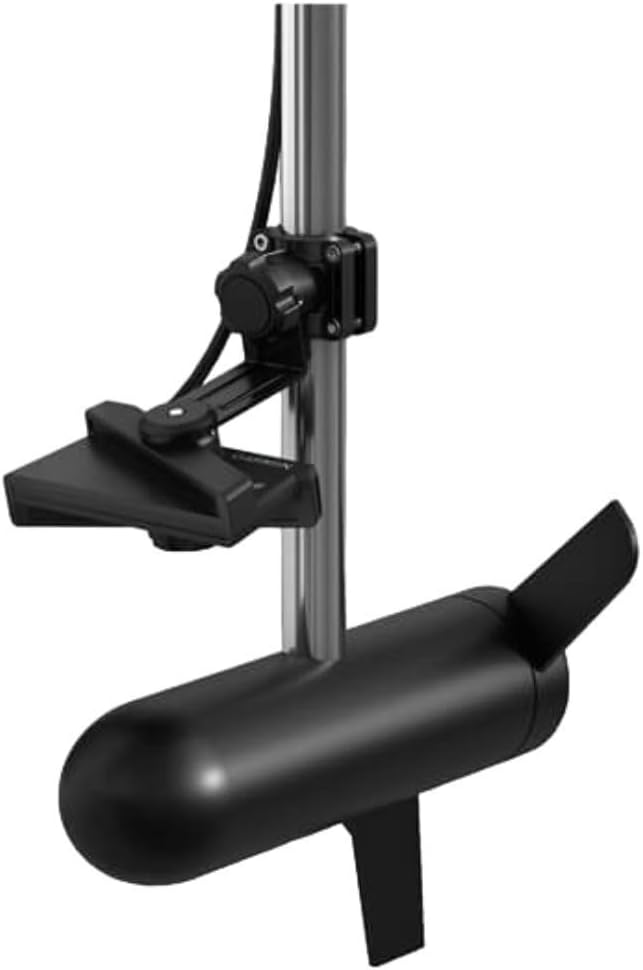
Figure 4: Transducer mounted using the perspective mount bracket.
The new LVS34 transducer is designed for easy upgrade and can be used with your existing LiveScope System black box (GLS 10).

Figure 5: The LVS34 Transducer alongside the GLS 10 black box.
Operating the LiveScope™ Plus System
The LiveScope™ Plus System provides real-time sonar images with improved clarity and reduced noise, allowing for a clearer view of fish and structure beneath and around your boat.

Figure 6: Overview of LiveScope™ Plus System's enhanced features.
Real-Time Imaging
Experience highly accurate live images of your surroundings, crucial for identifying fish and structure as they happen.

Figure 7: Real-time sonar display showing underwater activity.
Clear Vision
The system provides sharper images with reduced noise and fewer sonar artifacts, ensuring a clear picture of fish and structure without interference.

Figure 8: Enhanced clear vision display of underwater structures.
Image Stabilization
A built-in stabilization system helps maintain a steady sonar image on your compatible chartplotter, even in challenging water conditions.

Figure 9: Image stabilization ensures a steady view even in rough conditions.
Vivid Color Palettes
Choose from seven vivid color palettes, including Aqua, Caribbean, and Lava, to optimize contrast and clarity for viewing fish and structure.

Figure 10: Customizable color palettes for enhanced sonar visibility.
Sonar Modes
The LiveScope™ Plus System supports multiple modes to provide comprehensive underwater views:
- Forward Mode: Scout ahead of your boat to see what's happening in real-time.
- Down Mode: Explore live views of the activity directly beneath your boat.
- Perspective Mode: See under the water with a view from your perspective above the water. This mode is particularly useful in shallow water (up to 50 feet or 15 meters).

Figure 11: Forward Mode provides a real-time view ahead of the boat.

Figure 12: Down Mode offers a live view directly below the boat.

Figure 13: Perspective Mode provides a wide, overhead view of the underwater environment.
The chartplotter automatically detects which mode you are using based on the transducer's orientation.
Maintenance
To ensure the longevity and optimal performance of your Garmin LiveScope™ Plus System, regular maintenance is recommended:
- Cleaning: After each use, rinse the transducer and cables with fresh water to remove salt, dirt, and debris. Avoid using harsh chemicals or abrasive materials.
- Inspection: Periodically inspect the transducer cable for any signs of wear, cuts, or damage. Ensure all connections are secure and free from corrosion.
- Storage: When not in use for extended periods, store the system in a dry, cool place, protected from direct sunlight and extreme temperatures.
- Software Updates: Regularly check the Garmin website for software updates for your chartplotter and LiveScope™ system. Keeping the software updated ensures you have the latest features and performance enhancements.
Troubleshooting
If you encounter issues with your LiveScope™ Plus System, consider the following common troubleshooting steps:
- No Sonar Image:
- Verify all cable connections between the transducer, GLS 10 black box, and chartplotter are secure.
- Ensure the system is receiving power.
- Check the transducer's position and ensure it is fully submerged and not obstructed.
- Poor Image Quality / Noise:
- Adjust the gain and range settings on your chartplotter.
- Ensure the transducer face is clean and free of marine growth or debris.
- Check for electrical interference from other onboard electronics. Try turning off other devices temporarily to isolate the issue.
- Verify the transducer is correctly mounted and not experiencing excessive vibration.
- Incorrect Depth Readings:
- Confirm the transducer is properly oriented and submerged.
- Check for air bubbles or turbulence around the transducer.
For more advanced troubleshooting or issues not covered here, please consult the full Installation Manual or contact Garmin customer support.
Specifications
| Attribute | Value |
|---|---|
| Brand | Garmin |
| Model Name | 010-02706-10 |
| Power Source | Battery Powered |
| Display Type | Not available |
| Item Weight | 2.3 Pounds |
| Mounting Type | Trolling Motor Mount |
| UPC | 753759298463 |
| Item Package Dimensions L x W x H | 10.2 x 8.39 x 5.47 inches |
| Package Weight | 2.14 Kilograms |
| Item Dimensions LxWxH | 6.37 x 2.95 x 1.69 inches |
| Color | Black |
| Material | Plastic |
| Number of Items | 1 |
| Manufacturer | Garmin |
| Part Number | 010-02706-10 |
| Model Year | 2022 |
| Style | Transducer Only |
| Included Components | LVS34, trolling motor barrel mount and shaft mount, perspective mount bracket, documentation. |
| Sport Type | Boating |
| Date First Available | February 22, 2022 |
Warranty and Support
The Garmin LiveScope™ Plus System comes with a 2-year limited warranty from the manufacturer.
For product support, additional resources, or to register your product, please visit the official Garmin website or refer to the documentation included with your system.
You can also find the Installation Manual (PDF) here.