
Introduction to LiveScope™ Plus System
The Garmin LiveScope™ Plus System represents an advancement in live scanning sonar technology, providing clearer, more detailed images of fish and structure below and around your boat. This system includes the GLS 10™ sonar black box and the LVS34 transducer, designed to deliver exceptional target separation and reduced noise for an unparalleled fishing experience. It supports multiple viewing modes, including Forward, Down, and Perspective, adapting to various fishing scenarios.

Figure 1: The GLS 10 sonar black box and LVS34 transducer, core components of the LiveScope Plus System.
Setup and Installation
Proper installation is crucial for optimal performance of your LiveScope™ Plus System. This system is designed for integration with compatible Garmin ECHOMAP™ or GPSMAP® chartplotters (sold separately). The package includes all necessary mounts for versatile installation.
Included Components:
- GLS 10 sonar black box
- LVS34 transducer
- Trolling motor barrel mount
- Trolling motor shaft mount
- Perspective mode mount bracket
- Power cable
- Network cable
- Network adapter cable
- Documentation
For detailed installation instructions, please refer to the official Installation Manual (PDF) available here.

Figure 2: Transducer mounted on a trolling motor shaft (side view).
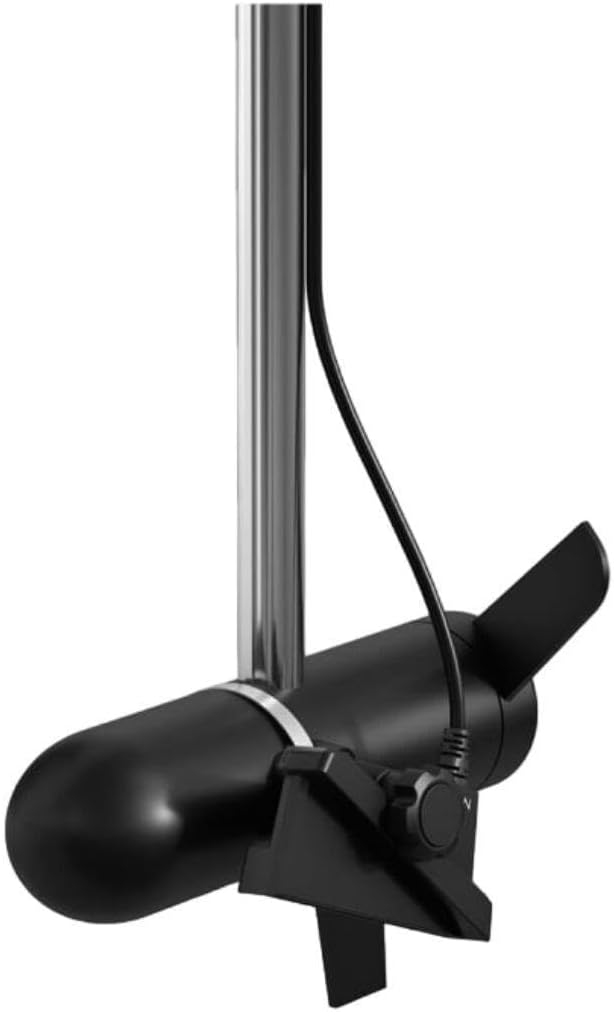
Figure 3: Transducer mounted on a trolling motor shaft (front view).

Figure 4: Transducer mounted on a trolling motor shaft (angled view).
Operating the LiveScope™ Plus System
The LiveScope™ Plus System provides real-time sonar images with improved screen clarity, increased transducer sensitivity, and enhanced target separation. It significantly reduces noise and sonar artifacts, offering a clear picture of fish and underwater structures.
Key Features:
- Live Sonar Images: Experience real-time views with improved clarity and target separation.
- Sharper Images: Reduced noise and fewer sonar artifacts provide a clearer picture of fish and structure.
- Easy Upgrade: The new LVS34 transducer can be used with an existing LiveScope System black box (GLS 10) for convenient upgrades.
- Vivid Color Palettes: Enhance detail and clarity with a selection of vibrant color options.
- Multiple Modes: Supports Forward, Down, and Perspective modes with all necessary mounts included.
Understanding Sonar Modes:
The LiveScope Plus System offers three distinct viewing modes to suit different fishing situations:
- Forward Mode: Allows you to scout ahead of your boat to see what is happening in real-time. Ideal for locating fish and structure before you reach them.
- Down Mode: Provides live views of the activity directly beneath your boat. Useful for vertical jigging or observing fish directly below.
- Perspective Mode: Offers an overhead sonar view, perfect for scouting and fishing in shallow water (up to 50 feet or 15 meters). This mode allows you to see shoreline, fish, buildings, and other underwater structures from a unique perspective.
The chartplotter automatically detects which mode you are using based on the transducer's orientation.
Maintenance
To ensure the longevity and optimal performance of your Garmin LiveScope™ Plus System, regular maintenance is recommended. After each use, especially in saltwater environments, rinse the transducer and cables with fresh water to prevent corrosion. Periodically inspect all cables and connections for any signs of wear or damage. Keep the sonar black box clean and dry, and avoid exposing it to extreme temperatures or direct sunlight for prolonged periods when not in use. Use a soft, damp cloth to clean the display screen of your compatible chartplotter.
Troubleshooting
If you encounter issues with your LiveScope™ Plus System, consider the following common troubleshooting steps:
- No Sonar Image: Verify all power and network cables are securely connected to both the GLS 10 black box and the compatible chartplotter. Ensure the system is receiving adequate power.
- Poor Image Quality/Noise: Check for obstructions around the transducer. Ensure the transducer is properly mounted and oriented for the selected mode. Adjust gain and range settings on your chartplotter. Electrical interference from other boat electronics can also cause noise; try isolating the power source or using a dedicated battery for the LiveScope system.
- Transducer Not Detected: Confirm the network cable connection. Restart both the GLS 10 black box and the chartplotter. Ensure your chartplotter software is up to date.
- Intermittent Operation: Inspect power and network cables for any cuts, pinches, or corrosion. Check battery voltage to ensure it is within the specified operating range.
For more in-depth troubleshooting or persistent issues, refer to the comprehensive Installation Manual or contact Garmin customer support.
Specifications
| Attribute | Detail |
|---|---|
| Brand | Garmin |
| Model Name | 010-02706-00 |
| Power Source | Battery Powered |
| Screen Size (Compatible Chartplotter) | 10.1 Inches (typical) |
| Item Weight | 10.6 Pounds |
| Mounting Type | Flush Mount or Surface Mount (for chartplotter) |
| UPC | 753759298456 |
| Item Package Dimensions L x W x H | 12.01 x 10.04 x 8.15 inches |
| Package Weight | 5.03 Kilograms |
| Item Dimensions L x W x H | 9.6 x 5.9 x 2.6 inches |
| Color | Black |
| Material | Plastic |
| Number of Items | 1 |
| Manufacturer | Garmin |
| Part Number | 010-02706-00 |
| Model Year | 2022 |
| Style | Transducer with GLS 10 |
| Sport Type | Boating |
| Date First Available | February 22, 2022 |
Warranty Information
The Garmin LiveScope™ Plus System comes with a 2-year limited warranty. This warranty covers defects in materials and workmanship under normal use. For specific terms, conditions, and details on how to make a warranty claim, please refer to the documentation included with your product or visit the official Garmin support website.
Support and Additional Resources
For further assistance, detailed operational guides, software updates, and frequently asked questions, please utilize the following resources:
- Official User Guide (PDF): Access the complete user manual for in-depth information on features, installation, and troubleshooting: Garmin LiveScope™ Plus System User Guide
- Garmin Support Website: Visit the official Garmin support portal for product registration, software downloads, and direct customer service contact options.