
1. Introduction and Overview
This manual provides essential information for the proper installation, configuration, operation, and maintenance of the HySecurity MX3037-0 Smart DC Controller Board. This controller is specifically designed for use with various HySecurity brand DC gate operators, enhancing perimeter security and communication capabilities for high-security applications.
The Smart DC Controller Board allows for extensive customization with over 70 configurable settings, ensuring reliable and tailored gate operation. It also features instant reporting and analysis, automatically timestamping events such as security breaches or system malfunctions.
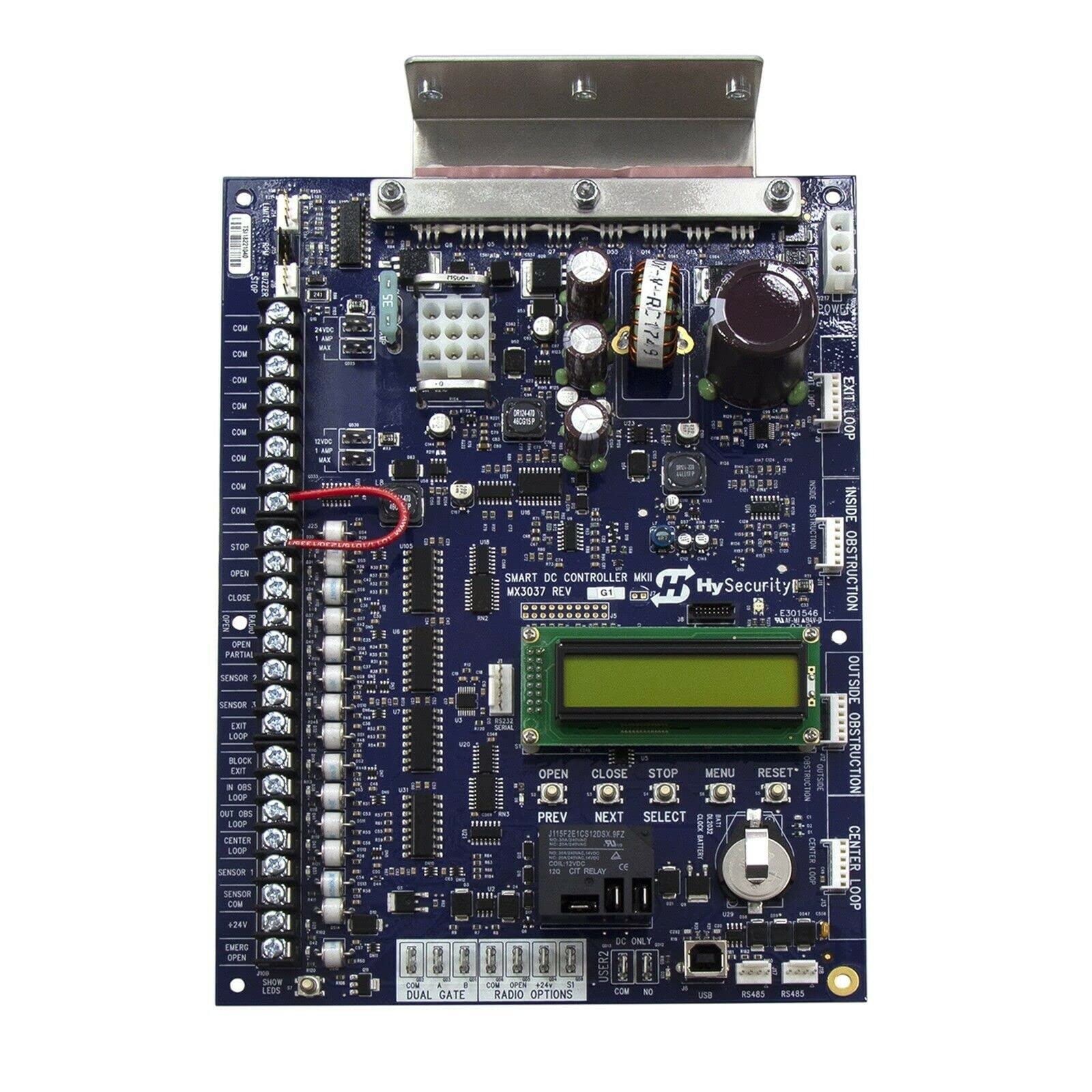
Figure 1: An overhead view of the HySecurity MX3037-0 Smart DC Controller Board. This image displays various terminals, connectors, integrated circuits, an LCD display, and control buttons. Key components visible include power input terminals, communication ports (USB, RS485), and multiple inputs for gate operation commands and sensors.
2. Key Features
- Easy Installation and Configuration
- Ethernet Connectivity via HyNet Gateway
- Support for Multiple HySecurity Gate Operators (SlideSmart DC, SwingSmart DC, StrongArmPark DC, WedgeSmart DC)
- Security Monitoring and Breach Reporting
- Integrated Warning Buzzer and Alarm System
- Configurable settings for customized gate operation
3. Setup and Installation
Proper installation is crucial for the reliable operation of the MX3037-0 controller board. Ensure all power is disconnected before beginning installation.
3.1. Mounting the Board
Mount the controller board securely within the gate operator enclosure, ensuring it is protected from environmental elements and vibrations. Refer to your specific gate operator's manual for recommended mounting locations and procedures.
3.2. Wiring Connections
Connect all necessary wiring according to the gate operator's wiring diagram and local electrical codes. Key connections include:
- Power Input: Connect the appropriate DC power supply to the designated power terminals. (Refer to the board for 12VDC and 24VDC inputs, 1 AMP MAX).
- Gate Operator Connections: Connect the controller to the gate operator's motor and other components.
- Control Inputs: Connect external control devices such as "STOP", "OPEN", "CLOSE", "OPEN PARTIAL", and "EMERG OPEN" buttons to their respective terminals.
- Sensor Inputs: Connect safety and operational sensors (e.g., "SENSOR 1", "SENSOR 2", "SENSOR 3", "EXIT LOOP", "IN OBS LOOP", "OUT OBS LOOP", "CENTER LOOP") to their designated terminals.
- Communication Ports: Utilize the USB or RS485 ports for advanced configuration or integration with other systems. Ethernet connectivity is available via the HyNet Gateway.
- Dual Gate & Radio Options: Connect accessories for dual gate operation or radio receivers to the specified terminals.
Always double-check all connections for proper polarity and secure fastening before applying power.
4. Operating Instructions
The MX3037-0 controller board features an integrated LCD display and navigation buttons for configuration and status monitoring.
4.1. Initial Power-Up and Configuration
- After all wiring is complete, apply power to the controller board.
- The LCD display will illuminate, showing initial boot-up information or a default status screen.
- Use the MENU button to access the main configuration menu.
- Navigate through menu options using the PREV and NEXT buttons.
- Select an option or confirm a setting using the SELECT button.
- The OPEN, CLOSE, and STOP buttons can be used for manual gate control during setup or normal operation.
- The RESET button can be used to restart the controller or clear certain errors.
- Configure the gate operator's parameters, including open/close limits, safety sensor behavior, and operational speeds, as required for your specific installation. Refer to the detailed programming guide for a complete list of over 70 settings.
4.2. Security Monitoring and Reporting
The controller provides security monitoring features. In the event of a security breach or system malfunction, the integrated warning buzzer and alarm system will activate. Instant reporting and analysis features automatically timestamp these events for review.
5. Maintenance
Regular maintenance ensures the longevity and optimal performance of your HySecurity MX3037-0 Smart DC Controller Board.
- Visual Inspection: Periodically inspect the board for any signs of dust accumulation, corrosion, loose connections, or damaged components.
- Cleaning: If necessary, gently clean the board using a soft, dry brush or compressed air to remove dust. Do not use liquids or abrasive cleaners.
- Connection Check: Ensure all terminal connections remain tight and secure.
- Battery Check: The board includes a clock battery (DL2032). Check its status periodically and replace if needed to maintain timekeeping functions.
Always disconnect power to the gate operator before performing any maintenance on the controller board.
6. Troubleshooting
If you encounter issues with your MX3037-0 controller board, refer to the following basic troubleshooting steps:
- No Power: Check the main power supply to the gate operator and the controller board. Verify all power connections are secure.
- Gate Not Responding:
- Check all control input wiring (STOP, OPEN, CLOSE).
- Verify safety sensors are not obstructed or malfunctioning.
- Check for error messages on the LCD display.
- Error Codes on LCD: Consult the comprehensive HySecurity programming guide for detailed explanations of specific error codes displayed on the LCD and recommended solutions.
- Buzzer/Alarm Activation: Investigate the cause of the alarm using the security monitoring and reporting features to identify the timestamped event.
For complex issues or if troubleshooting steps do not resolve the problem, contact HySecurity technical support or a qualified service technician.
7. Specifications
| Feature | Detail |
|---|---|
| Model Number | MX3037-0 |
| Manufacturer | HySecurity |
| Compatibility | HySecurity DC Gate Operators (SlideSmart DC, SwingSmart DC, StrongArmPark DC, WedgeSmart DC) |
| Power Input | 12VDC (1 AMP MAX), 24VDC (1 AMP MAX) |
| Connectivity | USB, RS485, Ethernet (via HyNet Gateway) |
| Display | Integrated LCD |
| Control Inputs | STOP, OPEN, CLOSE, OPEN PARTIAL, EMERG OPEN, Multiple Sensor Inputs |
| Special Features | Warning Buzzer, Alarm System, Security Monitoring, Breach Reporting, Over 70 Configurable Settings |
8. Warranty and Support
Warranty information for the HySecurity MX3037-0 Smart DC Controller Board is typically provided by the manufacturer or the authorized seller at the time of purchase. Please retain your proof of purchase for warranty claims.
For technical support, detailed programming guides, or service inquiries, please contact HySecurity customer service or your authorized HySecurity dealer. Contact information can usually be found on the manufacturer's official website or in the documentation accompanying your gate operator system.


