
BEBEN 1
BEBEN Wireless Earbuds User Manual
Model: 1
Brand: BEBEN
Introduction
Welcome to the user manual for your BEBEN Wireless Earbuds, Model 1. These earbuds are designed to provide a superior audio experience with features like 36 hours of playtime, smart touch controls, ergonomic design for sports, Hi-Fi sound, and active noise reduction for clear calls. This manual will guide you through the setup, operation, maintenance, and troubleshooting of your new earbuds.

Image: The BEBEN Wireless Earbuds, featuring the two earbuds with ear hooks and their compact charging case.
What's Included
- BEBEN Wireless Earbuds (Left and Right)
- Wireless Charging Case
- USB Type-C Charging Cable
- Silicone Ear Tips (S/M/L sizes)
- Portable Storage Bag
- User Manual
Specifications
| Feature | Detail |
|---|---|
| Model Name | 1 |
| Connectivity Technology | Bluetooth 5.0 |
| Total Playtime | Up to 36 Hours (with charging case) |
| Earbud Playtime (Single Charge) | Up to 6 Hours |
| Quick Charge | 5 minutes charge for 2 hours standby |
| Control Type | Smart Touch Control |
| Water Resistance Level | Waterproof |
| Noise Control | Active Noise Cancellation (for calls) |
| Earpiece Shape | Ear hooks |
| Compatible Devices | Multiple Bluetooth-enabled devices (smartphones, tablets, laptops, smart speakers) |
Setup
1. Initial Charging
Before first use, fully charge the earbuds and the charging case.
- Place both earbuds into the charging case.
- Connect the USB Type-C charging cable to the charging case and a power source.
- The LED indicators on the case will show charging status. A full charge for the case takes approximately 6 hours.
- The earbuds themselves charge quickly, with 5 minutes of charging providing 2 hours of standby time.

Image: Earbuds inside the charging case, illustrating the Type-C charging port and battery life indicators.
2. Pairing with Your Device (One-Step Auto Pairing)
The earbuds feature one-step auto pairing for convenience.
- Ensure Bluetooth is enabled on your smartphone, tablet, or other compatible device.
- Open the charging case and take out both earbuds. They will automatically power on and enter pairing mode.
- On your device, search for Bluetooth devices and select "C3" from the list.
- Once connected, you will hear a confirmation prompt, and the earbuds are ready for use.

Image: A smartphone screen showing "C3" as a discoverable Bluetooth device, with the earbuds next to it, demonstrating the one-step auto pairing process.
Note: The earbuds support single or binaural mode, allowing you to use one earbud independently or both together.
Operating Instructions
Touch Controls
The earbuds feature smart touch controls for easy management of music and calls. Please keep your hands dry when touching the controls for optimal sensitivity.
- Power On/Off:
- Automatically power on when taken out of the charging case.
- Automatically power off when placed back into the charging case.
- Play/Pause: Single tap on either earbud.
- Next Song: Double tap on the right earbud.
- Previous Song: Double tap on the left earbud.
- Volume Up: Long press the right earbud.
- Volume Down: Long press the left earbud.
- Answer/End Call: Single tap on either earbud.
- Reject Call: Press and hold either earbud for 2 seconds.
- Activate Voice Assistant (Siri/Google Assistant): Triple tap on either earbud.
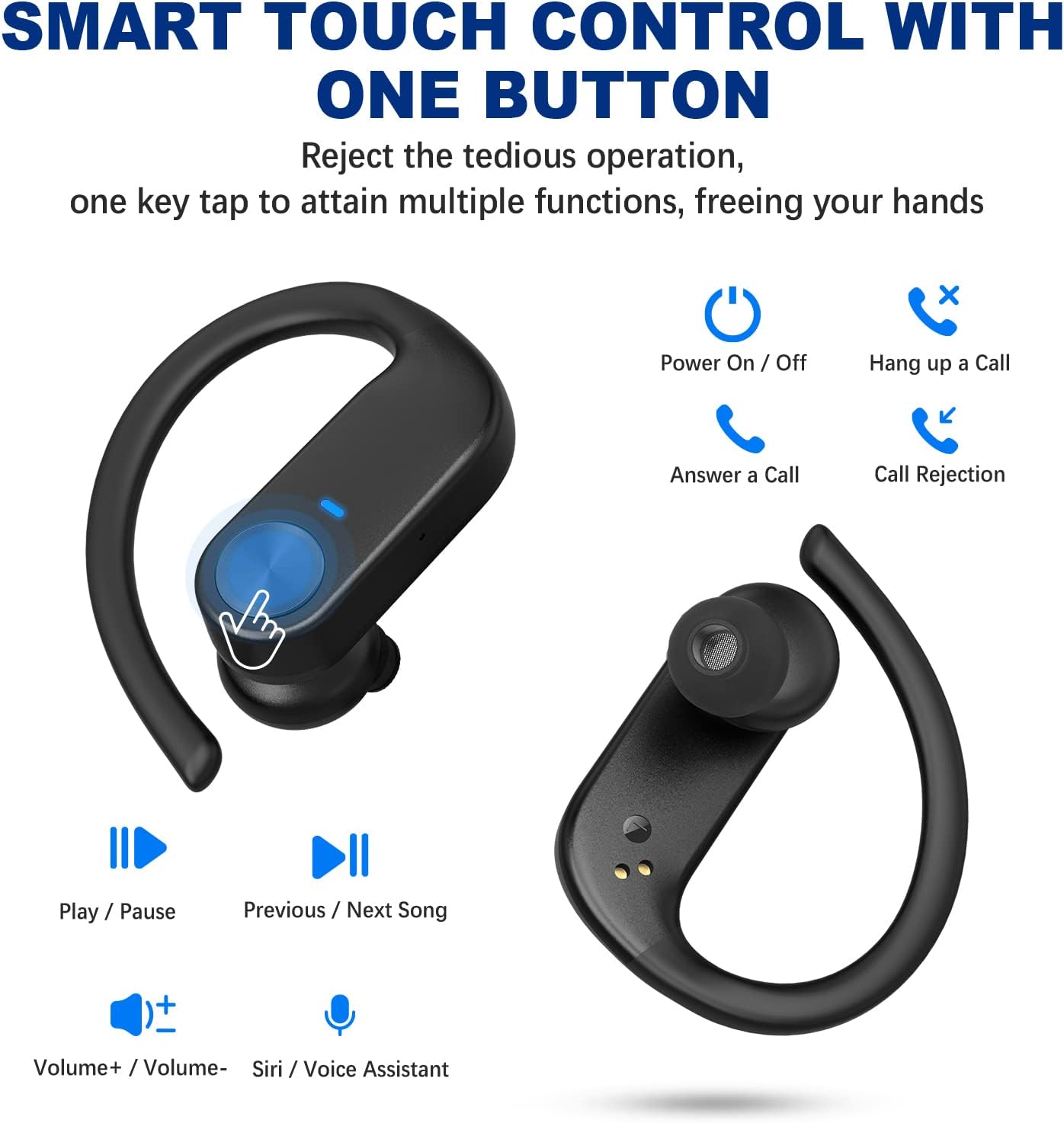
Image: Visual guide to the smart touch controls on the earbuds, showing functions like play/pause, volume, call management, and voice assistant activation.
Wearing the Earbuds
For optimal comfort and sound quality, choose the correct ear tips and adjust the ear hooks.
- Select the silicone ear tips (S/M/L) that best fit your ear canal.
- Insert the earbud into your ear canal.
- Place the ear hook over your ear and adjust it for a secure and comfortable fit. The ergonomic design ensures stability during activities like sports and workouts.

Image: Instructions on how to properly wear the earbuds, highlighting the soft ear tips and secure ear hooks for a comfortable and stable fit.
Maintenance and Care
- Regularly clean the earbuds, especially the ear tips and charging contacts, with a soft, dry cloth.
- Avoid using harsh chemicals or abrasive materials for cleaning.
- Store the earbuds in their charging case when not in use to protect them and ensure they remain charged.
- Keep the earbuds away from extreme temperatures, humidity, and dust.
- While waterproof, avoid prolonged submersion in water. Dry thoroughly if exposed to moisture.
Troubleshooting
| Problem | Solution |
|---|---|
| Earbuds not pairing/connecting. |
|
| Only one earbud working. |
|
| Low volume or poor sound quality. |
|
| Earbuds not charging. |
|
Warranty and Support
BEBEN products come with a standard manufacturer's warranty. For detailed warranty information, technical support, or customer service inquiries, please refer to the contact information provided on the product packaging or visit the official BEBEN website.
You can also visit the BEBEN Store on Amazon for more product information and support resources.
Ask a question about this manual
Ask about setup, troubleshooting, compatibility, parts, safety, or missing instructions. Manuals+ will review the question and use this page’s manual context to help answer it.