
MESTEK WM700A
Contents
MESTEK WM700A Digital Pinless Moisture Meter User Manual
Comprehensive guide for operating and maintaining your MESTEK WM700A moisture meter.
1. Introduction
The MESTEK WM700A is a state-of-the-art digital pinless moisture meter designed for non-destructive measurement of moisture content in various materials. Utilizing advanced electromagnetic wave sensors, it provides quick and accurate readings for wood, drywall, masonry, and other building materials. This manual provides detailed instructions for the proper use, maintenance, and troubleshooting of your device.
2. Safety Information
Please read all safety warnings and instructions carefully before using the device to ensure safe operation and prevent damage.
- Do not attempt to disassemble or modify the device. Unauthorized modifications can lead to malfunction or injury.
- Keep the device away from water and high humidity environments to prevent damage to electronic components.
- Avoid exposing the device to extreme temperatures or direct sunlight for prolonged periods.
- Use only the specified battery type (AAA) and ensure correct polarity during installation.
- Store the device in a dry, cool place when not in use.
- This device is for measurement purposes only and should not be used for medical or other non-intended applications.
3. Package Contents
Upon opening the package, please verify that all items listed below are present and in good condition:
- MESTEK WM700A Digital Pinless Moisture Meter
- Screwdriver (for battery compartment)
- 3 x AAA Batteries
- User Manual

Image: The MESTEK WM700A moisture meter, accompanied by a small screwdriver and three AAA batteries, as typically found in the product package.
4. Product Features
The MESTEK WM700A is equipped with several advanced features to provide accurate and convenient moisture detection:
- Non-Destructive Measurement: Utilizes imported electromagnetic wave sensors for precise moisture detection without damaging the material surface.
- Large Color LCD Display: Features a vibrant LCD screen with an analog bar display for easy interpretation of measurement results.
- Automatic Alarm Function: Alerts the user with a beep when wood moisture exceeds 17% or wall moisture exceeds 70%.
- Ambient Temperature and Humidity Detection: Displays current room temperature and humidity, with switchable °C/°F units.
- Automatic Calibration: Ensures measurement accuracy with automatic calibration upon startup.
- Data Hold Function: Allows users to freeze the current measurement on the screen for easy recording.
- One-Key Reset: Simplifies operation with a dedicated button to reset the device.
- Automatic Power-Off: Conserves battery life by automatically shutting down after 10 minutes of inactivity.
- Multiple Measurement Modes: Supports four distinct modes for different material types: SOFTWOOD, HARDWOOD, DRY WALL, and MASONRY.

Image: The MESTEK WM700A display highlighting its multifunctional smart features, including auto power off, sound alarm, data hold, and reset key.

Image: An overview of the MESTEK WM700A's main functions, including automatic power-off, alarm, LCD display, zero function, data retention, and temperature/humidity sensing.
5. Product Overview
Familiarize yourself with the components and layout of your MESTEK WM700A moisture meter.
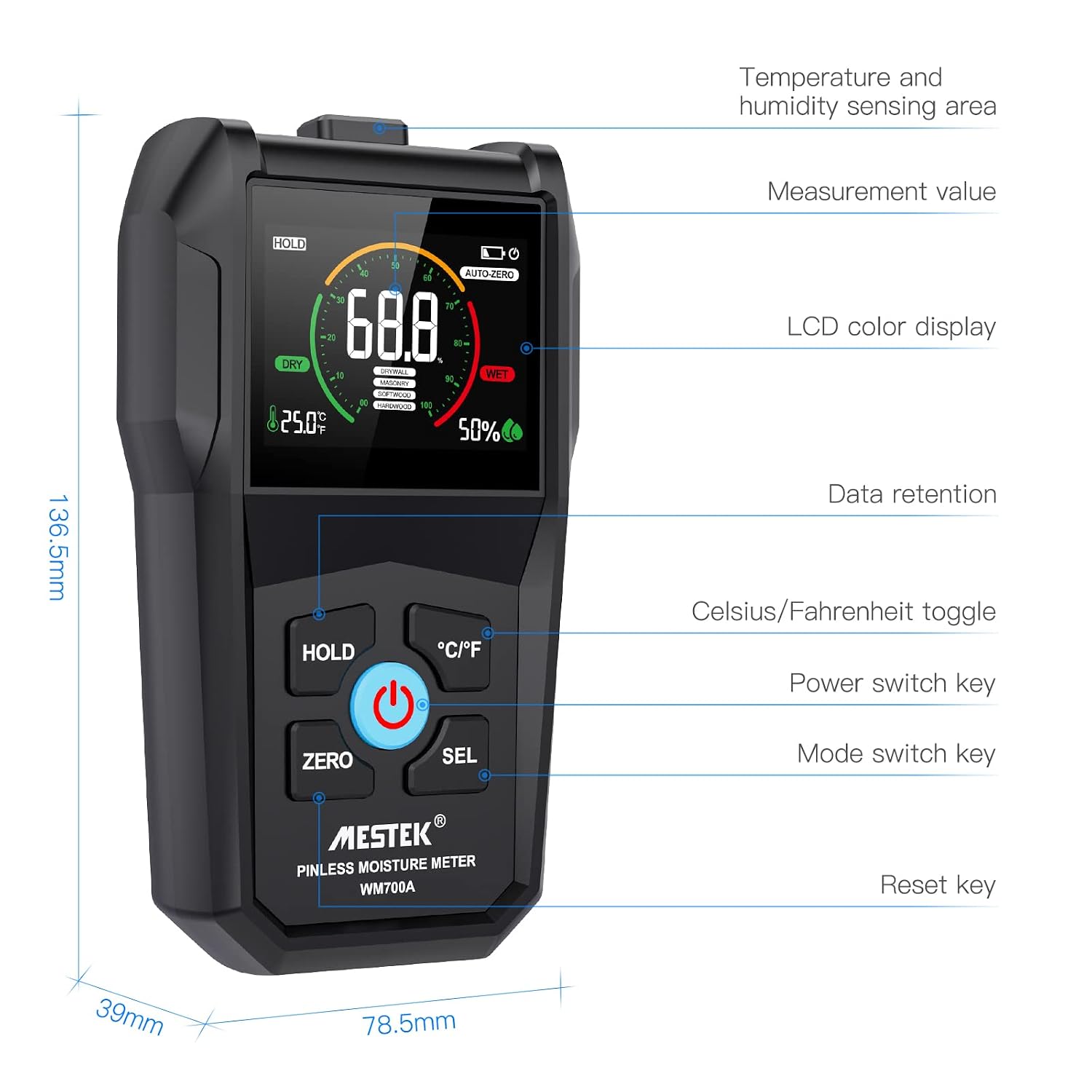
Image: A detailed diagram of the MESTEK WM700A, indicating the location of the temperature and humidity sensing area, LCD color display, measurement value, and control buttons (HOLD, ZERO, SEL, °C/°F, Power).
5.1. High-Precision Electromagnetic Wave Sensor
The device measures moisture non-destructively using an electromagnetic wave sensor located on the back. For accurate readings, the measured object's thickness must be greater than 20mm, and the area of contact must be greater than 40x40mm.

Image: A close-up view of the MESTEK WM700A's high-precision electromagnetic wave sensor, emphasizing the non-destructive measurement capability.
6. Setup
6.1. Battery Installation
- Locate the battery compartment cover on the back of the device.
- Use the provided screwdriver to loosen the screw on the battery compartment cover.
- Remove the cover.
- Insert three AAA batteries, ensuring correct polarity (+/-) as indicated inside the compartment.
- Replace the battery compartment cover and tighten the screw.
6.2. Initial Power On and Auto-Zero Calibration
After installing batteries, press the power button (ⓘ) to turn on the device. The meter will perform an automatic calibration (auto-zero) upon startup. Ensure the sensor is not in contact with any material during this process for accurate calibration.

Image: The MESTEK WM700A displaying the auto-zero calibration process, initiated by pressing the ZERO button.
7. Operating Instructions
7.1. Power On/Off
- To turn on: Press the power button (ⓘ).
- To turn off: Press and hold the power button (ⓘ) for a few seconds, or the device will automatically shut off after 10 minutes of inactivity.

Image: The MESTEK WM700A illustrating its automatic power-off feature, which activates after 10 minutes of inactivity to conserve battery life.
7.2. Mode Selection
The WM700A offers four measurement modes. Press the SEL button to cycle through the modes:
- SOFTWOOD: For measuring moisture in soft wood types.
- HARDWOOD: For measuring moisture in hard wood types.
- DRY WALL: For measuring moisture in drywall.
- MASONRY: For measuring moisture in concrete, brick, and other masonry materials.

Image: The MESTEK WM700A demonstrating the use of the SEL button to select between different measurement modes: DRYWALL, MASONRY, SOFTWOOD, and HARDWOOD.
7.3. Taking Measurements
- Select the appropriate material mode using the SEL button.
- Place the back of the device (where the sensor is located) flat against the surface of the material you wish to measure. Ensure full contact.
- Read the moisture percentage displayed on the LCD screen. The analog bar will also provide a visual indication of the moisture level.

Image: The MESTEK WM700A in use, measuring moisture levels in softwood, displaying the result on its screen.

Image: The MESTEK WM700A being used to detect moisture in a drywall surface, indicating its reliability for wall inspections.

Image: A composite image demonstrating the MESTEK WM700A's versatility in measuring moisture across various materials: drywall, masonry, softwood, and hardwood.
7.4. Data Hold Function
Press the HOLD button to freeze the current measurement on the display. Press it again to release the hold and resume live measurement.

Image: The MESTEK WM700A demonstrating the data hold function, activated by pressing the HOLD button to freeze the current reading on the screen.
7.5. Temperature Unit Switch (°C/°F)
Press the °C/°F button to toggle between Celsius and Fahrenheit for ambient temperature display.

Image: The MESTEK WM700A illustrating the temperature unit toggle function, allowing users to switch between Celsius and Fahrenheit by pressing the °C/°F button.
7.6. Alarm Function
The device will emit an audible beep when the measured moisture level exceeds predefined thresholds:
- Wood Moisture: Alarm activates if moisture is 17% or higher.
- Wall Moisture: Alarm activates if moisture is 70% or higher.

Image: The MESTEK WM700A displaying an alarm indicator, signifying that the detected moisture level has exceeded a preset threshold.
7.7. Moisture Level Interpretation
Refer to the table below for general guidelines on interpreting moisture levels for different materials:

Image: A comparative display showing moisture readings for softwood/hardwood and drywall/masonry, along with a table indicating low, mid, and high moisture level ranges for each material type.
| Moisture Level | Drywall / Masonry | Softwood / Hardwood |
|---|---|---|
| Low (Dry) | 0% - 30% | 0% - 14% |
| Mid (Damp) | 31% - 70% | 15% - 17% |
| High (Wet) | 70%+ | 17%+ |
8. Maintenance
- Cleaning: Wipe the device with a soft, dry cloth. Do not use abrasive cleaners or solvents.
- Storage: When not in use for extended periods, remove the batteries to prevent leakage. Store the device in its original packaging or a protective case in a cool, dry place.
- Battery Replacement: Replace batteries when the low battery indicator appears on the display to ensure accurate readings.
9. Troubleshooting
| Problem | Possible Cause | Solution |
|---|---|---|
| Device does not power on. | Dead or incorrectly installed batteries. | Check battery polarity. Replace with new AAA batteries. |
| Inaccurate readings. | Improper calibration; sensor not fully in contact; material too thin. | Perform auto-zero calibration on a dry, non-conductive surface. Ensure full contact with the material. Verify material thickness is >20mm. |
| Alarm sounds frequently. | High moisture content detected. | This indicates high moisture. Investigate the source of moisture. |
| Display is dim or flickering. | Low battery. | Replace batteries. |
10. Specifications
| Parameter | Value |
|---|---|
| Model Number | WM700A |
| Brand | MESTEK |
| Measurement Principle | Electromagnetic Wave Sensing (Pinless) |
| Measurement Accuracy (Moisture) | ±4% |
| Temperature Accuracy | ±4°C |
| Power Source | 3 x AAA Batteries (included) |
| Product Dimensions | 13.2 x 7.3 x 3.3 cm (5.2 x 2.87 x 1.3 inches) |
| Product Weight | 226 g (7.97 oz) |
| Color | Black |
| Auto Power-Off | 10 minutes of inactivity |
11. Warranty and Support
MESTEK is committed to providing high-quality products and excellent customer service. Your WM700A moisture meter comes with the following support:
- Warranty: 24-month warranty support from the date of purchase.
- Return Policy: 6-month unconditional return policy.
- Customer Service: Quick response within 24 hours for any inquiries or issues.
For further assistance or to contact support, please visit the official MESTEK store on Amazon: MESTEK Official Store
Ask a question about this manual
Ask about setup, troubleshooting, compatibility, parts, safety, or missing instructions. Manuals+ will review the question and use this page’s manual context to help answer it.