Introduction
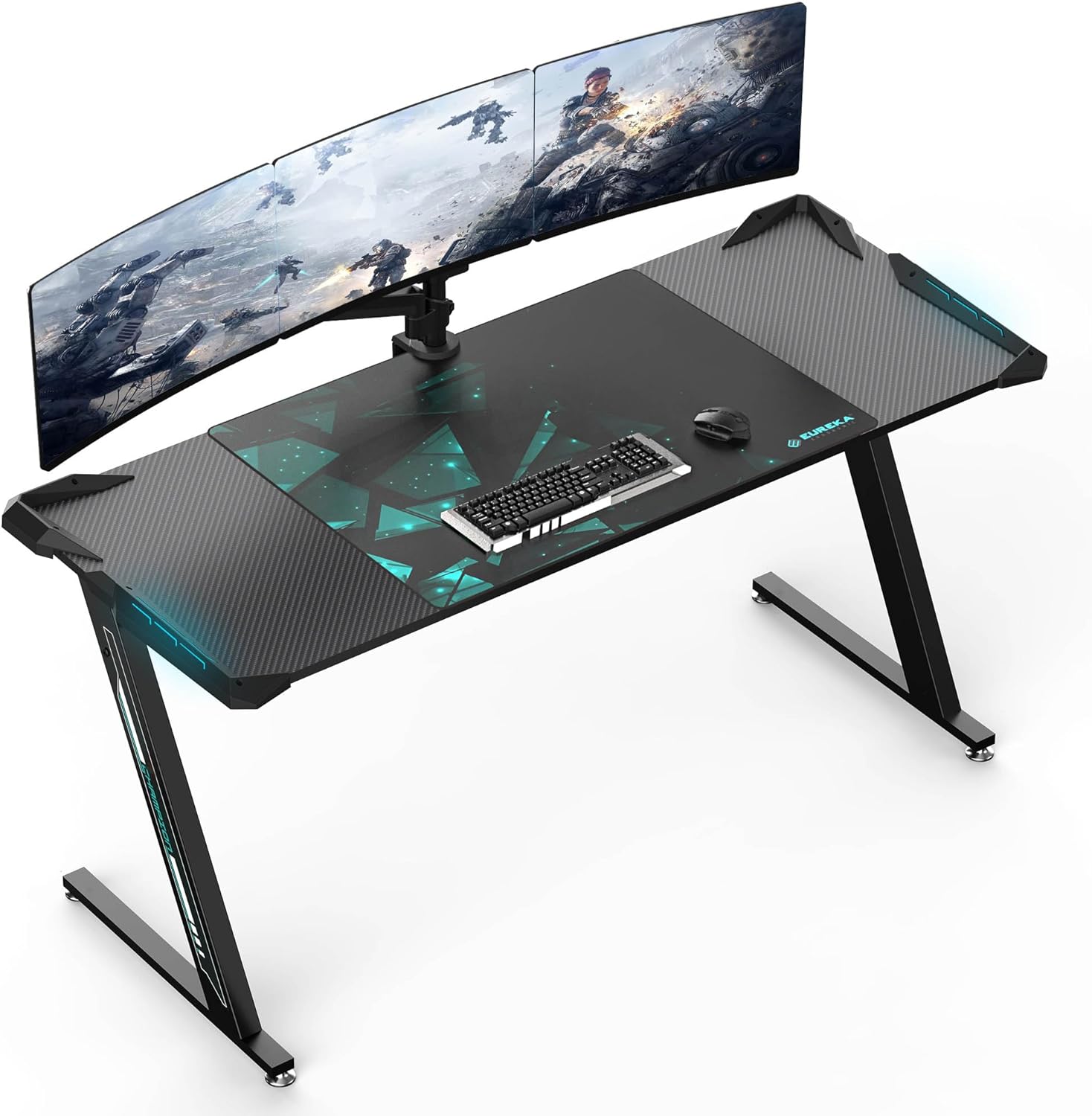
An overview of the EUREKA ERGONOMIC Z60 Gaming Desk, showcasing its spacious carbon fiber textured surface, integrated RGB lighting, and capacity for multiple monitors and gaming peripherals.
The EUREKA ERGONOMIC Z60 Gaming Desk is engineered for professional gamers, featuring a large 60-inch desktop that comfortably accommodates all gaming setups. This versatile desk also serves as an excellent computer workstation, complete with essential accessories like a headset hook, a cup holder, and a game controller stand. Its robust Z-shape design and carbon fiber texture provide both stability and a sleek aesthetic, while dynamic RGB LED lighting enhances your gaming environment.
Setup and Assembly
The EUREKA ERGONOMIC Z60 Gaming Desk requires assembly. Please follow these general steps carefully to ensure proper setup and stability.
Unpacking
- Carefully open the packaging and remove all components.
- Verify that all parts listed in the assembly guide (not provided here, refer to included manual) are present and undamaged.
- Lay out all components on a clean, soft surface to prevent scratches during assembly.
Assembly Steps
While specific steps are detailed in the physical instruction manual included with your product, general assembly involves:
- Attaching the Z-shaped legs to the main desktop frame.
- Securing the desktop panels to the frame.
- Installing the RGB lighting strips and connecting them.
- Attaching accessories such as the headset hook, cup holder, and game controller stand.
- Ensuring all screws and fasteners are tightened securely for stability.

Detailed diagram illustrating the dimensions of the Z60 Gaming Desk, including its length (60 4/8" / 153.5cm), width (23 7/8" / 60.5cm), height (30 7/8" / 78.5cm), and the impressive 500 lbs (226.8 kg) load capacity. The included mouse pad measures 31 4/8" (80cm) by 23 5/8" (60cm).
Operation
RGB LED Lighting Control
The Z60 Gaming Desk features dynamic RGB LED lighting integrated into its side armor. This lighting enhances your gaming atmosphere and can be customized to your preference.

A close-up view of the desk's side armor, highlighting the dynamic RGB LED lighting feature. It shows options for single-color and multi-color light shows, controlled by a single button for easy customization.
- Power Button: Locate the power button on the side armor to turn the RGB lights on or off.
- Mode Button: Press the mode button (often labeled P/S for Pattern/Speed) to cycle through various lighting effects, including single-color modes and dynamic multi-color light shows.
- Brightness/Speed Control: Some models may have additional buttons or a long-press function on the mode button to adjust brightness or the speed of dynamic effects.
Accessory Usage
- Headset Hook: Utilize the integrated headset hook to keep your gaming headset conveniently stored and within reach, preventing clutter on your desktop.
- Cup Holder: The dedicated cup holder helps prevent spills by securely holding your beverage away from your electronics.
- Game Controller Stand: Keep your game controllers organized and easily accessible on the provided stand.
Maintenance
Proper care and maintenance will extend the life and appearance of your EUREKA ERGONOMIC Z60 Gaming Desk.
Cleaning and Care
- Surface Cleaning: For the carbon fiber textured surface, use a soft, damp cloth with a mild, non-abrasive cleaner. Avoid harsh chemicals or abrasive materials that could damage the finish.
- Spills: Wipe up spills immediately to prevent staining or damage to the desktop material.
- Frame Cleaning: Clean the metal frame with a soft, dry or slightly damp cloth.
- Dusting: Regularly dust the desk to prevent buildup, especially around the RGB lighting elements.
- Tighten Fasteners: Periodically check and tighten all screws and fasteners to ensure the desk remains stable and secure.

An image emphasizing the high-quality carbon fiber textured surface of the desk, along with a note about EUREKA's commitment to health and safety, indicating the product has passed formaldehyde tests.
Troubleshooting
If you encounter any issues with your EUREKA ERGONOMIC Z60 Gaming Desk, refer to the following common problems and solutions.
| Problem | Possible Cause | Solution |
|---|---|---|
| Desk is wobbly or unstable. | Loose fasteners; uneven floor. | Ensure all screws and bolts are securely tightened. Adjust the leveling feet on the desk legs if your floor is uneven. |
| RGB lights are not working. | Power connection issue; faulty wiring. | Check that the power cable for the RGB lights is properly connected. Ensure the power source is active. If issues persist, contact customer support. |
| Accessories (headset hook, cup holder) are loose. | Improper installation or loose screws. | Re-attach and tighten the screws for the accessories. Ensure they are mounted correctly according to the assembly instructions. |
Product Specifications
| Feature | Detail |
|---|---|
| Brand | EUREKA ERGONOMIC |
| Model Number | ERK-Z60-B |
| Color | Black (Carbon Fiber Texture) |
| Shape | Z-shape |
| Product Dimensions (L x W x H) | 153.67 x 59.99 x 78.41 cm (60.5 x 23.6 x 30.9 inches) |
| Desktop Material | Engineered Wood with Carbon Fiber Texture |
| Finish Type | Laminated |
| Item Weight | 24.5 Kilograms (54 pounds) |
| Load Capacity | 226.8 kg (500 lbs) |
| Special Features | Ergonomic Design, Dynamic RGB LED Lighting, Headset Hook, Cup Holder, Game Controller Stand |
| Assembly Required | Yes |
Warranty and Support
Warranty Information
EUREKA ERGONOMIC products are built to high standards. For specific warranty terms and conditions, please refer to the warranty card included with your product or visit the official EUREKA ERGONOMIC website. The warranty typically covers manufacturing defects and material flaws under normal use.
Customer Support
If you have any questions, require assistance with assembly, or need to report a defect, please contact EUREKA ERGONOMIC customer service. As a US-based company in California, they offer local customer support.
For the most up-to-date contact information, please visit the official EUREKA ERGONOMIC website or refer to the contact details provided in your product packaging.


