
1. Introduction
The YOHOOLYO IPL Pulsed Light Hair Removal Device utilizes advanced Intense Pulsed Light (IPL) technology to provide effective and long-lasting hair reduction. Designed for home use, this device offers a convenient method for managing unwanted hair on various body areas. It features 999,999 flashes, 5 adjustable energy levels, and two operating modes to suit different skin sensitivities and treatment needs.

Image 1.1: YOHOOLYO IPL Hair Removal Device with power adapter, protective glasses, razor, and storage bag.
2. Safety Information and Warnings
Before using the device, please read and understand all safety instructions. Improper use can lead to skin irritation or injury.
- Skin Tone Suitability: This device is effective on a range of skin tones and hair colors. However, it is not suitable for very dark skin tones or very light hair colors (red, grey, white). Please refer to the skin tone chart below to determine suitability.
- Eye Protection: Always wear the provided protective glasses during operation to shield your eyes from the intense pulsed light.
- Skin Test: Before the first full treatment, perform a skin test on a small area of skin you intend to treat. Wait 24 hours to check for any adverse reactions.
- Energy Levels: Always start with the lowest energy level (Level 1) and gradually increase it as your skin adapts.
- Skin Contact Sensor: The device is equipped with a skin contact sensor. It will only emit a flash when the treatment window is in full contact with the skin, ensuring safe operation.
- Contraindications: Do not use the device on areas with tattoos, sensitive skin, or if you are pregnant. Consult a doctor if you have any underlying skin conditions or medical concerns.
- Clean Skin: Ensure your skin is clean, dry, and free of any lotions, creams, or deodorants before treatment.
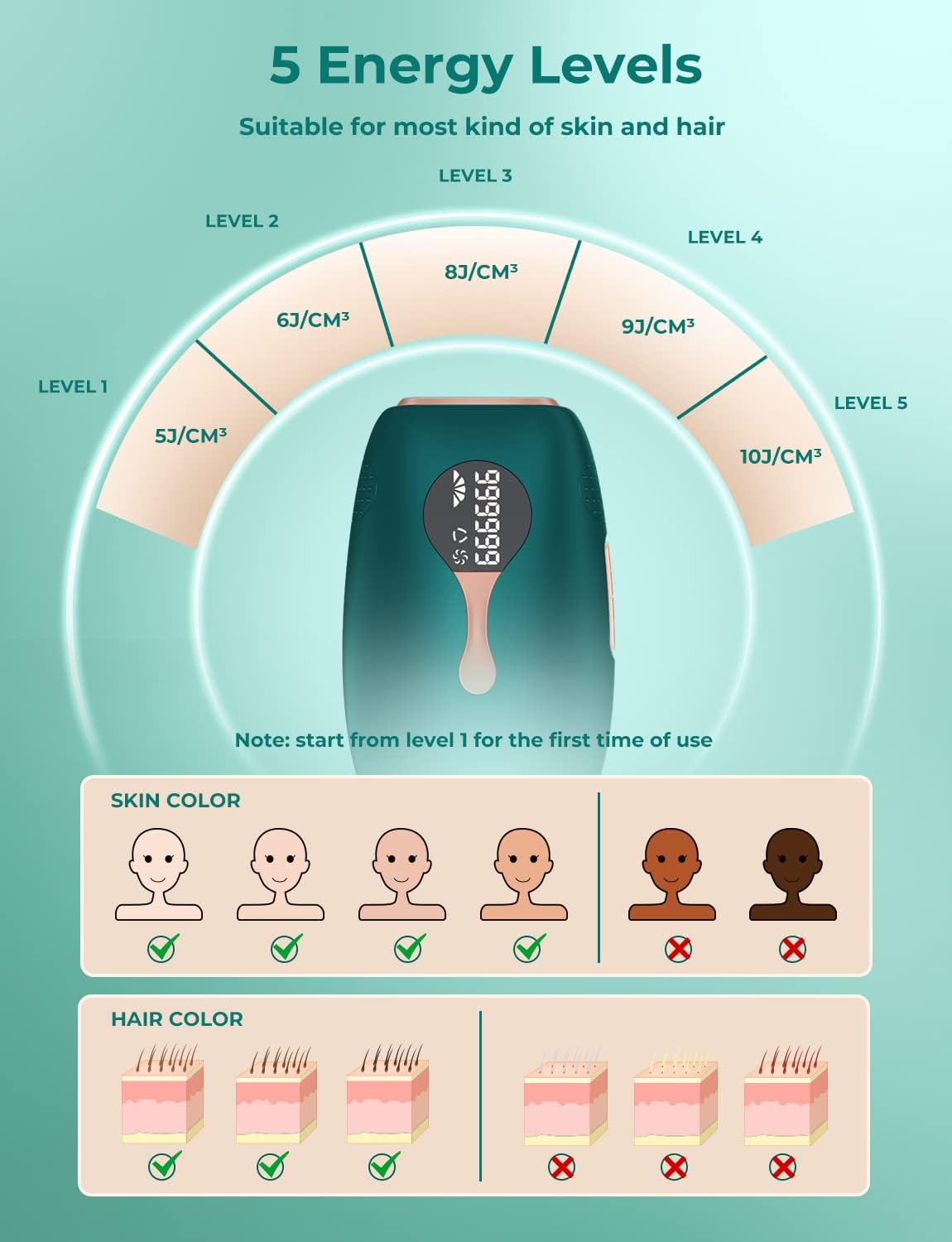
Image 2.1: Skin tone and hair color suitability chart for IPL treatment, indicating 5 energy levels. Start from level 1 for first use.
3. Product Components
The YOHOOLYO IPL Hair Removal Device package typically includes the following items:
- IPL Hair Removal Device
- Power Adapter
- Protective Glasses
- Razor
- User Manual
- Storage Bag

Image 3.1: Device overview showing the display, continuous flash button, power button/level selection, and skin contact sensor.
Key Parts:
- Display: Shows energy level, remaining flashes, and operating mode.
- Power Button / Level Selection: Long press to turn on/off. Short press to adjust energy levels.
- Continuous Flash Button: Activates continuous flash mode for larger areas.
- Single Flash Button: Activates single flash mode for precise treatment.
- Skin Contact Sensor: Ensures the device only flashes when in full contact with the skin.
4. Setup and Preparation
Follow these steps to prepare for your IPL hair removal session:
- Shave and Clean Skin: Shave the desired treatment area and ensure the skin is clean, dry, and free of any oils, lotions, or creams. Do not wax or pluck hair, as the IPL targets the hair follicle.
- Connect to Power: Plug the power adapter into the device and then into an electrical outlet.
- Wear Protective Glasses: Put on the provided protective glasses to shield your eyes from the intense light flashes.
- Power On: Long press the power button to turn on the device. The display will light up.
- Select Energy Level: Short press the power button to cycle through the 5 energy levels. Start with Level 1 for your first treatment and gradually increase as comfortable.

Image 4.1: Visual guide for setup and initial use, including shaving, connecting power, wearing goggles, powering on, selecting energy level, and applying skincare post-treatment.
5. Operating Instructions
Once the device is set up, you can begin your treatment:
5.1. Treatment Application
- Place the treatment window firmly against your skin, ensuring full contact. The device will detect skin contact.
- Press the flash button to emit a single flash. For continuous flashing, press and hold the continuous flash button and glide the device over the skin.
- Move the device to the next area, ensuring slight overlap to cover all desired areas.
- After completing the treatment, long press the power button to turn off the device and unplug it.
- Apply a soothing lotion or moisturizer to the treated area if desired.
5.2. Operating Modes
The device offers two operating modes:
- Single Flash Mode: Ideal for small or sensitive areas requiring precise treatment, such as the armpits, bikini line, or face. Press the flash button for each individual flash.
- Continuous Flash Mode: Suitable for larger body areas like legs, arms, or back. Press and hold the continuous flash button, then glide the device slowly over the skin. The device will emit flashes automatically.

Image 5.1: Illustration of single flash mode for small areas (e.g., armpit) and continuous flash mode for large areas (e.g., legs).
6. Usage Areas and Treatment Schedule
The YOHOOLYO IPL device can be used on various body parts. Typical treatment times are:
- Face: Approximately 1 minute
- Armpit: Approximately 2 minutes per armpit
- Arm: Approximately 2 minutes per arm
- Bikini Line: Approximately 2 minutes
- Leg: Approximately 5 minutes per leg
- Back: Approximately 5 minutes

Image 6.1: Recommended treatment areas and estimated times. Also indicates contraindications: tattoos, sensitive skin, and pregnant women.
6.1. Recommended Treatment Schedule
For optimal results, follow this general treatment schedule:
- Weeks 1-4: 2-3 times per week. During this phase, hair loss may begin naturally.
- Weeks 5-6: Twice a week. You should observe a reduction in hair growth.
- Weeks 7-8: Once a week. Hair will become finer and growth will be significantly reduced.
- After 8 Weeks: 1-2 times per month, or as needed. This phase aims for permanent hair removal, with minimal to no regrowth.

Image 6.2: Visual representation of hair reduction progress over 8+ weeks of consistent IPL treatment.
7. Maintenance
Proper maintenance ensures the longevity and effectiveness of your device:
- Cleaning: After each use, ensure the device is turned off and unplugged. Use a soft, dry cloth to gently wipe the treatment window and the device body. Do not use abrasive cleaners or immerse the device in water.
- Storage: Store the device in its original packaging or the provided storage bag in a cool, dry place, away from direct sunlight and moisture. Keep it out of reach of children.
- Inspection: Periodically inspect the power cord and the device for any signs of damage. If any damage is found, discontinue use and contact customer support.
8. Troubleshooting
If you encounter any issues with your YOHOOLYO IPL device, refer to the following common troubleshooting tips:
- Device Not Turning On:
- Ensure the power adapter is securely plugged into both the device and a working electrical outlet.
- Check if the power outlet is functional by plugging in another appliance.
- Long press the power button for a few seconds to ensure it registers.
- No Flash Emitted:
- Verify that the treatment window is in full and firm contact with your skin. The skin contact sensor must be activated.
- Check the display for any error codes or indicators.
- Ensure the device is not in standby mode. Press the flash button or continuous flash button.
- Confirm that the remaining flash count on the display is not zero.
- Skin Irritation After Use:
- Ensure you performed a skin test before full treatment.
- Reduce the energy level for subsequent treatments.
- Avoid treating the same area multiple times in one session.
- Apply a soothing, unscented moisturizer. If irritation persists, discontinue use and consult a dermatologist.
- Device Overheating:
- The device has a built-in overheating protection system. If it becomes too hot, it may temporarily stop flashing. Allow it to cool down before resuming use.
- Ensure the ventilation vents are not blocked.
If these steps do not resolve the issue, please contact customer support for further assistance.
9. Specifications
| Feature | Specification |
|---|---|
| Model Number | T28-ES |
| Technology | Intense Pulsed Light (IPL) |
| Flashes | 999,999 |
| Energy Levels | 5 adjustable levels |
| Operating Modes | Single Flash, Continuous Flash |
| Wavelength | 510-1200nm |
| Product Weight | 260 grams |
| Package Dimensions | 19.2 x 19.2 x 7.9 cm |
| Manufacturer | YOHOOLYO |
10. Warranty and Support
For warranty information, product support, or any inquiries not covered in this manual, please contact the seller or manufacturer directly. Keep your purchase receipt as proof of purchase for warranty claims.