
HyperGear 15610
HyperGear Vibe Bluetooth Wireless Headphones User Manual
Model: 15610 | Brand: HyperGear
Introduction
Thank you for choosing the HyperGear Vibe Bluetooth Wireless Headphones. These headphones are designed to provide a superior audio experience with advanced features for comfort and convenience. This manual will guide you through the setup, operation, and maintenance of your new headphones.

Image: HyperGear Vibe Bluetooth Wireless Headphones in white, highlighting its sleek design and packaging.
Safety Information
Please read all safety warnings and instructions carefully before using this product. Keep this manual for future reference.
- Do not expose the headphones to extreme temperatures, humidity, or liquids.
- Avoid dropping or subjecting the headphones to strong impacts.
- Do not attempt to disassemble or modify the headphones. This will void the warranty.
- Clean the headphones with a soft, dry cloth only.
- Prolonged listening at high volumes may cause hearing damage. Adjust volume to a safe level.
What's in the Box
Ensure all the following items are included in your package:
- HyperGear Vibe Bluetooth Wireless Headphones
- USB-C Charging Cable
- User Manual (this document)
Product Overview & Key Features
The HyperGear Vibe headphones are engineered for an immersive audio experience with user-friendly controls and a comfortable design.
Key Features:
- Premium Sound Quality: Enjoy deep bass and clear sound with high-definition stereo audio.
- Noise Isolation: Over-ear design with memory foam ear cups provides excellent noise isolation, blocking out distractions.
- Built-in Microphone: Seamlessly transition between music and calls with the integrated microphone.
- Intuitive Controls: Easy access on-ear controls for music playback, volume, and calls.
- Wireless Freedom: Bluetooth connectivity for untethered listening.
- Long-Lasting Battery: Up to 10 hours of continuous playback on a single charge.
- Foldable Design: Compact and portable for easy storage and travel.
- Versatile Compatibility: Connects with smartphones, tablets, laptops, and other Bluetooth-enabled devices.

Image: Visual representation of the Vibe Wireless Headphones' core features, including sound quality, battery, and design.

Image: Highlighting the high-fidelity sound and wireless freedom, with a diagram of the easy access controls on the earcups.
Video: An official product video showcasing the HyperGear Vibe Bluetooth Wireless Headphones, demonstrating their features and design.
Setup
1. Charging Your Headphones
Before first use, fully charge your HyperGear Vibe headphones. Use the included USB-C charging cable.
- Connect the USB-C end of the cable to the charging port on the headphones.
- Connect the USB-A end to a compatible USB power source (e.g., wall adapter, computer USB port).
- The LED indicator on the headphones will show charging status (refer to LED behavior in Specifications section for details).
- A full charge takes approximately 2 hours and provides up to 10 hours of continuous playback.

Image: Illustrates the long-lasting power of the headphones, indicating 10 hours of play time and 2 hours of charge time.
2. Bluetooth Pairing
Follow these steps to pair your headphones with a Bluetooth-enabled device:
- Ensure the headphones are turned off.
- Press and hold the Power ON/OFF button until the LED indicator flashes rapidly (usually blue and red), indicating pairing mode.
- On your device (smartphone, tablet, laptop), go to Bluetooth settings and turn Bluetooth ON.
- Search for available devices and select "HyperGear Vibe" from the list.
- Once connected, the LED indicator on the headphones will turn solid blue or stop flashing.
- The headphones will automatically reconnect to the last paired device when turned on, if the device's Bluetooth is active and within range.

Image: Demonstrates the wide compatibility of the HyperGear Vibe headphones with various devices such as cellphones, tablets, and laptops.
Operating Instructions
Familiarize yourself with the controls located on the earcups for seamless operation.
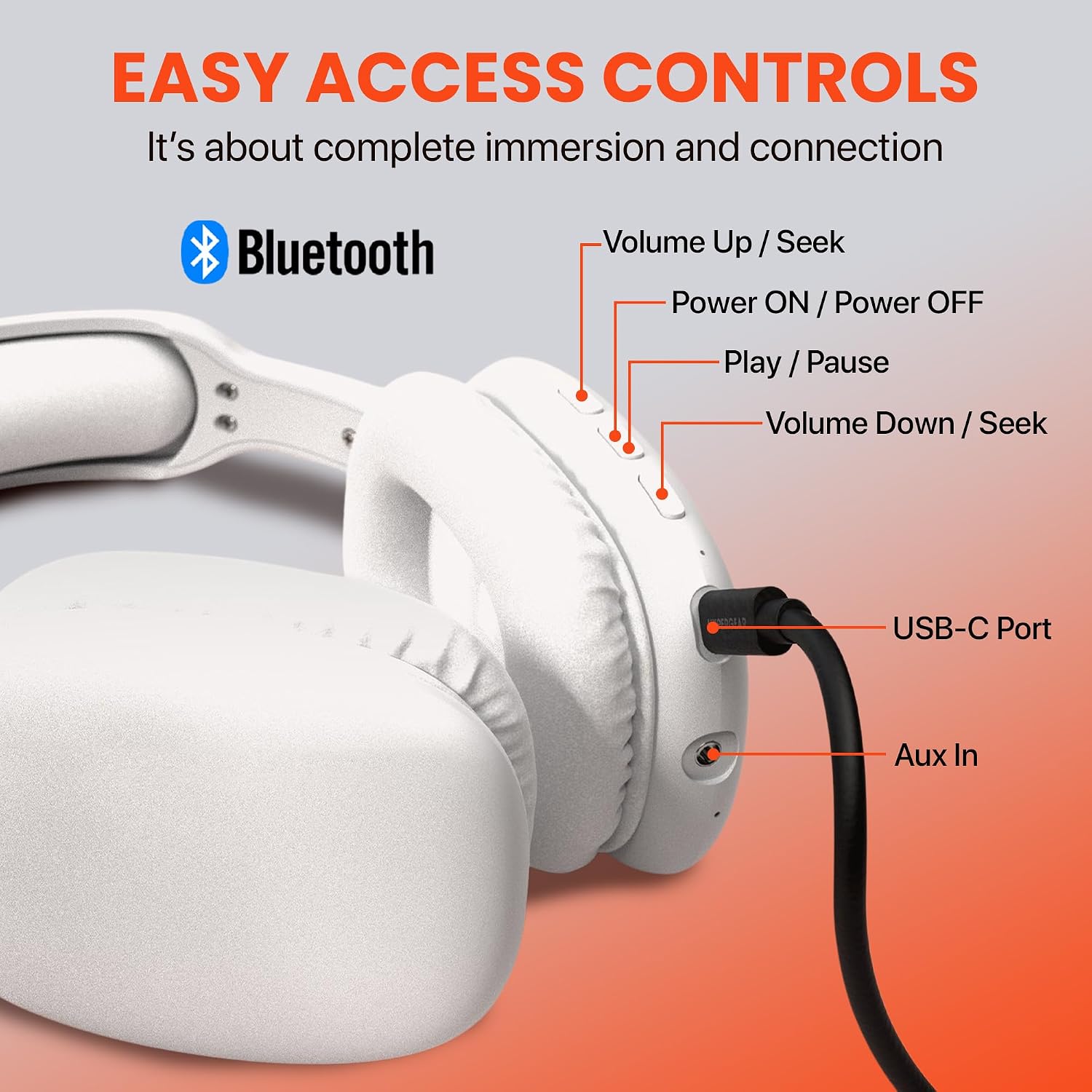
Image: Detailed diagram illustrating the location and function of all control buttons and ports on the HyperGear Vibe headphones.
Basic Controls:
| Button/Action | Function |
|---|---|
| Power ON/OFF Button (Press & Hold) | Power On/Off, Enter Pairing Mode |
| Play/Pause Button (Single Press) | Play/Pause Music, Answer/End Call |
| Volume Up / Seek Button (Single Press) | Increase Volume |
| Volume Up / Seek Button (Press & Hold) | Next Track |
| Volume Down / Seek Button (Single Press) | Decrease Volume |
| Volume Down / Seek Button (Press & Hold) | Previous Track |
| USB-C Port | Charging Input |
| Aux In Port | Connect via 3.5mm audio cable (not included) for wired listening |
Making and Receiving Calls:
- Answer Call: Press the Play/Pause Button once.
- End Call: Press the Play/Pause Button once during a call.
- Reject Call: Press and hold the Play/Pause Button for 2 seconds.
- Redial Last Number: Double-press the Play/Pause Button.
Maintenance
Proper care will ensure the longevity and optimal performance of your headphones.
- Cleaning: Wipe the headphones with a soft, slightly damp cloth. Do not use harsh chemicals or abrasive cleaners. Ensure no liquid enters the ports.
- Storage: When not in use, store the headphones in a cool, dry place, away from direct sunlight and extreme temperatures. The foldable design allows for compact storage.
- Battery Care: To preserve battery life, charge the headphones regularly, even if not used frequently. Avoid fully discharging the battery for extended periods.
Troubleshooting
If you encounter any issues, please refer to the following common problems and solutions:
| Problem | Solution |
|---|---|
| Headphones won't turn on. | Ensure the headphones are fully charged. Connect to a power source and try again. |
| Cannot pair with device. | Ensure headphones are in pairing mode (flashing LED). Turn off and on Bluetooth on your device. Move headphones closer to the device. Forget previous pairings on your device and try again. |
| No sound or low volume. | Check volume levels on both headphones and your device. Ensure headphones are properly paired. Try playing different audio sources. |
| Sound is distorted or cuts out. | Move closer to your device to avoid interference. Check for obstacles between headphones and device. Ensure headphones are fully charged. |
| Microphone not working. | Ensure headphones are properly connected. Check microphone settings on your device. |
Specifications
| Feature | Detail |
|---|---|
| Model Name | Vibe |
| Connectivity Technology | Wireless (Bluetooth) |
| Bluetooth Version | 5.0 |
| Bluetooth Range | 10 Meters (approx. 33 feet) |
| Battery Life | 10 Hours (continuous playback) |
| Charging Time | 2 Hours |
| Audio Driver Type | Dynamic Driver |
| Frequency Range | 20Hz - 20,000Hz |
| Noise Control | Sound Isolation |
| Ear Placement | Over Ear |
| Material | Memory Foam (earcups) |
| Item Weight | 11.7 ounces |
| Product Dimensions | 7.17 x 3.43 x 9.85 inches |
| Compatible Devices | Cellphones, Tablets, Laptops, Desktops |
| Included Components | USB-C Charging Cable |
| UPC | 633755156137 |
Warranty and Support
HyperGear products are built with quality and reliability in mind. For information regarding warranty coverage, technical support, or customer service, please visit the official HyperGear website or contact their customer support directly. Keep your purchase receipt as proof of purchase.
For further assistance, you may also refer to the product's detail page on Amazon.com: https://www.amazon.com/dp/B09SBTDD9Z
Related documents15610


Ask a question about this manual
Ask about setup, troubleshooting, compatibility, parts, safety, or missing instructions. Manuals+ will review the question and use this page’s manual context to help answer it.