
MiLESEEY S6
Contents
MiLESEEY Laser Distance Meter S6 User Manual
Brand: MiLESEEY | Model: S6
1. Important Safety Information
Please read this user manual carefully before using the MiLESEEY S6 Laser Distance Meter. Keep this manual for future reference.
1.1 Laser Safety
The MiLESEEY S6 emits a Class 2 laser. Observe the following safety precautions:
- Do not stare directly into the laser beam.
- Do not aim the laser beam at people or animals.
- Avoid direct eye exposure to the laser beam.
- Do not disassemble the device; laser radiation can be harmful.
1.2 General Safety
- Keep the device out of reach of children.
- Do not use the device in explosive environments or near flammable liquids or gases.
- Protect the device from moisture and direct sunlight.
- Use only specified batteries (2 x AAA alkaline batteries).
2. Product Overview
The MiLESEEY S6 Laser Distance Meter is a compact and versatile tool designed for accurate distance, area, and volume measurements.

Figure 2.1: MiLESEEY S6 Laser Distance Meter front view. The device features a clear LCD display and intuitive button layout for easy operation.
2.1 Components and Controls
- Laser Emitter/Receiver: Located at the top of the device.
- LCD Display: Shows measurements, battery status, and mode indicators.
- MEAS Button: Initiates measurement.
- Function Button (Square/Rectangle icon): Switches between measurement modes (Area, Volume, Pythagorean).
- Mute Button (Speaker icon): Toggles sound on/off.
- Minus (-) Button: Subtracts values or navigates menus.
- Save/Reference Point Button (Folder icon): Saves data or changes measurement reference point (front/rear of device).
- Plus (+) Button: Adds values or navigates menus.
- UNIT Button: Changes measurement units (m/in/ft/ft+in).
- Power Button: Turns the device on/off.
- Bubble Level: For horizontal alignment.

Figure 2.2: Key features of the S6 include robust design, silent operation, a bright backlight, and an integrated bubble level for accurate alignment.
3. Getting Started
3.1 Battery Installation
The MiLESEEY S6 requires two AAA alkaline batteries.
- Open the battery compartment cover on the back of the device.
- Insert two AAA batteries, ensuring correct polarity (+/-).
- Close the battery compartment cover securely.
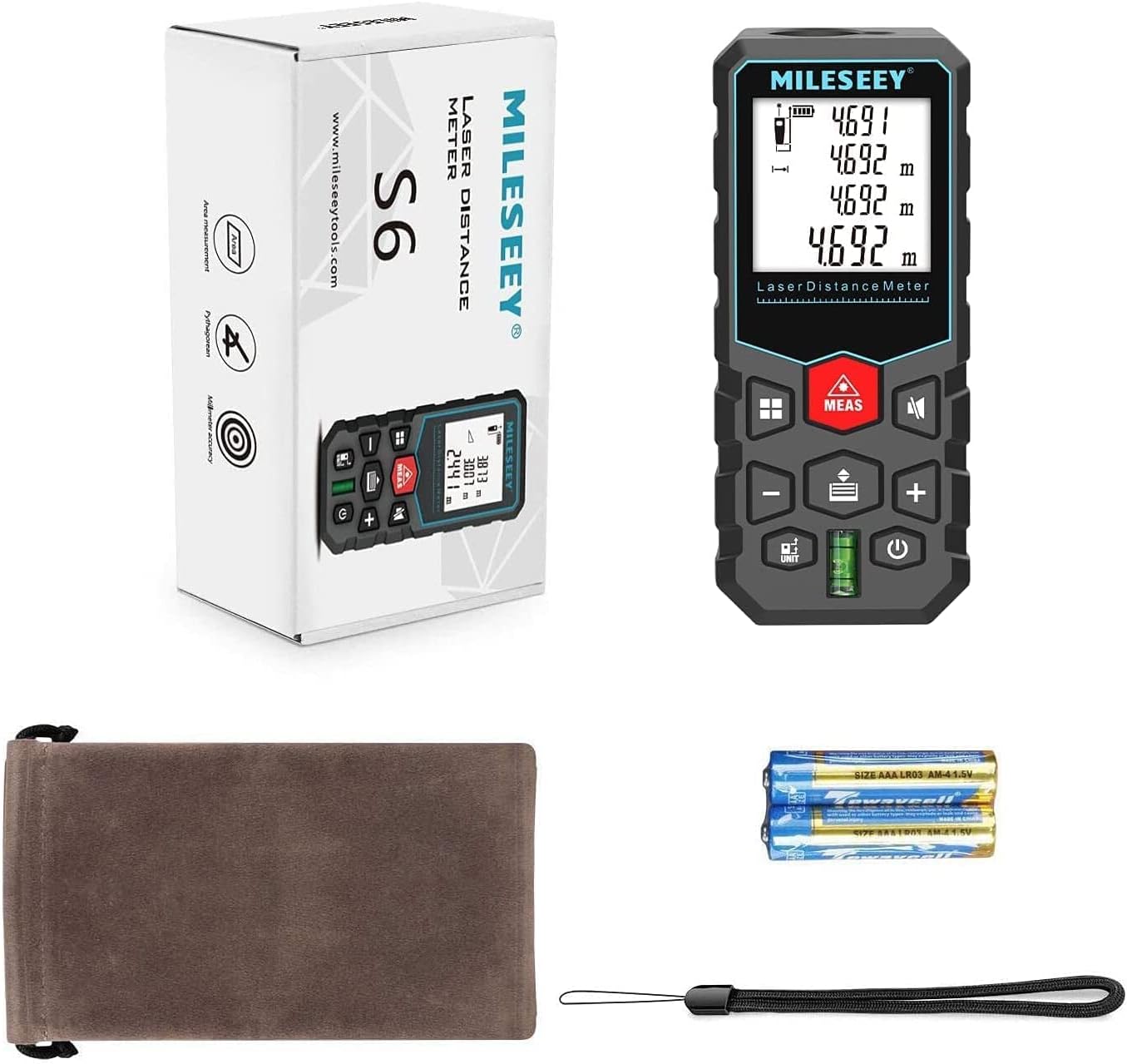
Figure 3.1: The product package includes the S6 laser meter, a protective pouch, two AAA batteries, and a wrist strap for convenience.
3.2 Powering On/Off
- To Power On: Press the Power button. The display will light up.
- To Power Off: Press and hold the Power button for 3 seconds. The device will also automatically power off after 3 minutes of inactivity to save battery.
3.3 Unit Conversion
Press the UNIT button to cycle through available measurement units: meters (m), inches (in), feet (ft), and feet + inches (ft+in).
4. Operating Instructions
4.1 Measurement Reference Point
The S6 can measure from the front or rear edge of the device. The default is usually the rear edge. Press the Save/Reference Point button to switch between reference points. An icon on the display will indicate the current reference point.

Figure 4.1: The device allows for flexible measurement reference points, either from its top or bottom edge, indicated by on-screen icons.
4.2 Single Distance Measurement
- Point the laser at the target surface.
- Press the MEAS button. The laser will activate.
- Press the MEAS button again to take the measurement. The result will appear on the display.
4.3 Continuous Measurement (Tracking)
This mode allows you to track minimum and maximum distances as you move the device.
- From single measurement mode, press and hold the MEAS button.
- Move the device slowly. The display will continuously update the current distance, along with the minimum and maximum recorded distances.
- Press the MEAS button again to stop continuous measurement.
4.4 Area Measurement
- Press the Function button once to enter Area Measurement mode. A square icon will appear on the display.
- Measure the first side (e.g., length) by pressing MEAS.
- Measure the second side (e.g., width) by pressing MEAS.
- The device will automatically calculate and display the area.
4.5 Volume Measurement
- Press the Function button twice to enter Volume Measurement mode. A cube icon will appear.
- Measure the length by pressing MEAS.
- Measure the width by pressing MEAS.
- Measure the height by pressing MEAS.
- The device will automatically calculate and display the volume.
4.6 Pythagorean Measurement (Indirect Measurement)
This mode is used to calculate inaccessible distances using the Pythagorean theorem.
- Press the Function button repeatedly until the desired Pythagorean mode icon appears (e.g., triangle with one unknown side).
- Follow the on-screen prompts to measure the required sides (hypotenuse, adjacent side). Ensure the device is held steady and level for accurate results.
- The device will calculate and display the unknown distance.

Figure 4.2: The S6 supports various measurement methods including single, volume, continuous, area, hook, and secondary hook measurements.
5. Advanced Features
5.1 Mute Function
To turn off the beep sound for quiet environments (e.g., libraries, classrooms), press the Mute button. Press it again to re-enable the sound.

Figure 5.1: The S6 features a mute function for silent operation and can store up to 20 data measurements for later review.
5.2 LCD Backlight
The large LCD display has a backlight for improved visibility in low-light conditions. The backlight automatically turns on when the device is active.
5.3 Data Storage
The S6 can store up to 30 groups of measurement data. To review stored data, press the Save/Reference Point button (short press) to scroll through the memory. You can manually delete data if needed.
5.4 Addition and Subtraction
After taking a measurement, you can add or subtract subsequent measurements. Press the Plus (+) or Minus (-) button, then take the next measurement. The device will display the calculated total.

Figure 5.2: The S6 supports addition and subtraction functions, enabling quick calculation of complex measurements like total area or remaining volume.
6. Technical Specifications
| Feature | Specification |
|---|---|
| Model Name | S6 |
| Measurement Accuracy | ±2 mm (1/16 inch) |
| Measurement Range | Up to 40 m (131 ft) |
| Measurement Speed | 0.5 seconds |
| Units | m / in / ft / ft+in |
| Laser Class | Class 2 |
| Laser Type | 635nm, <1mW |
| Data Storage | 30 groups |
| Auto Power Off | 3 minutes of inactivity |
| Power Source | 2 x AAA Alkaline Batteries |
| Material | Acrylonitrile Butadiene Styrene (ABS) |
| Dimensions | 11.5 x 5 x 2.8 cm (4.5 x 2 x 1.1 inches) |
| Weight | 180 g |
| IP Rating | IP54 (Dust and Splash Resistant) |

Figure 6.1: The S6 utilizes advanced optical technology for high accuracy (±2mm) and rapid measurement (0.5 seconds).
7. Care and Maintenance
- Cleaning: Use a soft, damp cloth to clean the device. Do not use abrasive cleaners or solvents.
- Storage: Store the device in its protective pouch in a cool, dry place when not in use. Remove batteries if storing for extended periods to prevent leakage.
- Handling: Avoid dropping the device or subjecting it to strong impacts.
8. Troubleshooting Guide
| Problem | Possible Cause | Solution |
|---|---|---|
| Device does not turn on. | Low or dead batteries; incorrect battery polarity. | Replace batteries; ensure correct polarity. |
| Inaccurate measurements. | Unstable surface; laser beam obstructed; measuring highly reflective or transparent surfaces. | Ensure stable measurement; clear obstructions; use a target plate for difficult surfaces. |
| Display shows "Error". | Measurement out of range; strong light interference. | Ensure target is within range; measure in less bright conditions. |
| No sound in mute mode. | Mute function is active. | Press the Mute button to re-enable sound. |
9. Warranty and Customer Support
The MiLESEEY S6 Laser Distance Meter comes with standard manufacturer certifications (CE/FCC/ROHS/FDA).
9.1 Included Components
Your package should contain:
- 1 x MiLESEEY S6 Laser Distance Meter
- 2 x AAA 1.5V Batteries
- 1 x User Manual
- 1 x Portable Pouch
- 1 x Wrist Strap
For further assistance or warranty claims, please contact MiLESEEY customer support through your purchase platform or the official MiLESEEY website.
Ask a question about this manual
Ask about setup, troubleshooting, compatibility, parts, safety, or missing instructions. Manuals+ will review the question and use this page’s manual context to help answer it.