
Introduction
This user manual provides detailed instructions for the installation, operation, and maintenance of your WALI Dual Monitor Mount (Model GSDM002W). This adjustable gas spring arms desk mount is designed to support two monitors up to 32 inches, with a weight capacity of 17.6 lbs per arm. It is compatible with VESA mounting holes of 75x75mm or 100x100mm.
Please read this manual thoroughly before installation to ensure proper setup and safe usage.
Key Features
- Compatibility: Fits LCD/LED flat screen TVs and monitors up to 32 inches, supporting up to 17.6 lbs per arm. VESA compatibility: 75x75mm or 100x100mm.
- Mounting Options: Features a two-stage locking system compatible with 3.1-inch C-clamp and 1.6-inch Grommet Base installations.
- Full Adjustability: Gas spring arms allow for tilt (+35°/-35°), swivel (+90°/-90°), and 360° rotation.
- Ergonomic Benefits: Enhances workspace efficiency and comfort by allowing optimal monitor positioning.
- Sturdy Construction: High-grade metal C-clamp, grommet base, and plate ensure a secure and stable connection.
- Cable Management: Integrated clips for organizing cables, contributing to a cleaner workspace.
Package Contents
Before beginning installation, please verify that all components are present and undamaged. The package includes:
- WALI Dual Monitor Gas Spring Stand x 1
- Mounting Hardware Kit (various screws, washers, spacers, and tools)
- User Manual (this document)

Image: Overview of the WALI Dual Monitor Mount and its main components.
Setup and Installation
The WALI Dual Monitor Mount offers two primary installation methods: C-clamp and Grommet Base. Choose the method that best suits your desk.
1. Choose Your Mounting Method

Image: Illustration showing the C-clamp and Grommet Base installation options. The C-clamp supports desks up to 3.1 inches thick, while the Grommet Base supports desks up to 1.6 inches thick.
- C-clamp: Ideal for desks with an edge where the clamp can be securely fastened. Supports desk thickness up to 3.1 inches.
- Grommet Base: Requires a pre-existing hole (grommet hole) in your desk. Supports desk thickness up to 1.6 inches.
2. Assemble the Mount
Follow the step-by-step instructions provided in the included hardware kit to assemble the main pole and arms. Ensure all screws are tightened securely.
3. Attach Monitors
Attach your monitors to the VESA plates on the arms. The mount supports VESA patterns of 75x75mm and 100x100mm. Use the appropriate screws and spacers from the hardware kit.

Image: The WALI Dual Monitor Mount installed on a desk, holding two monitors.
Operating and Adjustments
The WALI Dual Monitor Mount features gas spring arms for smooth and effortless adjustments, allowing you to customize your viewing experience.
Angle Adjustment
The monitor arms offer a wide range of motion:
- Tilt Range: +35° to -35°
- Swivel Range: +90° to -90°
- Screen Rotation: 360° (portrait to landscape)

Image: Visual representation of the tilt, swivel, and 360-degree screen rotation capabilities of the monitor mount.
Gas Spring Tension Adjustment
To ensure the arms hold your monitors securely and allow for smooth movement, you may need to adjust the gas spring tension. Use the provided Allen wrench.
- Turn clockwise for lighter monitors (to increase tension).
- Turn counter-clockwise for heavier monitors (to decrease tension).
Note: Keep the arm in a horizontal level when adjusting tension.
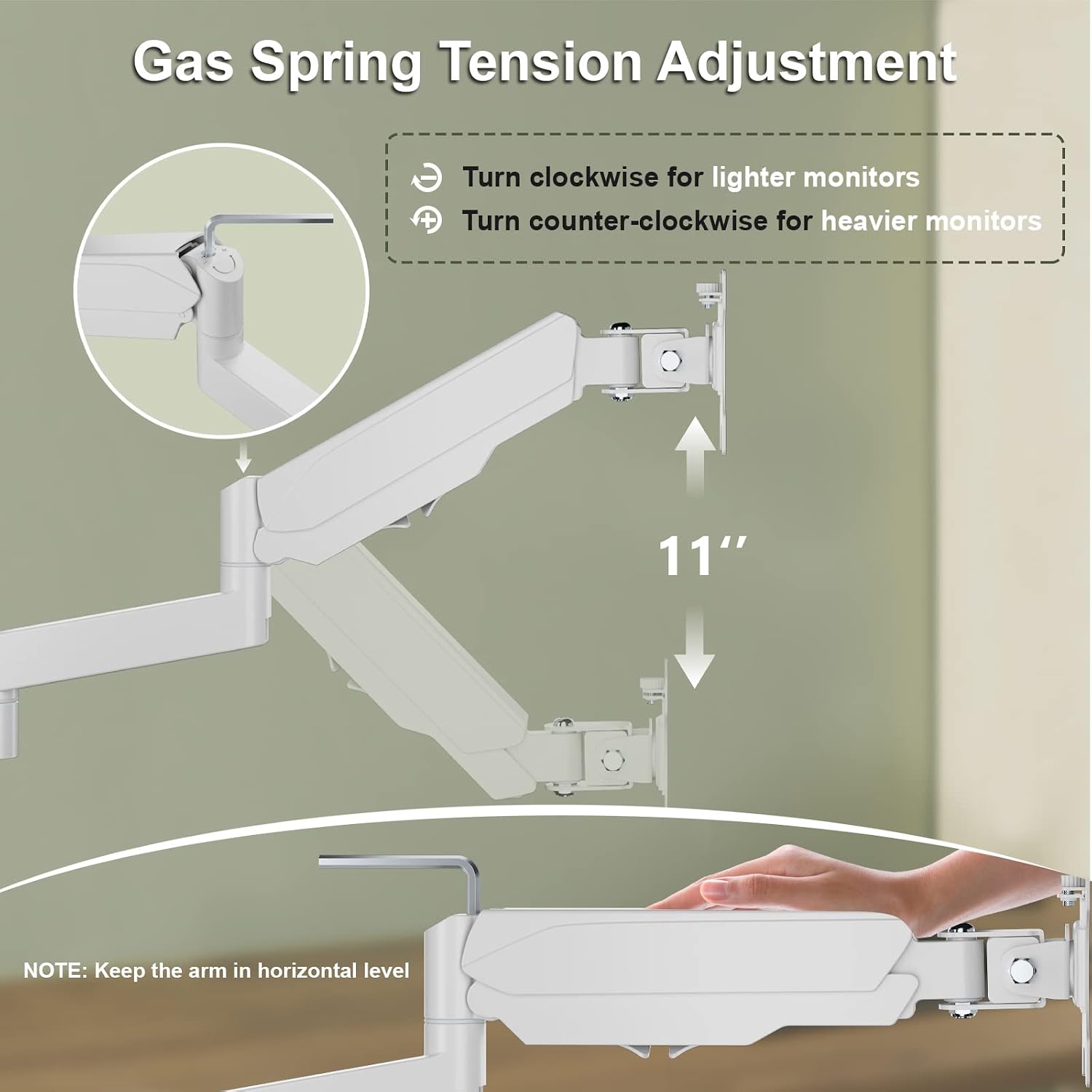
Image: Detailed illustration on how to adjust the gas spring tension using an Allen wrench, indicating directions for lighter and heavier monitors.
Cable Management
Utilize the integrated cable management clips along the arms to route and conceal your monitor cables, maintaining a tidy and organized workspace.

Image: The monitor mount with cables neatly routed through the integrated cable management system.
Product Demonstration Video
Video: An official demonstration video showcasing the features and adjustability of the WALI Dual Monitor Mount (Model GSDM002W). This video illustrates the installation process, tilt, swivel, and rotation capabilities, and how the gas spring arms function.
Maintenance
To ensure the longevity and optimal performance of your WALI Dual Monitor Mount, follow these maintenance guidelines:
- Cleaning: Wipe the mount with a soft, damp cloth. Avoid using abrasive cleaners or solvents, as they may damage the finish.
- Periodic Checks: Regularly inspect all screws and connections to ensure they remain tight. Re-tighten if necessary.
- Gas Spring Adjustment: If you notice the monitors sagging or not holding their position, re-adjust the gas spring tension as described in the "Operating and Adjustments" section.
Troubleshooting
If you encounter issues with your WALI Dual Monitor Mount, refer to the following common problems and solutions:
| Problem | Possible Cause | Solution |
|---|---|---|
| Monitor sags or does not stay in position. | Gas spring tension is too low for the monitor's weight. | Increase gas spring tension by turning the adjustment screw clockwise (refer to "Gas Spring Tension Adjustment" section). |
| Arm is difficult to move or too stiff. | Gas spring tension is too high. | Decrease gas spring tension by turning the adjustment screw counter-clockwise. |
| Mount feels unstable on the desk. | C-clamp or grommet base is not tightened sufficiently. | Ensure the C-clamp or grommet base is securely tightened to the desk. Check desk thickness compatibility. |
| Monitors are not level. | Minor misalignment during installation or adjustment. | Adjust the individual VESA plate tilt or rotate the monitor slightly until level. |
If the problem persists, please contact customer support.
Specifications
| Feature | Detail |
|---|---|
| Model Number | GSDM002W |
| Monitor Size Compatibility | Up to 32 inches |
| Weight Capacity | Up to 17.6 lbs per arm |
| VESA Compatibility | 75x75mm, 100x100mm |
| Tilt Range | +35° / -35° |
| Swivel Range | +90° / -90° |
| Rotation | 360° |
| Max Height | Up to 23.62 inches |
| Max Extension | Up to 18.34 inches |
| C-clamp Desk Thickness | Up to 3.1 inches |
| Grommet Base Desk Thickness | Up to 1.6 inches |
| Material | Metal |
| Color | White |
Warranty and Support
WALI provides experienced and friendly US-based customer support available to assist 7 days a week. For any questions, issues, or warranty claims, please contact WALI customer service through their official channels or the retailer where the product was purchased.
Please retain your proof of purchase for warranty purposes.


