
1. Introduction
Thank you for choosing the Conentool 21V Cordless Drill Driver Set. This manual provides essential information for the safe and effective use of your new tool. Please read all instructions carefully before operation to ensure proper handling, maximize performance, and prevent injury. Keep this manual for future reference.
2. Safety Instructions
Always observe basic safety precautions when using electric tools to reduce the risk of fire, electric shock, and personal injury.
General Power Tool Safety Warnings
- Work Area Safety: Keep your work area clean and well-lit. Cluttered or dark areas invite accidents. Do not operate power tools in explosive atmospheres, such as in the presence of flammable liquids, gases, or dust.
- Electrical Safety: Avoid body contact with earthed or grounded surfaces such as pipes, radiators, ranges, and refrigerators. Do not expose power tools to rain or wet conditions.
- Personal Safety: Always wear eye protection. Use appropriate safety equipment such as dust masks, non-skid safety shoes, hard hats, or hearing protection when necessary. Dress properly; avoid loose clothing or jewelry.
- Tool Use and Care: Do not force the power tool. Use the correct power tool for your application. Disconnect the plug from the power source and/or remove the battery pack before making any adjustments, changing accessories, or storing power tools.
- Battery Pack Use and Care: Recharge only with the charger specified by the manufacturer. Do not use battery packs with any other power tools.
3. Package Contents
Your Conentool 21V Cordless Drill Driver Set includes the following items:
- 1x Cordless Drill
- 1x Carry Case
- 2x 1500mAh Lithium-Ion Batteries
- 1x Charger
- 9x Socket Wrenches ( 4-12mm)
- 12x Screwdriver Bits
- Conventional Drill Bits
- Tile Drill Bit
- Long Screwdriver Bit
- 1x Flexible Drill Shaft

Image: Complete Conentool 21V Cordless Drill Driver Set with all accessories laid out.
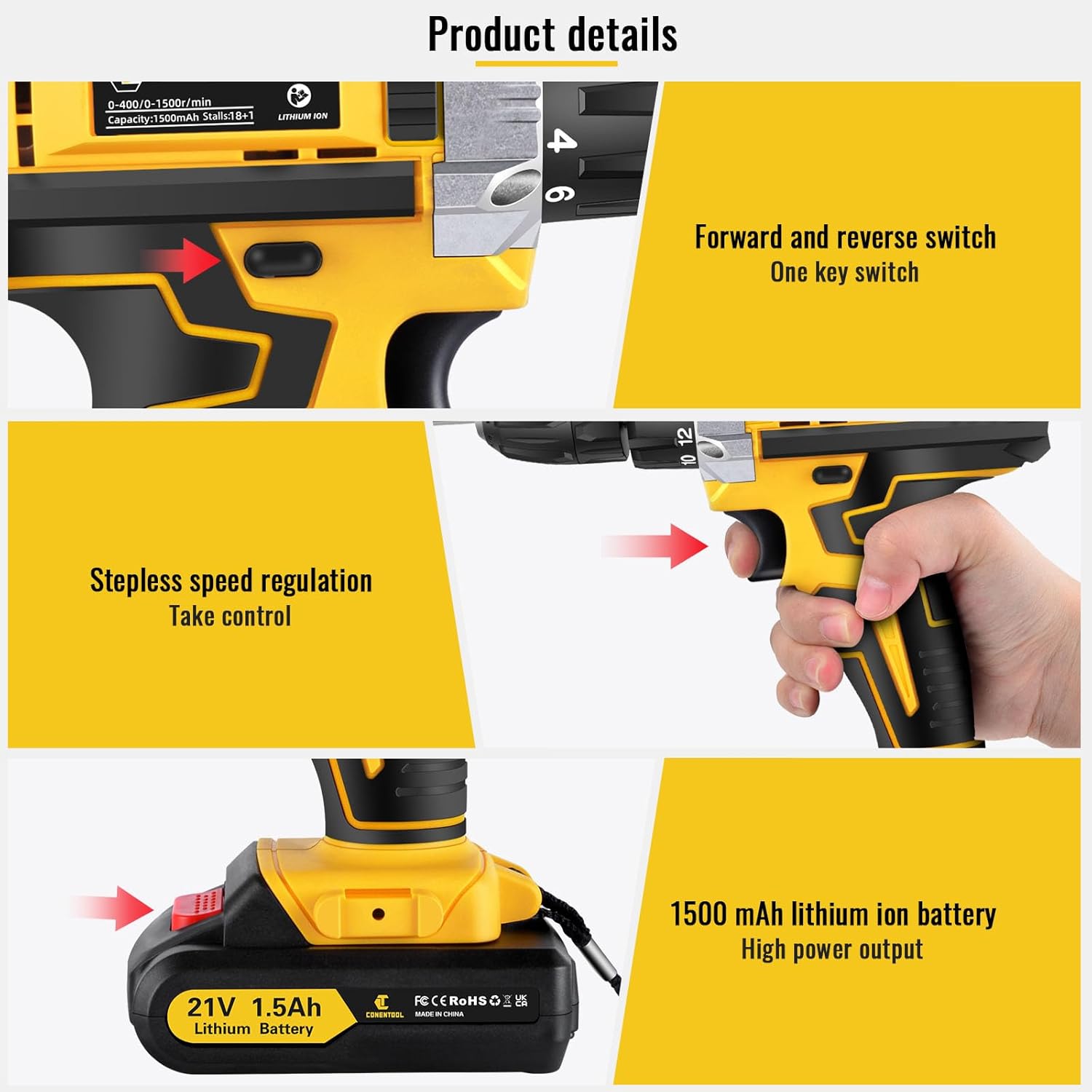
Image: Close-up view of the various accessories included in the set, such as the drill, batteries, charger, and different types of bits and wrenches.
4. Product Overview
The Conentool 21V Cordless Drill Driver is a versatile and powerful tool designed for various drilling and screwing tasks. It features a robust motor, ergonomic design, and multiple adjustable settings for optimal performance.
Key Features:
- 45N.m Max Torque: Provides ample power for demanding applications.
- 18+1 Torque Adjustment: Allows precise control for different materials and tasks, from delicate screwing to heavy-duty drilling.
- Two-Speed Setting: Offers flexibility with a low speed (0-400rpm) for high torque applications and a high speed (0-1500rpm) for faster drilling.
- Dual 1500mAh Batteries: Ensures extended operation time with quick charging.
- Compact and Lightweight Design: Minimizes user fatigue during prolonged use.
- Built-in LED Light: Illuminates the work area for improved visibility in low-light conditions.
- 3/8" (10mm) Self-Locking Chuck: Enables quick and easy bit changes.
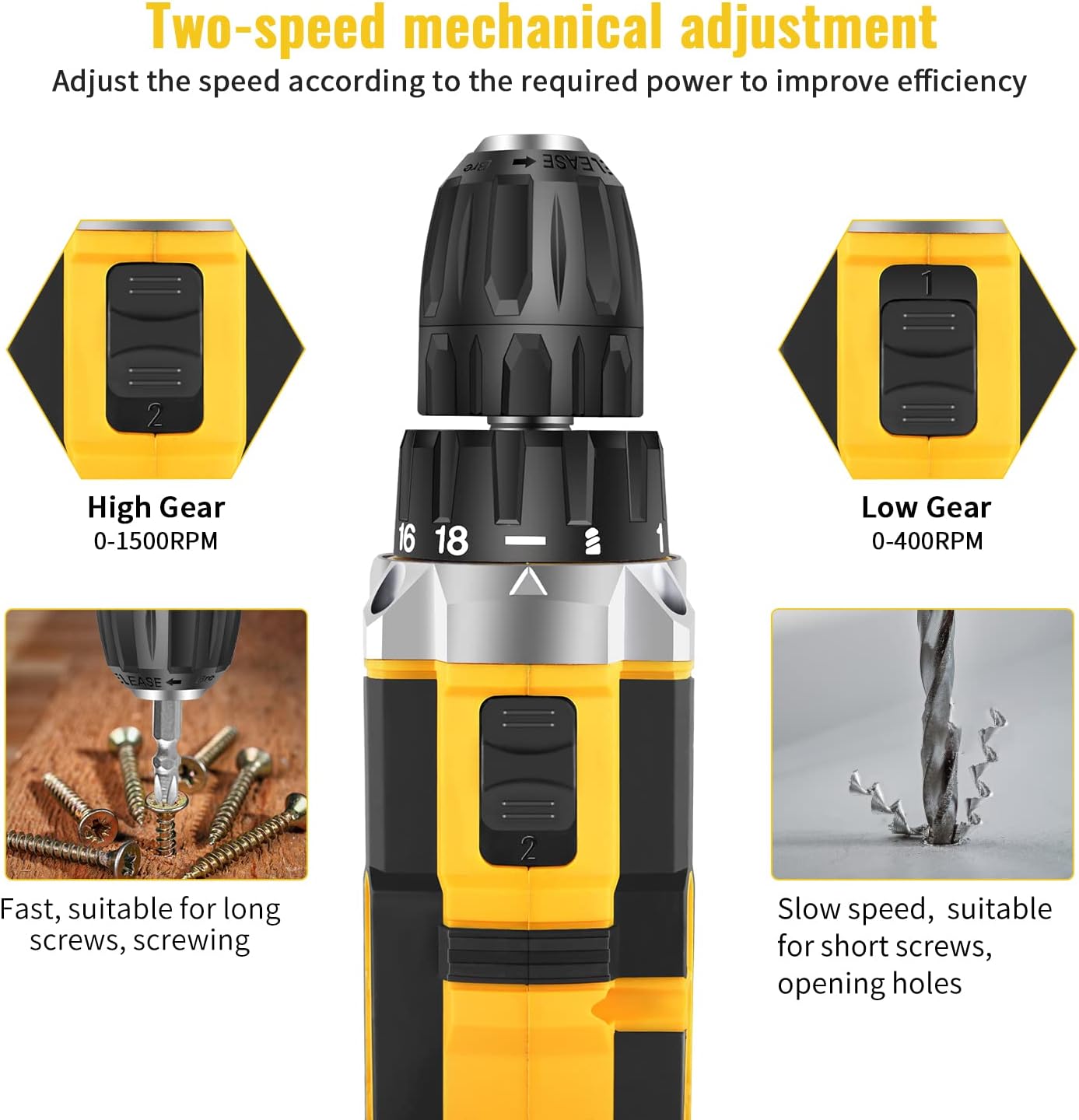
Image: Detailed diagram pointing out various features of the drill, including torque settings, speed selector, ventilation, LED light, and grip.

Image: Visual representation of the drill's internal motor, highlighting its 45N.m maximum torque and efficient heat dissipation.

Image: The drill depicted as lightweight and compact, designed to reduce user fatigue.

Image: Illustration of the drill's motor cooling system, demonstrating effective heat dissipation.

Image: Close-up of the integrated LED light, designed to illuminate the work area.
5. Setup
5.1 Charging the Battery
The drill comes with two 1500mAh lithium-ion batteries. Before first use, fully charge both batteries. A fast charger is included, and a full charge typically takes about 1 hour.
- Connect the charger to a standard power outlet.
- Slide the battery pack onto the charger until it clicks into place.
- The charger indicator light will show the charging status (refer to charger manual for specific light indications).
- Once fully charged, remove the battery from the charger.
5.2 Installing/Removing the Battery
- To Install: Align the battery pack with the base of the drill handle and slide it in until it clicks securely into place.
- To Remove: Press the battery release button located on the front of the battery pack and slide the battery out of the drill handle.

Image: Details on battery installation and removal, along with trigger and switch controls.
5.3 Installing Drill Bits/Screwdriver Bits
The drill features a 3/8" (10mm) self-locking chuck for quick and easy bit changes.
- Rotate the chuck counter-clockwise to open the jaws.
- Insert the desired drill bit or screwdriver bit into the chuck, ensuring it is seated firmly.
- Rotate the chuck clockwise to tighten the jaws securely around the bit. Ensure the bit is centered and tight before operation.

Image: Close-up of the drill chuck, showing how to insert and secure bits.
6. Operating Instructions
6.1 Powering On/Off and Variable Speed Trigger
The drill is activated by pressing the variable speed trigger. The speed of rotation increases as you press the trigger further.
- To start the drill, press the trigger.
- To increase speed, press the trigger further.
- To stop the drill, release the trigger.

Image: Illustration of the variable speed trigger and the forward/reverse button.
6.2 Two-Speed Mechanical Adjustment
The drill has two mechanical speed settings, selected via a switch on top of the drill housing.
- Gear 1 (Low Speed: 0-400rpm): Provides higher torque, ideal for driving screws or drilling into harder materials.
- Gear 2 (High Speed: 0-1500rpm): Provides lower torque but faster rotation, suitable for drilling into softer materials or for quick tasks.

Image: Diagram showing the two-speed selector switch and its corresponding RPM ranges.
6.3 Torque Adjustment (18+1 Settings)
The torque collar allows you to adjust the amount of rotational force the drill applies. This prevents over-tightening screws or damaging materials.
- Rotate the torque collar to select the desired setting from 1 to 18. Lower numbers are for smaller screws and softer materials, higher numbers for larger screws and harder materials.
- The drill icon setting is for drilling applications, providing maximum torque.

Image: The torque adjustment ring with settings for different materials.
6.4 Forward/Reverse Switch
The forward/reverse switch is located above the trigger and controls the direction of rotation.
- Push the switch to the left for forward rotation (for drilling and tightening screws).
- Push the switch to the right for reverse rotation (for loosening screws or removing bits).
- When the switch is in the center position, the trigger is locked, preventing accidental startup.
6.5 Using the LED Light
The integrated LED light automatically illuminates when the trigger is pressed, providing visibility in dimly lit work areas.

Image: The LED light in action, illuminating the work surface, and the onboard bit holder.
7. Maintenance
Regular maintenance ensures the longevity and optimal performance of your drill.
- Cleaning: Keep the ventilation openings clear and clean. Use a soft, damp cloth to wipe down the tool. Do not use harsh chemicals or abrasive cleaners.
- Battery Care: Store batteries in a cool, dry place away from direct sunlight. Do not store fully discharged batteries for extended periods. Recharge them periodically if not in use.
- Storage: Store the drill and all accessories in the provided carry case in a dry, secure location, out of reach of children.
8. Troubleshooting
If you encounter issues with your Conentool drill, refer to the following common problems and solutions:
| Problem | Possible Cause | Solution |
|---|---|---|
| Drill does not start | Battery not charged; Battery not properly inserted; Forward/Reverse switch in center (locked) position. | Charge battery; Re-insert battery securely; Move switch to forward or reverse position. |
| Loss of power during operation | Battery low; Overload. | Recharge battery; Reduce pressure on the drill or use a lower speed/higher torque setting. |
| Bit wobbles or falls out | Chuck not tightened sufficiently; Bit shank damaged. | Re-tighten chuck firmly; Replace damaged bit. |
| Overheating | Prolonged heavy use; Blocked ventilation. | Allow tool to cool down; Clear ventilation openings. |
If the problem persists after attempting these solutions, please contact Conentool customer support.
9. Specifications
| Feature | Specification |
|---|---|
| Model Number | P000125 |
| Voltage | 21V |
| Battery Type | Lithium Ion |
| Battery Capacity | 1500mAh (1.5Ah) |
| Max Torque | 45 N.m |
| Torque Settings | 18+1 |
| No-Load Speed (Low) | 0-400 RPM |
| No-Load Speed (High) | 0-1500 RPM |
| Chuck Size | 3/8" (10mm) |
| Power Source | Battery Powered |
| Material | Metal |
| Item Weight | 2.5 kg |
| Product Dimensions | 30.5 x 27 x 10.5 cm |
10. Warranty and Support
Conentool is committed to providing high-quality tools. For any product-related inquiries, technical assistance, or warranty claims, please contact Conentool customer support. Refer to your purchase documentation for specific warranty terms and contact information.
You can also visit the official Conentool store on Amazon for more information and support: Conentool Store