
1. Introduction
This manual provides detailed instructions for the PRYME BTH-900-MAX Wireless Dual-Muff Headset. This professional-grade headset is designed for reliable communication in demanding environments, offering dual-link capability for simultaneous connection to two-way radios, cellphones, and tablets.
Key Features:
- Noise-Reducing Condenser Boom Microphone: Equipped with a replaceable wind sock for clear audio transmission.
- Fully Integrated Wireless Technology: Provides a clean, professional, and wire-free communication experience.
- Dual Link Capability: Connects to both cellphones/tablets and two-way radios simultaneously.
- Broad Radio Compatibility: Works with all PrymeBLU radio adapters (V2 series), and ICOM, Kenwood, EFJ, and BK radios with internal Bluetooth.
- Dedicated Control Buttons: Separate buttons for Push-To-Talk (PTT) radio functions and cellphone (Answer/Call) operations.
- Water Resistant Design: Ensures durability and reliable performance in various conditions.
- Noise Cancellation: Enhances audio clarity by reducing ambient noise.
- Foldable Structure: Allows for convenient storage and transport.

Figure 1: The PRYME BTH-900-MAX Wireless Dual-Muff Headset, showcasing its robust design and integrated boom microphone.
2. Setup
2.1 Charging the Headset
Before initial use, fully charge the headset. The headset includes a Lithium Polymer battery. Use the provided USB charging cable and adapter.
- Connect the small end of the USB charging cable to the charging port on the headset.
- Connect the larger end of the USB cable to the power adapter.
- Plug the power adapter into a standard electrical outlet.
- The LED indicator on the headset will show charging status (e.g., red for charging, blue for fully charged).
- Allow approximately [X hours - information not provided, user should refer to product packaging or full manual] for a full charge. A full charge provides up to 50 hours of battery life.

Figure 2: USB charging cable and power adapter for the headset.
2.2 Powering On/Off
- To Power On: Press and hold the Power button (usually marked with a power symbol) until the LED indicator illuminates.
- To Power Off: Press and hold the Power button until the LED indicator turns off.
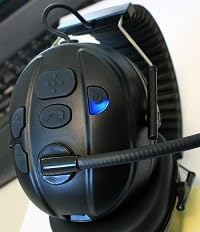
Figure 3: Headset controls showing the power button and a blue indicator light, typically indicating power on or pairing mode.

Figure 4: Headset controls showing the power button and a red indicator light, typically indicating low battery or charging status.
2.3 Bluetooth Pairing
The BTH-900-MAX supports dual-link Bluetooth connectivity, allowing connection to two devices simultaneously (e.g., a radio adapter and a cellphone).
- Enter Pairing Mode: With the headset off, press and hold the Power button for approximately 5-7 seconds until the LED indicator flashes rapidly (e.g., alternating red and blue).
- Pair with First Device: On your first device (e.g., PrymeBLU radio adapter, cellphone, or tablet), enable Bluetooth and search for available devices. Select "BTH-900-MAX" from the list.
- Confirm Connection: Once paired, the LED indicator on the headset will change (e.g., slow blue flashes) to indicate a successful connection.
- Pair with Second Device (Dual Link): To connect a second device, repeat step 1 to enter pairing mode again. Then, on your second device, enable Bluetooth and select "BTH-900-MAX". The headset will attempt to connect to both devices.
- Ensure both devices show "BTH-900-MAX" as connected in their Bluetooth settings.
3. Operation
3.1 Wearing the Headset
The BTH-900-MAX features a behind-the-head racing style design for a secure and comfortable fit. Adjust the headband and earcups for optimal comfort and noise isolation.

Figure 5: The BTH-900-MAX headset positioned on a mannequin head, illustrating the behind-the-head wearing style.
3.2 Controls Overview
The headset features dedicated control buttons for various functions. Familiarize yourself with their placement and operation.

Figure 6: Top-down view of the headset's control panel, showing the layout of buttons for various functions.

Figure 7: A close-up view of the side control buttons on the headset, including volume and call controls.
3.3 Radio Communication (PTT)
When connected to a compatible two-way radio via a PrymeBLU adapter or built-in Bluetooth:
- Press and hold the dedicated PTT button on the headset to transmit.
- Release the PTT button to listen.
3.4 Cellphone/Tablet Communication
When connected to a cellphone or tablet:
- Answer/End Call: Press the dedicated Call button (usually marked with a phone icon) to answer an incoming call or end an active call.
- Voice Assistant: Long press the Call button to activate your device's voice assistant (e.g., Siri, Google Assistant).
- Volume Control: Use the Volume Up (+) and Volume Down (-) buttons to adjust audio levels.

Figure 8: An example of a Push-to-Talk (PTT) application on a smartphone, demonstrating compatibility for mobile communication.
3.5 Microphone Adjustment
The boom microphone is flexible and can be adjusted for optimal voice pickup. Position it approximately 1-2 inches from your mouth.

Figure 9: A detailed view of the noise-reducing condenser boom microphone, including its protective wind sock.
4. Maintenance
4.1 Cleaning
- Wipe the headset surfaces with a soft, damp cloth. Avoid using harsh chemicals or abrasive cleaners.
- The ear cushions can be gently cleaned with a mild soap solution if necessary. Ensure they are completely dry before reattaching.
- The microphone wind sock can be removed and cleaned or replaced if it becomes worn or dirty.

Figure 10: A close-up of the padded earphone, highlighting the comfortable and replaceable ear cushions.
4.2 Storage
When not in use, store the headset in a cool, dry place. The foldable design allows for compact storage.
- Fold the headset to minimize its footprint.
- Avoid exposing the headset to extreme temperatures or direct sunlight for prolonged periods.
5. Troubleshooting
Common Issues and Solutions:
- No Power:
- Ensure the headset is fully charged. Connect it to the charger and check the LED indicator.
- Cannot Pair with Device:
- Ensure the headset is in pairing mode (rapidly flashing LED).
- Make sure Bluetooth is enabled on your device and it's within the 10-meter range.
- Try turning off and on both the headset and your device's Bluetooth.
- If previously paired, try "forgetting" the device on your phone/radio and re-pairing.
- Poor Audio Quality / No Sound:
- Check the volume levels on both the headset and the connected device.
- Ensure the microphone boom is correctly positioned and the wind sock is clean.
- Verify that the headset is properly connected via Bluetooth.
- Move closer to the connected device to ensure you are within the 10-meter Bluetooth range.
- Dual Link Issues:
- Ensure both devices are successfully paired and show as connected.
- Some devices may prioritize one connection over another. Test functionality with each device individually first.
6. Specifications
| Model Name: | BTH-900-MAX |
| Connectivity Technology: | Wireless (Bluetooth) |
| Bluetooth Range: | 10 Meters |
| Battery Life: | 50 Hours |
| Battery Type: | 1 Lithium Polymer (included) |
| Control Type: | Volume Control, Push Button (PTT) |
| Special Features: | Foldable, Lightweight, Noise Cancellation, Water Resistant, iOS Phone Control |
| Ear Placement: | Over Ear |
| Form Factor: | Over Ear |
| Noise Control: | Active Noise Cancellation |
| Item Weight: | 14.4 ounces (0.9 Pounds) |
| Product Dimensions: | 9.45 x 6.3 x 9.06 inches |
| Included Components: | Ear Cushions |
| UPC: | 638615134348 |
7. Warranty Information
Specific warranty details for the PRYME BTH-900-MAX Wireless Dual-Muff Headset are not provided in the product data. Please refer to the manufacturer's official website or the product packaging for comprehensive warranty terms and conditions.
8. Customer Support
For technical assistance, troubleshooting beyond this manual, or inquiries regarding your PRYME BTH-900-MAX headset, please contact PRYME customer support. Contact information can typically be found on the official PRYME website or within the product packaging.
9. Product Video Guide
Video 1: An official product video demonstrating the PRYME Wireless Dual-Muff Headset with Boom Mic, highlighting its key features and professional applications. (Duration: 1:29)


