
Hover-1 Renegade
Hover-1 Renegade Electric Scooter User Manual
Model: Renegade (H1-RENE-BLK)
Introduction
This manual provides essential information for the safe and efficient operation of your Hover-1 Renegade Electric Scooter. Please read this manual thoroughly before using the scooter to ensure proper setup, usage, and maintenance. Retain this manual for future reference.

Image: The Hover-1 Renegade Electric Scooter, black in color, shown from a front-side angle, highlighting its sleek design and front headlight.
Safety Information
Operating an electric scooter carries inherent risks. To minimize these risks and ensure your safety, always adhere to the following guidelines:
- Always wear appropriate safety gear, including a helmet, knee pads, and elbow pads.
- Familiarize yourself with local laws and regulations regarding electric scooter usage.
- Perform a pre-ride inspection: check tire pressure, brake function, and ensure all components are secure.
- Do not ride in adverse weather conditions, such as heavy rain, snow, or ice.
- Avoid riding on uneven surfaces, potholes, or obstacles that could cause loss of control.
- Maintain a safe speed and always be aware of your surroundings, including pedestrians and other vehicles.
- Do not exceed the maximum weight limit of 264 pounds.
- Avoid sudden acceleration or braking.
- Ensure the scooter is fully charged before each use, especially for longer rides.
Package Contents
Upon unpacking your Hover-1 Renegade Electric Scooter, please verify that all the following items are included:
- Hover-1 Renegade Electric Scooter
- Charging Adapter
- User Manual (this document)
Product Overview
The Hover-1 Renegade Electric Scooter is designed for efficient urban commuting, featuring dual motors, a robust frame, and user-friendly controls.
Key Features
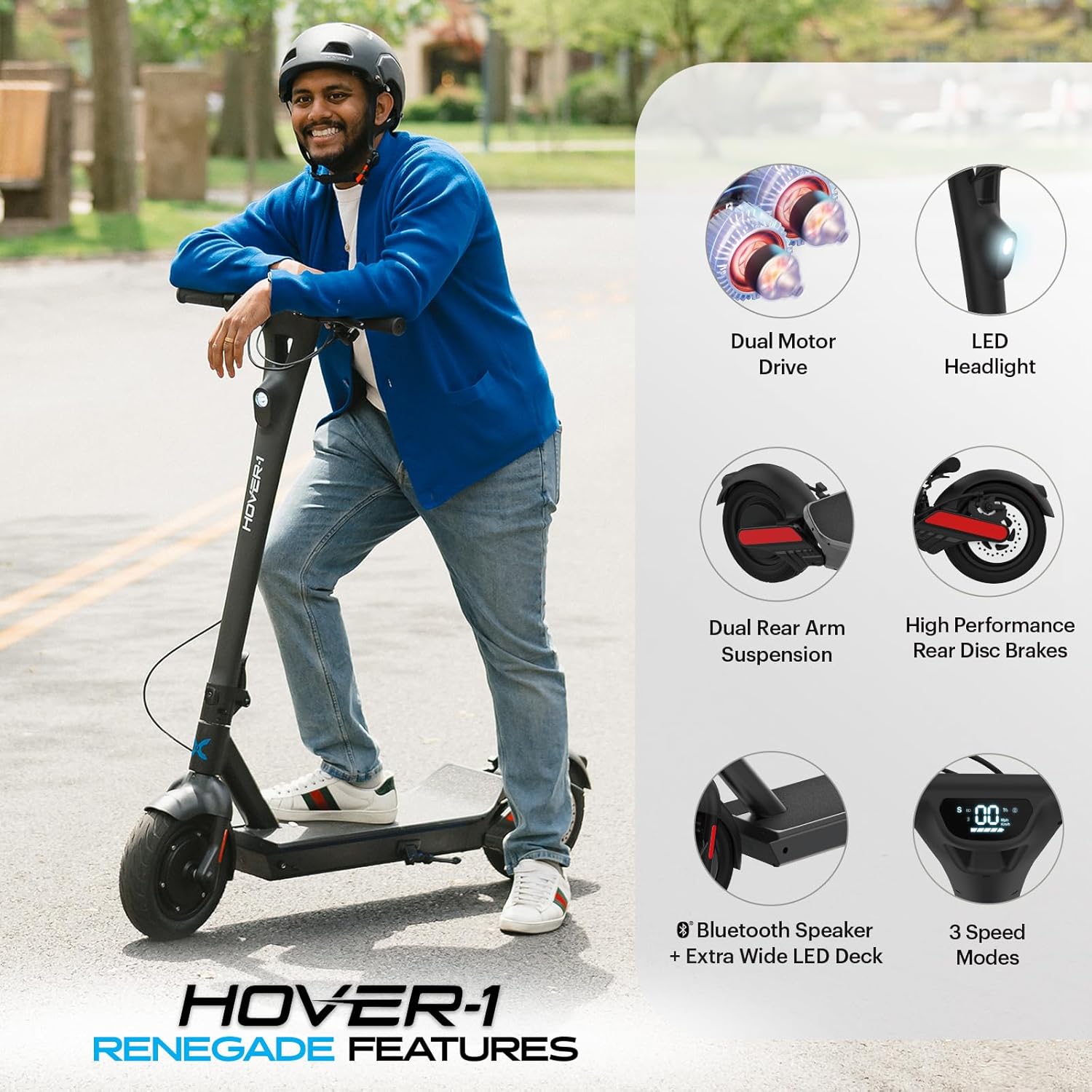
Image: An illustration highlighting key features of the Hover-1 Renegade, including Dual Motor Drive, LED Headlight, Dual Rear Arm Suspension, High Performance Rear Disc Brakes, Bluetooth Speaker with Wide LED Deck, and 3 Speed Modes.
- Dual 450W Brushless Motors: Provides powerful acceleration and performance, capable of handling inclines up to 15 degrees.
- 10-inch Pneumatic Tires: High-traction tires designed for a smooth and comfortable ride.
- LCD Display: Shows speed, battery status, cruise control, and headlight indicators.
- Rear Disc Brake: Ensures reliable stopping power.
- LED Taillight: Enhances visibility for safer night riding.
- Foldable Design: Allows for convenient storage and transport.
- Bluetooth Speaker: Integrated speaker for audio playback.
Controls and Indicators

Image: A close-up view of the Hover-1 Renegade's handlebars, labeling the Folding Clip, Brake lever, Power Button, Dual Drive Button, Turn Signal, Bell, LCD Digital Display, and Thumb Throttle.
- Power Button: Turns the scooter on/off and cycles through speed modes.
- Thumb Throttle: Controls acceleration.
- Brake Lever: Activates the rear disc brake.
- Dual Drive Button: Engages or disengages the second motor for increased power.
- Turn Signal: Activates left or right turn indicators.
- Bell: For alerting pedestrians and other riders.
- Folding Clip: Mechanism for folding the scooter for storage.
- LCD Digital Display: Provides real-time information including:
- High Speed Mode indicator
- Headlight Icon
- Speedometer (MPH/KMH)
- Cruise Control Icon
- Dual Drive (2-Wheel Drive) indicator
- Bluetooth Indicator
- Battery Indicator
Setup
Unfolding the Scooter
- Place the scooter on a flat, stable surface.
- Release the folding clip mechanism located near the base of the handlebar stem.
- Carefully lift the handlebar stem until it locks securely into the upright position. Ensure the locking mechanism is fully engaged before use.
- Adjust the handlebar height if necessary, securing it at your preferred level.

Image: A visual comparison of the Hover-1 Renegade scooter in its unfolded state (4 ft tall) and folded state (1 ft 10 in tall, 3 ft 9 in long), demonstrating its portability.
Initial Charging
Before your first ride, fully charge the scooter's battery. A full charge typically takes approximately 7 hours.
- Locate the charging port on the scooter.
- Connect the charging adapter to the charging port.
- Plug the charging adapter into a standard wall outlet.
- The indicator light on the charger will typically show red during charging and turn green when fully charged.
- Once fully charged, disconnect the charger from the scooter and the wall outlet.
Operating Instructions
Powering On/Off
- To power on: Press and hold the Power Button until the LCD display illuminates.
- To power off: Press and hold the Power Button until the LCD display turns off.
Riding the Scooter
- Place one foot firmly on the deck of the scooter.
- Use your other foot to push off the ground to gain initial momentum.
- Once moving, gently press the Thumb Throttle to accelerate.
- To slow down or stop, release the throttle and gently squeeze the Brake Lever.
Speed Modes
The scooter features multiple speed modes. Briefly press the Power Button while the scooter is on to cycle through the available speed settings. The current speed mode will be indicated on the LCD display.
Dual Drive Mode
For increased power and acceleration, especially on inclines, activate Dual Drive Mode.
- To activate: Press the Dual Drive Button. The LCD display will show an indicator for 2-wheel drive.
- To deactivate: Press the Dual Drive Button again.
Cruise Control
For maintaining a constant speed during longer rides:
- Activate cruise control by pressing the throttle down two times quickly while maintaining a desired speed.
- A cruise control icon will appear on the LCD display.
- To deactivate, gently apply the brake or press the throttle again.
Bluetooth Connectivity
The scooter includes a Bluetooth speaker for audio playback.

Image: A rider on the Hover-1 Renegade scooter, with a graphic overlay showing a smartphone playing music, indicating the scooter's Bluetooth speaker functionality.
- Ensure the scooter is powered on.
- Enable Bluetooth on your mobile device.
- Search for "Hover-1 Renegade" in your device's Bluetooth settings and pair.
- A Bluetooth indicator will appear on the scooter's LCD display once connected.
- You can now play audio through the scooter's integrated speaker.
Maintenance
Battery Care

Image: A graphic illustrating key battery maintenance tips, including not leaving batteries unused for extended periods, storing in a cool dry place, maintaining 60-80% charge for storage, charging every six months, and proper charging instructions.
- Do not leave batteries unused for extended periods. Lithium-ion batteries self-discharge when not in use.
- Store batteries in a cool, dry place away from direct sunlight.
- Keep the battery at approximately 60% to 80% capacity before storing the product or the battery for long periods.
- Charge the battery to approximately 70% at least once every six months if stored.
- Do not leave the battery on charge for extended periods after it is done charging.
- Dropping your batteries can damage the circuitry inside and cause the battery to malfunction. Inspect the battery carefully before use if dropped.
- Recommended storage temperature for the battery is between 41°F and 77°F (5°C and 25°C).
Tire Maintenance
- Regularly check the tire pressure of the 10-inch pneumatic tires. Maintain recommended pressure for optimal performance and safety.
- Inspect tires for any signs of wear, punctures, or damage before each ride.
General Care
- Keep the scooter clean by wiping it with a damp cloth. Avoid using harsh chemicals or abrasive cleaners.
- Regularly check all bolts and fasteners to ensure they are tight and secure.
- Store the scooter in a dry, protected area when not in use.
Troubleshooting
This section addresses common issues you might encounter with your Hover-1 Renegade Electric Scooter. For problems not listed here, please contact customer support.
| Problem | Possible Cause | Solution |
|---|---|---|
| Scooter does not power on. | Low battery; loose connections; power button malfunction. | Charge the battery fully. Ensure all cables are securely connected. If issue persists, contact support. |
| Reduced range or power. | Under-inflated tires; low battery charge; riding conditions (e.g., inclines, heavy load). | Check and inflate tires to recommended pressure. Fully charge the battery. Adjust riding style for optimal efficiency. |
| Brakes feel weak or unresponsive. | Brake cable adjustment needed; worn brake pads. | Inspect brake cables and adjust tension. Check brake pads for wear and replace if necessary. Consult a professional if unsure. |
| Handlebar wobbles. | Loose bolts in the stem or folding mechanism. | Ensure all bolts in the handlebar stem and folding mechanism are securely tightened. |
Specifications

Image: A diagram showing the dimensions of the Hover-1 Renegade Electric Scooter: 47.5 inches in length, 20.47 inches in width, and 44.7 inches in height.
| Feature | Detail |
|---|---|
| Brand | Hover-1 |
| Model Name | Renegade |
| Model Number | H1-RENE-BLK |
| Motor Power | Dual 450W Brushless Motors (900W total) |
| Max Speed | 18 MPH |
| Max Range | Up to 33 Miles |
| Battery | 54V/10 Ah Lithium-ion |
| Charging Time | 7 Hours |
| Weight Limit | 264 Pounds |
| Tire Size | 10 Inches |
| Tire Type | Pneumatic |
| Brake Style | Rear Disc Braking |
| Suspension Type | Dual Suspension |
| Product Dimensions (LxWxH) | 47.5" x 20.47" x 44.7" |
| Item Weight | 46.3 Pounds |
| Frame Material | Aluminum |
| UPC | 888255235169 |
Warranty and Support
The Hover-1 Renegade Electric Scooter comes with a 1-Year Limited Warranty. For warranty claims or technical support, please refer to the contact information provided with your purchase documentation or visit the official Hover-1 website.
It is recommended to register your product to facilitate warranty service.
Related documentsRenegade


Ask a question about this manual
Ask about setup, troubleshooting, compatibility, parts, safety, or missing instructions. Manuals+ will review the question and use this page’s manual context to help answer it.