
Introduction
This manual provides detailed instructions for the safe and efficient use of your new emporia JOY-LTE 4G Volte Senior Flip Phone. Please read this manual thoroughly before operating the device to ensure proper functionality and to understand all features. Keep this manual for future reference.
Product Overview
The emporia JOY-LTE is a user-friendly flip phone designed for seniors, featuring large keys, a clear display, and essential communication functions. It supports 4G VoLTE for high-quality calls and includes an emergency call button for added safety.
Key Features:
- Large Keys: Ergonomically designed keys with excellent pressure points for easy dialing and navigation.
- Dual Displays: A 2.8-inch main color display and a 1.1-inch external display for quick information at a glance.
- Emergency Call Button: A dedicated button on the back to automatically call up to 5 pre-set emergency contacts and send an emergency SMS.
- Speed Dial Keys: Three integrated quick-dial keys (I, II, III) for immediate access to important contacts.
- 4G VoLTE Technology: Ensures high voice quality and reduced background noise during calls.
- Hearing Aid Compatibility: Rated M4/T4 for use with hearing aids.
- Durability: IP54 rating for dust and splash protection.
- Integrated Camera: 2 Megapixel camera for capturing photos.
- Useful Tools: Includes alarm, calculator, and calendar functions.
- Charging Cradle: Comes with a charging cradle for convenient and easy charging.
Package Contents:
- emporia JOY-LTE Mobile Phone
- Rechargeable Lithium-ion Battery
- USB Type-C Cable
- Charging Cradle
- Additional Battery Cover (without emergency button)
- Instruction Manual (this document)
Setup
1. Installing the SIM Card and Battery
- Remove the Battery Cover: Gently pry open the battery cover from the notch located at the bottom edge of the phone.
- Insert SIM Card: Locate the SIM card slot. Insert your Nano-SIM card with the gold contacts facing down and the cut corner aligned as shown in the diagram. Ensure it clicks into place.
- Insert Battery: Place the Lithium-ion battery into the battery compartment, aligning the gold contacts on the battery with the contacts in the phone.
- Replace Battery Cover: Attach the battery cover, pressing firmly until it snaps securely into place. You can choose between the cover with the emergency button or the plain cover.
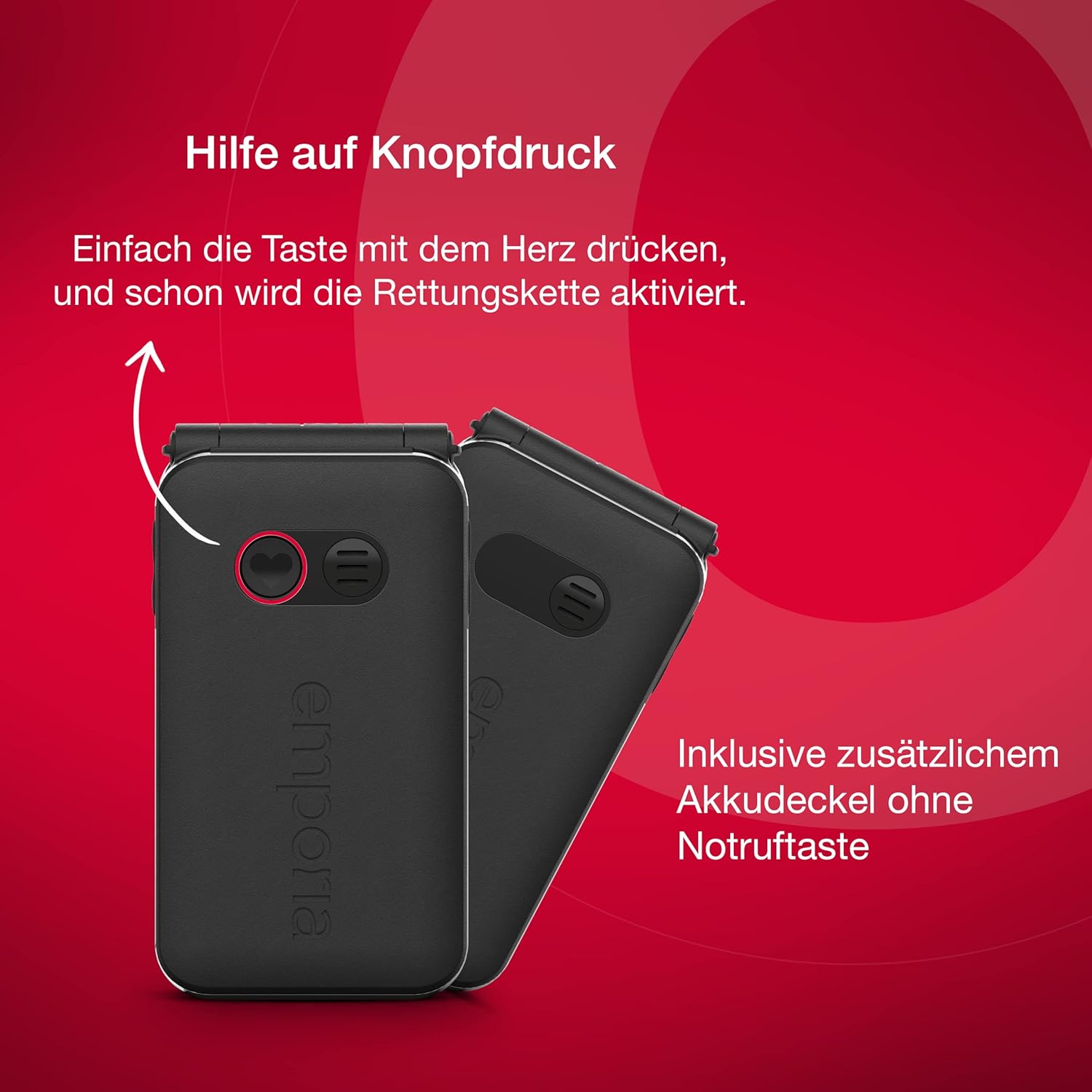
Image: The back of the emporia JOY-LTE phone, illustrating the emergency button and the option to use an alternative battery cover without the button.
2. Charging the Battery
Before first use, fully charge the phone's battery. Use the provided USB Type-C cable and charging cradle.
- Connect the USB Type-C cable to the charging cradle and then to a power adapter (not included) or a computer's USB port.
- Place the phone into the charging cradle. Ensure the charging contacts on the phone align with those on the cradle. The charging indicator on the phone's screen will show the charging status.
- A full charge typically takes approximately 2-3 hours.
3. Powering On/Off
- To Power On: Press and hold the red End Call/Power button (■) until the screen lights up.
- To Power Off: Press and hold the red End Call/Power button (■) until a power-off option appears on the screen. Select "Power Off" and confirm.
Operating Instructions
Basic Functions
- Making a Call:
- Enter the phone number using the keypad.
- Press the green Call button (■) to initiate the call.
- To end the call, press the red End Call button (■).
- Answering a Call: When the phone rings, press the green Call button (■) to answer.
- Sending/Receiving SMS: Navigate to the "Messages" menu. Use the keypad to compose messages.

Image: The emporia JOY-LTE phone in its open position, displaying the main screen and large keypad. Key features such as the practical flip function, dual battery covers, 2MP camera, user-friendly operation, adjustable font size, and hearing aid compatibility are highlighted.
Emergency Call Function
The emergency call button is located on the back of the phone. It is designed to provide quick assistance in critical situations.
- Setting Up Emergency Numbers: Access the "Emergency" settings in the phone's menu to program up to 5 emergency contacts. These contacts will be called in sequence until one answers.
- Activating Emergency Call: Press and hold the emergency button on the back of the phone for a few seconds. The phone will automatically dial the pre-set emergency numbers one by one.
- Emergency SMS: After the emergency call is confirmed, an emergency SMS will be sent to all programmed emergency contacts.
Speed Dial Keys
The phone features three dedicated speed dial keys (I, II, III) above the numeric keypad for quick access to your most important contacts.
- Programming Speed Dial: Go to "Contacts" or "Settings" to assign a contact to each speed dial key (I, II, III).
- Using Speed Dial: Simply press the desired speed dial key (I, II, or III) to call the assigned contact directly.

Image: The emporia JOY-LTE phone open, illustrating the keypad with the three speed dial keys (I, II, III) circled, emphasizing their function for quickly reaching important contacts.
Camera Function
Your phone is equipped with a 2 Megapixel camera.
- Accessing Camera: Navigate to the "Camera" icon in the main menu.
- Taking Photos: Use the navigation keys to frame your shot and press the "OK" button to capture the image.
- Viewing Photos: Photos are saved in the "Gallery" or "My Files" section.
Adjusting Settings
- Volume Control: Use the volume buttons on the side of the phone to adjust call volume, ringtone volume, and media volume.
- Font Size: The phone offers adjustable font sizes for improved readability. Access this setting in the "Display" or "Accessibility" menu.
- Alarm, Calculator, Calendar: These applications can be found in the main menu. Follow on-screen instructions for their use.
Maintenance
- Cleaning: Use a soft, dry cloth to clean the phone's screen and body. Avoid using harsh chemicals or abrasive materials.
- Battery Care:
- Avoid extreme temperatures, as they can reduce battery life.
- Do not leave the phone fully discharged for extended periods.
- Use only original or approved charging accessories.
- Water and Dust Resistance (IP54): The phone is protected against dust ingress and splashing water from any direction. However, it is not waterproof. Do not immerse the phone in water or expose it to heavy rain. Ensure all ports are closed when exposed to moisture.
- Storage: If storing the phone for a long period, charge the battery to about 50% and store it in a cool, dry place.
Troubleshooting
| Problem | Possible Cause | Solution |
|---|---|---|
| Phone does not turn on. | Battery is discharged or not properly inserted. | Charge the battery. Ensure the battery is correctly inserted. |
| Cannot make or receive calls. | No network signal, SIM card not inserted correctly, or SIM card issue. | Check network coverage. Reinsert SIM card. Contact your service provider if the issue persists. |
| Poor call quality. | Weak signal, interference, or phone settings. | Move to an area with better signal. Check volume settings. Ensure hearing aid compatibility settings are correct if applicable. |
| Battery drains quickly. | High usage, background processes, or aging battery. | Reduce screen brightness. Close unused applications. If the battery is old, consider replacing it. |
| Emergency button not working. | Emergency numbers not programmed or button not held long enough. | Ensure emergency numbers are correctly set in the menu. Press and hold the button for at least 3 seconds. |
If you encounter problems not listed here, or if the suggested solutions do not resolve the issue, please contact Emporia customer support.
Specifications
| Feature | Detail |
|---|---|
| Brand | Emporia |
| Model Name | JOY-LTE (V228-LTE_001_IT) |
| Product Type | Flip Mobile Phone |
| Color | Black |
| Operating System | emporia (Custom OS) |
| Main Screen Size | 2.8 Inches |
| External Screen Size | 1.1 Inches |
| Resolution | 320 x 240 pixels |
| Cellular Technology | 4G VoLTE |
| Wireless Carrier Compatibility | All Carriers |
| Camera Resolution | 2 Megapixels |
| Connector Type | USB Type-C |
| Battery Type | Lithium-ion (Included) |
| Special Features | Emergency button, Large keys, Charging cradle, IP54 dust and splash protection, Hearing aid compatible (M4/T4) |
| Memory Storage Capacity | 64 GB (Internal storage for contacts, messages, photos) |

Image: Physical dimensions of the emporia JOY-LTE phone, showing its length, width, and folded thickness.
Warranty and Support
Warranty Information
Your emporia JOY-LTE phone comes with a standard manufacturer's warranty. Please refer to the warranty card included in your product packaging for specific terms, conditions, and duration. Keep your proof of purchase for warranty claims.
Information regarding spare parts availability and software updates is not available at this time, as per product specifications.
Customer Support
For technical assistance, troubleshooting, or service inquiries, please contact Emporia customer support. Contact details can typically be found on the manufacturer's official website or in the warranty documentation.
Manufacturer: emporia


