
RemotesReplaced DPVR-7530D
RemotesReplaced Compatible Remote Control User Manual for FUNAI DPVR-7530D DVD Player
Model: DPVR-7530D
1. Introduction
This manual provides comprehensive instructions for the RemotesReplaced compatible remote control, specifically designed for use with the FUNAI DPVR-7530D DVD player. This remote offers all the essential functions required to operate your device effectively. Please read this manual thoroughly before use to ensure proper operation and to maximize your user experience.
2. Setup
2.1 Battery Installation
The remote control requires two AAA batteries (not included). Follow these steps to install them:
- Locate the battery compartment cover on the back of the remote control.
- Press down on the tab and slide the cover off in the direction indicated by the arrow.
- Insert two AAA batteries, ensuring the positive (+) and negative (-) terminals align correctly with the markings inside the compartment.
- Slide the battery compartment cover back into place until it clicks securely.
No setup codes are required. Once batteries are installed, the remote is ready for use with your FUNAI DPVR-7530D DVD player.

Figure 2.1: Back view of the remote control, highlighting the battery compartment. This image shows the location for inserting two AAA batteries.
3. Operating Instructions
This section details the functions of the buttons on your RemotesReplaced compatible remote control.
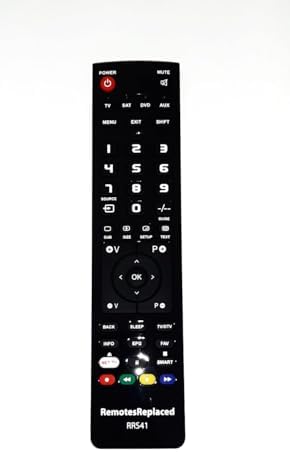
Figure 3.1: Front view of the remote control, displaying the layout of all functional buttons.

Figure 3.2: Side view of the remote control, illustrating its profile and button placement.

Figure 3.3: Top view of the remote control, showing the infrared emitter at the front.
3.1 Basic Functions
- POWER (Red Button): Turns the FUNAI DPVR-7530D DVD player on or off.
- MUTE: Mutes or restores the audio output.
- TV/SAT/DVD/AUX: Selects the input source on your television or audio system. Use DVD for controlling the FUNAI DPVR-7530D.
- Number Buttons (0-9): Used for direct channel selection or inputting numerical values.
- VOL +/-: Adjusts the volume level.
- CH +/- (P +/-): Changes the channel or navigates through menus.
- OK (Enter): Confirms a selection or enters a menu option.
- Directional Arrows (Up, Down, Left, Right): Navigates through menus and options.
3.2 Playback and Menu Functions
- MENU: Accesses the main menu of the DVD player.
- EXIT: Exits the current menu or function.
- GUIDE: Displays the electronic program guide (if supported by the connected TV/system).
- SETUP: Accesses the system setup menu.
- TEXT: Toggles teletext display (if available).
- BACK: Returns to the previous screen or menu.
- INFO: Displays information about the current program or disc.
- EPG: Electronic Program Guide.
- FAV: Accesses favorite channels or settings.
- SLEEP: Sets a sleep timer.
- TV/DTV: Switches between TV and Digital TV modes.
- NET TV / SMART: Accesses network or smart features (if supported by the connected device).
- Playback Controls (Play, Pause, Stop, Rewind, Fast Forward, Previous, Next): Controls DVD playback.
- Colored Buttons (Red, Green, Yellow, Blue): These buttons typically correspond to on-screen prompts in menus or interactive features.
4. Maintenance
4.1 Cleaning the Remote Control
To maintain the remote control's appearance and functionality:
- Wipe the surface with a soft, dry cloth.
- For stubborn dirt, lightly dampen the cloth with water or a mild, non-abrasive cleaner.
- Avoid using harsh chemicals, solvents, or abrasive cleaning pads, as these can damage the remote's finish or internal components.
4.2 Battery Replacement
Replace the batteries when the remote control's response becomes sluggish or stops functioning. Always replace both batteries at the same time with new AAA batteries. Do not mix old and new batteries, or different types of batteries.
5. Troubleshooting
If you experience issues with your remote control, refer to the following common problems and solutions:
| Problem | Possible Cause | Solution |
|---|---|---|
| Remote control does not work. |
|
|
| Buttons are unresponsive or sticky. |
|
|
| Remote controls other devices unintentionally. |
|
|
6. Specifications
| Brand | RemotesReplaced |
| Model Number | DPVR-7530D |
| Compatible Device | FUNAI DPVR-7530D DVD Player |
| Power Source | 2 x AAA Batteries |
| Maximum Range | 10 Meters |
| Item Weight | 120 Grams |
| Manufacturer | Linkwebb |
7. Warranty and Support
7.1 Warranty Information
This RemotesReplaced compatible remote control comes with a 1-year warranty from the date of purchase. This warranty covers manufacturing defects and ensures the remote control functions as intended. Please retain your proof of purchase for warranty claims.
7.2 Customer Support
For any questions, technical assistance, or warranty claims, please contact your retailer or the RemotesReplaced customer service. Refer to the packaging or your purchase documentation for specific contact details.
Ask a question about this manual
Ask about setup, troubleshooting, compatibility, parts, safety, or missing instructions. Manuals+ will review the question and use this page’s manual context to help answer it.