
1. Introduction
This manual provides instructions for the setup, operation, and maintenance of your SINGER MX231 Sewing Machine and its accompanying Universal Hard Carrying Case. The SINGER MX231 is designed for a wide range of sewing projects, from basic mending to creative crafts, offering 97 stitch applications including basic, decorative, and stretch stitches. Its lightweight and portable design, along with user-friendly features, make it suitable for both beginners and experienced sewers.

Figure 1: SINGER MX231 Sewing Machine, a versatile tool for various sewing tasks.
2. Setup
2.1 Unpacking and Placement
Carefully remove the sewing machine and all accessories from the packaging. Place the machine on a stable, flat surface with adequate lighting. Ensure there is enough space for fabric movement.
2.2 Connecting Power and Foot Pedal
- Insert the power cord into the machine's power socket.
- Plug the foot pedal into its designated port on the machine.
- Connect the power cord to a suitable electrical outlet.
- Turn on the machine using the power switch, usually located on the side. The built-in LED light will illuminate the sewing area.
2.3 Threading the Machine
Proper threading is crucial for optimal stitch quality. Follow the numbered guides on the machine for the upper thread path. For the bobbin, wind it first, then insert it into the bobbin case.

Figure 2: Side view of the SINGER MX231, illustrating the upper threading path and needle area.
2.4 Using the Automatic Needle Threader
The built-in needle threader simplifies threading the needle. Follow the machine's instructions for engaging the threader and guiding the thread through the needle eye.
3. Operating Instructions
3.1 Stitch Selection
The SINGER MX231 offers 97 stitch applications. Use the stitch selector dial to choose your desired stitch pattern. Refer to the stitch chart on the machine for available options.

Figure 3: Close-up of the SINGER MX231 showing the stitch selector dial with various stitch patterns.
3.2 Adjusting Stitch Length and Width
Customize your stitches by adjusting the stitch length and width dials. Experiment with different settings on scrap fabric to achieve the desired look for your project.
3.3 One-Step Buttonhole
The machine features a convenient one-step buttonhole function. Attach the buttonhole foot and follow the specific instructions in the detailed manual for consistent buttonholes.
3.4 Adjustable Presser Foot Pressure
Adjust the presser foot pressure to accommodate various fabric thicknesses, from very heavy to very fine, ensuring smooth feeding and consistent stitching.
3.5 Free Arm Sewing
Remove the accessory storage compartment to convert the machine into a free arm. This feature is ideal for sewing cuffs, sleeves, pant hems, and other small, circular projects.

Figure 4: A person operating the SINGER MX231 Sewing Machine, demonstrating its ease of use for various projects.
4. Included Accessories
The SINGER MX231 comes with a comprehensive accessory kit to support your sewing needs:
- General Purpose Foot
- Buttonhole Foot
- Button Sewing Foot
- Edge/Quilting Guide
- Screwdriver
- Seam Ripper / Lint Brush
- Pack of Needles
- Bobbins (Class 15 transparent)
- Thread Spool Cap
- Darning Plate
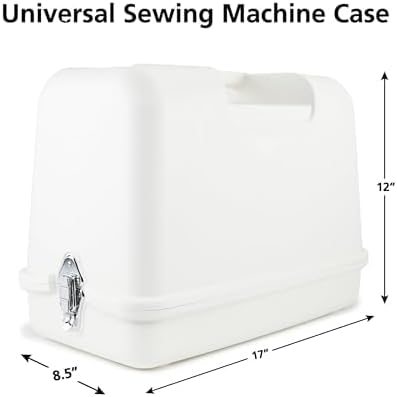
Figure 5: The accessory kit for the SINGER MX231, including various feet, needles, and tools.
5. SINGER Universal Hard Carrying Case
The SINGER Universal Hard Carrying Case provides sturdy protection and convenient portability for your sewing machine. It accommodates most free-arm portable sewing machines, including the MX231.
5.1 Case Features
- Impact Resistant Storage: Provides rigid support and protection for the machine.
- Non-Slip Inner Tray: Offers extra protection on all sides.
- Handle for Easy Transport: Comfortable and sturdy handle built into the lid for durability and portability.
- Safety Lock Clasps: Securely holds the case closed.
5.2 Case Dimensions
- Inside Dimensions: 18" x 9" x 12.5" (51 x 28 x 37cm)
- Outside Dimensions: 20.5" x 11.8" x 14.8" (52 x 30 x 38cm)
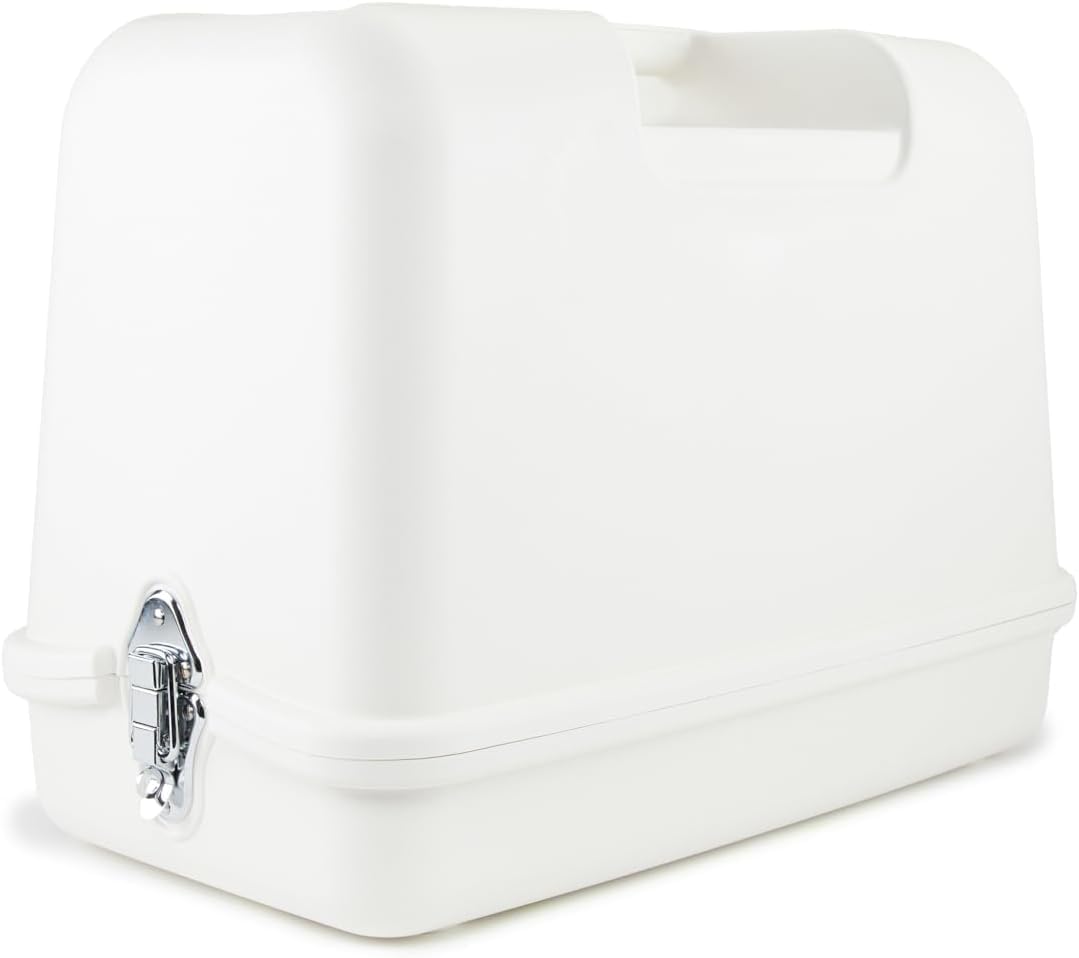
Figure 6: The SINGER Universal Hard Carrying Case, designed for protecting and transporting your sewing machine.

Figure 7: A person demonstrating the portability of the SINGER MX231 in its Universal Hard Carrying Case.
6. Maintenance
Regular maintenance ensures the longevity and optimal performance of your sewing machine.
- Cleaning: Regularly remove lint and dust from the bobbin area, feed dogs, and tension discs using the provided lint brush.
- Needle Replacement: Replace needles frequently, especially when working with new projects or if the needle shows signs of dullness or bending.
- Oiling: Refer to the detailed product manual for specific oiling instructions, if applicable.
7. Troubleshooting
If you encounter issues with your sewing machine, consider the following common troubleshooting steps:
- Skipped Stitches: Check if the needle is inserted correctly, if it's the right type for your fabric, and if it's bent or dull. Re-thread the machine completely.
- Thread Breaking: Ensure the machine is threaded correctly, the tension is appropriate for your thread and fabric, and the thread is not old or damaged.
- Fabric Jamming: Verify that the presser foot is down and the feed dogs are engaged. Ensure proper needle and thread combination for the fabric.
For more detailed troubleshooting, consult the full product manual or the SINGER support website.
8. Specifications
| Feature | Detail |
|---|---|
| Brand | SINGER |
| Model Number | MX231 |
| Material | Metal |
| Product Dimensions (L x W x H) | 16.97" x 8.86" x 13.39" |
| Weight | 11.79 pounds |
| Power Source | Corded Electric |
| Stitch Applications | 97 |
| Buttonhole Type | One-step |
| Needle Threader | Built-in Automatic |
9. Warranty Information
The SINGER MX231 Sewing Machine comes with a limited warranty:
- 90-Day Warranty: For electrical components.
- 2-Year Warranty: For mechanical components.
- 25-Year Warranty: For the sewing machine head.
Please retain your proof of purchase for warranty claims. For full details, refer to the warranty card included with your product or visit the official SINGER website.
10. Support
For additional assistance, detailed instructions, or to access online resources, please visit the official SINGER website or contact SINGER customer support.
This manual is intended for informational purposes only. SINGER reserves the right to make changes to product specifications without prior notice.