
1. Introduction
Thank you for choosing the Darkglass Exponent 500 Bass Amplifier Head. This manual provides essential information for the safe and efficient operation of your amplifier. The Exponent 500 is a versatile 500-watt bass amplifier head featuring advanced digital signal processing, audio interface functionality, full MIDI control, an effects loop, and Bluetooth connectivity. Please read this manual thoroughly before using the device to ensure proper setup and optimal performance.
2. Important Safety Instructions
- Power Source: Connect the unit only to the specified power supply voltage indicated on the rear panel. Ensure the voltage selector switch is set correctly for your region (100-120 VAC or 200-240 VAC).
- Ventilation: Do not block any ventilation openings. Ensure adequate airflow around the unit to prevent overheating.
- Water and Moisture: Do not expose this apparatus to rain or moisture. Do not place objects filled with liquids, such as vases, on the apparatus.
- Heat: Do not place near any heat sources such as radiators, heat registers, stoves, or other apparatus (including amplifiers) that produce heat.
- Grounding: This apparatus must be grounded. Use only a power cord with a grounding-type plug.
- Servicing: Do not attempt to service this product yourself. Refer all servicing to qualified service personnel. Opening the unit may expose you to dangerous voltages or other hazards.
- Cables: Protect the power cord from being walked on or pinched, particularly at plugs, convenience receptacles, and the point where they exit from the apparatus.
- Cleaning: Unplug this apparatus during lightning storms or when unused for long periods of time. Clean only with a dry cloth.
3. Product Overview
3.1 Front Panel Controls

Figure 1: Front view of the Darkglass Exponent 500 Bass Amplifier Head, showing the input jack, various control knobs (labeled 'a' through 'e'), and master volume, along with five preset buttons and other indicators.
- Input: 1/4" instrument input jack.
- Input Gain Knob: Adjusts the input sensitivity.
- Knobs 'a' through 'e': These controls are context-sensitive and adjust parameters of the selected preamp or effect module. Their specific functions are displayed on the unit's screen or controlled via software.
- Master Volume Knob: Controls the overall output volume of the amplifier.
- Preset Buttons (1-5): Selects different user-defined presets or effect configurations.
- Infinity Icon Button: Likely related to loop or continuous play functions.
- Speaker Icon Button: Toggles speaker output or related settings.
- Headphone Icon Button: Activates or controls headphone output.
3.2 Rear Panel Connections
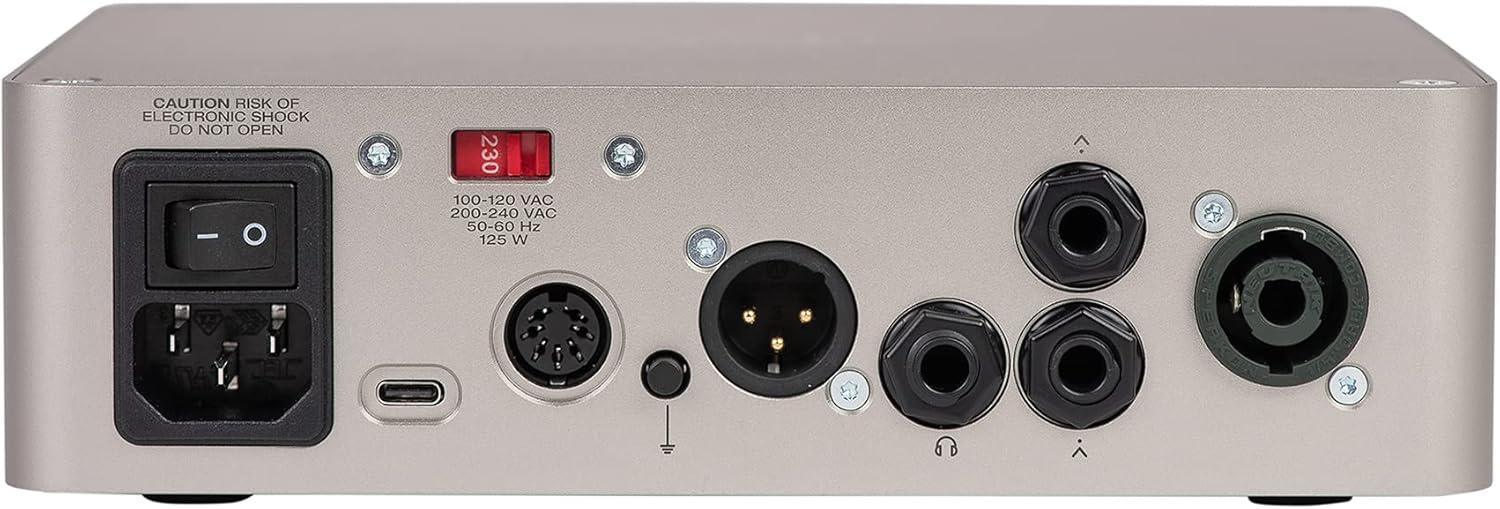
Figure 2: Rear view of the Darkglass Exponent 500 Bass Amplifier Head, showing the power input, power switch, voltage selector, USB-C port, MIDI input/output, XLR DI output, ground lift switch, headphone output, and two speaker outputs.
- Power Input: Standard IEC power connector for the included power cable.
- Power Switch: Turns the unit on or off.
- Voltage Selector (100-120 VAC / 200-240 VAC): Selects the appropriate operating voltage for your region. Ensure this is set correctly before powering on.
- USB-C Port: Connects to a computer for audio interface functionality, firmware updates, and software control.
- MIDI In/Out: 5-pin DIN connectors for MIDI control and integration with other MIDI devices.
- XLR DI Output: Balanced direct output for connecting to mixing consoles or recording interfaces.
- Ground Lift Switch: Helps eliminate hum or ground loop noise when using the XLR DI output.
- Headphone Output: 3.5mm jack for connecting headphones.
- Speaker Outputs: Two 1/4" speaker jacks for connecting to bass cabinets.
4. Setup Guide
4.1 Initial Power Connection
- Verify Voltage: Before connecting the power cable, ensure the voltage selector switch on the rear panel is set to the correct voltage for your region (100-120 VAC or 200-240 VAC). Incorrect voltage selection can damage the unit.
- Connect Power: Plug the supplied IEC power cable into the power input on the rear panel and then into a grounded AC outlet.
- Power Off: Ensure the power switch on the rear panel is in the OFF position before making any other connections.
4.2 Connecting Your Instrument and Speakers
- Instrument Input: Connect your bass guitar to the 1/4" INPUT jack on the front panel using a high-quality instrument cable.
- Speaker Connection: Connect your bass cabinet(s) to the 1/4" SPEAKER OUTPUTS on the rear panel. Ensure your cabinet's impedance matches the amplifier's requirements (typically 4 or 8 ohms). Do not connect to speaker outputs while the amplifier is powered on.
4.3 Computer and MIDI Connections
- USB-C: For audio interface functionality, firmware updates, and software control, connect a USB-C cable from the Exponent 500's USB-C port to your computer.
- MIDI: Use standard 5-pin MIDI cables to connect the MIDI IN/OUT ports to external MIDI controllers or interfaces for advanced control.
4.4 Bluetooth Pairing
The Exponent 500 supports Bluetooth for audio streaming or control. Refer to the Darkglass Suite software or the unit's display for specific pairing instructions. Typically, you will activate Bluetooth on the amplifier, then search for "Darkglass Exponent 500" on your Bluetooth-enabled device and pair.
5. Operating Instructions
5.1 Powering On and Off
- Power On: After all connections are made, ensure the Master Volume knob is set to minimum. Flip the power switch on the rear panel to the ON position.
- Power Off: Turn the Master Volume knob to minimum, then flip the power switch on the rear panel to the OFF position.
5.2 Basic Sound Adjustment
- Input Gain: Adjust the Input Gain knob to achieve a strong signal without clipping. The unit may have an indicator for optimal input level.
- Master Volume: Slowly increase the Master Volume knob to reach your desired listening level.
- Tone Shaping (Knobs 'a' through 'e'): These knobs control various parameters depending on the selected preset or module. Use the Darkglass Suite software for detailed configuration and understanding of their current function.
5.3 Using Presets
The five preset buttons (1-5) on the front panel allow for quick recall of different sound configurations. Press a button to activate the corresponding preset. Presets can be customized and saved using the Darkglass Suite software.
5.4 Audio Interface Functionality
When connected to a computer via USB-C, the Exponent 500 functions as an audio interface. This allows you to record your bass directly to a Digital Audio Workstation (DAW) or use the amplifier for playback from your computer. Ensure the necessary drivers (if any) are installed and select the Exponent 500 as your audio input/output device in your computer's sound settings or DAW.
5.5 Effects Loop
The effects loop allows you to integrate external effects pedals or processors into your signal chain. Connect the SEND of the Exponent 500 to the input of your effects unit, and the output of your effects unit to the RETURN of the Exponent 500. This places the external effects after the preamp section but before the power amp.
6. Maintenance
- Cleaning: Clean the exterior of the amplifier with a soft, dry cloth. Do not use abrasive cleaners, solvents, or waxes.
- Storage: When not in use for extended periods, store the amplifier in a dry, cool environment, away from direct sunlight and extreme temperatures.
- Ventilation: Regularly check that the ventilation openings are clear of dust and debris to ensure proper cooling.
7. Troubleshooting
| Problem | Possible Cause | Solution |
|---|---|---|
| No power | Power cable disconnected, power switch off, incorrect voltage selection, blown fuse. | Check power cable connections. Ensure power switch is ON. Verify voltage selector setting. If fuse is suspected, consult qualified service personnel. |
| No sound output | Master volume low, instrument cable faulty, speaker cable faulty, speaker cabinet disconnected, incorrect preset selected, effects loop issue. | Increase Master Volume. Check all cable connections. Test with different cables/speakers. Ensure a valid preset is active. Bypass effects loop to check if it's the source of the problem. |
| Hum or noise | Ground loop, faulty cables, interference from other electronics. | Engage the Ground Lift switch on the rear panel. Try different cables. Move amplifier away from other electronic devices. |
| Controls unresponsive | Software glitch, unit frozen. | Power cycle the unit. If issues persist, connect to computer via USB-C and check for firmware updates using Darkglass Suite software. |
If you encounter problems not listed here or if the suggested solutions do not resolve the issue, please contact Darkglass Electronics customer support.
8. Specifications
| Model Name | Exponent 500 |
| Item Model Number | E500 |
| Brand | Darkglass Electronics |
| Output Wattage | 500 Watts |
| Item Weight | 5.07 pounds (approx. 2.3 kg) |
| Package Dimensions | 10.51 x 9.88 x 3.03 inches (approx. 26.7 x 25.1 x 7.7 cm) |
| Color | Silver |
| Power Source | Corded Electric |
| Connector Types | XLR, 3.5mm Jack, 6.35mm Jack (1/4") |
| Number of Bands | 3 (referring to EQ bands, though the product description implies more complex tone shaping) |
| Features | 500-watt Bass Amplifier Head, Effects, Audio Interface Functionality, Full MIDI control, Effects Loop, Bluetooth |
9. Warranty and Support
For information regarding warranty coverage, technical support, or service, please visit the official Darkglass Electronics website or contact their customer support directly. Keep your proof of purchase for warranty claims.
Darkglass Electronics Official Website: www.darkglass.com


