
Introduction
This manual provides detailed instructions for the setup, operation, and maintenance of your RemotesReplaced RRS41 replacement remote control. This remote is specifically designed to be compatible with the BEKO B19-T5-CK1W television model, offering all the functionalities of the original remote without requiring any complex setup codes.
Product Overview
The RemotesReplaced RRS41 is a dedicated replacement remote control. It operates using infrared technology and is pre-programmed for immediate use with your compatible BEKO B19-T5-CK1W television.
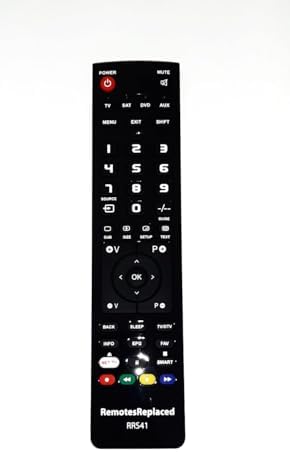
Image 1: Front view of the RemotesReplaced RRS41 remote control, showing all buttons and the brand logo at the bottom.

Image 2: Close-up view of the RemotesReplaced RRS41 remote control, highlighting the button layout for power, mute, channel, volume, and navigation controls.

Image 3: Top view of the RemotesReplaced RRS41 remote control, illustrating the infrared (IR) emitter at the front, which sends signals to the television.
Setup
To begin using your RemotesReplaced RRS41 remote control, follow these simple steps:
- Battery Installation:
Locate the battery compartment on the back of the remote control. Slide the battery cover downwards to open it.

Image 4: Back view of the RemotesReplaced RRS41 remote control, clearly showing the battery compartment cover.
Insert two (2) AAA batteries, ensuring the positive (+) and negative (-) terminals align correctly with the markings inside the compartment.
Close the battery cover by sliding it back into place until it clicks securely.
- Initial Use:
No configuration codes are required. The remote is pre-programmed for the BEKO B19-T5-CK1W. Simply point the remote towards your television and press the POWER button to turn on your TV.
Operating Instructions
The RemotesReplaced RRS41 remote control provides full functionality for your BEKO B19-T5-CK1W television. Below is a general guide to its primary functions:
- Power Button (POWER): Turns the television on or off.
- Mute Button (MUTE): Mutes or unmutes the television audio.
- Number Buttons (0-9): Directly select channels.
- Channel Up/Down (CH+/CH-): Changes the television channel sequentially.
- Volume Up/Down (VOL+/VOL-): Adjusts the television volume.
- Navigation Pad (Arrow Buttons & OK): Used to navigate menus and confirm selections.
- Menu Button (MENU): Accesses the television's main menu.
- Exit Button (EXIT): Exits the current menu or function.
- Source/Input Button (SOURCE): Selects input sources (e.g., HDMI, AV).
- Smart/Net TV Buttons: Accesses smart TV features or streaming applications, if supported by your television model.
Maintenance
To ensure the longevity and optimal performance of your remote control, please observe the following maintenance guidelines:
- Cleaning: Wipe the remote control with a soft, dry cloth. Avoid using liquid cleaners or abrasive materials, as these can damage the remote's surface or internal components.
- Battery Replacement: Replace batteries when the remote's response becomes sluggish or stops working. Always replace both batteries simultaneously with new AAA batteries. Do not mix old and new batteries, or different types of batteries.
- Storage: Store the remote in a dry place, away from direct sunlight, extreme temperatures, and high humidity.
- Disposal: Dispose of used batteries according to local regulations. Do not dispose of batteries in general household waste.
Troubleshooting
If you encounter issues with your remote control, refer to the following common problems and solutions:
| Problem | Possible Cause / Solution |
|---|---|
| Remote is not responding. |
|
| Some buttons are not working. |
|
| Remote range is reduced. |
|
Specifications
| Feature | Detail |
|---|---|
| Brand | RemotesReplaced |
| Model Number (Remote) | RRS41 |
| Compatible TV Model | BEKO B19-T5-CK1W |
| Connectivity Technology | Infrared (IR) |
| Power Source | 2 x AAA Batteries (not included) |
| Maximum Range | 10 Meters (approximately 33 feet) |
| Item Weight | 120 Grams (approximately 4.23 ounces) |
Warranty and Support
Warranty: This RemotesReplaced remote control comes with a 1-year warranty from the date of purchase, covering manufacturing defects. Please retain your proof of purchase for warranty claims.
Support: For further assistance, troubleshooting not covered in this manual, or warranty inquiries, please contact RemotesReplaced customer support through the retailer where the product was purchased.