
Introduction
This manual provides instructions for the RemotesReplaced compatible remote control designed for the AKAI ZAP26510K-L. This remote is an electronic replacement for your original remote, offering identical functionality without the need for complex setup codes. Simply insert batteries and begin use.

Figure 1: Front view of the RemotesReplaced compatible remote control.
Setup
Battery Installation
- Locate the battery compartment on the back of the remote control.
- Slide the battery cover downwards or in the direction indicated by an arrow to open it.
- Insert two (2) AAA batteries, ensuring the positive (+) and negative (-) terminals align correctly with the markings inside the compartment.
- Replace the battery cover by sliding it back into position until it clicks securely.
No programming or code entry is required. The remote is ready for use immediately after battery installation.

Figure 2: Back view of the remote control, illustrating the battery compartment location.
Operating Instructions
This remote control provides access to all functions of your AKAI ZAP26510K-L device. Point the remote directly at the device's infrared receiver and press the desired button.
Key Functions Overview
- POWER: Turns the device on or off.
- MUTE: Silences the audio output.
- TV/SAT/DVD/AUX: Selects the input source.
- Number Buttons (0-9): Direct channel selection or inputting numerical values.
- MENU: Accesses the device's main menu.
- EXIT: Exits the current menu or function.
- SHIFT: Provides access to secondary functions of certain buttons.
- SOURCE: Cycles through available input sources.
- GUIDE/EPG: Displays the electronic program guide.
- Volume (+/-): Adjusts the volume level.
- Channel (P+/P-): Changes channels up or down.
- Navigation (Up/Down/Left/Right) & OK: Navigates menus and confirms selections.
- BACK: Returns to the previous screen or menu.
- INFO: Displays information about the current program or content.
- SLEEP: Sets a sleep timer for the device.
- FAV: Accesses favorite channels or content.
- NET TV/SMART: Accesses smart TV features or streaming services.
- Color Buttons (Red, Green, Yellow, Blue): Used for specific functions within menus or applications.
- Playback Controls (Play, Pause, Stop, Rewind, Fast Forward): Controls media playback.

Figure 3: Detailed view of the remote control buttons and their labels.
Maintenance
Cleaning
To clean the remote control, use a soft, dry cloth. For stubborn dirt, lightly dampen the cloth with water or a mild, non-abrasive cleaner. Avoid using harsh chemicals or abrasive materials, as these can damage the remote's surface or internal components.
Battery Care
- Replace batteries when the remote's response becomes sluggish or stops working.
- Always replace both batteries at the same time with new ones of the same type (AAA).
- If the remote will not be used for an extended period, remove the batteries to prevent leakage and potential damage.
Troubleshooting
- Remote not responding:
- Check if the batteries are inserted correctly with the correct polarity.
- Replace old batteries with new ones.
- Ensure there is a clear line of sight between the remote control and the device's infrared receiver. Obstructions can block the signal.
- Confirm the remote is pointed directly at the device.
- Specific buttons not working:
- Ensure you are pressing the correct button for the desired function.
- If the remote has mode buttons (e.g., TV, DVD), ensure the correct mode is selected for the device you are trying to control.
Specifications
| Feature | Specification |
|---|---|
| Brand | RemotesReplaced |
| Model Number | ZAP26510K-L |
| Compatible With | AKAI ZAP26510K-L |
| Batteries Required | 2 x AAA (not included) |
| Number of Buttons | 10 (as per product specifications, though visual inspection shows more) |
| Item Weight | 120 Grams |
Warranty and Support
This RemotesReplaced compatible remote control comes with a 1-year warranty. For warranty claims or technical support, please refer to your purchase documentation or contact RemotesReplaced directly through their official channels.
Recycling Information
Please dispose of this product and its packaging responsibly. Refer to the recycling information provided on the packaging for guidance on proper disposal of materials such as bubble wrap (LDPE 4 plastic) and paper (PAP 22). Always check with your local municipality for specific recycling guidelines in your area.
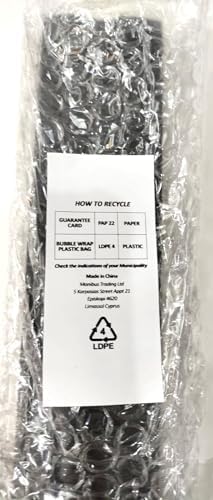
Figure 4: Product packaging displaying recycling information.