
1. Introduction
This document provides detailed instructions for the use and maintenance of your RemotesReplaced compatible remote control, designed specifically for the AKAI AKTV2012 television model. This remote offers full functionality, replicating the original remote's features without the need for complex programming.
2. Setup
2.1 Battery Installation
The remote control requires two AAA batteries (not included). Follow these steps to install them:
- Locate the battery compartment on the back of the remote control.
- Slide the battery compartment cover downwards or outwards to open it.
- Insert two AAA batteries, ensuring the positive (+) and negative (-) terminals align correctly with the markings inside the compartment.
- Replace the battery compartment cover by sliding it back into position until it clicks securely.

Image: Bottom view of the remote control, highlighting the battery compartment cover for easy access during battery installation.
2.2 Initial Use
No setup codes or programming are required. Once batteries are installed, the remote control is ready for immediate use with your AKAI AKTV2012 television.
3. Operating Instructions
This remote control provides access to all standard functions of your AKAI AKTV2012 TV. Below is a general overview of common buttons and their functions.
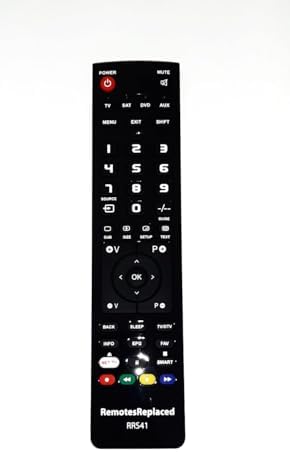
Image: Front view of the remote control, displaying the layout of all functional buttons.
- POWER: Turns the television on or off.
- MUTE: Mutes or unmutes the television audio.
- Number Buttons (0-9): Directly select channels or input numerical values.
- VOL +/-: Adjusts the volume level.
- CH +/-: Changes the television channel.
- MENU: Accesses the television's main menu.
- SOURCE / INPUT: Cycles through available input sources (HDMI, AV, etc.).
- Navigation Buttons (Up, Down, Left, Right, OK): Used to navigate menus and confirm selections.
- BACK / EXIT: Returns to the previous screen or exits the current menu.
- SMART / NET TV: Accesses smart TV features or streaming applications (if supported by your TV model).
- Color Buttons (Red, Green, Yellow, Blue): Functionality varies depending on the TV menu or application.
4. Maintenance
4.1 Cleaning
To clean the remote control, use a soft, dry cloth. For stubborn dirt, lightly dampen the cloth with water or a mild, non-abrasive cleaner. Avoid using harsh chemicals or abrasive materials, as these can damage the remote's surface or internal components.
4.2 Battery Care
If the remote control will not be used for an extended period, remove the batteries to prevent leakage, which can damage the device. Replace batteries when the remote's responsiveness decreases.
5. Troubleshooting
If you encounter issues with your remote control, please refer to the following common problems and solutions:
| Problem | Solution |
|---|---|
| Remote is not responding. | Check if the batteries are inserted correctly with the correct polarity. Replace old batteries with new ones. Ensure there are no obstructions between the remote and the TV's IR receiver. |
| Some buttons are not working. | This could indicate low battery power; try replacing the batteries. Ensure the remote is pointed directly at the TV. If the issue persists, the button may be physically stuck or damaged. |
| Remote range is reduced. | Replace the batteries. Ensure the remote's IR emitter (at the top) is clean and unobstructed. Reduce the distance between the remote and the TV. |
6. Specifications
| Feature | Detail |
|---|---|
| Brand | RemotesReplaced |
| Model Number | AKTV2012 |
| Compatible With | AKAI AKTV2012 Television |
| Battery Type | 2 x AAA (not included) |
| Weight | Approximately 120 Grams |
7. Warranty and Support
7.1 Warranty Information
This RemotesReplaced compatible remote control comes with a 1-year warranty, covering manufacturing defects and ensuring reliable performance. Please retain your proof of purchase for warranty claims.
7.2 Customer Support
For further assistance or inquiries, please refer to the contact information provided by your retailer or the RemotesReplaced official website.