
WHILL Fi
WHILL Model F Power Chair User Manual
Model: Fi
1. Introduction
Welcome to the WHILL Model F Power Chair User Manual. This guide provides essential information for the safe and effective use, maintenance, and troubleshooting of your new WHILL Model F. Please read this manual thoroughly before operating the device.
The WHILL Model F is a revolutionary foldable power chair designed for convenience, performance, and smart technology integration. It offers enhanced mobility for adults and elderly users, featuring a lightweight design, remote control capabilities via a dedicated app, and excellent maneuverability for both indoor and outdoor environments.
2. Safety Information
Your safety is paramount. Adhere to all safety guidelines to prevent injury or damage to the device.
- Maximum Weight Capacity: Do not exceed the maximum user weight of 250 lbs (113 kg).
- Remote Lock: Always engage the remote lock feature when the chair is not in use to prevent unintended movement.
- Air Travel: If traveling by air, consult with your airline regarding their specific policies for mobility devices and batteries. Follow all safety guidelines for air travel, including battery removal and proper storage as instructed by the airline and WHILL.
- Obstacle Clearance: The Model F can climb obstacles up to 1.4 inches (3.5 cm) high. Do not attempt to climb higher obstacles.
- Environmental Use: Designed for both indoor and outdoor use on hard floors and carpets. Avoid extreme temperatures or wet conditions.
3. Product Overview
The WHILL Model F combines innovative design with practical features for enhanced mobility.
Key Features:
- Foldable & Lightweight: Folds in less than 3 seconds and weighs less than 53 lbs (24 kg) when the battery is removed, making it highly portable.
- High Performance: Offers a 12.4-mile (20 km) range per charge with its Lithium-ion battery, a 250 lb (113 kg) user weight capacity, and a top speed of 3.7 mph (6 km/h).
- Remote Control: Utilize the WHILL app to remotely drive and control the Model F.
- Powerful & Maneuverable: Equipped with two powerful motors, it can climb over obstacles up to 1.4 inches (3.5 cm) high. Its 30.7-inch (78 cm) turning radius allows for easy navigation in narrow spaces.
- Adjustable: Controller and armrest height, controller side (right or left), arm height, and arm width (18–20 inches / 45.7–50.8 cm between armrests) are all adjustable for personalized comfort.

Figure 3.1: WHILL Model F Power Chair (Unfolded)
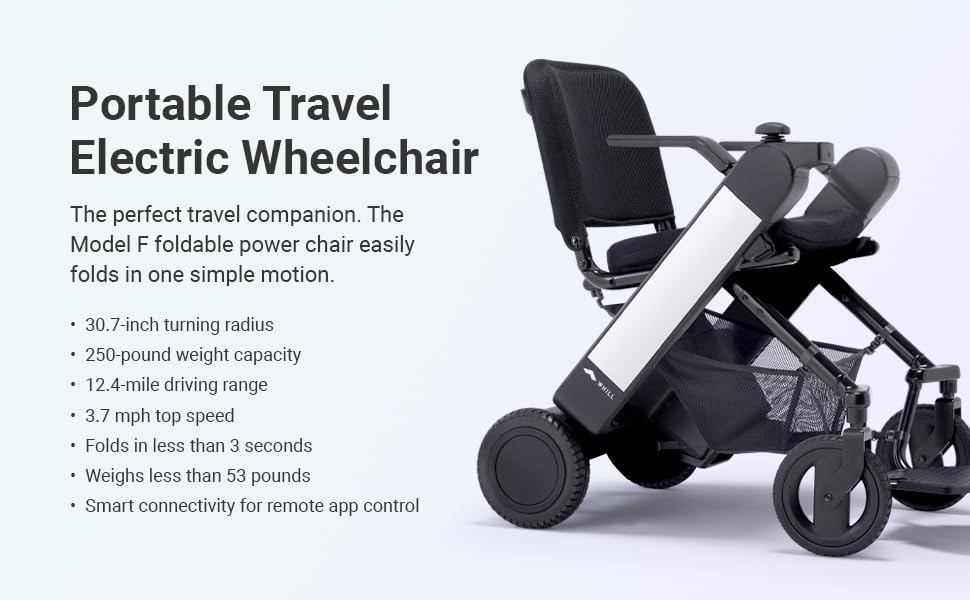
Figure 3.2: Portable Travel Electric Wheelchair Features
4. Setup
4.1 Unpacking
Carefully remove all components from the packaging. Ensure all included components are present: the chair, WHILL app (download required), remote control, and user manual.
4.2 Battery Installation & Initial Charge
- Locate the battery compartment, typically under the seat or at the rear of the chair.
- Insert the Lithium-ion battery securely until it clicks into place.
- Connect the charger to the charging port on the chair and then to a standard electrical outlet.
- Allow the battery to fully charge before first use. The charging indicator will show completion.
4.3 Unfolding the Chair
The WHILL Model F is designed for easy unfolding. Follow these steps:
- Place the folded chair on a flat, stable surface.
- Grasp the designated handle or frame part.
- Gently pull upwards and outwards until the chair locks into its open position. Ensure all locking mechanisms are engaged.

Figure 4.1: Unfolding the WHILL Model F
4.4 Adjustments
Customize your chair for optimal comfort and control:
- Armrest Height: Adjust the armrests to your preferred height using the release levers.
- Controller Side: The controller can be mounted on either the right or left side of the chair. Consult the quick start guide for specific instructions on switching sides.
- Arm Width: Adjust the width between the armrests (18-20 inches) to suit your body frame.
5. Operating the WHILL Model F
5.1 Powering On/Off
To power on the chair, press and hold the power button on the controller until the indicator lights illuminate. To power off, press and hold the power button again until the lights turn off.
5.2 Driving Controls
The WHILL Model F is controlled via a joystick. Push the joystick in the desired direction to move. The further you push, the faster the chair will move, up to its maximum speed of 3.7 mph.
- Forward/Backward: Push the joystick forward or backward.
- Turning: Push the joystick left or right to turn. The chair has a tight turning radius of 30.7 inches for excellent maneuverability.
- Stopping: Release the joystick to its neutral position to engage the electromagnetic brakes and stop the chair.
5.3 Folding/Unfolding Procedure
The Model F features a quick-fold mechanism for easy transport and storage.
- To Fold: Locate the lock release button (Figure 5.1). Press the button and gently push the backrest forward until the chair folds into its compact form. Ensure the chair is powered off before folding.
- To Unfold: Refer to Section 4.3.
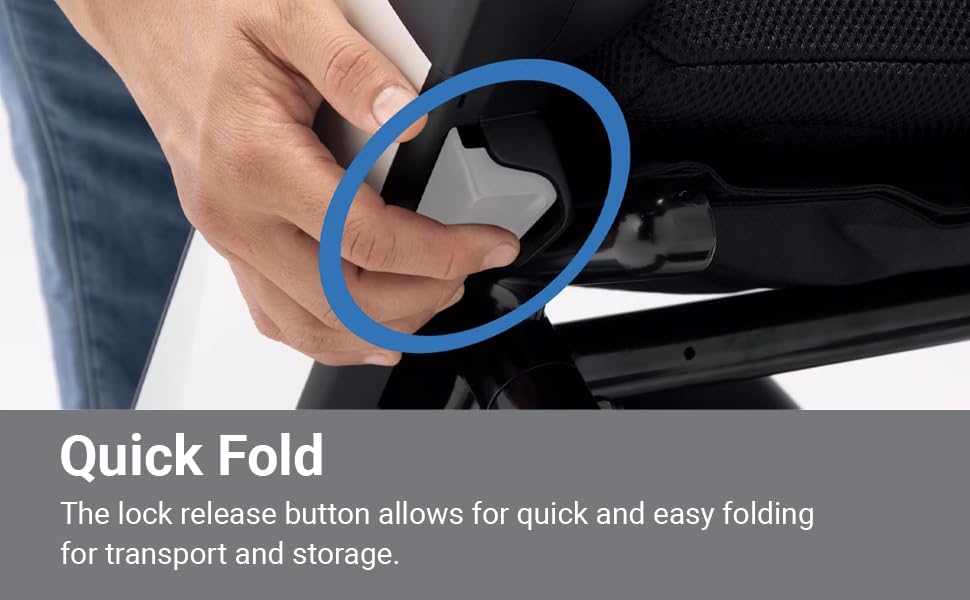
Figure 5.1: Quick Fold Lock Release Button
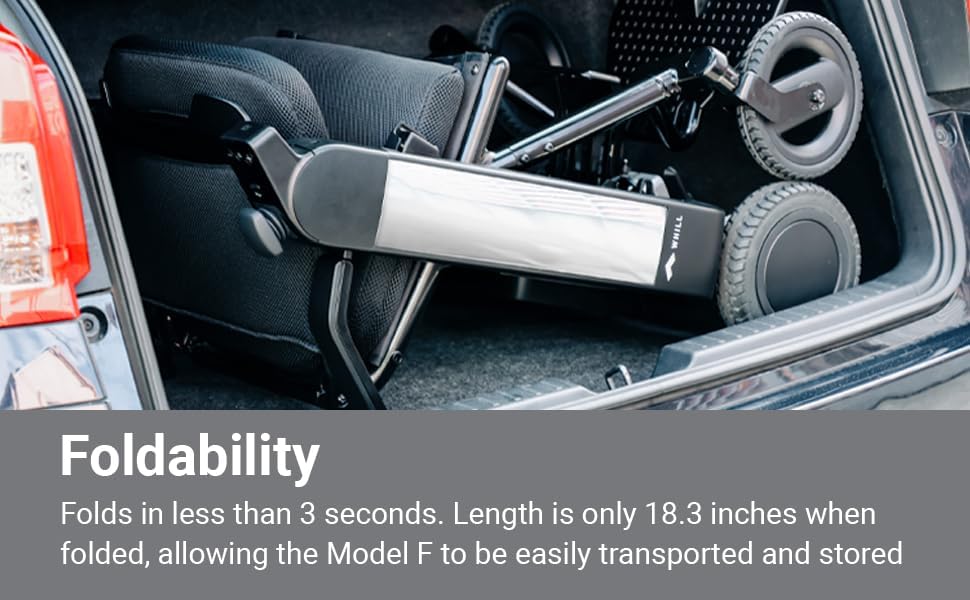
Figure 5.2: Folded Chair in Car Trunk

Figure 5.3: Compact Storage
5.4 Using the WHILL App
The WHILL app allows for remote control and monitoring of your Model F. Download the app from your device's app store.
- Pairing: Follow the in-app instructions to pair your smartphone with the Model F via Bluetooth.
- Remote Driving: Use the app interface to remotely drive the chair, useful for parking or retrieving it from a distance.
- Status Monitoring: View battery level, mileage, and other diagnostic information.
- Lock/Unlock: Remotely lock or unlock the chair for added security.
6. Maintenance
Regular maintenance ensures the longevity and optimal performance of your WHILL Model F.
- Cleaning: Clean the chair with a damp cloth. Avoid using abrasive cleaners or excessive water.
- Battery Care: Charge the battery as instructed in the manual. Do not allow the battery to fully discharge for extended periods. Store the battery in a cool, dry place if not in use for a long time.
- Tire Inspection: Periodically check the tires for wear and tear.
- General Inspection: Regularly inspect all moving parts, connections, and fasteners for any signs of damage or looseness. Contact customer support if you notice any issues.
7. Troubleshooting
If you encounter issues with your WHILL Model F, refer to the following common problems and solutions:
| Problem | Possible Cause | Solution |
|---|---|---|
| Chair does not power on. | Battery not installed correctly or discharged. | Ensure battery is fully inserted. Charge the battery. |
| Chair does not move. | Joystick not in neutral position; remote lock engaged; error code displayed. | Release joystick. Disengage remote lock via app or controller. Consult manual for error codes. |
| Reduced range or speed. | Low battery charge; operating on inclines; exceeding weight capacity. | Recharge battery. Avoid prolonged use on steep inclines. Ensure user weight is within limits. |
| App connectivity issues. | Bluetooth off; app not updated; chair not powered on. | Ensure Bluetooth is on. Update app. Power on chair. Re-pair if necessary. |
If the problem persists after attempting these solutions, please contact WHILL customer support.
8. Specifications
Detailed technical specifications for the WHILL Model F Power Chair.
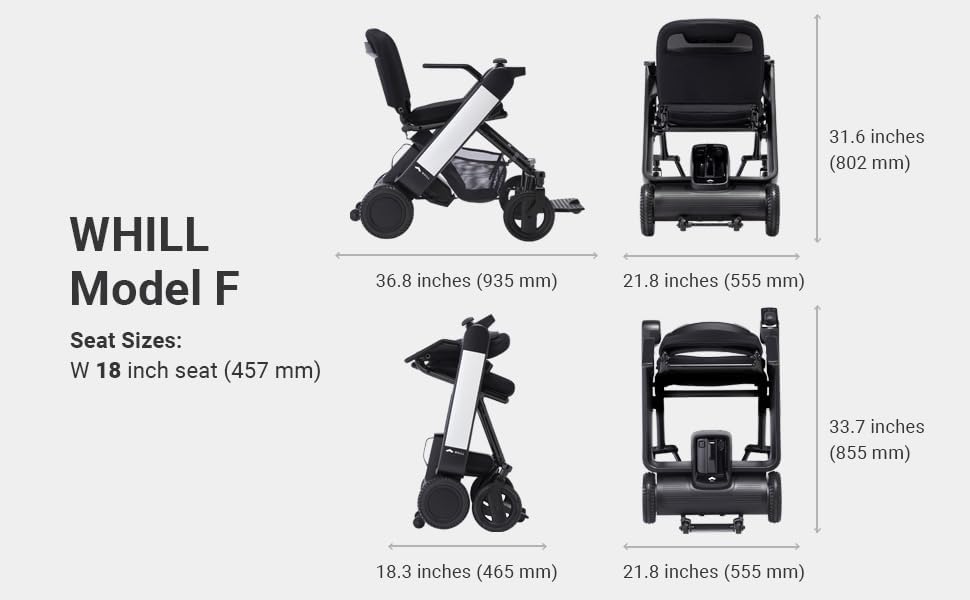
Figure 8.1: WHILL Model F Dimensions
| Specification | Value |
|---|---|
| Model Name | Model F (Fi) |
| Dimensions (Unfolded) | 36.8 x 21.9 x 31.6 inches (935 x 555 x 802 mm) |
| Dimensions (Folded) | 18.3 x 21.8 x 33.7 inches (465 x 555 x 855 mm) |
| Item Weight | 58.9 pounds (26.7 kg) |
| Weight (without battery) | Less than 53 pounds (24 kg) |
| Maximum Weight Recommendation | 250 pounds (113 kg) |
| Top Speed | 3.7 mph (6 km/h) |
| Range per Charge | 12.4 miles (20 km) |
| Turning Radius | 30.7 inches (78 cm) |
| Max Incline | 1.4 inches (3.5 cm) obstacle clearance |
| Battery Type | Lithium Ion (1 included) |
| Seat Size | 18 inch (457 mm) width |
| Foldable | Yes |
| Included Components | Chair, WHILL app, remote control, user manual |
9. Warranty and Support
For warranty information, please refer to the documentation included with your purchase or visit the official WHILL website. WHILL provides customer support for any inquiries, technical assistance, or service needs.
Contact Information: Please visit the WHILL Store on Amazon or the official WHILL website for the most up-to-date support contact details.
Related documentsFi


Ask a question about this manual
Ask about setup, troubleshooting, compatibility, parts, safety, or missing instructions. Manuals+ will review the question and use this page’s manual context to help answer it.