
Cuifati Cuifatikx6md3q5so7610
Contents
Cuifati Smart Bracelet User Manual
Model: Cuifatikx6md3q5so7610 | Brand: Cuifati
Introduction
Thank you for choosing the Cuifati Smart Bracelet. This device is designed to help you monitor your daily activities, track your health metrics, and stay connected. This manual provides essential information on how to set up, operate, and maintain your smart bracelet to ensure optimal performance and longevity.
What's in the Box
Please check the package contents to ensure all items are present:
- Smart Bracelet Host
- Charger (USB plug)
- Wristband
- User Manual
Setup
1. Charging the Device
Before first use, fully charge your smart bracelet. The device features a built-in USB plug, eliminating the need for a separate charging cable or dock. Simply plug the bracelet directly into any standard USB port (e.g., computer, USB wall adapter).
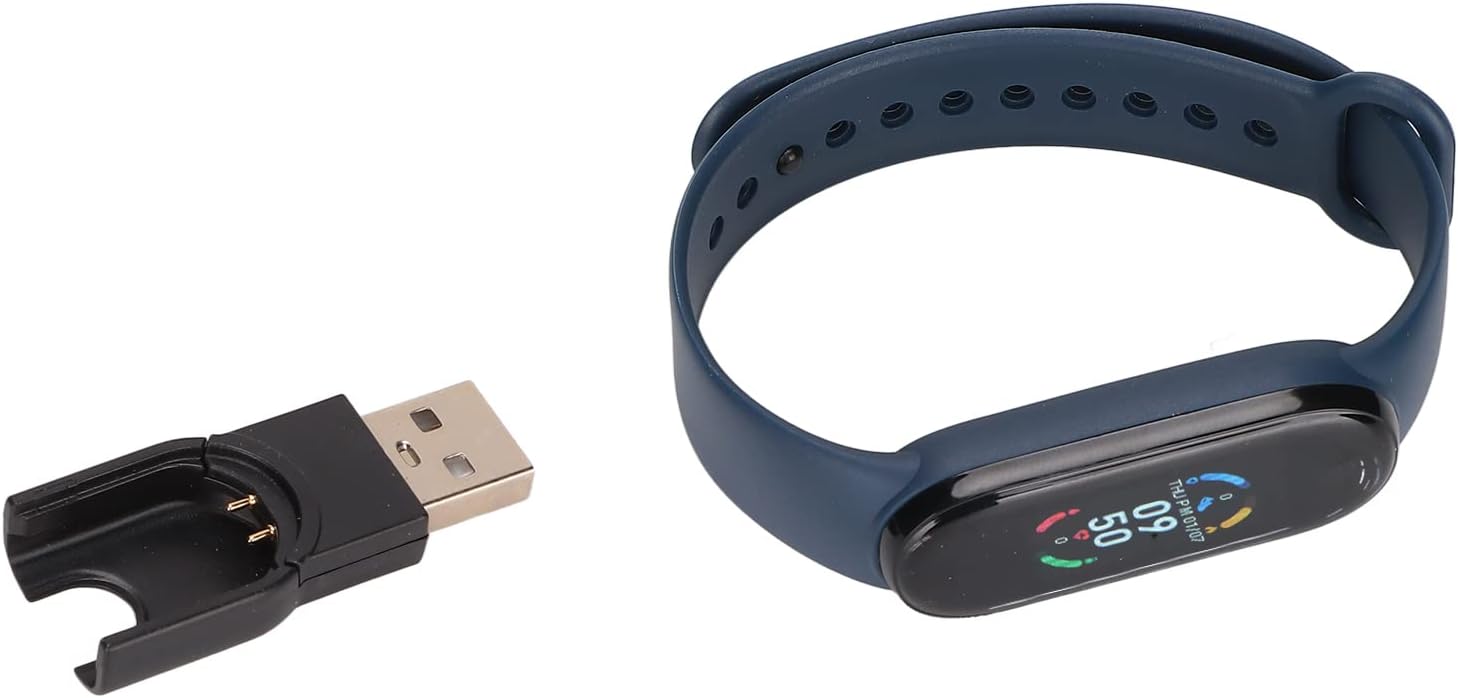
Image: The smart bracelet shown alongside its integrated USB charging plug.
A full charge typically takes 2 to 2.5 hours. A single charge can provide up to 7 days of working time.

Image: The smart bracelet display with text indicating 'Charging Time: 2-2.5H' and 'Use Time: 7 Days'.
2. App Installation and Pairing
To unlock the full functionality of your smart bracelet, you need to download and install the companion application on your smartphone. The app allows for data synchronization, settings customization, and message notifications.
- Compatibility: The app is compatible with Android Version 4.4 and above, and iOS Version 8.5 and above.
- Download: Search for the official Cuifati app in your device's app store (Google Play Store for Android, Apple App Store for iOS).
- Pairing: Once the app is installed, open it and follow the on-screen instructions to pair your smart bracelet via Bluetooth. Ensure Bluetooth is enabled on your smartphone.
Operating Instructions
1. Basic Navigation
The smart bracelet features a touch-sensitive display. Swipe left/right or tap to navigate through different functions and menus.

Image: A side view of the Cuifati Smart Bracelet, highlighting its display.
2. Activity Tracking
The smart bracelet accurately records your daily activities, including:
- Step Counter: Tracks the number of steps taken throughout the day.
- Distance: Estimates the distance covered based on your steps.
- Calories Burned: Calculates the approximate calories expended.
- Activity Minutes: Monitors your active time.

Image: The smart bracelet display showing various activity metrics, labeled as an 'Exercise Watch'.
3. Heart Rate Monitoring
The bracelet automatically and continuously tracks your real-time heart rate. This data can be viewed on the device and in the companion app, providing insights into your cardiovascular health.

Image: A woman performing yoga, with a graphical representation of continuous heart rate monitoring data overlaid.
4. Sleep Monitoring
The smart bracelet monitors your sleep duration and quality. It provides a comprehensive analysis of your sleep patterns, helping you understand and improve your sleep habits for a healthier life.

Image: A man sleeping while wearing the smart bracelet, with a smartphone displaying detailed sleep analysis data.
5. APP Message Notifications
Once paired with your smartphone, the smart bracelet can display incoming calls and important messages directly on its screen, ensuring you stay informed without needing to check your phone constantly.
6. Sports Modes
The bracelet offers various sports modes tailored for specific activities, allowing for more accurate tracking during your workouts.

Image: A visual representation of different sports modes supported by the smart bracelet, including running, walking, cycling, general fitness, and swing-based activities.
Maintenance
1. Cleaning
To maintain the cleanliness and hygiene of your smart bracelet, regularly wipe the device and wristband with a soft, damp cloth. Avoid using harsh chemicals or abrasive materials.
2. Water Resistance (IP67)
The Cuifati Smart Bracelet features an IP67 waterproof rating. This means it is resistant to splashes, rain, and can be worn while washing hands. However, it is important to note that the device is not suitable for showering, swimming, or diving. Prolonged exposure to water or submersion may cause damage.

Image: A person swimming while wearing the smart bracelet. Note: Despite this image, the device is not recommended for swimming or showering due to its IP67 rating limitations.
Troubleshooting
If you encounter issues with your Cuifati Smart Bracelet, please refer to the following common problems and solutions:
| Problem | Possible Cause / Solution |
|---|---|
| Device not turning on or charging | Ensure the USB plug is fully inserted into a working USB port. Allow at least 30 minutes for initial charge. Check if the charging port on the bracelet is clean and free of debris. |
| Inaccurate step count or activity data | Ensure the bracelet is worn snugly on your wrist. Calibrate the device through the companion app if available. Movement not associated with walking (e.g., arm gestures) can sometimes be misinterpreted. |
| Low battery warning despite recent charge | Verify the charging connection is stable. Try a different USB port or power adapter. If the issue persists, the battery may be degraded. |
| No notifications from phone | Ensure Bluetooth is enabled on your phone and the bracelet is paired. Check app notification settings on both the bracelet app and your phone's system settings. The app must be running in the background. |
| Water damage after exposure | The IP67 rating protects against splashes and rain, but not submersion or high-pressure water (e.g., showering, swimming, diving). If water entered the device, it may be permanently damaged. |
Specifications
Key technical specifications of the Cuifati Smart Bracelet:
| Feature | Detail |
|---|---|
| Brand | Cuifati |
| Model Number | Cuifatikx6md3q5so7610 |
| ASIN | B09RZLN9Y9 |
| Item Weight | 1.41 ounces |
| Package Dimensions | 6.73 x 3.07 x 0.91 inches |
| Screen Size | 1.5 Inches |
| Standing Screen Display Size | 1.5 Inches |
| Special Feature | Heart Rate Monitor |
| Connectivity Technology | Bluetooth |
| Wireless Communication Standard | Bluetooth |
| Battery Cell Composition | Polymer |
| GPS | No GPS |
| Shape | Heart |
| Color | Blue |
| Style | Modern |
| Manufacturer | Cuifati |
| Country of Origin | China |
| Date First Available | February 8, 2022 |
Warranty and Support
For any product-related inquiries, technical support, or warranty claims, please contact the seller or manufacturer directly through the platform where the product was purchased. Keep your purchase receipt as proof of purchase.
Documents and downloads
Ask a question about this manual
Ask about setup, troubleshooting, compatibility, parts, safety, or missing instructions. Manuals+ will review the question and use this page’s manual context to help answer it.