
1. Introduction
Thank you for purchasing the Kruger & Matz KM0821 Digital Alarm Clock Radio. This device combines a digital clock with an FM radio and dual alarm functions, designed for convenience and reliability. Please read this manual carefully before operating the device to ensure proper use and to maximize its performance.
2. Safety Instructions
- Do not expose the device to rain, moisture, or extreme temperatures.
- Avoid placing the device near heat sources such as radiators, stoves, or other heat-producing appliances.
- Ensure proper ventilation; do not block any ventilation openings.
- Use only the specified power supply (230V/50Hz).
- Do not attempt to open or repair the device yourself. Refer all servicing to qualified personnel.
- Keep the device away from strong magnetic fields.
- Dispose of batteries responsibly according to local regulations.
3. Package Contents
Please check that the following items are included in your package:
- Kruger & Matz KM0821 Digital Alarm Clock Radio
- User Manual
- Power Cable (integrated)
4. Product Overview
Familiarize yourself with the various parts of your alarm clock radio.
Front View

The front panel features a large blue LED display showing the current time, DST indicator, and FM radio frequency. The 'Kruger & Matz' logo is visible at the bottom.
Top View (Control Buttons)

The top panel houses all control buttons for setting time, alarms, radio functions, and display brightness. Key buttons include AL1/VOL-, AL2/VOL+, PRO/TIME, DIMMER/DST, HOUR/TU-, MIN/TU+, and FM/.
Rear View
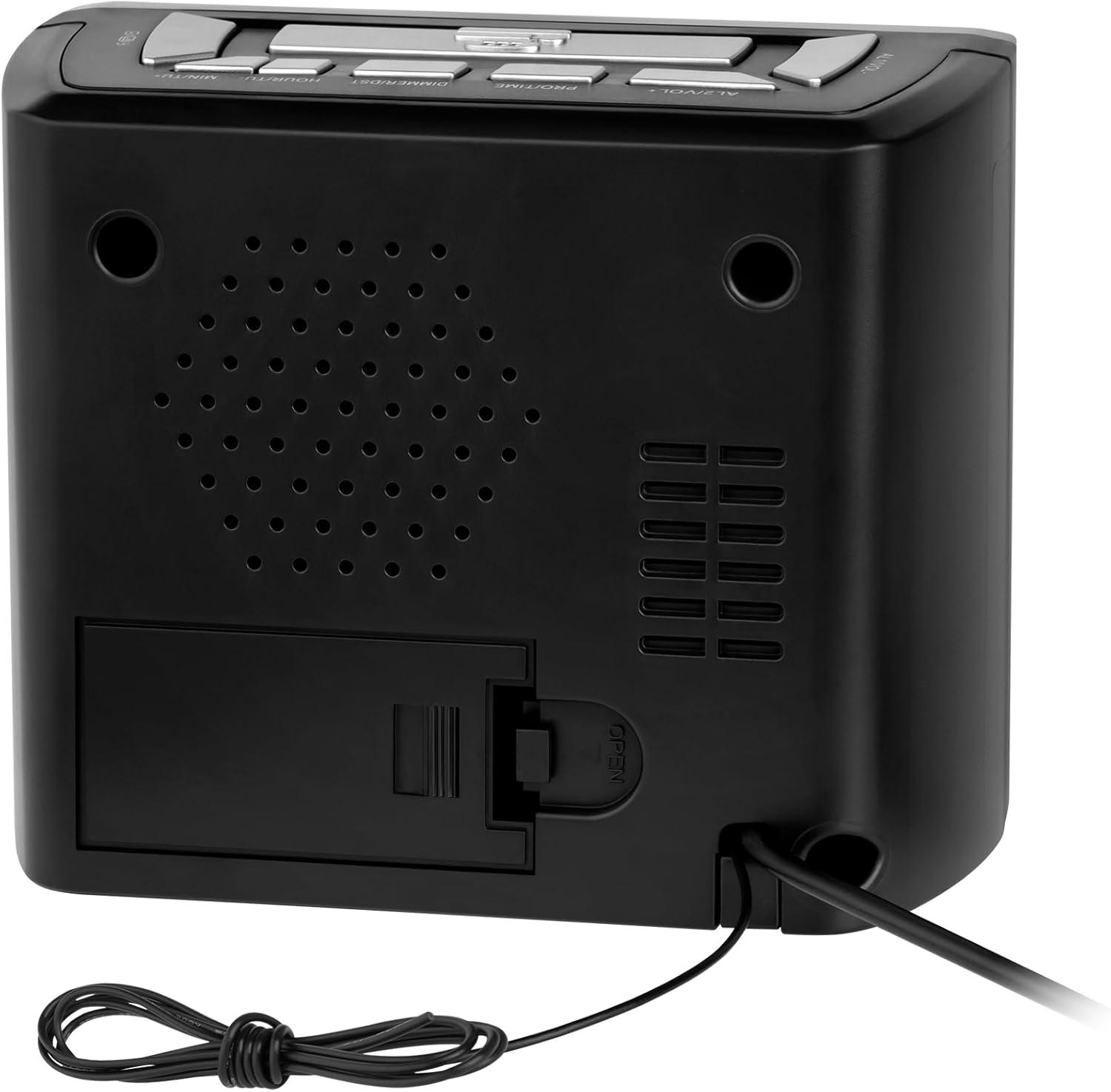
The rear panel includes the speaker grille, the battery compartment for backup power, and the integrated power cord. An FM wire antenna is also present.
5. Setup
5.1 Power Connection
- Uncoil the integrated power cable from the back of the unit.
- Plug the power cable into a standard 230V/50Hz wall outlet. The display will light up.
5.2 Battery Backup Installation
The device requires 2 x AAA 1.5V batteries (not included) for time and alarm settings backup during a power outage.
- Open the battery compartment cover on the rear of the unit.
- Insert 2 AAA batteries, ensuring correct polarity (+ and -).
- Close the battery compartment cover securely.
5.3 FM Antenna
For optimal FM radio reception, fully extend the wire antenna located at the back of the unit. Adjust its position for the best signal.
6. Operating Instructions
6.1 Setting the Time
- Press and hold the PRO/TIME button until the hour digits flash.
- Use the HOUR/TU- button to adjust the hour.
- Use the MIN/TU+ button to adjust the minutes.
- Press PRO/TIME again to confirm and exit time setting mode.
6.2 Setting Alarms (Alarm 1 and Alarm 2)
The KM0821 features two independent alarms.
- Press and hold the AL1/VOL- button (for Alarm 1) or AL2/VOL+ button (for Alarm 2) until the alarm hour digits flash.
- Use the HOUR/TU- button to set the alarm hour.
- Use the MIN/TU+ button to set the alarm minutes.
- Press the respective alarm button (AL1/VOL- or AL2/VOL+) again to confirm the time.
- After setting the time, press the alarm button repeatedly to cycle through alarm modes: OFF, Buzzer, or Radio. The corresponding alarm icon will appear on the display.
6.3 Radio Operation
- Press the FM/ button to turn the radio ON or OFF.
- To tune to a station, press and hold the HOUR/TU- or MIN/TU+ buttons for automatic scanning. Briefly press them for manual tuning.
- To save a station: While listening to a station, press and hold the PRO/TIME button. The preset number will flash. Use HOUR/TU- or MIN/TU+ to select a preset number (1-10). Press PRO/TIME again to save.
- To recall a saved station: Briefly press the PRO/TIME button repeatedly to cycle through saved stations.
6.4 Volume Adjustment
When the radio is on, use the AL1/VOL- and AL2/VOL+ buttons to adjust the volume level.
6.5 Display Dimmer
Press the DIMMER/DST button repeatedly to adjust the brightness of the LED display (e.g., High, Medium, Low, Off).
6.6 Daylight Saving Time (DST)
Press and hold the DIMMER/DST button to activate or deactivate Daylight Saving Time. The DST indicator will appear or disappear on the display.
7. Maintenance
- Cleaning: Use a soft, dry cloth to clean the exterior of the device. Do not use abrasive cleaners or solvents.
- Storage: If storing the device for an extended period, remove the backup batteries to prevent leakage.
8. Troubleshooting
| Problem | Possible Cause | Solution |
|---|---|---|
| No power/Display off | Power cable not connected; Power outlet faulty | Ensure power cable is securely plugged in; Try a different outlet. |
| Poor FM reception | Antenna not extended; Weak signal area | Fully extend and adjust the wire antenna; Try repositioning the unit. |
| Alarm does not sound | Alarm not activated; Volume too low (for radio alarm) | Ensure alarm is set to Buzzer or Radio mode; Increase radio volume. |
| Time/settings lost after power outage | Backup batteries not installed or depleted | Install or replace 2 x AAA backup batteries. |
9. Specifications
| Feature | Specification |
|---|---|
| Model | KM0821 |
| Display | LED |
| Radio Type | FM |
| FM Frequency Range | 87.5 - 108 MHz |
| Preset Stations | 10 |
| Alarms | Dual Alarm |
| Speaker Impedance | 8 ohms / 0.5 W |
| Power Consumption | 3 W |
| Power Supply | 230 V / 50 Hz |
| Battery Backup | 2 x AAA 1.5 V (for time retention) |
| Dimensions (L x W x H) | 130 x 63 x 116 mm (5.12 x 2.48 x 4.57 inches) |
| Weight | 300 g (0.66 lbs) |
10. Warranty and Support
For warranty information and technical support, please refer to the documentation provided at the time of purchase or contact your retailer. You may also visit the official Kruger & Matz website for further assistance.