
1. Introduction
Thank you for choosing the Devoko Ergonomic Gaming Chair, model OCRC8900. This manual provides detailed instructions for the assembly, operation, and maintenance of your new chair. Please read this manual carefully before assembly and use to ensure proper function and longevity of the product.
The Devoko OCRC8900 is designed to provide comfort and support during extended periods of sitting, whether for gaming, work, or relaxation. Its ergonomic design includes multi-point support, an adjustable headrest, and lumbar cushion to conform to your spine.

Image 1.1: Front view of the Devoko Ergonomic Gaming Chair OCRC8900 in black.
2. Safety Information
- Always follow the assembly instructions carefully.
- Ensure all screws and bolts are securely tightened before using the chair. Periodically check and re-tighten if necessary.
- Do not stand on the chair or use it as a step stool.
- Do not exceed the maximum weight capacity of 130 kg (286 lbs).
- Keep children away from moving parts during assembly and adjustment.
- Use the chair on a flat, stable surface.
3. Package Contents
Please check the package contents against the list below. If any parts are missing or damaged, please contact customer support.
- 1 x Devoko Ergonomic Gaming Chair (disassembled)
- 1 x Assembly Tool Kit (includes Allen wrench and screws)
- 1 x User Manual (this document)
4. Assembly Instructions
Follow these steps to assemble your Devoko Ergonomic Gaming Chair. It is recommended to assemble the chair on a soft, clean surface to prevent damage.
- Attach Casters to Base: Insert the five casters into the holes at the end of each leg of the chair base. Push firmly until they click into place.
- Insert Gas Lift: Place the gas lift cylinder into the center hole of the assembled chair base. Ensure it is seated securely.
- Assemble Seat Mechanism: Attach the seat mechanism to the underside of the seat cushion using the provided screws. Ensure the front of the mechanism faces the front of the seat.
- Attach Armrests: Secure the armrests to the sides of the seat cushion using the designated screws. Do not fully tighten yet.
- Connect Backrest to Seat: Align the backrest with the seat cushion's metal brackets. Secure them together using the remaining screws. Once aligned, tighten all screws for the armrests and backrest firmly. Ensure all screws are aligned with their holes before tightening.
- Place Seat Assembly onto Gas Lift: Carefully place the assembled seat and backrest onto the gas lift cylinder, ensuring the center hole of the seat mechanism aligns with the top of the gas lift.
- Attach Headrest and Lumbar Cushions: Position the headrest cushion and lumbar support cushion as desired. These are typically secured with straps.

Image 4.1: Diagram illustrating key dimensions and components for assembly.

Image 4.2: Detail of the gas lift cylinder, a key component for height adjustment.
5. Operating Instructions
Your Devoko Ergonomic Gaming Chair offers several adjustable features to customize your seating experience.
5.1. Seat Height Adjustment
To adjust the seat height, locate the lever on the right side beneath the seat. While seated, pull the lever up to lower the seat. To raise the seat, stand up slightly and pull the lever up. Release the lever to lock the height in place. The gas lift allows for a height adjustment range of 33-43 cm.
5.2. Backrest Recline Adjustment
The backrest can be reclined between 90° and 150°. To recline, pull the recline lever (typically located on the right side, near the height adjustment lever) and lean back to your desired angle. Release the lever to lock the backrest in position. To return to an upright position, pull the lever and lean forward.

Image 5.1: Illustration of the chair's recline angles (90°, 120°, 150°) and height adjustment mechanism.
5.3. Armrest Adjustment
The armrests are adjustable. Locate the buttons or levers on the side of the armrests to adjust their height. Adjust them to a comfortable position that supports your arms and shoulders.

Image 5.2: Detail showing the adjustable armrests and the tilt lock mechanism.
5.4. Lumbar and Headrest Cushions
The chair includes a removable headrest pillow and lumbar support cushion. Adjust their position along the backrest to find the most comfortable and supportive placement for your neck and lower back.

Image 5.3: Ergonomic design highlighting multi-point support for the spine.
5.5. Swivel Function
The chair features a 360-degree swivel function, allowing for easy rotation and access to your workspace without needing to move the entire chair.
6. Maintenance
- Cleaning: Wipe the chair's surface with a soft, damp cloth. For tougher stains, use a mild soap solution and then wipe with a clean, damp cloth. Avoid harsh chemicals or abrasive cleaners.
- Casters: Periodically check the casters for hair or debris that may hinder smooth movement. Clean as needed.
- Fasteners: Regularly check all screws and bolts to ensure they are tight. Re-tighten any loose fasteners to maintain stability and safety.
7. Troubleshooting
| Problem | Possible Cause | Solution |
|---|---|---|
| Chair is wobbly or unstable. | Loose screws or improper assembly. | Check all assembly screws and tighten them securely. Ensure the chair is on a flat surface. |
| Seat height adjustment not working. | Gas lift not properly engaged or damaged. | Ensure the gas lift is correctly inserted into the base and seat mechanism. If still not working, contact support. |
| Casters not rolling smoothly. | Debris caught in casters or damaged casters. | Inspect casters for hair, dust, or other obstructions and remove them. If damaged, consider replacement. |
| Backrest recline not locking. | Recline mechanism not engaged or damaged. | Ensure the recline lever is fully released to lock the position. If the issue persists, contact support. |
| Lumbar/Headrest cushions slide out of place. | Cushions not properly secured or straps are loose. | Adjust the straps to secure the cushions more firmly to the backrest. |
8. Specifications
| Feature | Detail |
|---|---|
| Model Number | OCRC8900 |
| Brand | Devoko |
| Color | Black |
| Material | Alloy Steel frame, High-density foam, PU leather upholstery |
| Seat Dimensions (W x D) | 37 cm x 52 cm (14.6 in x 20.5 in) |
| Backrest Dimensions (W x H) | 56 cm x 93 cm (22 in x 36.6 in) |
| Adjustable Seat Height | 33 cm - 43 cm (13 in - 17 in) |
| Maximum Weight Capacity | 130 kg (286 lbs) |
| Product Weight | 20 kg (44 lbs) |
| Recline Angle | 90° to 150° |
| Special Features | Ergonomic design, Adjustable height, Reclining backrest, Adjustable armrests, Lumbar support, Headrest pillow, 360° swivel, Silent casters |

Image 8.1: Indication of the chair's maximum weight capacity.
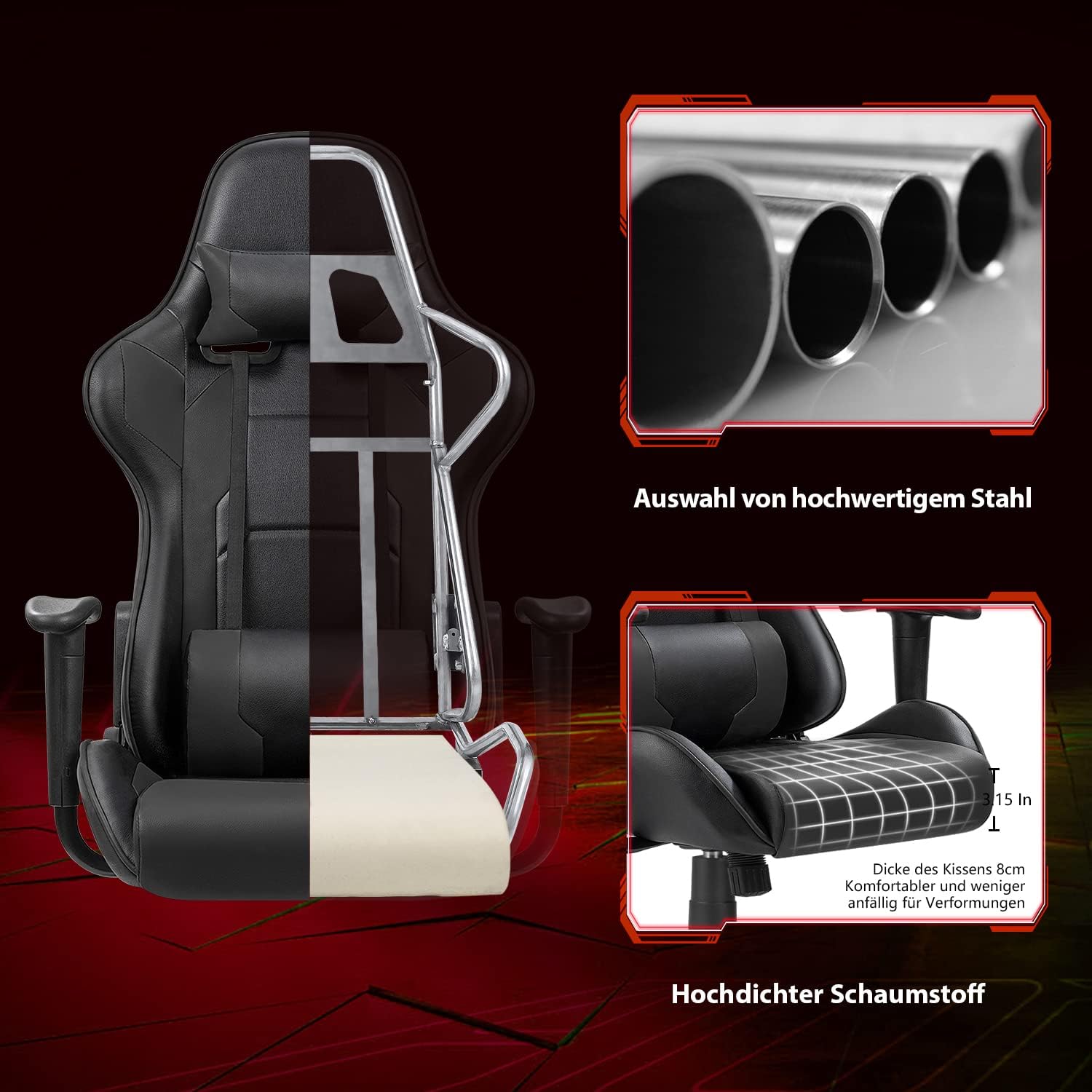
Image 8.2: Cutaway view illustrating the robust alloy steel frame and high-density foam construction.
9. Warranty and Support
Devoko is committed to providing high-quality products and customer satisfaction. While specific warranty details are not provided in this manual, please retain your proof of purchase for any warranty claims.
If you have any questions, require assistance with assembly, or encounter any issues with your Devoko Ergonomic Gaming Chair, please do not hesitate to contact our customer support team. We are here to help.
For support, please refer to the contact information provided with your purchase or visit the official Devoko website.


