Introduction
This instruction manual provides detailed guidance for the safe installation, operation, and maintenance of your Troy Lighting Tristan 12-Light Semi-Flush Mount fixture, Model C2812-PBR. Please read all instructions carefully before beginning installation and retain this manual for future reference.
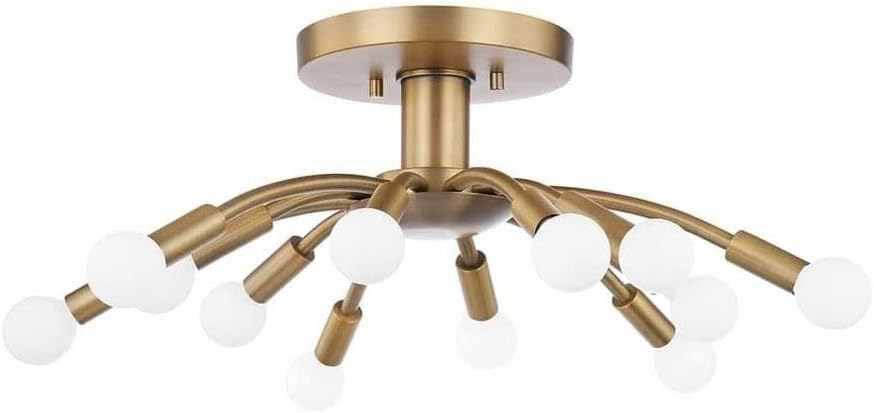
This image displays the complete Troy Lighting Tristan 12-Light Semi-Flush Mount fixture. It features a central brass canopy that attaches to the ceiling, with twelve radiating arms of varying lengths, each terminating in a bulb socket. The fixture has a modern, sputnik-like design, showcasing its brass finish and the arrangement of its light sources.
Safety Information
WARNING: Risk of electric shock. Disconnect power at the fuse box or circuit breaker before installation or servicing.
- All electrical connections must be in accordance with local codes, ordinances, or the National Electric Code (NEC). Consult a qualified electrician if you are unfamiliar with proper electrical wiring connections.
- This fixture is intended for indoor use only.
- Ensure the mounting surface can support the weight of the fixture.
- Do not exceed the maximum wattage specified for each bulb socket.
- Wear safety glasses and gloves during installation.
- Never connect the fixture to a power source while it is still in the packaging.
Package Contents
Verify that all components are present before discarding packaging materials.
- Fixture Body (with pre-attached arms and wiring)
- Mounting Plate/Crossbar
- Mounting Screws and Wire Nuts
- Instruction Manual
Note: Light bulbs are not included and must be purchased separately. This fixture requires 12 incandescent bulbs, maximum 60 watts each.
Tools Required
- Phillips Head Screwdriver
- Flat Head Screwdriver
- Wire Strippers
- Electrical Tape
- Ladder (if necessary)
- Safety Glasses
Setup and Installation
Follow these steps carefully to install your semi-flush mount fixture.
- Turn Off Power: Locate the circuit breaker or fuse box that supplies power to the fixture location. Turn off the main power switch. Verify power is off using a voltage tester.
- Prepare for Installation: Carefully unpack the fixture and its components. Lay them out on a clean, soft surface to prevent scratches.
- Install Mounting Plate: Attach the mounting plate (crossbar) to the electrical junction box in the ceiling using the provided mounting screws. Ensure it is securely fastened.
- Make Electrical Connections:
- Connect the black wire from the fixture to the black (hot) wire from the junction box using a wire nut.
- Connect the white wire from the fixture to the white (neutral) wire from the junction box using a wire nut.
- Connect the ground wire (bare copper or green) from the fixture to the ground wire from the junction box (or to the green ground screw on the mounting plate) using a wire nut.
- Ensure all wire nuts are tightly secured and wrap connections with electrical tape for added safety.
- Mount the Fixture: Carefully tuck all wires into the junction box. Align the fixture's canopy with the mounting plate and secure it using the provided screws or nuts, ensuring it sits flush against the ceiling.
- Install Bulbs: Screw the appropriate incandescent bulbs (max 60W each) into the 12 sockets. Do not overtighten.

A detailed view of the Troy Lighting Tristan fixture, focusing on several of its brass-finished arms and the white, spherical bulbs installed in their sockets. This close-up highlights the construction of the arms and the connection points for the bulbs, providing a clearer look at the fixture's material and design elements.
Important: After installation, restore power at the circuit breaker and test the fixture.
Operating Instructions
The Troy Lighting Tristan fixture operates via a standard wall switch connected to the electrical circuit. Simply toggle the wall switch to turn the light fixture on or off.
Maintenance
Cleaning
To clean the fixture, ensure the power is turned off at the circuit breaker. Use a soft, dry, or slightly damp cloth. Do not use abrasive cleaners, solvents, or polishes as they may damage the finish. Avoid spraying cleaners directly onto the fixture.
Bulb Replacement
Before replacing bulbs, turn off the power to the fixture at the circuit breaker and allow bulbs to cool completely. Unscrew the old bulb and screw in a new incandescent bulb (max 60W). Ensure the replacement bulb matches the specified wattage to prevent overheating.
Troubleshooting
| Problem | Possible Cause | Solution |
|---|---|---|
| Fixture does not light up. | No power to the fixture. | Check circuit breaker or fuse. Ensure wall switch is on. |
| Loose or incorrect wiring. | Turn off power. Check all wire connections. Re-secure if loose. | |
| Defective bulb(s). | Replace bulb(s) with new ones. | |
| Lights flicker. | Loose bulb or wiring connection. | Turn off power. Tighten bulbs. Check wire connections. |
| Bulbs burn out quickly. | Incorrect wattage bulb. | Ensure bulbs do not exceed 60W. |
Specifications
| Model Number | C2812-PBR |
| Brand | Troy Lighting |
| Dimensions (L x W x H) | 25"L x 25"W x 9"H |
| Finish Color | Brass |
| Material | Aluminum, Stainless Steel, Glass |
| Light Source Type | Incandescent |
| Number of Light Sources | 12 |
| Max Wattage per Bulb | 60 Watts |
| Voltage | 120 Volts |
| Mounting Type | Ceiling Mount (Semi-Flush) |
| Indoor/Outdoor Usage | Indoor |
| Assembly Required | Yes |
| Item Weight | 8.62 Pounds |
Warranty
This Troy Lighting fixture is covered by a 1-year manufacturer's limited warranty from the date of purchase. This warranty covers defects in materials and workmanship under normal use. It does not cover damage resulting from improper installation, accident, misuse, abuse, or unauthorized modifications. Please retain your proof of purchase for warranty claims.
Support
If you encounter any issues not covered in the troubleshooting section or require further assistance, please contact Troy Lighting customer support. For the most up-to-date contact information, please visit the official Troy Lighting website or refer to your purchase documentation.
When contacting support, please have your model number (C2812-PBR) and proof of purchase readily available.


