
Hover-1 H1-FM95-BLU
Hover-1 Electric Go-Kart User Manual
Model: H1-FM95-BLU
1. Introduction and Safety Information
Welcome to the Hover-1 Electric Go-Kart user manual. This manual provides essential information for the safe operation, maintenance, and troubleshooting of your new electric go-kart. Please read this manual thoroughly before first use to ensure proper function and to prevent injury or damage.
Important Safety Guidelines:
- Always wear appropriate safety gear, including a helmet, knee pads, and elbow pads.
- Ensure the go-kart is fully charged before each use.
- Do not exceed the maximum weight limit of 330 lbs (150 kg).
- Recommended for ages 8 and older.
- Operate the go-kart in safe, open areas away from traffic, pedestrians, and obstacles.
- Avoid operating in wet conditions or on uneven terrain.
- Familiarize yourself with all controls, including the foot accelerator and dual disc brakes, before riding.
2. Product Overview
The Hover-1 Electric Go-Kart is designed for an exhilarating riding experience, featuring a powerful 700W motor, three speed modes, and an intuitive LCD display. Its robust design accommodates riders up to 330 lbs.

The Hover-1 Electric Go-Kart, showcasing its sleek blue design and robust frame.

The integrated LCD display provides real-time information on battery life, current speed, and selected speed mode.

Experience speeds up to 15 MPH with three distinct speed modes for varying skill levels and environments.

The go-kart features an adjustable frame and steering, allowing for comfortable riding positions for various rider sizes.

Dual front headlights provide enhanced visibility and a distinctive look.
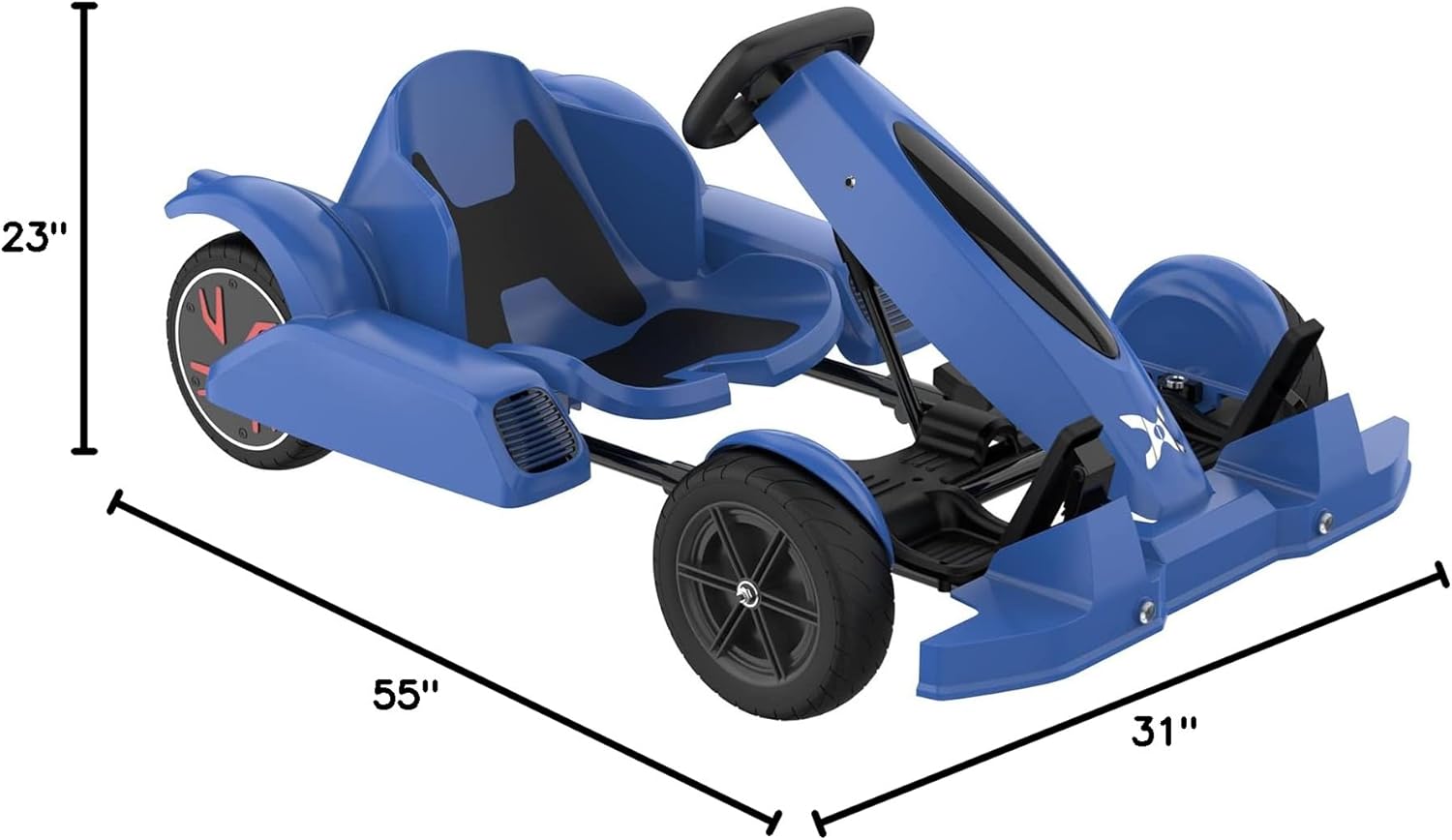
Detailed dimensions of the go-kart: 55 inches (L) x 31 inches (W) x 23 inches (H).
3. Setup
Unpacking and Initial Assembly:
Your Hover-1 Electric Go-Kart comes with an assembly kit and charger. While much of the go-kart is pre-assembled, some minor setup may be required. Refer to the included assembly guide for detailed instructions.
Initial Charging:
Before first use, fully charge the go-kart's battery. Connect the charger to the charging port on the go-kart and then to a standard wall outlet. The charging indicator will show when the battery is fully charged. Do not overcharge the battery.
4. Operating Instructions
Controls:
- Steering Wheel: Used to control the direction of the go-kart.
- Foot Accelerator: Press down to accelerate. Release to slow down.
- Dual Disc Brakes: Apply the brake levers to slow down or stop.
- LCD Display: Shows current speed, battery level, and selected speed mode.
Speed Modes:
The go-kart features three adjustable speed modes, allowing riders to choose a speed appropriate for their skill level and environment. Consult the LCD display to confirm the active speed mode.
Riding Tips:
- Start in the lowest speed mode until you are comfortable with the controls.
- Maintain a safe distance from other riders and objects.
- Always be aware of your surroundings.
Official Product Video:
This video provides a dynamic overview of the Hover-1 Electric Go-Kart in action, demonstrating its speed and maneuverability. It showcases the go-kart's design and highlights its performance capabilities.
5. Maintenance
Battery Care:
- Charge the battery regularly, even if not in use, to prolong its lifespan.
- Store the go-kart in a cool, dry place.
- Avoid fully depleting the battery before recharging.
Tire Maintenance:
The go-kart is equipped with 10-inch pneumatic tires. Regularly check tire pressure and inflate as needed to ensure optimal performance and safety.
Cleaning:
Wipe down the go-kart with a damp cloth after use. Avoid using harsh chemicals or abrasive cleaners.
6. Troubleshooting
If you encounter issues with your Hover-1 Electric Go-Kart, please refer to the following general troubleshooting tips. For more complex problems, contact customer support.
- Go-Kart not turning on: Ensure the battery is charged and the power switch is in the "ON" position.
- Reduced performance: Check battery level. Low tire pressure can also affect performance.
- Brakes not responding: Inspect brake cables and pads for wear or damage.
For further assistance, please contact Hover-1 customer support.
7. Specifications
| Feature | Detail |
|---|---|
| Brand | Hover-1 |
| Model Name | H1-FM95-BLU |
| Max Speed | Up to 15 MPH (24 KM/H) |
| Max Distance | Up to 15.5 Miles (25 KM) |
| Max Weight Capacity | 330 lbs (150 kg) |
| Motor Power | 700 Watts (Dual 350W Motors) |
| Tires | 10" (25.5 cm) Pneumatic |
| Brakes | Dual Disc Brakes |
| Display | LCD Display |
| Item Weight | 90 Pounds |
| Item Dimensions (LxWxH) | 55 x 31 x 23 inches |
| Material | Polypropylene |
| Color | Blue |
8. Warranty and Support
Warranty Information:
The Hover-1 Electric Go-Kart comes with a 90-Day Warranty. Please retain your proof of purchase for warranty claims. The warranty covers manufacturing defects under normal use conditions.
Customer Support:
For technical assistance, warranty claims, or any questions regarding your Hover-1 Electric Go-Kart, please visit the official Hover-1 website or contact their customer service department. Contact information can typically be found on the product packaging or the brand's official website.
You can also visit the Hover-1 Store on Amazon for more information.
Related documentsH1-FM95-BLU


Ask a question about this manual
Ask about setup, troubleshooting, compatibility, parts, safety, or missing instructions. Manuals+ will review the question and use this page’s manual context to help answer it.