Introduction
This manual provides essential instructions for the safe and efficient use of your Cygnett PowerBase II 10W Wireless Charger. Please read this manual thoroughly before operating the device and retain it for future reference.
Product Overview
The Cygnett PowerBase II is a 10W wireless charging pad designed to provide convenient and fast charging for Qi-compatible devices. It features a textured, non-slip surface to securely hold your device during charging and includes a built-in 2-meter USB charging cable for easy connection.

Image: Top view of the Cygnett PowerBase II wireless charging pad, showcasing its textured surface and compact design.
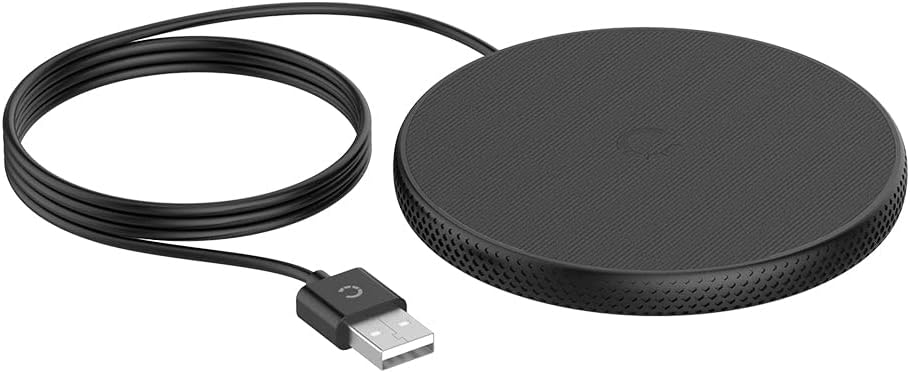
Image: The Cygnett PowerBase II wireless charger, displaying its integrated 2-meter USB charging cable coiled next to the charging pad.
Setup Instructions
- Connect to Power: Plug the integrated USB-A cable of the PowerBase II into a compatible USB power adapter (not included). For optimal 10W fast charging, use a power adapter that supports Quick Charge 2.0/3.0 or USB Power Delivery.
- Placement: Place the Cygnett PowerBase II on a flat, stable surface, such as a desk or nightstand. Ensure there is adequate ventilation around the charger.
Operating Instructions
- Initiate Charging: Place your Qi-compatible device directly onto the center of the Cygnett PowerBase II charging pad.
- Charging Confirmation: Your device should indicate that it is charging. The PowerBase II may have an LED indicator (refer to product packaging for specific LED behavior) to confirm active charging.
- Case Compatibility: The charger is compatible with most phone cases up to 3mm thick. Thicker cases or cases containing metal may interfere with wireless charging.
- Optimal Placement: For efficient charging, ensure your device is centered on the charging pad. Slight adjustments may be necessary for proper alignment.

Image: An iPhone placed on the Cygnett PowerBase II wireless charger, showing the device's screen indicating 100% charge.

Image: A top-down view of an iPhone positioned centrally on the Cygnett PowerBase II wireless charger, with the phone screen displaying a full battery icon.
Compatibility
The Cygnett PowerBase II is designed to work with all devices that support the Qi wireless charging standard. This includes, but is not limited to:
- Apple iPhones (iPhone 8 and newer models)
- Samsung Galaxy S series (S8 and newer models)
- Samsung Galaxy Note series (Note8 and newer models)
- Apple AirPods and AirPods Pro (with wireless charging case)
- Other Qi-enabled smartphones and accessories.
Safety Information
- Do not expose the charger to water, moisture, or extreme temperatures.
- Avoid dropping or subjecting the charger to severe impacts.
- Do not disassemble, modify, or attempt to repair the charger.
- Keep the charger away from medical devices, as magnetic fields may interfere with their operation.
- Ensure proper ventilation during use to prevent overheating.
- Use only with compatible USB power adapters.
Troubleshooting
- Device not charging:
- Ensure the charger is properly connected to a working power source.
- Verify your device is Qi-compatible.
- Remove any metallic objects or excessively thick cases from your device.
- Reposition your device on the center of the charging pad.
- Slow charging:
- Confirm your USB power adapter supports 10W output (e.g., Quick Charge 2.0/3.0 or USB PD).
- Ensure your device is correctly aligned on the charging pad.
- Close unnecessary background applications on your device.
- Charger or device getting warm:
- It is normal for wireless charging to generate some heat. If it becomes excessively hot, discontinue use and check for obstructions or improper alignment.
- Ensure adequate ventilation around the charger.
Specifications
| Brand | Cygnett |
| Model Number | MPACPII10WFWCBLK |
| Wireless Charging Standard | Qi |
| Output Wattage | 10W (Max) |
| Power Source | Corded Electric (USB-A) |
| Cable Length | 2 meters (integrated) |
| Dimensions | 12 x 1.2 x 10 cm |
| Weight | 30 g |
| Color | Black |
Maintenance
To maintain the performance and appearance of your Cygnett PowerBase II:
- Clean the charging pad regularly with a soft, dry cloth.
- Do not use harsh chemicals or abrasive cleaners.
- Ensure the charger is disconnected from power before cleaning.
Warranty and Support
For warranty information and customer support, please refer to the official Cygnett website or contact their customer service department. Keep your proof of purchase for warranty claims.


