
Introduction
This manual provides essential information for the setup, operation, and maintenance of your Wearable4U Garmin Instinct 2 Solar 45mm GPS Rugged Outdoor Smartwatch and the accompanying Black Wireless Earbuds. Please read this manual thoroughly to ensure proper use and to maximize the performance of your devices.
What's in the Box
Verify that all items are present in your package:
- 1x Garmin Instinct 2 Solar Smart Watch, Graphite
- 1x Smart Watch Charging Cable
- 2x Black Wireless Earphones
- 6x Replacement 3D Headphones (ear tips)
- 1x EarBuds 2-in-1 Charging Case
- 1x Charging Micro USB Cable
- Documentation (this manual)
Key Features
The Garmin Instinct 2 Solar Smartwatch and included earbuds offer a range of functionalities designed for outdoor activities and daily use:
- Durable Design: Features a fiber-reinforced polymer case, water and thermal resistance up to 100 meters, and scratch-resistant Corning Gorilla glass.
- Solar Charging: Extends battery life significantly, offering unlimited battery life in smartwatch mode with sufficient solar exposure (50,000 lux conditions for 3 hours/day).
- Multi-GNSS Support: Utilizes GPS, GLONASS, and Galileo for accurate tracking in challenging environments.
- Health Monitoring: Includes wrist-based heart rate tracking, stress tracking, sleep score, and advanced sleep monitoring.
- Built-in Sports Apps: Preloaded activity profiles for running, cycling, swimming, strength training, indoor climbing, virtual running, golf, yoga, and more.
- HIIT Workouts: Tracks HIIT workouts including AMRAP, EMOM, Tabata, and custom settings.
- VO2 Max: Provides an indicator of expected performance, accounting for heat and altitude.
- ABC Sensors: Built-in altimeter, barometer, and 3-axis electronic compass for navigation.
- TracBack Routing: Navigate back to your starting point using this feature.
- Smart Notifications: Receive alerts and messages when paired with a compatible smartphone.
- Wireless Earbuds: Bluetooth 5.0 earbuds with a 1500mAh charging case, designed for fitness with water and sweat resistance.

Image: Front, back, and side views of the Garmin Instinct 2 Solar Smartwatch, showcasing its rugged design and button layout.
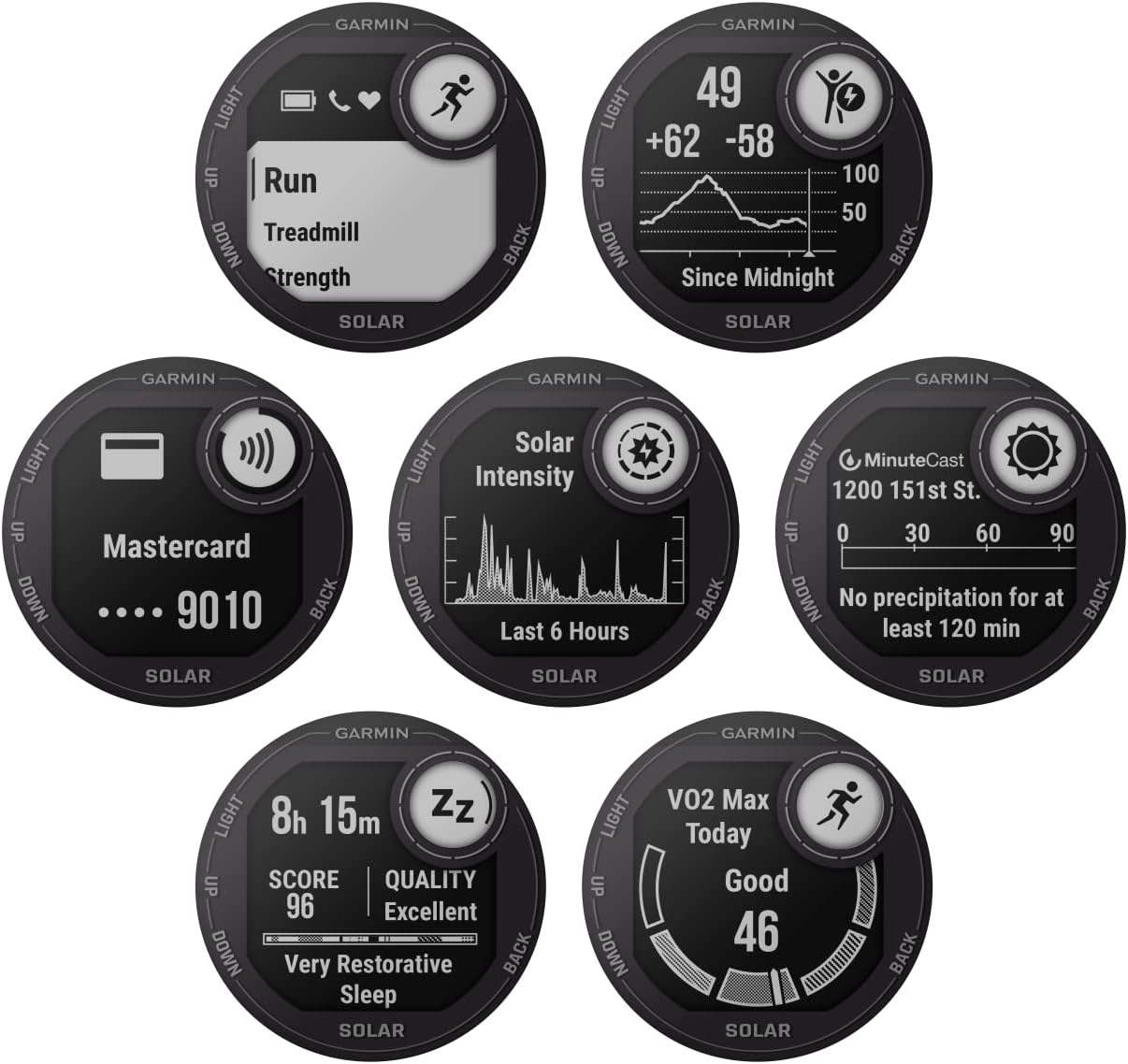
Image: Multiple watch faces and data screens displayed on the Garmin Instinct 2 Solar, illustrating activity tracking, solar intensity, and weather information.

Image: The Garmin Instinct 2 Solar Smartwatch displaying ABC sensor data, including altitude, barometric pressure, and compass readings.

Image: The Garmin Instinct 2 Solar Smartwatch displaying a menu of built-in sports apps, including options for running, treadmill, and strength training.

Image: The Wearable4U Black Wireless Earbuds shown with their 2-in-1 charging case, highlighting their water-resistant design and Bluetooth 5.0 connectivity.
Setup
Garmin Instinct 2 Solar Smartwatch
- Initial Charge: Connect the smartwatch to the charging cable and plug it into a USB power source. Allow it to charge fully before first use. The solar charging feature extends battery life but does not replace initial charging.
- Power On: Press and hold the LIGHT button (top left) until the Garmin logo appears.
- Initial Setup: Follow the on-screen prompts to select your language, pair with your smartphone via the Garmin Connect app, and configure basic settings.
- Pairing with Garmin Connect App:
- Download the Garmin Connect app on your smartphone.
- Open the app and create an account or log in.
- Follow the app's instructions to add your Instinct 2 Solar device.
- Confirm the pairing code displayed on both your watch and phone.
Wearable4U Black Wireless Earbuds
- Charge the Case: Connect the Micro USB cable to the charging case and a USB power source. The LED indicator on the case will show charging status.
- Charge Earbuds: Place the earbuds into the charging case. They will automatically begin charging.
- Pairing:
- Remove both earbuds from the charging case. They will automatically enter pairing mode.
- On your smartphone or other Bluetooth device, go to Bluetooth settings and select the earbuds from the list of available devices.
- A voice prompt will confirm successful pairing.
Operating Instructions
Garmin Instinct 2 Solar Smartwatch
- Button Functions:
- LIGHT (Top Left): Press to turn on/off backlight. Hold to access controls menu (Garmin Pay, power off, etc.).
- MENU/UP (Middle Left): Press to scroll through widgets and menus. Hold to access the main menu.
- DOWN (Bottom Left): Press to scroll through widgets and menus.
- GPS (Top Right): Press to start/stop an activity. Press to select an option in a menu.
- SET/BACK (Bottom Right): Press to return to the previous screen. Hold to view the watch face.
- Activity Tracking:
- From the watch face, press GPS to view the activity list.
- Select an activity (e.g., Run, Hike, Bike).
- Wait for GPS signal (if applicable) and press GPS again to start the timer.
- Press GPS to pause, then select Resume, Save, or Discard.
- Health Monitoring: The watch continuously monitors heart rate, steps, and sleep. View these metrics on the respective widgets by pressing UP or DOWN from the watch face.
- Smart Notifications: Ensure your watch is paired with your smartphone. Notifications will appear on the watch screen.
Video: An official overview of the Garmin Instinct 2 Smartwatches, highlighting key features and rugged design. This video demonstrates the watch's capabilities for various outdoor activities and daily use.
Wearable4U Black Wireless Earbuds
- Power On/Off: Earbuds power on automatically when removed from the case and power off when returned.
- Music Playback:
- Tap either earbud once to Play/Pause.
- Double-tap the right earbud for Next Track.
- Double-tap the left earbud for Previous Track.
- Call Management:
- Tap either earbud once to Answer/End a call.
- Hold either earbud for 2 seconds to Reject a call.
Maintenance
- Smartwatch Cleaning: Rinse the watch with fresh water after exposure to sweat, salt water, or chlorine. Use a soft, damp cloth to wipe the device. Avoid harsh chemicals.
- Earbuds Cleaning: Gently wipe earbuds and charging case with a dry, soft cloth. Do not use liquids or sprays. Ensure charging contacts are clean and dry.
- Storage: Store devices in a cool, dry place away from direct sunlight and extreme temperatures.
- Battery Care: For optimal battery life, avoid fully discharging the devices frequently. Charge regularly.
Troubleshooting
Smartwatch Issues
- Watch not turning on: Ensure the watch is fully charged. Connect to the charging cable and a power source.
- GPS not acquiring signal: Ensure you are in an open area with a clear view of the sky. Allow several minutes for the watch to acquire a signal.
- Heart rate sensor inaccurate: Ensure the watch is worn snugly on your wrist, above the wrist bone. Clean the sensor regularly.
- Solar charging not working: Ensure the watch face is exposed to direct sunlight. The solar intensity widget can confirm charging. Note that solar charging is supplementary and requires significant light exposure.
- Connectivity problems with phone: Ensure Bluetooth is enabled on your phone and the Garmin Connect app is open. Try restarting both devices.
Earbuds Issues
- Earbuds not pairing: Ensure earbuds are charged. Place them back in the case, then remove them to re-enter pairing mode. Forget the device on your phone's Bluetooth settings and try pairing again.
- Only one earbud working: Place both earbuds back in the charging case, then remove them simultaneously. This often re-syncs them.
- No sound: Check volume levels on both your connected device and the earbuds. Ensure earbuds are properly seated in your ears.
Specifications
| Feature | Detail |
|---|---|
| Product Dimensions | 1.77 x 1.77 x 0.57 inches |
| Item Weight | 13.1 ounces |
| Item Model Number | 010-02627-10 |
| Operating System | Garmin OS |
| Special Features | Bluetooth, barometric altimeter, built-in 3-axis compass, fishing and hunting activity profiles |
| Battery Capacity | 350 Milliamp Hours |
| Connectivity Technology | Bluetooth |
| Wireless Communication Standard | Bluetooth |
| Battery Cell Composition | Lithium Polymer |
| GPS | GPS enabled |
| Brand | Wearable4U |
| Model Name | Instinct 2 Solar |
Warranty Information
For specific warranty details regarding your Wearable4U Garmin Instinct 2 Solar Smartwatch and Earbuds, please refer to the warranty card included in your product packaging or visit the official Wearable4U website. Warranty terms typically cover manufacturing defects for a specified period from the date of purchase.
Customer Support
If you encounter any issues or have questions not addressed in this manual, please contact Wearable4U customer support. Contact information can typically be found on the product packaging, the official Wearable4U website, or through your retailer.


