
Electro-Voice EVERSE 8
Electro-Voice EVERSE 8 Portable Battery-Powered Loudspeaker User Manual
1. Introduction
This manual provides essential information for the safe and effective operation of your Electro-Voice EVERSE 8 portable battery-powered loudspeaker. The EVERSE 8 is designed to deliver high-quality audio performance in a compact, weatherized, and highly portable package. It features an 8-inch woofer, a high-output titanium tweeter, integrated Bluetooth audio streaming and control, and a built-in digital mixer with effects.
The EVERSE 8 is suitable for a wide range of applications, including live music, vocal reinforcement, audio playback, and events, both indoors and outdoors, thanks to its IP43-rated weatherized design when used with the included input cover.
2. What's in the Box
Please verify that all items are present upon unpacking:
- Electro-Voice EVERSE 8 Loudspeaker
- Power Cable
- Battery Pack
- Weatherized Input Cover
- User Manual (this document)
3. Setup
3.1 Battery Installation and Charging
The EVERSE 8 is powered by a custom-designed, high-capacity Li-ion battery pack. To install or remove the battery, use the tool-free screws located on the rear panel. Ensure the battery is securely seated.
To charge the battery, connect the included power cable to the AC inlet on the rear panel and then to a suitable power outlet. The battery can be charged while the unit is in use or powered off. Protection circuitry is integrated to prevent over-discharge.

Image: Rear panel of the EVERSE 8, illustrating the power input, battery compartment, and various audio connections.
3.2 Initial Power On
After installing the battery or connecting to AC power, locate the power switch on the rear panel and set it to the 'ON' position. The QuickSmartDSP display will illuminate, indicating the unit is operational.
3.3 Speaker Placement
The EVERSE 8 offers flexible placement options:
- Tripod Mount: For extended throw and wider coverage, mount the speaker on a standard speaker tripod using the integrated pole mount socket on the bottom.
- Stage Wedge: Position the speaker long-side down at a 55-degree angle for use as a stage monitor.
- Upright with Kick-back: Use the 30-degree kick-back angle to project sound upwards from a performance area.
- Flat Surface: Place on any stable, flat surface using the built-in feet with no-skid rubber pads.

Image: The underside of the EVERSE 8, highlighting the pole mount for tripod use and stable rubber feet.
3.4 Weatherized Use
For outdoor use or in environments with splashes and light rain, ensure the included weatherized input cover is properly installed over the rear panel connections. This maintains the IP43 rating for water resistance.

Image: A close-up view of the EVERSE 8 grille, showing its weather-resistant construction with water droplets.
4. Operating Instructions
4.1 QuickSmart Mobile App and Bluetooth Control
The EVERSE 8 can be controlled wirelessly via the QuickSmart Mobile app, available for iOS and Android devices. This app provides comprehensive control over all audio functions, including the digital mixer, effects, and system settings.
- Pairing: Activate Bluetooth on your mobile device. On the EVERSE 8, press and hold the Bluetooth pairing button (Input 3/4 section) until the indicator flashes. Select 'EVERSE 8' from your device's Bluetooth list.
- Audio Streaming: Once paired, you can stream audio directly to the EVERSE 8.
- True Wireless Stereo (TWS): For a stereo setup, two EVERSE 8 units can be paired together via Bluetooth TWS. Refer to the QuickSmart Mobile app for detailed instructions on TWS pairing.

Image: The QuickSmart Mobile app interface on a tablet, demonstrating remote control capabilities for the EVERSE 8.
4.2 Onboard Digital Mixer and DSP
The EVERSE 8 features a four-channel digital mixer with studio-quality effects and advanced DSP (Digital Signal Processing) functions, developed in collaboration with Dynacord. Access these features via the QuickSmartDSP display and master volume knob on the rear panel, or through the QuickSmart Mobile app.
- Inputs: Two combo XLR/TRS inputs (Input 1 and Input 2) support microphones and line-level sources. Input 1 offers 48V phantom power for condenser microphones. Input 3/4 is a stereo input via Bluetooth or 3.5mm AUX.
- Effects: Apply various effects such as reverb, delay, and chorus to individual channels.
- Feedback Suppression: Automatic feedback suppression helps eliminate unwanted audio feedback.
- Music Ducking: This feature automatically lowers background music volume when a microphone signal is detected.
- Master Volume: Adjust the overall output level using the master volume knob. Press the knob to navigate DSP menus.
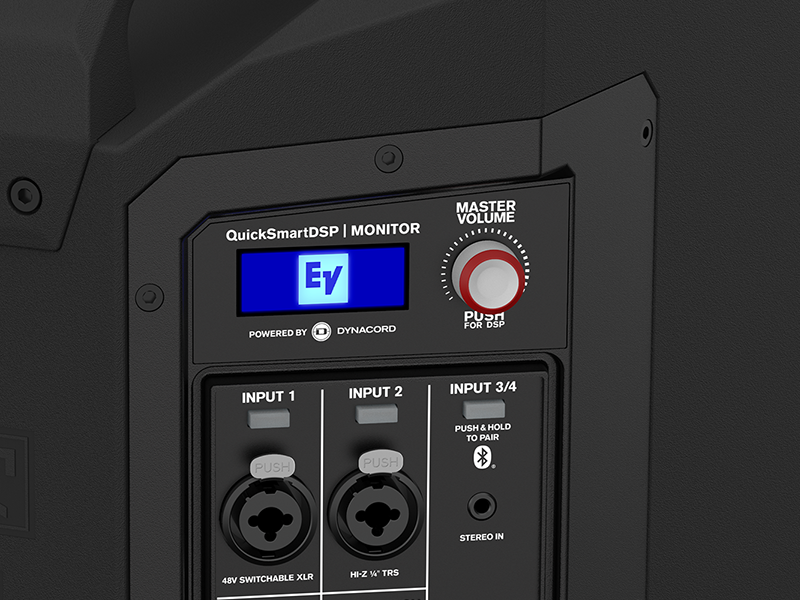
Image: Detailed view of the QuickSmartDSP display and master volume control on the EVERSE 8 rear panel.
4.3 Integrated 12V DC Port and USB Charging
The EVERSE 8 includes an integrated 12V DC port, powered by the internal battery, which is ideal for powering wireless microphone systems. An optional accessory tray can be attached to the top of the EVERSE 8 to secure receiver hardware.
A USB charging port is also available for convenient mobile device charging during use.

Image: The EVERSE 8 rear panel showing a wireless receiver connected to the 12V DC output, demonstrating expanded functionality.
5. Maintenance
5.1 Cleaning
Clean the exterior of the EVERSE 8 with a soft, dry cloth. For stubborn dirt, a slightly damp cloth can be used. Avoid using abrasive cleaners, solvents, or harsh chemicals, as these can damage the finish and components.
5.2 Battery Care
To maximize battery life and performance:
- Store the battery in a cool, dry place when not in use.
- Avoid fully discharging the battery for extended periods. The integrated protection circuitry helps prevent this, but regular charging is recommended.
- If storing for a long time, charge the battery to approximately 50% capacity every few months.
5.3 Weatherized Cover
Regularly inspect the weatherized input cover for any signs of wear or damage. Ensure it is properly seated and sealed when using the speaker in wet conditions to maintain its IP43 rating.
6. Troubleshooting
If you encounter issues with your EVERSE 8, refer to the following common solutions:
- No Power: Ensure the power cable is securely connected and the power switch is ON. If using battery power, check that the battery is installed correctly and charged.
- No Sound: Verify that the master volume is turned up and individual channel volumes are not muted or set too low. Check all audio cable connections and ensure input sources are active.
- Bluetooth Connection Issues: Ensure Bluetooth is enabled on your device and the EVERSE 8 is in pairing mode. Try unpairing and re-pairing the device. Move closer to the speaker to rule out range issues.
- Distorted Sound: Reduce the input gain of the source device or the EVERSE 8's input channels. Check for damaged cables.
- Feedback: Utilize the automatic feedback suppression feature in the DSP settings. Reposition microphones or the speaker to reduce feedback.
For persistent issues, consult the full user manual available on the Electro-Voice website or contact customer support.
7. Specifications
| Feature | Detail |
|---|---|
| Model Name | F.01U.399.427 (EVERSE 8) |
| Speaker Type | 2-Way Battery Powered Loudspeaker / Monitor |
| Woofer Diameter | 8 Inches |
| Tweeter Diameter | 1 Inch |
| Max. Peak SPL | 121 dB |
| Beam Angle | 100° x 100° |
| Frequency Response | 50 Hz - 20 kHz |
| Peak Power | 400 W |
| Power Source | Battery Powered (Li-ion) / AC |
| Battery Run Time | Up to 12 hours |
| Connectivity Technology | Bluetooth (Audio & Control) |
| Bluetooth Range | 10 Meters |
| Inputs | 2x Combi XLR/TRS, 1x Stereo 3.5mm AUX, Bluetooth |
| Outputs | Mix Out |
| Special Features | DSP, 4-Channel Digital Mixer, 48V Phantom Power, Automatic Feedback Suppression, Music Ducking, 12V DC Output, USB Charging Port |
| Weather Resistance | IP43 Rated (with weatherized input cover) |
| Material | Polypropylene (Plastic) |
| Product Dimensions (D x W x H) | 19" x 14" x 15" |
| Item Weight | 10.6 kg (23.3 lbs) |

Image: Visual representation of the EVERSE 8 dimensions.
8. Warranty and Support
8.1 Limited Warranty
The Electro-Voice EVERSE 8 comes with a limited warranty. Please refer to the warranty card included with your product or visit the official Electro-Voice website for detailed terms and conditions regarding coverage, duration, and claims procedures.
8.2 Customer Support
For technical assistance, service, or further information, please contact Electro-Voice customer support. Contact details can be found on the official Electro-Voice website or in the documentation provided with your product.
Online Resources: Visit the Electro-Voice Store for additional product information and resources.
Related documentsEVERSE 8


Ask a question about this manual
Ask about setup, troubleshooting, compatibility, parts, safety, or missing instructions. Manuals+ will review the question and use this page’s manual context to help answer it.