
1. Introduction
Thank you for purchasing the Cuisinart SM-50 Precision Master 5.5-Quart Stand Mixer. This appliance is designed to simplify your baking and cooking tasks with its powerful motor and versatile attachments. Please read this manual thoroughly before use to ensure safe and efficient operation.
2. Important Safety Instructions
- Always unplug the mixer from the power outlet before cleaning, assembling, or disassembling parts.
- Keep hands, hair, clothing, as well as spatulas and other utensils away from moving beaters during operation to reduce the risk of injury to persons and/or damage to the mixer.
- Do not operate any appliance with a damaged cord or plug, or after the appliance malfunctions or has been dropped or damaged in any manner.
- Do not use outdoors.
- Do not immerse the motor base in water or other liquids.
3. Setup
3.1 Unboxing
Carefully remove all components from the packaging. Ensure all parts listed in the 'What's Included' section are present.

Figure 1: Cuisinart SM-50 Precision Master Stand Mixer with bowl and whisk attachment.
3.2 Attaching the Mixing Bowl
- Place the mixing bowl onto the base of the mixer.
- Turn the bowl clockwise until it locks securely into place.

Figure 2: Attaching the stainless steel mixing bowl to the mixer base.
3.3 Attaching/Detaching Accessories
- Ensure the mixer is unplugged.
- Push the tilt-back head release lever (located at the back of the mixer head) and lift the motor head until it locks in the tilted position.
- Align the chosen attachment (chef's whisk, dough hook, or flat mixing paddle) with the attachment shaft.
- Push the attachment upwards and twist clockwise until it locks into place.
- To detach, reverse the process: push up, twist counter-clockwise, and pull down.

Figure 3: The Chef's Whisk attachment, ideal for whipping cream and light mixtures.

Figure 4: The Flat Mixing Paddle attachment, suitable for batters and frostings.

Figure 5: The Dough Hook attachment, designed for kneading bread and pizza dough.
3.4 Attaching the Splash Guard
The splash guard helps prevent ingredients from splattering during mixing. It consists of two parts that slide together. Once assembled, position it over the mixing bowl with the pour spout facing forward.
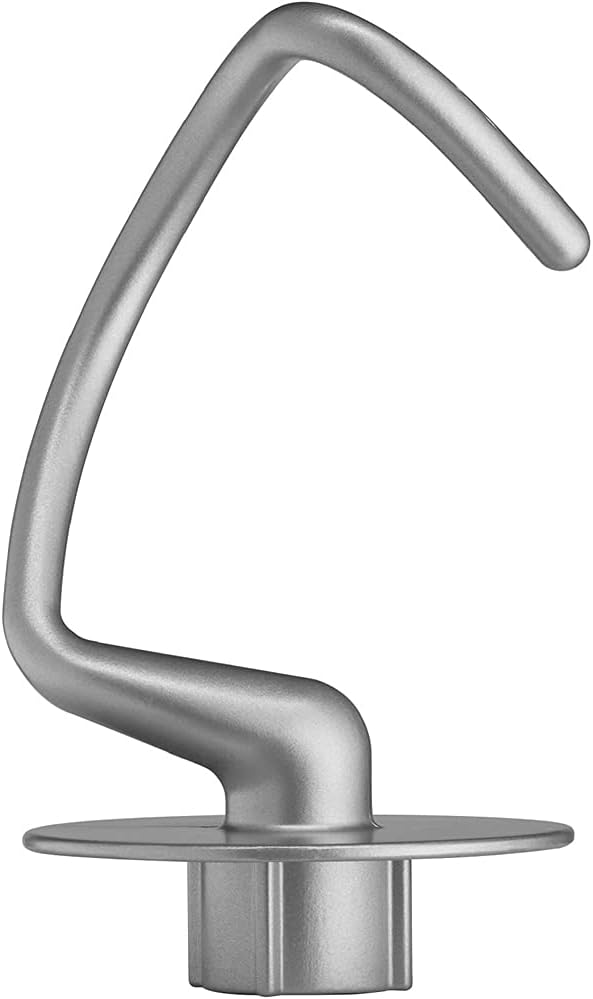
Figure 6: The splash guard with its integrated pour spout.
3.5 Power Connection
Plug the mixer into a standard 120V AC electrical outlet.
4. Operating Instructions
4.1 Digital Dial and Speed Control
The Cuisinart SM-50 features a digital dial with 12 speeds for precise control. Rotate the dial to select your desired speed. The digital display will show the current speed and a countdown timer for pre-programmed settings.
Video 1: Demonstration of the digital dial and speed control on the Cuisinart Precision Master Stand Mixer.
4.2 Pre-Programmed Settings
The mixer includes pre-programmed settings for common tasks:
- Dough: Ideal for kneading various doughs like white bread, wheat bread, and pizza dough.
- Mixing: Suitable for dry ingredient mixing and creaming.
- Whipping: Perfect for whipping cream and mashing potatoes.
Video 2: Overview of the Cuisinart Stand Mixer's 12 speeds and stainless steel bowl features.
4.3 Optional Attachments
The mixer features one power outlet for optional attachments (sold separately), such as a Pasta Extruder, Pasta Roller & Cutters, Ice Cream Maker, Meat Grinder, and Spiralizer. Refer to the specific attachment's manual for installation and operation.
5. Maintenance
5.1 Cleaning
- Mixing Bowl: The 5.5-quart polished stainless steel bowl is dishwasher safe.
- Attachments: The chef's whisk, dough hook, flat mixing paddle, and splash guard are dishwasher safe.
- Motor Base: Wipe the motor base with a damp cloth. Do not immerse in water.
5.2 Storage
Store the mixer and its attachments in a clean, dry place. For convenience, attachments can be stored inside the bowl with the splash guard covering it to prevent dust accumulation.
6. Troubleshooting
If you encounter any issues with your Cuisinart SM-50 Stand Mixer, please refer to the following common solutions:
- Mixer not turning on: Ensure the power cord is securely plugged into a working outlet. Check if the tilt-back head is fully lowered and locked into place.
- Attachments not engaging: Verify that the attachment is correctly aligned with the shaft and twisted clockwise until it locks.
- Excessive noise or vibration: Ensure the mixing bowl is securely locked onto the base. Reduce the batch size if it exceeds the mixer's capacity.
For further assistance, contact Cuisinart customer support.
7. Specifications
| Brand | Cuisinart |
| Model Number | E9CUISM50 |
| Capacity | 5.5 Quarts |
| Motor Wattage | 500 watts |
| Number of Speeds | 12 |
| Construction Material | Die-cast metal |
| Product Dimensions | 14.17"D x 7.87"W x 14.13"H |
| Item Weight | 15 pounds |
| Dishwasher Safe Parts | Bowl, Chef's whisk, Dough hook, Flat mixing paddle, Splash guard |

Figure 7: Product dimensions of the Cuisinart SM-50 Stand Mixer.
8. Warranty and Support
8.1 Warranty Information
This product includes a 1 Year Extended Protection Plan in addition to the full manufacturer protection. Please refer to the warranty card included in your packaging for detailed terms and conditions.
8.2 Customer Support
For technical support, service, or warranty claims, please visit the official Cuisinart website or contact their customer service department. Contact information can be found in your product's original documentation.